
1. はじめに
Thank you for choosing the IMILAB EC2 Outdoor IP Security Camera. This manual provides essential information for the proper installation, operation, and maintenance of your device. The IMILAB EC2 is a versatile security camera designed for both indoor and outdoor use, featuring Full HD resolution, infrared night vision, motion detection, and two-way audio communication. Please read this manual thoroughly before using the product to ensure optimal performance and safety.
2. パッケージ内容
下記のすべての品目がパッケージに含まれていることをご確認ください。不足または破損している品目がある場合は、カスタマーサポートまでご連絡ください。
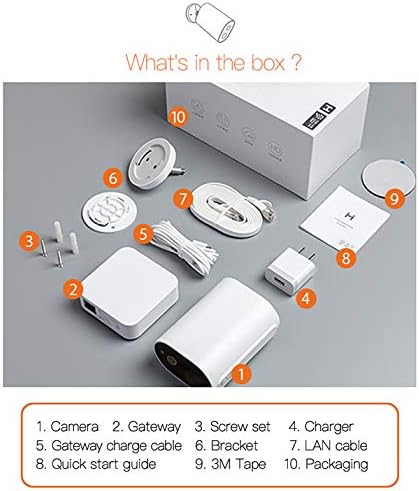
Image: Contents of the IMILAB EC2 package, including the camera, gateway, and accessories.
- カメラ
- ゲートウェイ
- ネジセット
- 充電器
- Gateway charge cable
- ブラケット
- LANケーブル
- クイックスタートガイド
- 3Mテープ
- パッケージ
3.製品オーバーview
The IMILAB EC2 camera is designed for robust security monitoring with several key features:
- コードレスデザイン: Offers flexible placement without power cable limitations.
- AI Scanning: Advanced artificial intelligence for improved detection accuracy.
- バッテリー寿命の延長: Up to 4 months on a single charge under typical usage conditions.
- 月額料金なし: Cloud storage for recorded events is available without subscription.
- IP66耐候性: Certified for dust and water resistance, suitable for outdoor environments.
- Passive IR Detection: Utilizes Passive Infrared (PIR) for motion sensing.
- ナイトビジョン: Integrated infrared LEDs for clear monitoring in low-light or dark conditions.
- 1080P HD解像度: 鮮明で詳細なビデオ映像を提供tage.
- AES128暗号化: Ensures secure data transmission and storage.

Image: Visual representation of the IMILAB EC2's main features.
4. セットアップ
Follow these steps to set up your IMILAB EC2 camera:
- カメラを充電します: Before initial use, fully charge the camera using the provided charger and gateway charge cable.
- アプリをダウンロード: Download the official IMILAB Home app (or compatible Xiaomi Home app) from your smartphone's app store (available for Android and iOS).
- ゲートウェイの電源をオンにします。 Connect the Gateway to a power source and to your router via the LAN cable. Wait for the indicator light to show it's ready for pairing.
- カメラをペアリングする: Open the app, create an account, and follow the on-screen instructions to add the Gateway and then the EC2 camera. Ensure your smartphone is connected to a 2.4GHz Wi-Fi network during setup.
- カメラを取り付ける: Choose a suitable location for mounting. The camera can be mounted on a wall or other flat surface using the provided bracket, screws, and 3M tape. Ensure the camera has a clear field of view and is within Wi-Fi range of the Gateway.

Image: The IMILAB EC2 camera shown mounted on a wall, illustrating its installation flexibility.
5. 操作手順
5.1 ライブ View 録音
Access the live video feed from your camera through the IMILAB Home app. You can manually record video or capture screenshots directly from the live view インタフェース。
5.2 動きの検出とアラーム
The camera features a PIR motion sensor and AI-powered human detection to minimize false alarms. When motion is detected, the camera can automatically record a short video clip and send a notification to your smartphone.
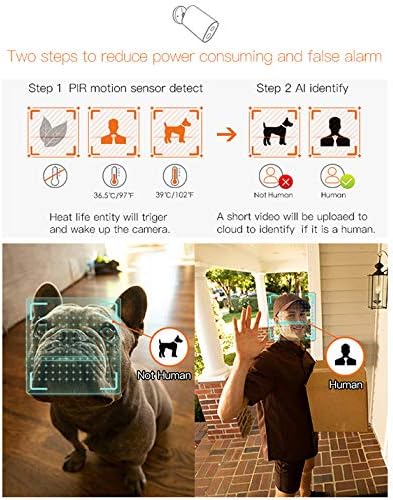
Image: Illustration of the camera's PIR motion detection and AI human identification process.
5.3 ナイトビジョン
The IMILAB EC2 is equipped with infrared night vision, allowing it to capture clear video footage even in complete darkness. This feature activates automatically in low-light conditions.

Image: Comparison demonstrating the superior night vision capabilities of the IMILAB EC2 camera.
5.4 双方向オーディオ
Utilize the built-in microphone and speaker to communicate with individuals near the camera, directly through the app.
5.5 クラウドストレージ
The camera offers free cloud storage for recorded events for a limited duration (e.g., 7 days), eliminating the need for a local memory card. This ensures your footage is securely backed up.

Image: The IMILAB EC2 camera highlighting its free cloud storage feature.
6. メンテナンス
6.1 耐候性
The IMILAB EC2 camera has an IP66 rating, making it resistant to dust and powerful water jets. It is designed to withstand various outdoor weather conditions, including heat, wind, snow, and rain.

Image: The IMILAB EC2 camera's internal structure and its resilience to extreme weather conditions.
6.2 バッテリーの充電
The camera is powered by a rechargeable Lithium Polymer battery. When the battery level is low, you will receive a notification via the app. Recharge the camera using the provided charging cable and adapter. A full charge can last up to 4 months, depending on usage and environmental factors.

Image: The IMILAB EC2 camera demonstrating its long battery life, capable of 4 months on a single charge.
6.3 クリーニング
Periodically clean the camera lens and housing with a soft, dry cloth to ensure clear image quality and proper operation. Do not use harsh chemicals or abrasive materials.
7。 トラブルシューティング
If you encounter issues with your IMILAB EC2 camera, refer to the following common solutions:
- カメラがWi-Fiに接続できない: Ensure the Gateway is powered on and connected to your router. Verify your Wi-Fi network is 2.4GHz. Restart the camera and Gateway, then attempt pairing again.
- ビデオ品質が悪い: カメラの設置場所のWi-Fi信号強度を確認してください。カメラのレンズが汚れておらず、障害物がないことを確認してください。
- モーション検出が機能しない: Verify motion detection settings are enabled in the app. Adjust sensitivity levels if necessary. Ensure the camera's view 邪魔されません。
- バッテリーの消耗が早い: 頻繁なモーション検知イベント、ライブ view access, or poor Wi-Fi signal can increase battery consumption. Reduce detection sensitivity or optimize camera placement.
- 通知なし: Check your smartphone's app notification settings and ensure they are enabled for the IMILAB Home app.
8. 仕様
Detailed technical specifications for the IMILAB EC2 Outdoor IP Security Camera (Model CMSXJ11A):
| 特徴 | 仕様 |
|---|---|
| モデル名 | Xiaomi CMSXJ11A |
| ビデオキャプチャ解像度 | 1080p(フルHD) |
| 有効なビデオ解像度 | 1080 |
| フレームレート | 毎秒30フレーム |
| 接続技術 | ワイヤレス(Wi-Fi) |
| 無線通信技術 | Wi-Fi |
| 接続プロトコル | Wi-Fi |
| 屋内/屋外での使用 | 屋内、屋外 |
| 特集 | Night Vision, Motion Detector |
| 電源 | 電池駆動 |
| バッテリー | 1 個のリチウムポリマー電池が必要 (付属) |
| リチウム電池のエネルギー含有量 | 0.6ワット時 |
| リチウム電池容量tage | 5ボルト |
| リチウム電池の重量 | 0.9グラム |
| IP 定格 | IP66(防塵・防水) |
| 対応デバイス | スマートフォン(Android、iOS) |
| 取り付けタイプ | 壁掛け |
| 色 | 白 |
| 商品の寸法 (長さ x 幅 x 高さ) | 3 x 2 x 4 cm |
| アイテム重量 | 530グラム |
9. 保証とサポート
For warranty information, please refer to the documentation provided with your purchase or contact your retailer. Specific warranty terms may vary by region and seller.
For technical support or further assistance, please visit the official IMILAB website or contact their customer service. You may also find support resources on the IMILAB brand page on Amazon.