
導入
ご購入ありがとうございますasing the VOKSUN S300 Portable Bluetooth Vinyl Record Player. This device is designed to provide a unique and versatile audio experience, allowing you to enjoy your vinyl collection and digital music with ease. This manual will guide you through the setup, operation, and maintenance of your record player to ensure optimal performance and longevity.
製品を使用する前にこのマニュアルをよくお読みになり、今後の参考のために保管してください。
安全に関する注意事項
To prevent fire or shock hazards, observe the following precautions:
- ユニットを雨や湿気にさらさないでください。
- このユニットを水の近くで使用しないでください。
- 乾いた布でのみ清掃してください。
- 通気口を塞がないでください。メーカーの指示に従って設置してください。
- ラジエーター、暖房レジスター、ストーブ、その他の機器(以下を含む)などの熱源の近くに設置しないでください。 amp熱を発生する装置。
- 特にプラグ、コンセント、およびユニットから出ている部分で、電源コードが踏まれたり挟まれたりしないように保護してください。
- メーカー指定のアタッチメント/アクセサリのみを使用してください。
- 雷雨のときや長期間使用しない場合は、このユニットのプラグを抜いてください。
- すべてのサービスを資格のあるサービス担当者に依頼してください。 電源コードやプラグの破損、液体のこぼれ、物の落下、雨や湿気にさらされた、正常に動作しないなど、何らかの形でユニットが損傷した場合は、修理が必要です。 、または削除されました。
パッケージ内容
パッケージにすべてのアイテムが含まれていることを確認します。
- VOKSUN S300 Portable Bluetooth Vinyl Record Player
- 電源アダプター
- USBケーブル
- 3.5mmAUXケーブル
- 取扱説明書
製品終了view
背面パネルの接続
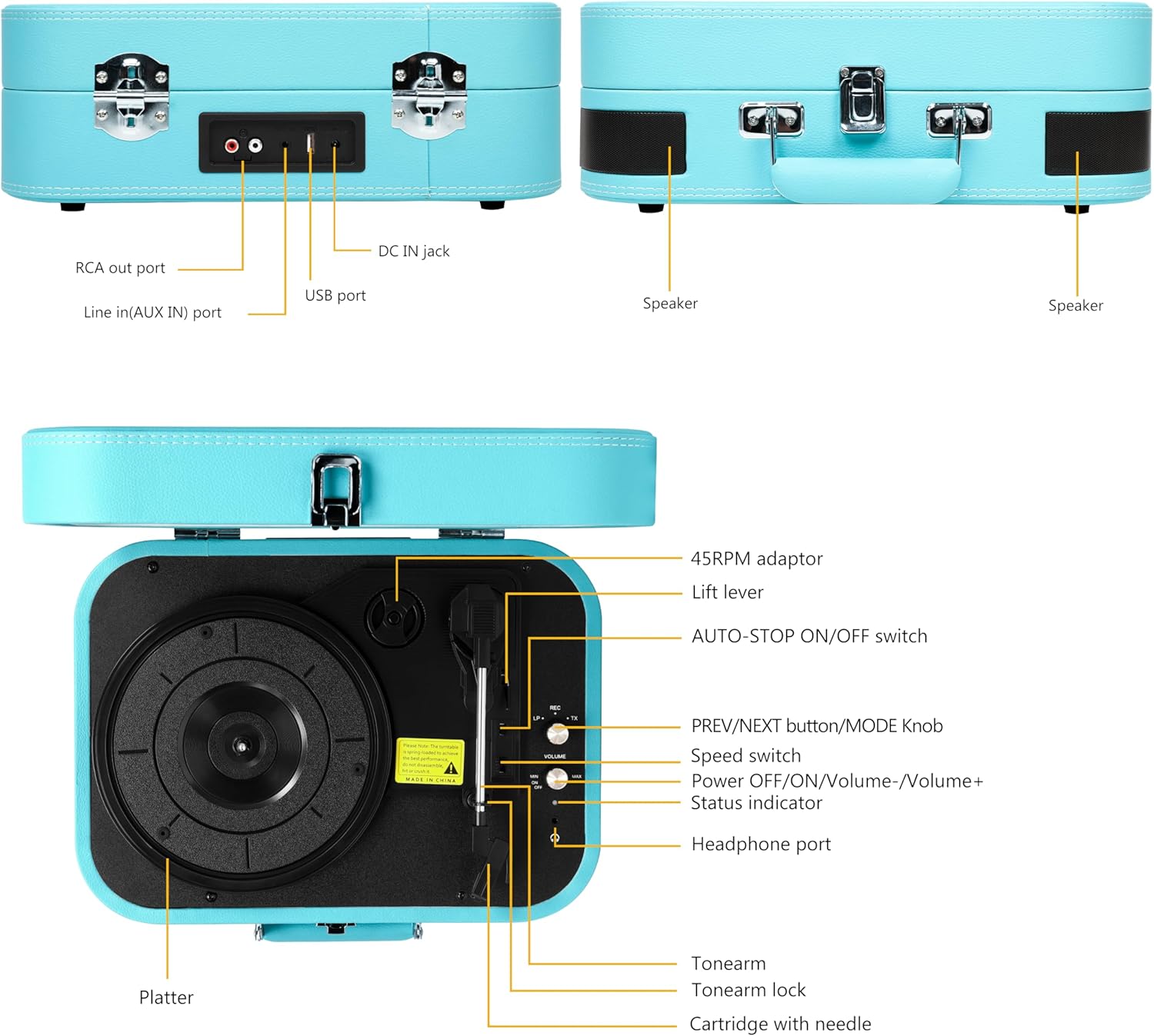
This image displays the rear panel of the record player, highlighting the RCA output for external speakers, the AUX input for connecting external audio devices, the DC IN jack for power, and the USB port for playback and recording.
- RCA Out Port: Connects to external speakers for enhanced audio output.
- Line In (AUX IN) Port: Connects external audio devices (e.g., smartphones, MP3 players) via a 3.5mm cable.
- DC IN ジャック: Power input for the record player.
- USBポート: MP3を再生するには files from a USB flash drive or recording vinyl to MP3.
Top Panel Controls and Components

This image illustrates the top view of the record player, detailing the platter, tonearm assembly, speed selector, and various control buttons and ports.
- 45RPM Adaptor: Used for playing 45 RPM records with a large center hole.
- リフトレバー: トーンアームを上げ下げします。
- AUTO-STOP ON/OFF Switch: Enables or disables the auto-stop function at the end of a record.
- PREV/NEXT Button / MODE Knob: Controls track selection (USB/Bluetooth) and switches between input modes (Vinyl, Bluetooth, AUX, USB).
- スピードスイッチ: Selects playback speed (33-1/3, 45, 78 RPM).
- Power OFF/ON / Volume-/Volume+ Knob: 本体の電源のオン/オフや音量の調整をします。
- ステータスインジケーター: LED light indicating current mode or status.
- ヘッドフォンポート: プライベートリスニング用にヘッドフォンを接続します。
- トーンアーム: カートリッジとスタイラスを保持します。
- トーンアームロック: Secures the tonearm when not in use or during transport.
- Cartridge with Needle: Reads the grooves of the vinyl record.
- プラッター: レコードを置く回転面。
設定
1. 開梱
Carefully remove the record player from its packaging. Retain the packaging for future transport or storage. Ensure all components listed in the 'Package Contents' section are present.
2. 電源接続
- 電源アダプターをレコードプレーヤー背面の DC IN ジャックに接続します。
- Plug the other end of the power adapter into a suitable wall outlet.
3. 初期配置
レコードプレーヤーは、直射日光、熱源、過度のほこりや振動を避け、安定した平らな場所に置いてください。機器の周囲に十分な換気を確保してください。
操作手順
1. Basic Vinyl Playback
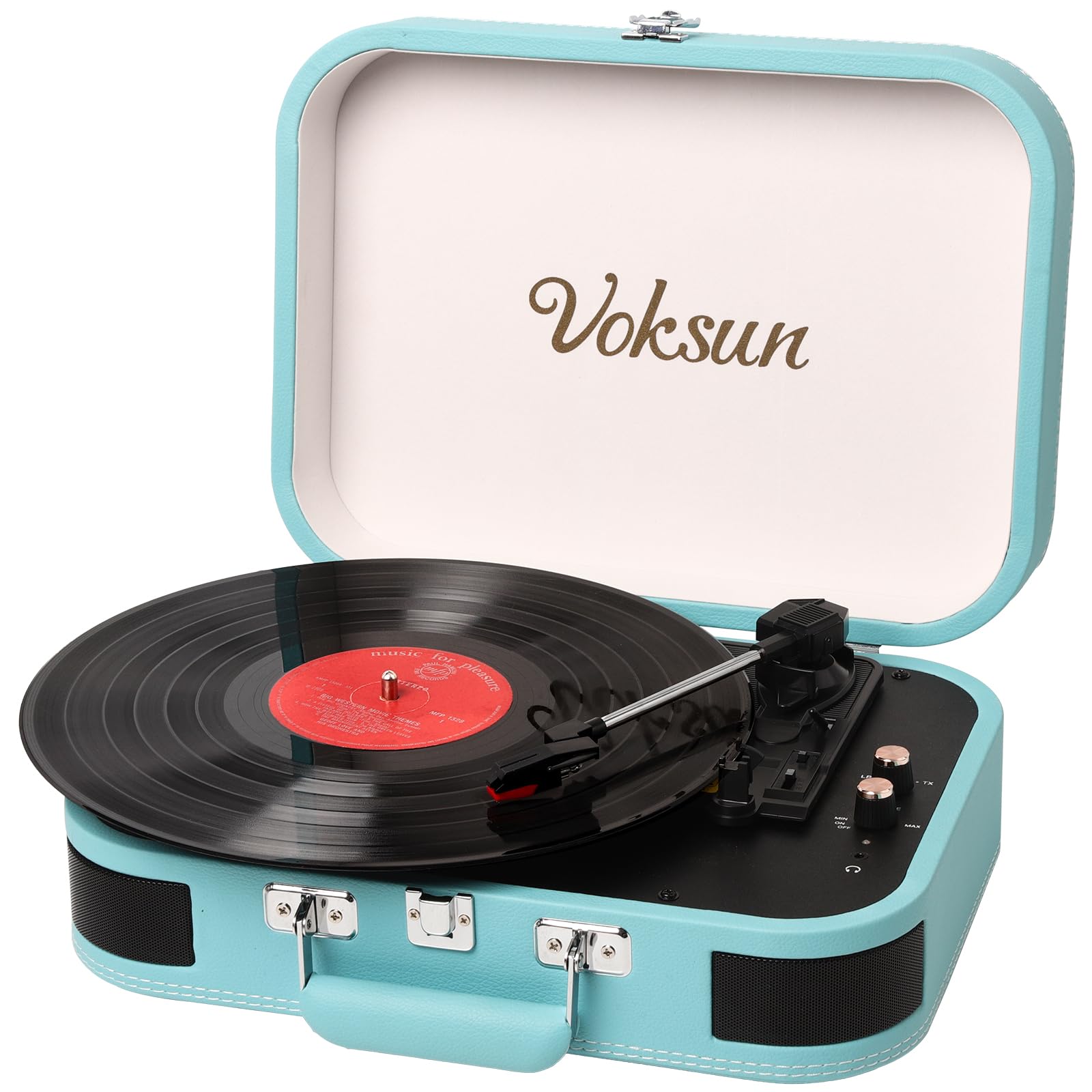
This image shows the record player in an open position with a vinyl record placed on the platter, illustrating its readiness for playing music.
- レコードプレーヤーの蓋を開けます。
- Turn the Power OFF/ON/Volume knob clockwise to power on the unit. The status indicator will light up.
- ビニールレコードをプラッターの上に置きます。
- Select the appropriate speed (33-1/3, 45, or 78 RPM) using the Speed Switch, matching your record's speed. Use the 45RPM adaptor if necessary for 45 RPM records.
- Release the Tonearm Lock.
- Lift the Tonearm using the Lift Lever.
- Carefully position the stylus over the desired track of the record.
- Gently lower the Tonearm using the Lift Lever. The record will begin to play.
- Adjust the volume using the Power OFF/ON/Volume knob.
- At the end of the record, if the AUTO-STOP switch is ON, the platter will stop rotating automatically. If OFF, it will continue to rotate.
- 再生を手動で停止するには、トーンアームを持ち上げて元の位置に戻し、トーンアーム ロックをかけます。
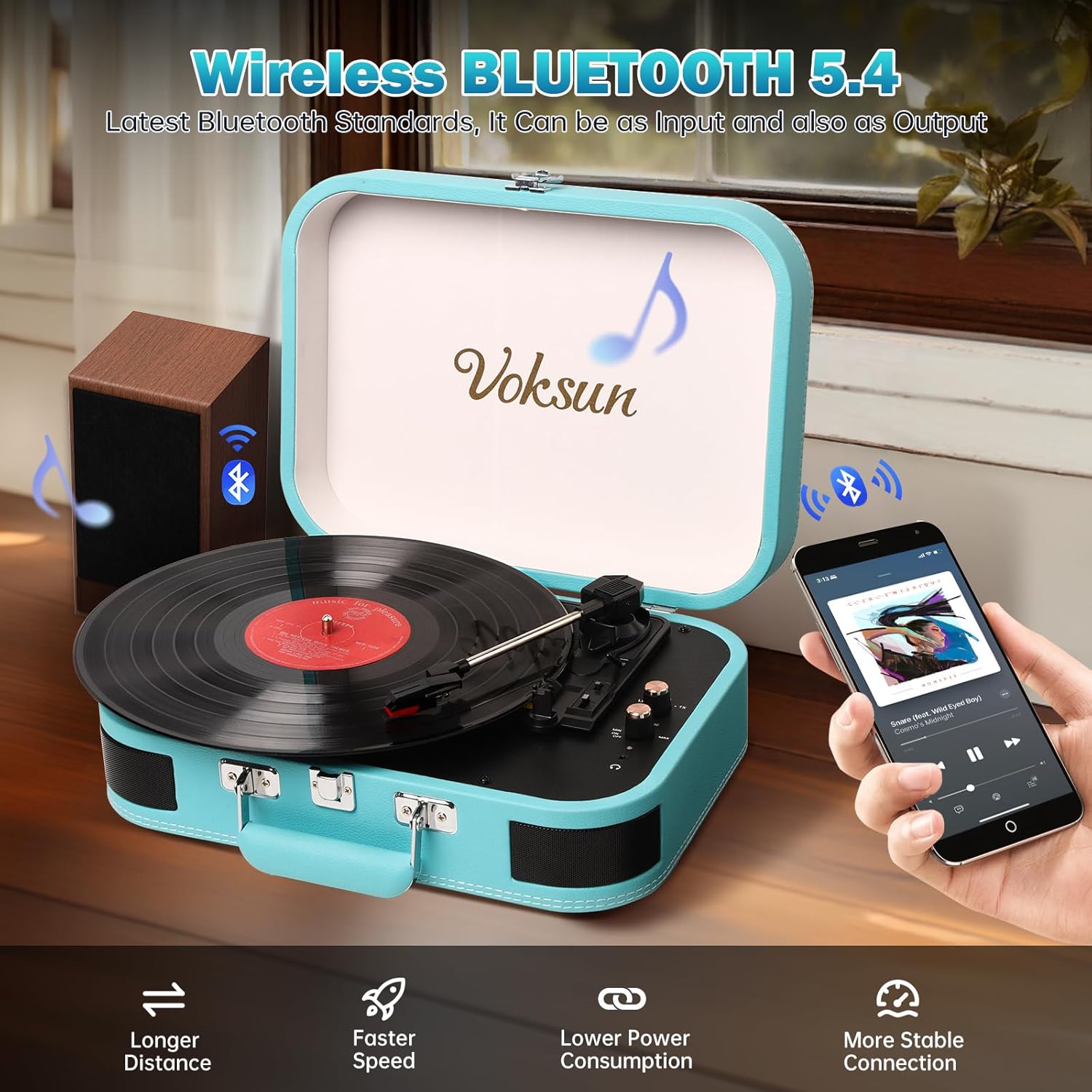
2.Bluetoothモード
This image demonstrates the record player's Bluetooth connectivity, showing a smartphone wirelessly streaming music to the unit.
- レコードプレーヤーの電源を入れます。
- Rotate the MODE knob to select Bluetooth mode. The status indicator will flash blue, indicating pairing mode.
- スマートフォンやその他の Bluetooth 対応デバイスで Bluetooth を有効にします。
- 検索する "VOKSUN" in your device's Bluetooth list and select it to pair.
- Once paired, the status indicator will stop flashing and remain solid blue.
- You can now play music from your device through the record player's speakers. Adjust volume on both the record player and your device.
3.AUX入力

This image illustrates the use of the 3.5mm AUX IN and Headphone ports, showing a user enjoying music with headphones and an AUX cable connected.
- レコードプレーヤーの電源を入れます。
- Connect one end of the 3.5mm AUX cable to the AUX IN port on the rear of the record player.
- Connect the other end of the AUX cable to the headphone jack of your external audio device (e.g., smartphone, MP3 player).
- Rotate the MODE knob to select AUX mode.
- Play music from your external device. The audio will be routed through the record player's speakers.
- Adjust volume on both the record player and your external device.
4.USB再生
- レコードプレーヤーの電源を入れます。
- MP3オーディオが入ったUSBフラッシュドライブを挿入します files into the USB port on the rear of the record player.
- Rotate the MODE knob to select USB mode.
- The record player will automatically begin playing the MP3 fileUSB ドライブから s を取得します。
- Use the PREV/NEXT buttons to skip tracks.
- Adjust the volume using the Power OFF/ON/Volume knob.
5. Vinyl to MP3 Recording

This diagram visually explains how to transform audio from vinyl records into WAV format files, which are then saved to a USB flash drive.
- USB フラッシュ ドライブが USB ポートに挿入されていることを確認します。
- Start playing a vinyl record as described in 'Basic Vinyl Playback'.
- While the record is playing, press and hold the MODE knob for a few seconds until the status indicator changes, indicating recording has started.
- The record player will convert the vinyl audio into MP3 files and save them to the connected USB drive.
- To stop recording, press the MODE knob again.
6. External Speaker Connection (RCA)

This image provides a clear visual guide for connecting the record player to external speakers via RCA output, as well as other portable audio devices.
- Connect RCA cables (not included) to the RCA Out ports on the rear of the record player.
- Connect the other end of the RCA cables to the corresponding audio input jacks on your external ampスピーカーまたはパワードスピーカー。
- Ensure the record player is in the desired playback mode (Vinyl, Bluetooth, AUX, or USB).
- Adjust the volume on both the record player and your external audio system.
7. ヘッドホンの使用
- Plug your headphones into the Headphone Port on the top panel.
- Audio will automatically be routed to your headphones, muting the built-in speakers.
- Adjust the volume using the Power OFF/ON/Volume knob.
メンテナンス
1. 清掃
- Wipe the record player's exterior with a soft, dry cloth. Do not use abrasive cleaners or solvents.
- Keep the lid closed when not in use to prevent dust accumulation on the platter and tonearm.
2. スタイラスのお手入れ

This close-up image focuses on the stylus and cartridge, which are crucial for reading the grooves of a vinyl record.
- The stylus (needle) is delicate. Handle it with care.
- 指でスタイラスに触れないようにしてください。
- 柔らかいブラシで後ろから前に向かって優しくブラッシングして、スタイラスを定期的に掃除してください。
- A worn stylus can damage records and degrade sound quality. Replace the stylus when necessary.
3. ストレージ
When storing the record player, ensure the tonearm is secured with the tonearm lock and the lid is closed. Store in a cool, dry place.
トラブルシューティング
| 問題 | 考えられる原因 | 解決 |
|---|---|---|
| 電源なし | 電源アダプターが接続されていないか故障しています。 | 電源アダプタがユニットと機能している電源コンセントにしっかりと接続されていることを確認します。 |
| スピーカーから音が出ない | 音量が低すぎる、間違ったモードが選択されている、ヘッドフォンが接続されています。 | Increase volume. Verify correct mode (Vinyl, Bluetooth, AUX, USB). Disconnect headphones if present. |
| レコードのスキップや音の歪み | Record is dirty or scratched; stylus is dirty or worn; unit is not level. | レコードをクリーニングしてください。針をクリーニングするか交換してください。ユニットを安定した水平な場所に置いてください。 |
| Bluetoothがペアリングされない | Record player not in Bluetooth mode; device too far; device already paired to another unit. | Ensure record player is in Bluetooth mode (flashing blue light). Move device closer. Disconnect from other Bluetooth devices. |
| Vinyl to MP3 recording not working | USB drive not inserted or full; USB drive not formatted correctly. | Ensure USB drive is inserted and has sufficient space. Format USB drive to FAT32 if necessary. |
仕様
This image highlights the record player's ability to play records at different speeds (33-1/3, 45, 78 RPM) and accommodate various record sizes.
| 特徴 | 詳細 |
|---|---|
| モデル番号 | S300 |
| ブランド | ヴォクスン |
| 再生速度 | 33-1/3、45、78 回転数 |
| 接続性 | Bluetooth, AUX In, USB, RCA Out, Headphone Jack |
| 録音機能 | Vinyl to MP3 (via USB) |
| 内蔵スピーカー | はい、ステレオ |
| 電源 | DC電源アダプター |
| 材質タイプ | Plastic (with PVC leather finish) |
| 製品寸法 | 35 x 25.5 x 12.5 cm(13.8 x 10 x 4.9インチ) |
| アイテム重量 | 2.97 kg (6.55 ポンド) |
| 色 | 青 |
保証とサポート
VOKSUN products are designed and manufactured to the highest quality standards. For warranty information, please refer to the warranty card included in your package or contact your local retailer.
For technical support, troubleshooting assistance, or service inquiries, please contact VOKSUN customer service through the contact information provided on the product packaging or the official VOKSUN website. Please have your model number (S300) and purchase date available when contacting support.