
1. はじめに
ご購入ありがとうございますasing the VOKSUN S300 Portable Vintage Turntable. This device combines classic aesthetics with modern functionality, allowing you to enjoy your vinyl records and digital music. Please read this manual carefully before use to ensure proper operation and to maximize your listening experience.
The VOKSUN S300 features a portable suitcase design, 3-speed playback, built-in stereo speakers, Bluetooth In/Out connectivity, USB playback, AUX input, and RCA output.

Image 1.1: VOKSUN S300 Portable Vintage Turntable in blue suitcase design.
2.製品オーバーview
2.1 コンポーネントとコントロール
Familiarize yourself with the various parts of your VOKSUN S300 turntable:
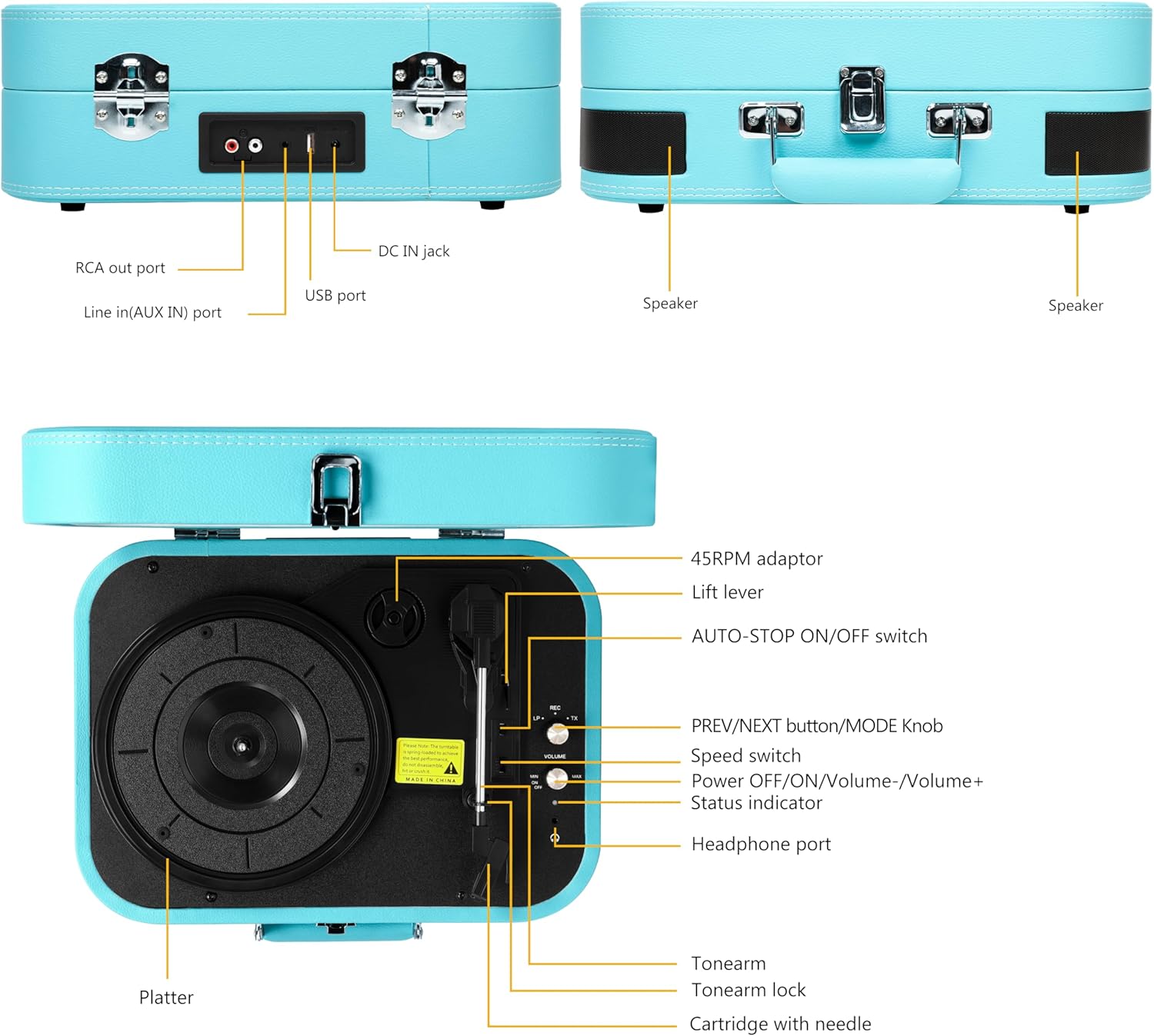
Image 2.1: Detailed diagram of the VOKSUN S300 turntable's components and controls.
- プラッター: ビニールレコードが置いてある場所。
- 45 RPM アダプター: 中央の穴が大きい7インチレコードの再生に使用します。
- リフトレバー: トーンアームを上げ下げします。
- AUTO-STOP ON/OFF Switch: Enables or disables the automatic stop function at the end of a record.
- PREV/NEXT button/MODE Knob: Controls track selection (USB/Bluetooth) and mode switching.
- スピードスイッチ: 再生速度(33、45、または78 RPM)を選択します。
- Power OFF/ON/Volume-/Volume+: Controls power and volume.
- ステータスインジケーター: Shows the current operating status.
- ヘッドフォンポート: ヘッドホンでプライベートに聴くのに最適です。
- トーンアーム: カートリッジと針を保持します。
- トーンアームロック: 使用していないときにトーンアームを固定します。
- Cartridge with Needle: レコードの溝を読み取ります。
- RCA Out Port: Connects to external speakers or amplifiers。
- Line in (AUX IN) Port: 外部オーディオデバイスを接続します。
- USBポート: USB フラッシュドライブから音楽を再生します。
- DC IN ジャック: 電源入力。
- 講演者: オーディオ出力用のステレオ スピーカーを内蔵しています。
3. セットアップ
3.1開梱と配置
- ターンテーブルをパッケージから慎重に取り出します。
- ターンテーブルは、直射日光、熱源、過度のほこりや振動を避け、安定した水平な場所に置いてください。
- ユニットの周囲に十分な換気を確保してください。
3.2電源接続
- Connect the power adapter to the DC IN Jack on the back of the turntable.
- 電源アダプタを適切な壁のコンセントに差し込みます。
3.3 初期準備
- Unlock the tonearm by gently pushing the tonearm lock to the side.
- Remove the protective cap from the stylus (needle) if present.
4. 操作手順
4.1 レコードの再生

Image 4.1: The VOKSUN S300 turntable demonstrating its 3-speed selectable feature for various record sizes.
- ターンテーブルの蓋を開けます。
- Place a vinyl record on the platter. If playing a 7-inch record with a large center hole, place the 45 RPM adaptor on the spindle first.
- Select the appropriate speed (33, 45, or 78 RPM) using the Speed Switch.
- Turn the Power OFF/ON/Volume knob clockwise to power on the unit and adjust the volume.
- Push the Lift Lever up to raise the tonearm.
- Manually move the tonearm over the desired starting point of the record.
- Push the Lift Lever down to gently lower the tonearm onto the record. Playback will begin.
- To stop playback, push the Lift Lever up to raise the tonearm, then return the tonearm to its rest and secure it with the tonearm lock.
- If the AUTO-STOP switch is ON, the platter will automatically stop spinning when the record finishes. If OFF, the platter will continue to spin.
4.2 Bluetooth Function (In & Out)

Image 4.2: The VOKSUN S300 turntable demonstrating wireless Bluetooth connectivity with a smartphone.
4.2.1 Bluetooth Input (Streaming to Turntable)
- ターンテーブルをオンにします。
- Rotate the MODE knob to select Bluetooth Input mode. The status indicator will flash blue.
- Enable Bluetooth on your smartphone, tablet, or other device and search for "VOKSUN S300".
- Select "VOKSUN S300" to pair. Once connected, the status indicator will glow solid blue.
- You can now play music from your device through the turntable's built-in speakers.
4.2.2 Bluetooth Output (Streaming from Turntable)
This feature allows you to stream audio from your vinyl records to an external Bluetooth speaker or headphones.
- 外部 Bluetooth スピーカー/ヘッドフォンがペアリング モードになっていることを確認します。
- Turn on the turntable and select Phono mode (for playing records).
- Start playing a vinyl record.
- Rotate the MODE knob to select Bluetooth Output mode. The turntable will automatically search for nearby Bluetooth devices.
- Once connected, the audio from the record will play through your external Bluetooth device.
4.3 AUX入力

Image 4.3: A user enjoying private listening with headphones connected to the VOKSUN S300 via the 3.5mm AUX input.
Connect external audio devices (e.g., MP3 player, smartphone) to the turntable using a 3.5mm audio cable (not included) plugged into the AUX IN port. Rotate the MODE knob to select AUX mode. Audio from the connected device will play through the turntable's speakers.
4.4 USB再生

Image 4.4: Diagram illustrating the USB port connection on the VOKSUN S300 turntable for direct playback from a USB flash drive.
MP3オーディオが入ったUSBフラッシュドライブを挿入します files into the USB port. Rotate the MODE knob to select USB mode. The turntable will automatically begin playing the audio files. Use the PREV/NEXT buttons to skip tracks.
4.5 RCA 出力
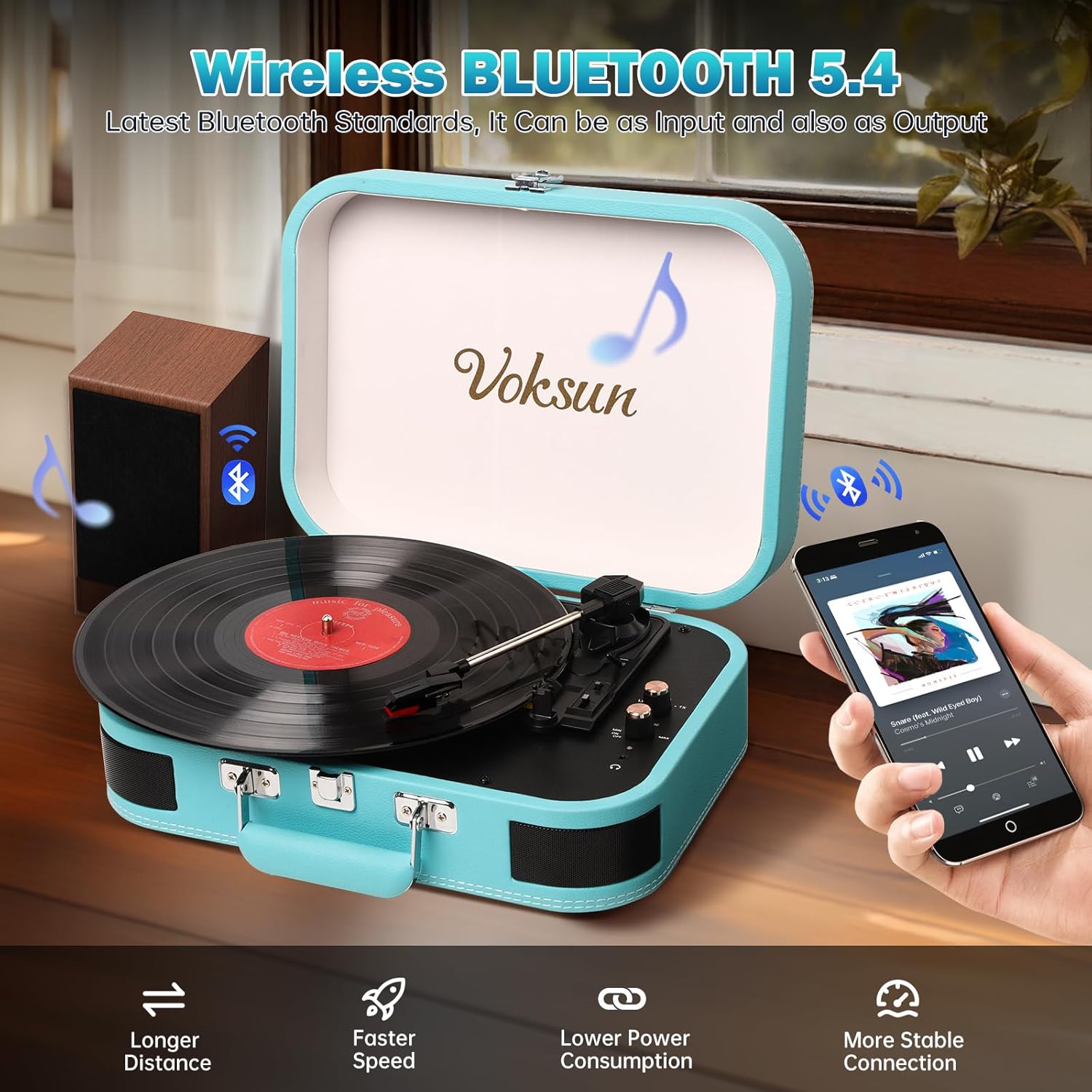
Image 4.5: Rear panel connections of the VOKSUN S300, highlighting RCA output for external speakers.
ターンテーブルを外部スピーカーまたは amplifier for a louder or higher-quality sound experience, use an RCA cable (not included) to connect the RCA Out ports on the turntable to the corresponding input ports on your external audio system.
4.6 ヘッドホンの使用
For private listening, plug your 3.5mm headphones into the Headphone Port on the turntable. The built-in speakers will automatically mute.
5. メンテナンス
5.1 ターンテーブルのクリーニング
- Wipe the turntable casin柔らかく乾いた布で拭いてください。研磨剤入りの洗剤や溶剤は使用しないでください。
- プラッターとスタイラスにほこりがたまらないように、使用していないときはダストカバーを閉じてください。
5.2 スタイラスのお手入れ
- Gently clean the stylus periodically with a soft brush designed for stylus cleaning, brushing from back to front.
- 指でスタイラスに触れないようにしてください。
- A worn stylus can damage records and degrade sound quality. Replace the stylus when necessary.
5.3 記録管理
- Handle records by their edges to avoid transferring oils from your skin.
- レコードはスリーブに入れて縦に置き、涼しく乾燥した場所に保管してください。
- レコード専用のクリーニングブラシまたは溶液を使用して、定期的にレコードをクリーニングし、ほこりや静電気を除去してください。
6。 トラブルシューティング
If you encounter issues with your VOKSUN S300 turntable, please refer to the following common problems and solutions:
| 問題 | 考えられる原因 | 解決 |
|---|---|---|
| 電源なし | 電源アダプターが接続されていません。電源コンセントが機能していません。ユニットの電源がオンになっていません。 | Ensure power adapter is securely connected and plugged into a working outlet. Turn the Power knob clockwise. |
| スピーカーから音が出ない | 音量が低すぎます。ヘッドフォンが接続されています。間違ったモードが選択されています。 | 音量を上げてください。ヘッドフォンを外してください。正しいモード(Phono、Bluetooth、AUX、USB)が選択されていることを確認してください。 |
| レコードスキップ | Record is dirty or scratched; Stylus is dirty or worn; Turntable not level; Excessive vibration. | Clean the record. Clean or replace the stylus. Place turntable on a level, stable surface. Avoid placing near vibrating objects. |
| Bluetoothペアリングが失敗する | Turntable not in pairing mode; Device Bluetooth off; Device too far. | Ensure turntable is in Bluetooth pairing mode (flashing blue indicator). Enable Bluetooth on your device. Move device closer to turntable. |
| 自動停止が機能しない | AUTO-STOP switch is OFF. | Ensure the AUTO-STOP switch is set to ON. Note that some records may not trigger auto-stop correctly due to variations in groove design. |
7. 仕様
- モデル: S300
- ブランド: ヴォクスン
- 寸法(長さ×幅×高さ): 40.5 x 30.5 x 19.5 cm(15.9 x 12.0 x 7.7インチ)
- 重さ: 2.91 kg (6.42 ポンド)
- 再生速度: 33 1/3、45、78 回転
- 互換性のあるレコードサイズ: 7、10、12インチ
- モータータイプ: ベルト駆動
- 接続性: Bluetooth In/Out, AUX In (3.5mm), USB Playback, RCA Out
- 特別な機能: Built-in Stereo Speakers, Auto-Stop Function, Headphone Jack
- 電源: AC Power Adapter (Cable Electric)
- 消費電力: 78ワット
- 材料: PVC Leather (Casing)
- 含まれるコンポーネント: Dust cover, power cable, 45 RPM adapter
8. 保証とサポート
VOKSUN products are designed for reliability and performance. For warranty information, please refer to the documentation provided at the time of purchase or contact your retailer. If you require technical assistance or have questions not covered in this manual, please contact VOKSUN customer support through the retailer's platform or the official VOKSUN webサイト。
Please note that the provided JSON did not contain specific video URLs with creator type information, therefore no product videos could be embedded in this manual.