
導入
The EOTECH 558.A65 Holographic Weapon Sight is designed for rapid target acquisition and precision aiming. This sight is compatible with all Gen I-III night vision devices and features an adjustable, locking, quick-detach mount for versatile application. This manual provides essential information for the proper setup, operation, and maintenance of your 558.A65 sight.
製品終了view
Familiarize yourself with the key components of the EOTECH 558.A65 Holographic Weapon Sight.
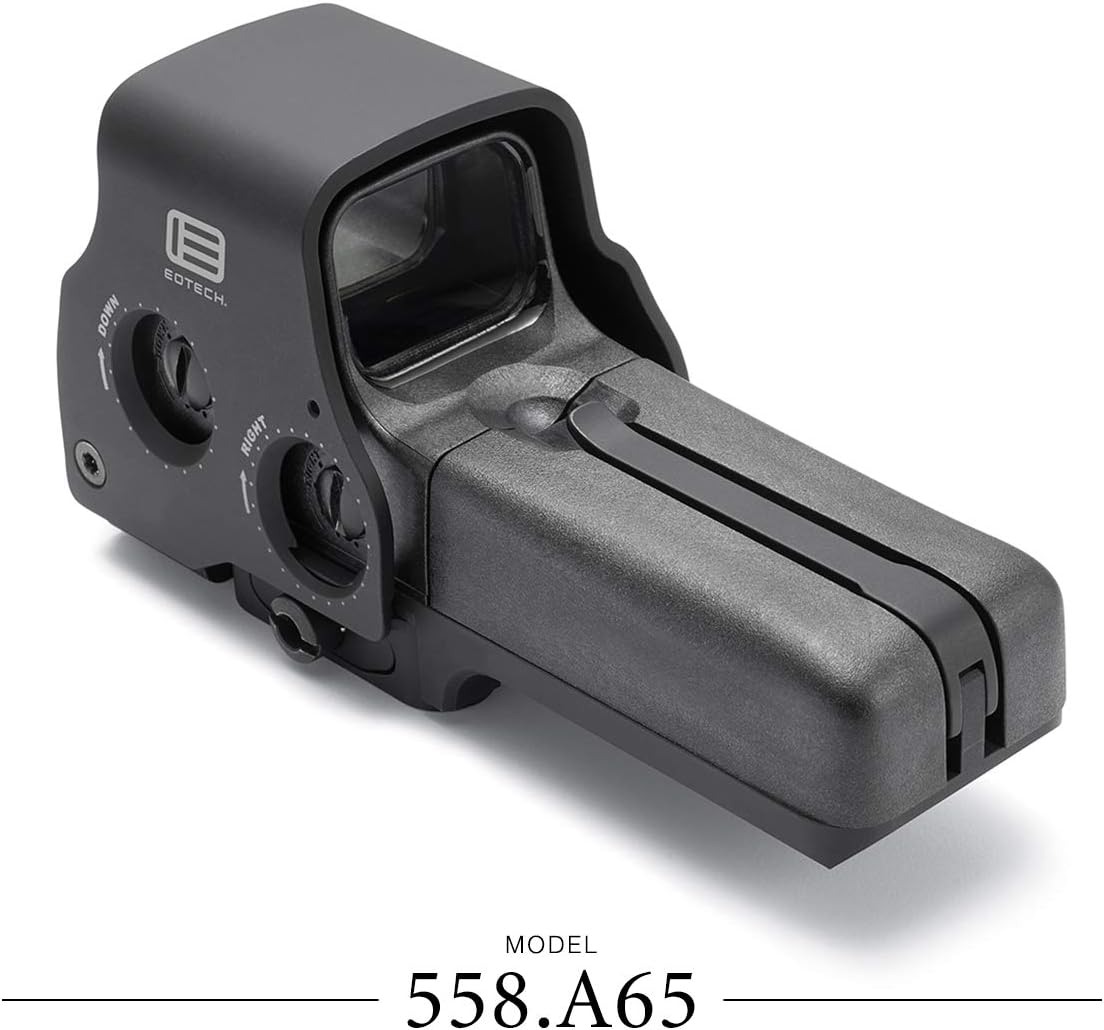
図1: 側 view of the EOTECH 558.A65 sight, highlighting the battery cap latch, aluminum hood, removable battery compartment, and quick detach lever.
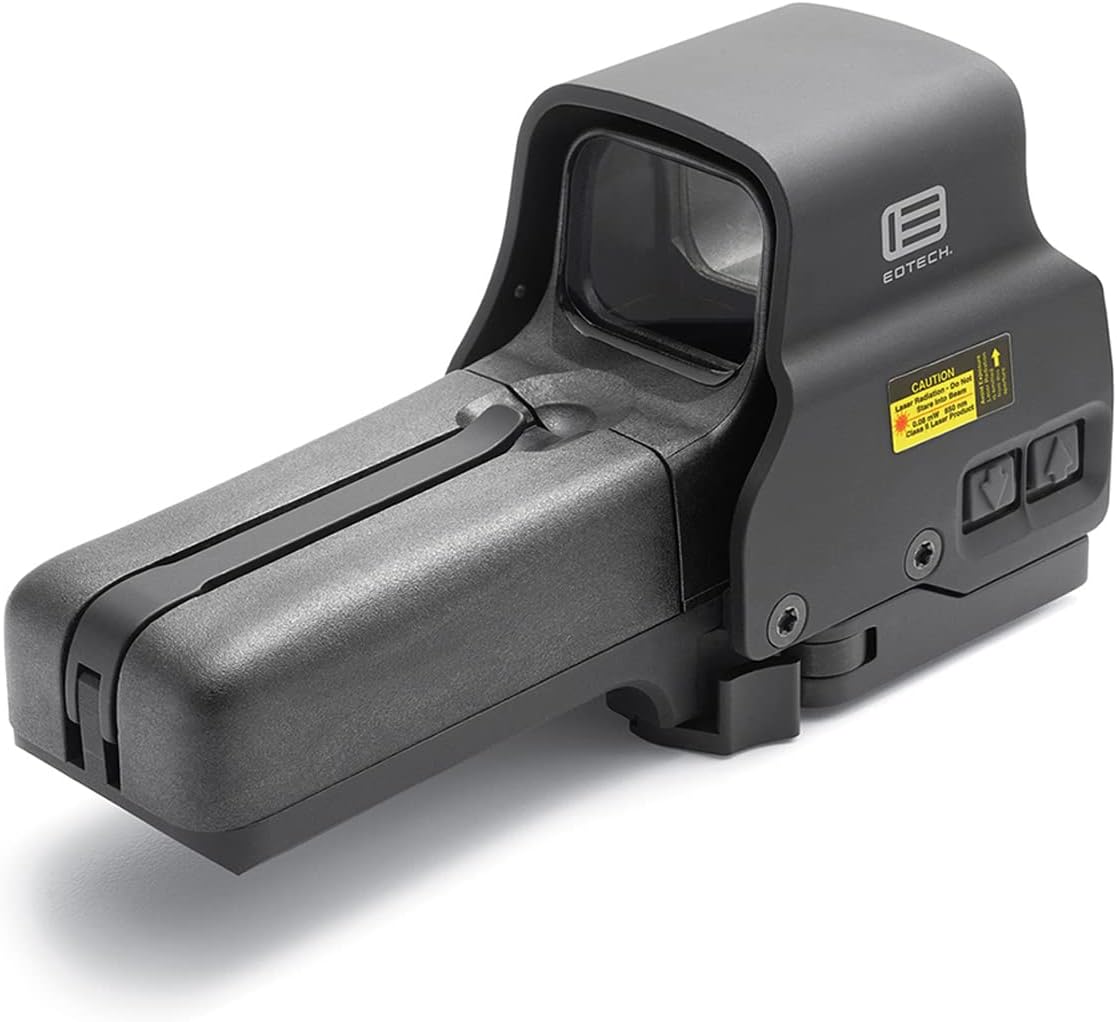
図2: トップダウン view of the EOTECH 558.A65 sight, showing the windage and elevation adjustment dials.
設定
1. バッテリーの取り付け
- 照準器の側面にある電池ボックスを見つけます。
- Unlatch the battery cap latch and open the removable battery compartment.
- Insert two (2) AA batteries, ensuring correct polarity. The sight supports both lithium and alkaline AA batteries.
- バッテリーコンパートメントを閉じて、ラッチを固定します。
2. 照準器の取り付け
The 558.A65 features a quick-detach mount compatible with both 1" Weaver and MIL-STD-1913 (Picatinny) rails.
- Ensure the quick-detach lever is in the open position.
- Align the sight's base with the rail on your firearm.
- Press the sight firmly onto the rail and close the quick-detach lever until it locks securely.
- Verify that the sight is firmly attached and does not wobble. Adjust the tension of the quick-detach lever if necessary.
操作手順
1. 電源のオン/オフ
- To power on, press either the UP or 下 明るさ調整ボタン。
- To power off, press both the UP そして 下 buttons simultaneously. The sight will also automatically power off after 8 hours if the last button pressed was UP, or after 4 hours if the last button pressed was 下.
2.明るさの調整
The sight offers 30 brightness settings, including 10 settings specifically for night vision compatibility. The side-button operation is ideal for use with a magnifier.
- を押す UP button to increase reticle brightness.
- を押す 下 button to decrease reticle brightness.
3.暗視モード
The 558.A65 is fully compatible with Gen I-III night vision devices.
- To activate night vision mode, press the NV button. The reticle brightness will automatically adjust to the lowest night vision setting.
- 使用 UP そして 下 buttons to cycle through the 10 night vision brightness settings.
- To exit night vision mode, press the NV button again. The sight will return to its previous daylight brightness setting.
4. Reticle Pattern
The sight features a 68 MOA ring with a 1 MOA dot reticle, designed for fast target acquisition and precise aiming.

図3: The 68 MOA ring and 1 MOA dot reticle pattern.
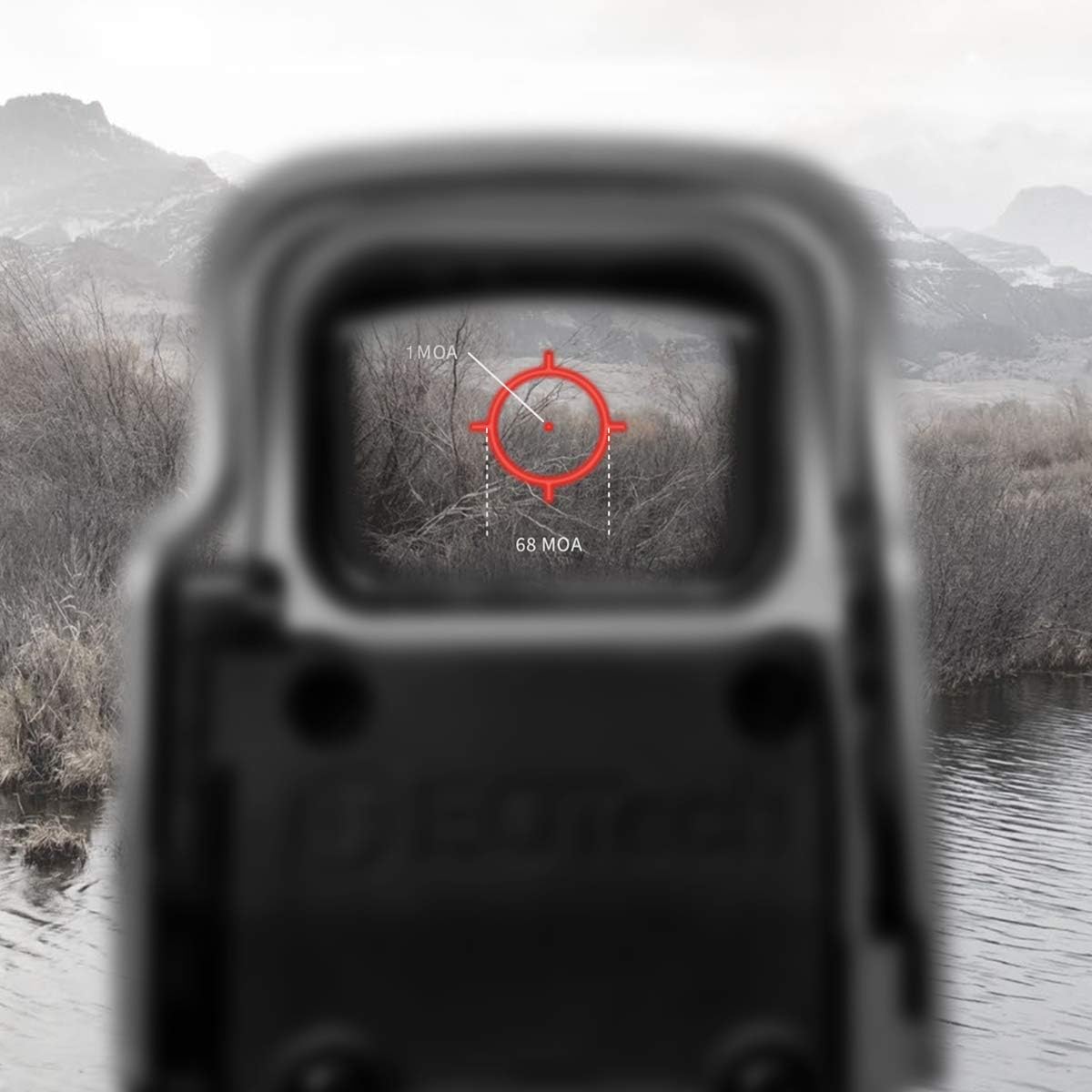
図4: The reticle as seen through the sight, demonstrating its appearance in an operational environment.
5. Zeroing the Sight (Windage and Elevation)
To achieve optimal accuracy, the sight must be zeroed to your firearm. This process adjusts the point of impact to match your point of aim.
- Mount the sight securely on your firearm.
- Using a stable shooting rest, fire a group of shots at a target at your desired zeroing distance.
- 狙った点に対する着弾点を観察します。
- Use a flat-head screwdriver or a coin to adjust the windage (left/right) and elevation (up/down) adjustment dials located on the side and top of the sight.
- 回転する UP arrow on the elevation dial moves the point of impact up.
- 回転する 下 arrow on the elevation dial moves the point of impact down.
- 回転する 右 arrow on the windage dial moves the point of impact right.
- 回転する 左 arrow on the windage dial moves the point of impact left.
- Make small adjustments and fire additional groups until the point of impact consistently matches your point of aim.
メンテナンス
1. 清掃
- Use a soft, clean cloth to wipe down the exterior of the sight.
- For lenses, use a lens cleaning pen or a soft lens cloth with a small amount of lens cleaning solution. Avoid abrasive materials or harsh chemicals.
- Ensure no debris enters the battery compartment.
2. バッテリーの交換
Replace batteries when the reticle begins to dim or flash, indicating low power. Battery life is approximately 2500 continuous hours with lithium batteries or 2200 continuous hours with alkaline batteries at nominal setting 12.
- セットアップ セクションに記載されているバッテリーの取り付け手順に従ってください。
- 常に新しい高品質の単三電池を使用してください。
トラブルシューティング
- Reticle is dim or not visible:
- バッテリー残量を確認し、必要に応じて交換してください。
- 明るさを上げるには UP ボタン。
- Ensure the sight is not in night vision mode during daylight use.
- Reticle appears blurry or distorted:
- This can sometimes be caused by astigmatism in the user's eye. Try lowering the brightness setting; a lower brightness can sometimes make the reticle appear clearer for individuals with slight astigmatism.
- Ensure the sight's lenses are clean.
- Sight does not power on:
- Verify batteries are correctly installed with proper polarity.
- 電池を新しいものと交換してください。
- バッテリーの接点が清潔で腐食していないことを確認してください。
- Sight is loose on the rail:
- Ensure the quick-detach lever is fully closed and locked.
- Adjust the tension of the quick-detach lever if it feels loose even when locked.
仕様
The following table outlines the key specifications for the EOTECH 558.A65 Holographic Weapon Sight.
| 特徴 | 仕様 |
|---|---|
| 寸法 | 5.6" L x 2.2" W x 2.9" H (Product Description) / 7.5" L x 6.65" W x 3.6" H (Specifications) Note: Discrepancy in source data. Refer to manufacturer's official product page for precise dimensions. |
| 重さ | 13.8 oz (Product Description) / 1.25 Pounds (Specifications) Note: Discrepancy in source data. 1.25 lbs = 20 oz. Refer to manufacturer's official product page for precise weight. |
| 耐水性 | 33フィート(10メートル) |
| 色 | 黒 |
| マウント | Quick Detach fits both 1" Weaver and MIL-STD-1913 Rail |
| 明るさ設定 | 30 total (10 for night vision) |
| 電源 | 単三電池2本 |
| バッテリー寿命 | Up to 2500 continuous hours (lithium) or 2200 continuous hours (alkaline) at nominal setting 12 |
| レチクル | 68 MOA ring with 1 MOA dot |
| ナイトビジョン対応 | Yes (Gen I-III) |
| 材料 | アルミニウム |
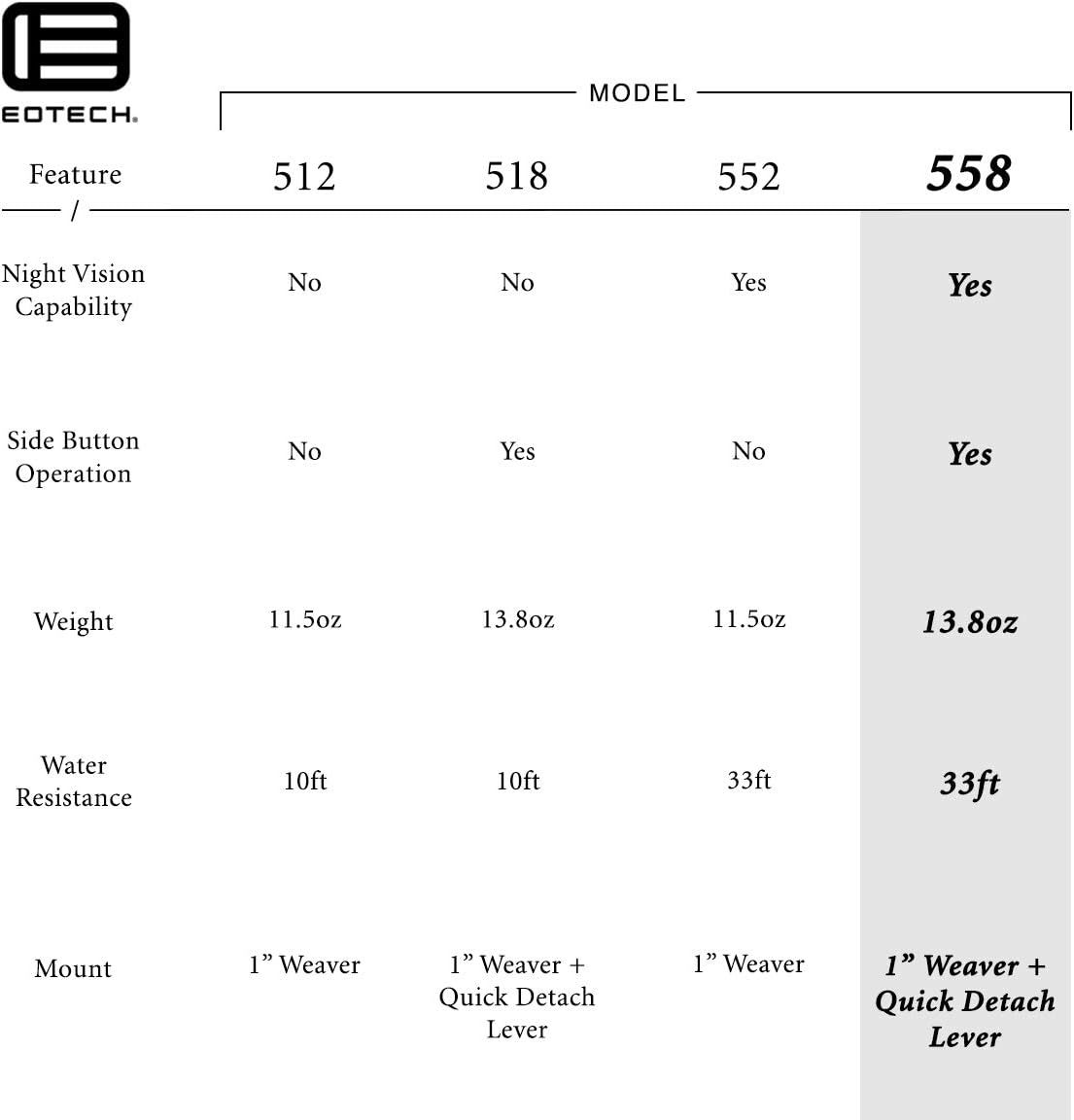
図5: Feature comparison table for various EOTECH HWS models, with the 558.A65 features highlighted.
保証
The EOTECH 558.A65 Holographic Weapon Sight comes with the EOTECH HWS Prestige Warranty, which is a 10-year limited warranty. For full details regarding warranty coverage, terms, and conditions, please refer to the official EOTECH manufacturer's webサイトをご覧いただくか、カスタマー サポートに直接お問い合わせください。
サポート
For further assistance, technical support, or service inquiries, please contact EOTECH customer support. Refer to the official EOTECH web最新の連絡先情報とサポート リソースについては、こちらのサイトをご覧ください。
- メーカー: EOTech
- Webサイト: www.eotechinc.com (元ample、実際のリンクはJSONでは提供されません)