
1. はじめにview
The ESX INFOTAINMENT VN1015-MA-DAB-4G is an advanced Android-based naviceiver designed for vehicle integration, offering a comprehensive multimedia and navigation experience. This unit features a 10.1-inch anti-glare multi-angle touchscreen, Android operating system, 4G/LTE connectivity, DAB+ digital radio, and Google Maps navigation. It supports Bluetooth hands-free calling and audio streaming, USB and MicroSD media playback, and includes inputs for rearview cameras and auxiliary devices.
主な機能は次のとおりです。
- 10.1-inch high-resolution, anti-glare multi-angle touchscreen.
- Android Operating System for versatile app usage.
- Integrated 4G/LTE dongle for mobile internet (requires optional SIM card).
- DAB+ digital radio reception with station logos and AM/FM radio with RDS.
- Google Maps navigation (online and offline capabilities).
- Bluetooth hands-free system with audio streaming.
- Multiple connectivity options: 2x USB ports, 1x MicroSD slot, 1x camera input, 2x video outputs, 1x AUX/video input, 1x AUX/audio input.
- Support for steering wheel controls (optional adapter may be required).
2. セットアップとインストール
Proper installation is crucial for the optimal performance of your ESX VN1015-MA-DAB-4G naviceiver. It is highly recommended that installation be performed by a qualified professional to ensure correct wiring and vehicle compatibility.
2.1.コンポーネントの識別
Familiarize yourself with the various ports and connections on the rear of the unit before installation.
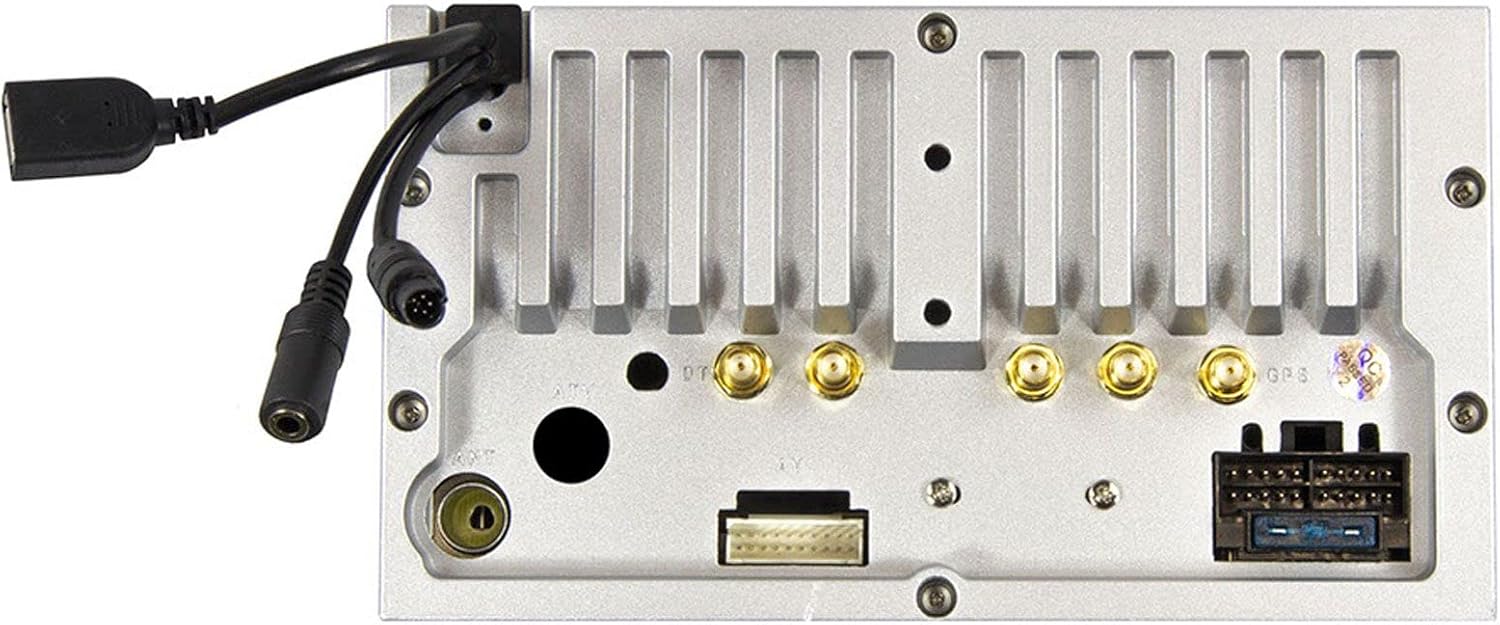
図2.1: 後方 view of the ESX VN1015-MA-DAB-4G unit, illustrating the power harness, antenna inputs, USB ports, and auxiliary connections.
2.2. 配線接続
- 電源: Connect the main power harness to your vehicle's electrical system, ensuring correct positive, negative, and accessory (ACC) connections.
- スピーカー出力: Connect your vehicle's speakers to the corresponding outputs on the naviceiver.
- アンテナ接続: Connect the FM/AM antenna. For DAB+ digital radio, connect the included DAB+ antenna to the designated port.
- GPSアンテナ: GPSアンテナを接続し、障害物のない場所に設置します。 view 最適な信号受信のために天空の角度を調整します。
- USB ポート: Connect external USB devices for media playback or smartphone connectivity.
- マイクロフォン: Connect the external microphone (VNA-MIC-AND, optional) for improved hands-free call quality.
- 後方view カメラ: リアを接続しますview camera to the dedicated camera input. Ensure the reverse trigger wire is correctly connected for automatic display switching.
- ビデオ出力: Utilize the two video outputs for connecting external monitors.
- AUX入力: Connect external audio/video sources to the AUX/video and AUX/audio inputs.
- 4G/LTE Dongle: If using mobile internet via 4G/LTE, insert a compatible SIM card into the optional 4G/LTE dongle and connect it to a USB port.
- ステアリングホイールコントロール: If your vehicle supports steering wheel controls, an optional adapter may be required to integrate this functionality.
2.3. 初期電源投入
After all connections are secure, turn on your vehicle's ignition. The naviceiver should power on. Follow any on-screen prompts for initial setup, such as language selection and time zone.
3. 操作手順
This section details the primary functions and operations of your ESX VN1015-MA-DAB-4G naviceiver.
3.1. 基本的な操作とインターフェース
The unit features a responsive touchscreen and physical buttons for common functions.

図3.1: The main screen showing the radio interface with frequency display and control buttons.
- 電源ボタン: Press and hold to turn the unit on/off. A short press may mute audio or put the unit into standby.
- 音量コントロール: オーディオ出力レベルを調整します。
- ホームボタン: Android のメインホーム画面に戻ります。
- 戻るボタン: Navigates back one step in menus or applications.
- カメラボタン: Direct access to the camera input display (e.g., rearview カメラ)。
3.2. Android オペレーティング システム
The naviceiver runs on an Android operating system, allowing access to various applications and customization options.
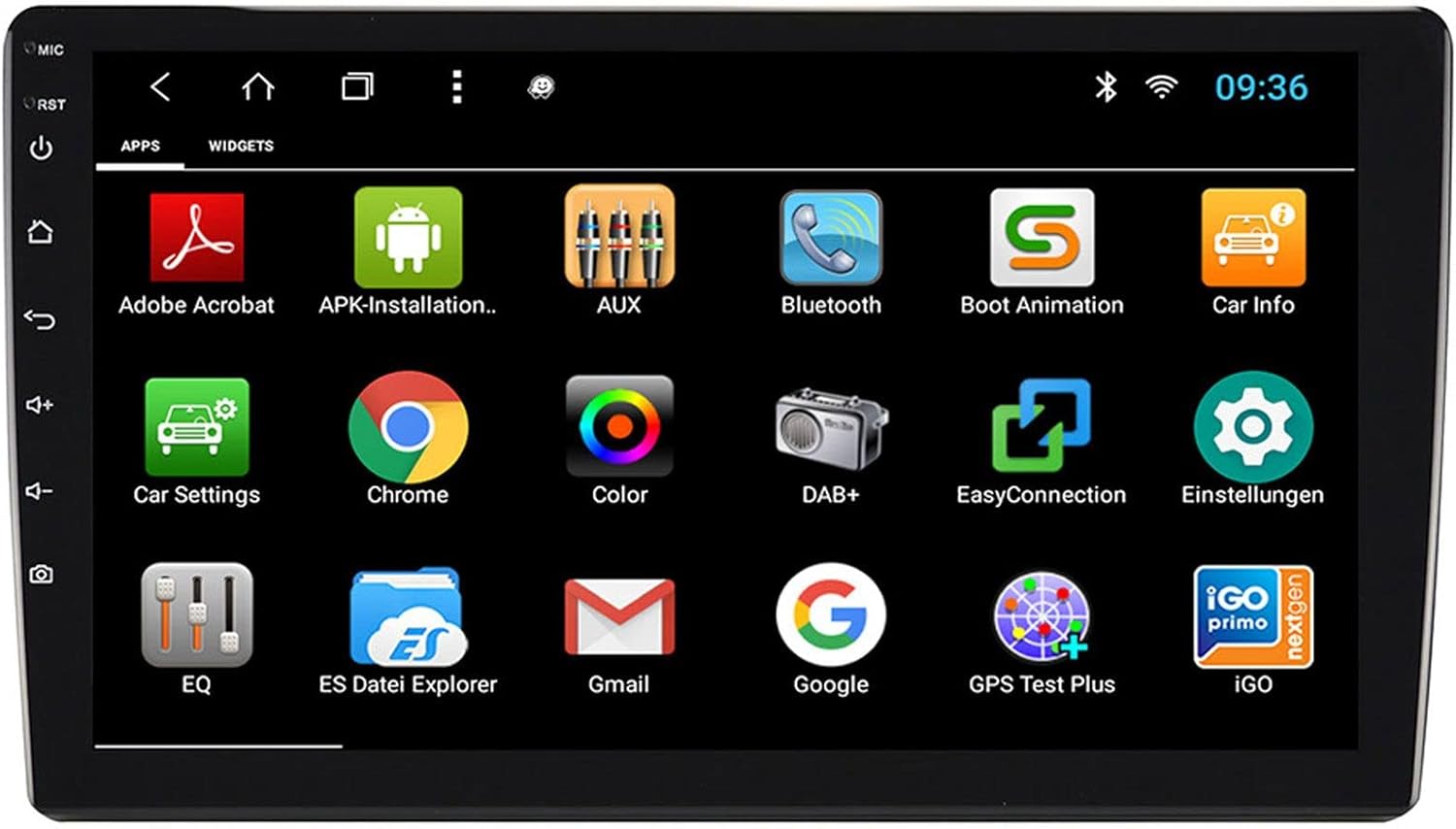
図3.2: The applications screen, displaying various pre-installed and user-installed Android apps.
- App Launcher: アプリ ドロワーからインストールされているすべてのアプリケーションにアクセスします。
- ウィジェット: Customize your home screen with widgets for quick access to information or functions.
- 設定: Adjust system settings, network connections, display, audio, and more.
- インターネット接続性: Connect to the internet via a WiFi hotspot (from a compatible smartphone) or by inserting a SIM card into the 4G/LTE dongle.
3.3. Radio Functions (AM/FM/DAB+)
The unit supports both analog and digital radio broadcasts.
- バンドの選択: Switch between AM, FM, and DAB+ bands.
- チューニング: Manually tune or use the auto-scan function to find available stations.
- プリセット: お気に入りのステーションを保存して、すぐにアクセスできるようにします。
- RDS (FM): Radio Data System displays station information (e.g., station name, song title).
- DAB+ の機能: Enjoy higher quality digital audio and view station logos where available.
3.4. Bluetooth接続
Pair your smartphone for hands-free communication and audio streaming.
- ペアリング: Enable Bluetooth on your smartphone and search for the naviceiver. Select the unit and confirm the pairing code.
- ハンズフリー通話: Make and receive calls directly from the naviceiver screen.
- オーディオストリーミング: Play music from your smartphone wirelessly through the naviceiver.
3.5. Navigation (Google Maps)
Utilize Google Maps for turn-by-turn navigation.

図3.3: The navigation interface showing a map with a selected destination.
- オンラインナビゲーション: Requires an active internet connection (WiFi hotspot or 4G/LTE).
- オフラインマップ: Download maps for specific regions to use navigation without an internet connection.
- 目的地入力: Enter addresses or points of interest using the touchscreen keyboard.
3.6. メディアの再生
オーディオとビデオを再生する filesさまざまなソースから。
- USB: Connect USB drives containing media files.
- マイクロSD: Insert a MicroSD card into the dedicated slot for media or navigation data.
- サポートされている形式: The unit supports a wide range of audio and video formats. Refer to the system settings for a complete list.
3.7. カメラ入力
The naviceiver automatically displays the rearview camera feed when the vehicle is in reverse, or manually via the camera button.

図3.4: 後方view ダイナミック駐車ガイドラインを備えたカメラディスプレイ。
- 自動アクティベーション: When connected correctly, the rearview camera image appears automatically when shifting into reverse.
- 駐車ガイドライン: Adjustable parking lines assist with maneuvering.
4. メンテナンス
Regular maintenance ensures the longevity and optimal performance of your naviceiver.
- 画面のクリーニング: 柔らかく糸くずの出ない布でタッチスクリーンを優しく拭いてください。頑固な汚れには、軽くamp布を水またはスクリーンに安全なクリーナーで拭いてください。刺激の強い化学薬品や研磨剤は使用しないでください。
- ソフトウェアアップデート: システム設定またはメーカーのソフトウェアアップデートを通じて、利用可能なソフトウェアアップデートを定期的に確認してください。 webサイト。更新によりパフォーマンスが向上し、機能が追加され、バグが修正されることがあります。
- 一般的なケア: 極端な温度、長時間の直射日光、過度の湿気にさらさないでください。すべての接続が確実に行われていることを確認してください。
5。 トラブルシューティング
This section addresses common issues you might encounter with your ESX VN1015-MA-DAB-4G naviceiver.
| 問題 | 考えられる原因 | 解決 |
|---|---|---|
| ユニットの電源が入りません。 | 電源が供給されていない、ヒューズが切れている、配線が間違っている。 | Check vehicle's fuse box and the unit's power connections. Ensure ACC wire is receiving power. |
| 音が出ません。 | Volume too low; Mute activated; Incorrect speaker wiring; Audio source issue. | Increase volume. Check if mute is active. Verify speaker connections. Try a different audio source. |
| GPS signal loss or inaccurate navigation. | GPS antenna obstructed or disconnected; Outdated maps. | GPSアンテナがクリアであることを確認する view of the sky and is securely connected. Update maps if necessary. |
| Bluetooth接続の問題。 | Device not in pairing mode; Interference; Unit not discoverable. | Ensure both devices are in pairing mode. Restart both devices. Check Bluetooth settings on the naviceiver. |
| タッチスクリーンが反応しない。 | System freeze; Software error. | Perform a soft reset (refer to the unit's specific reset procedure, often a small reset button). If persistent, a factory reset might be needed (data loss may occur). |
| DAB+ radio not receiving stations. | DAB+ antenna not connected or faulty; Poor signal area. | Check DAB+ antenna connection. Ensure the antenna is correctly installed. Try rescanning for stations in a different location. |
If you encounter issues not listed here or if the suggested solutions do not resolve the problem, please contact ESX customer support or your authorized dealer.
6. 仕様
Below are the technical specifications for the ESX VN1015-MA-DAB-4G Naviceiver:
| 特徴 | 詳細 |
|---|---|
| ブランド | ESX |
| モデル | VN1015-MA-DAB-4G |
| 画面サイズ | 10.1インチ(25.6 cm) |
| 表示タイプ | High-resolution, anti-glare multi-angle touchscreen |
| オペレーティング·システム | アンドロイド |
| ラム | 4ギガバイト |
| フラッシュメモリ | 64ギガバイト |
| 接続性 | Bluetooth, USB, 4G/LTE (via dongle), WiFi (via hotspot) |
| ラジオチューナー | AM/FM with RDS, DAB+ Digital Radio |
| ナビゲーション | Google マップ(オンライン/オフライン) |
| 入力 | 1x Camera Input, 1x AUX/Video Input, 1x AUX/Audio Input, 2x USB Ports, 1x MicroSD Slot |
| 出力 | 2x Video Outputs, Pre-amplified outputs (Front/Rear/Subwoofer) |
| 制御方法 | タッチスクリーン |
| 対応デバイス | スマートフォン |
7. 保証とサポート
Your ESX VN1015-MA-DAB-4G naviceiver comes with a Certificate of Authenticity. For specific warranty terms and conditions, please refer to the documentation provided with your purchase or contact your authorized ESX dealer.
For technical support, troubleshooting assistance beyond this manual, or inquiries regarding parts and service, please contact your point of purchase or visit the official ESX webカスタマー サービス連絡先情報のサイト。