
1. はじめに
This manual provides instructions for the operation and maintenance of your Crosley CR612B-AB Corsair Tabletop AM/FM Bluetooth Radio with CD Player and Dual Alarm Clock. Please read this manual thoroughly before using the product to ensure proper function and to prevent damage.

Figure 1: Crosley CR612B-AB Corsair Tabletop AM/FM Bluetooth Radio with CD Player and Dual Alarm Clock.
2. 箱の中身
以下にリストされているすべてのアイテムがパッケージに含まれていることを確認してください。
- Crosley CR612B Corsair Radio Unit
- AC電源アダプター
- 取扱説明書
3.製品オーバーview
Familiarize yourself with the various components and controls of your Corsair radio.

Figure 2: Front Panel Controls and Features. This image highlights the headphone jack, alarm clock buttons (Alarm 1, Alarm 2), and the analog tuning dial.
- ボリュームノブ: 音声出力レベルを調整します。
- チューニングノブ: AM/FMラジオの周波数を選択します。
- モードボタン: Switches between AM/FM radio, CD player, and Bluetooth modes.
- スリープボタン: スリープタイマー機能を有効にします。
- アラーム1 / アラーム2ボタン: Set and activate dual alarms.
- 時間ボタン: Used for setting the clock.
- AM/FMボタン: AM ラジオ バンドと FM ラジオ バンドを切り替えます。
- CD プレーヤーのコントロール: Play/Pause, Stop, Display, CD Mode, Skip/Search (Forward/Backward), Program.
- ヘッドフォンジャック: プライベートリスニング用。
- 電源ボタン: ユニットの電源をオンまたはオフにします。
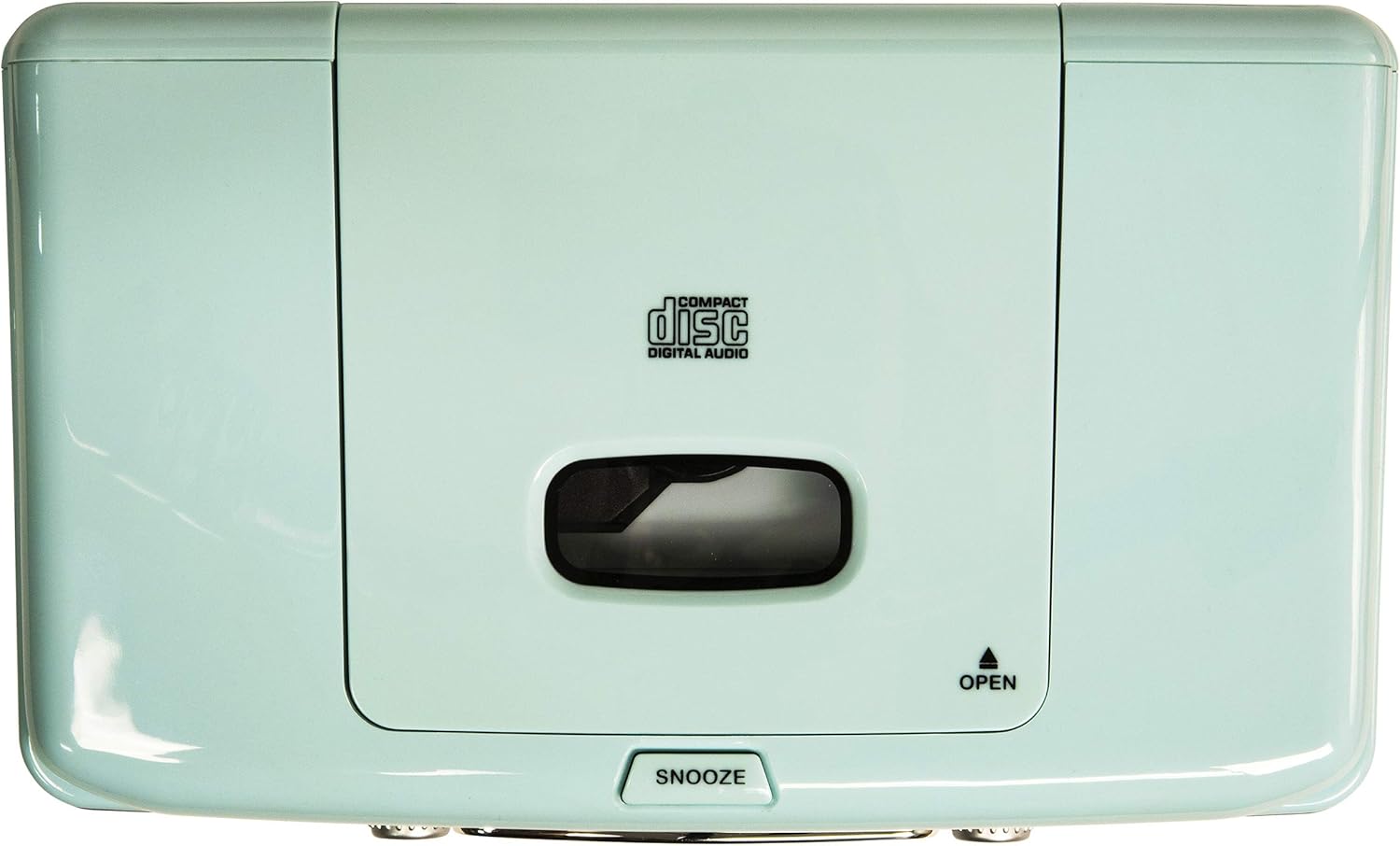
Figure 3: Top Panel. This image shows the top-loading CD player compartment and the Snooze button.

Figure 4: Rear Panel. This image displays the AC power input and the battery compartment for backup power.
4. セットアップ
4.1電源接続
- ユニットが安定した平らな面に設置されていることを確認してください。
- AC 電源アダプターを本体背面の DC IN ジャックに接続します。
- AC電源アダプタを標準の壁のコンセントに差し込みます。
4.2 バッテリーバックアップ (オプション)
For alarm clock backup during power outages, install one 9V battery (not included) into the battery compartment on the rear of the unit. This will maintain time and alarm settings in case of a power interruption.
4.3 アンテナのセットアップ
The unit has a built-in AM antenna. For FM reception, extend the wire FM antenna located on the rear of the unit for optimal signal reception.
5. 操作手順
5.1 電源オン/オフ
を押す 力 ユニットの電源をオンまたはオフにするには、前面パネルにあるボタンを使用します。
5.2 AM/FMラジオの操作
- を押す モード button until 'RADIO' is displayed.
- を押す FM/AM AM または FM バンドを選択するボタン。
- 回転する チューニング ノブを回して希望のラジオ局を選択します。
- 調整する 音量 ノブを回して、好みのリスニングレベルに合わせます。
Video 1: Crosley CR612B-AB Corsair AM/FM Bluetooth Radio. This video demonstrates the radio's AM/FM tuning functionality.
5.3 CDプレーヤーの操作
- を押す モード button until 'CD' is displayed.
- を押す 開ける button on the top of the unit to open the CD compartment.
- ラベル面を上にして CD をコンパートメントに置きます。
- CDコンパートメントの蓋を閉じます。
- を押す 再生/一時停止 ボタンをクリックして再生を開始します。
- 使用 スキップ/検索 トラック間を移動するためのボタン。
- を押す 停止 再生を終了するボタン。
- の プログラム button allows you to create a custom playback order for tracks.

Figure 5: CD Player Open. This image shows the top-loading CD player ready for disc insertion.
5.4Bluetoothの操作
- を押す モード button until 'BT' (Bluetooth) is displayed. The unit will enter pairing mode, indicated by a flashing 'BT'.
- 外部デバイス (スマートフォン、タブレットなど) で Bluetooth を有効にします。
- 検索する 'Crosley Corsair' in your device's Bluetooth settings and select it to pair.
- Once paired, the 'BT' indicator will stop flashing, and you can stream audio from your device to the radio.
- Adjust the volume on both your external device and the radio for optimal sound.

Figure 6: Bluetooth Streaming. This image illustrates connecting an external device via Bluetooth to the radio.
Video 2: CR612B Corsair Tabletop AM/FM Bluetooth Radio with CD Player. This video provides an overview of the radio's features, including Bluetooth connectivity.
5.5 目覚まし時計機能
- 設定時間: を押し続けます 時間 ボタンをクリックしてください。 スキップ/検索 buttons to adjust hours and minutes, then press 時間 再度確認します。
- アラーム1/2の設定: どちらかを押し続けます アラーム1 or アラーム2 ボタンをクリックしてください。 スキップ/検索 buttons to set the alarm time. Press the respective アラーム button again to select the alarm source (Buzzer, Radio, or CD) and confirm.
- アラームの有効化/無効化: 短く押す アラーム1 or アラーム2 アラームのオン/オフを切り替えます。アラームが有効な場合は、ディスプレイにアラームアイコンが表示されます。
- スヌーズ: アラームが鳴ったら、 スヌーズ button on top of the unit to temporarily silence it. The alarm will sound again after a few minutes.
- 目覚まし時計: を押す 寝る ボタンを繰り返し押してスリープタイマー(例:15分、30分、60分、90分)を設定します。設定時間経過後、自動的に電源が切れます。
5.6 ヘッドホンの使用
3.5mmヘッドフォンを差し込みます ヘッドフォンジャック on the front panel for private listening. The main speakers will be muted automatically.
6. メンテナンス
6.1 クリーニング
- 本体の外側は、乾いた柔らかい布で拭いてください。
- 仕上げを傷める恐れがあるため、研磨剤入りの洗剤、ワックス、溶剤は使用しないでください。
- CD コンパートメントを清潔に保ち、ほこりが付かないようにしてください。
6.2 ストレージ
When not in use for extended periods, unplug the unit from the power outlet and store it in a cool, dry place.
7。 トラブルシューティング
| 問題 | 考えられる原因 | 解決 |
|---|---|---|
| 電源なし | 電源コードがしっかりと接続されていません。 | Ensure the AC power adapter is firmly plugged into the unit and a working wall outlet. |
| 電波受信不良 | 弱い信号。 | Adjust the position of the FM wire antenna. For AM, try repositioning the unit. |
| CDが再生されない | CD が正しく挿入されていないか、汚れている/傷が付いています。 | Ensure the CD is inserted label-side up. Clean the CD with a soft cloth. Try a different CD. |
| Bluetoothが接続されない | デバイスがペアリングモードになっていないか、離れすぎています。 | Ensure the radio is in Bluetooth mode and 'BT' is flashing. Move your device closer to the radio. Check your device's Bluetooth settings. |
| アラームが鳴らない | アラームが設定されていないか、無効になっています。 | Verify alarm time and source are set correctly and the alarm is activated (icon visible). |
8. 仕様
| ブランド | クロスリー |
| モデル番号 | CR612B-AB |
| 色 | アクアブルー |
| 製品寸法(長さ x 幅 x 高さ) | 長さ6.75インチ x 幅11.5インチ x 高さ7.25インチ |
| 接続技術 | ブルートゥース |
| サポートされている無線帯域 | FM/AM |
| オーディオ出力モード | ステレオ |
| 電源 | ACアダプター |
| バッテリー要件 | 1 x 9V battery (for backup, not included) |
| 表示タイプ | 導かれた |
| 材料 | Chrome (accents) |

Figure 7: Product Dimensions. This diagram provides the overall measurements of the unit.
9.保証とサポート
9.1 保証情報
この製品は、 1年間のメーカー限定保証保証範囲と条件の詳細については、パッケージに同梱されている保証カードを参照してください。
9.2 カスタマーサポート
For technical assistance, troubleshooting, or warranty claims, please contact Crosley customer support. Contact information can typically be found on the manufacturer's official webサイトまたは製品パッケージに記載されています。