
1.製品オーバーview
The Alecto WS-1560 is a wireless weather station designed to provide accurate indoor and outdoor environmental data. Featuring a clear color display and a remote outdoor sensor, it offers comprehensive weather information and additional useful functions for your home.
主な特徴:
- 屋内と屋外の温度と湿度を測定します。
- Long-range wireless outdoor sensor (up to 100 meters).
- 5.7-inch well-lit color display with animated weather forecast icons.
- Temperature and ice alarm functions.
- スヌーズ機能付き目覚まし時計。
- Memory function for latest and highest readings.
- Moon phase indicator, date, day, and time display.
- Battery-operated main unit and outdoor sensor with backup batteries.

Figure 1.1: Alecto WS-1560 Main Unit and Wireless Outdoor Sensor.
2. パッケージ内容
Ensure all components are present and in good condition upon unpacking:
- Alecto WS-1560 Main Unit (Indoor Display)
- ワイヤレス屋外センサ
- ユーザーマニュアル
- (Power adapter and batteries may be included depending on package)
Video 2.1: Illustrative video showing typical weather station components and basic setup. (Note: This video is for a related product and may not show the exact Alecto WS-1560 model.)
3. セットアップとインストール
3.1. バッテリーの取り付け
Both the main unit and the outdoor sensor require batteries for operation. Ensure you use the correct type and polarity.
- 屋外センサー:
- ワイヤレス屋外センサーの背面にある電池ケースを開きます。
- 極性マーク(+/-)に従って、単三電池 2 本(別売)を挿入します。
- 電池ケースをしっかりと閉めてください。
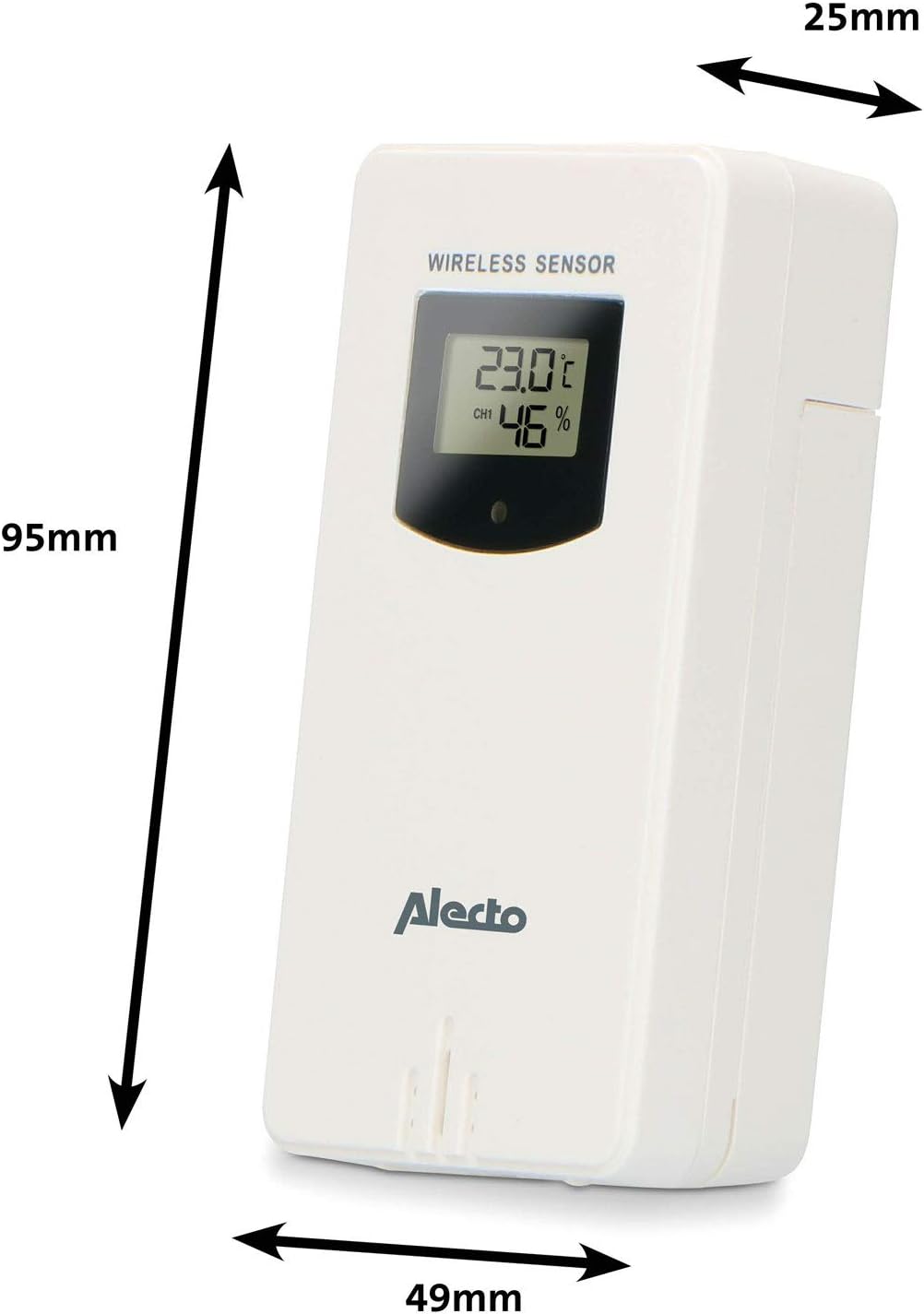
Figure 3.1: Wireless Outdoor Sensor dimensions and battery compartment location.
- 本体:
- 本体背面の電池ケースを開きます。
- Insert 2x AA batteries (not included) according to the polarity markings (+/-). These serve as backup batteries.
- 電池ケースをしっかりと閉めてください。
- Connect the main unit to a power outlet using the provided power adapter (if included).

Figure 3.2: Main Unit dimensions and power input.
3.2.センサーの配置
For accurate outdoor readings, proper placement of the wireless sensor is crucial:
- Place the sensor in a shaded area, away from direct sunlight, to prevent inaccurate temperature readings.
- センサー周囲の空気の循環が良好であることを確認してください。
- センサーを地面から約 1.5 ~ 2.5 メートル (5 ~ 8 フィート) の高さに垂直に取り付けます。
- Avoid placing the sensor near heat sources (e.g., vents, windows) or moisture sources.
- The maximum transmission range is 100 meters (328 feet) in open air. Walls and other obstacles will reduce this range.

図3.3:例ample of outdoor sensor placement on a wall.
3.3. Pairing the Sensor with the Main Unit
The main unit and sensor should automatically pair once both are powered on. If pairing does not occur:
- Ensure both units have fresh batteries and are within range.
- Press the "TX" button inside the outdoor sensor's battery compartment to manually send a signal.
- On the main unit, you may need to initiate a search for the outdoor sensor (refer to the "Operation" section for specific button functions).
4. 操作
4.1. 表示レイアウト
5.7インチのカラーディスプレイは、view of all measured data. Key areas include:
- 屋外の温度と湿度: Displays current outdoor conditions.
- 室内温度と湿度: 現在の室内の状態を表示します。
- Animated Weather Forecast: Icons predict upcoming weather (sunny, partly cloudy, cloudy, rainy, snowy).
- 時間と日付: 現在の時刻、曜日、日付。
- 大気圧: 現在の大気圧。
- 月相: 現在の月の満ち欠けをグラフィックで表します。
- Temperature/Ice Alarm Indicators: Alerts for specific temperature thresholds or potential ice conditions.

図4.1:詳細 view of the main unit's color display.
4.2. ボタンの機能
The main unit features several buttons for setting and adjusting functions. Common buttons include:
- セット: Enters setup mode for time, date, and other settings.
- モード: Switches between display modes or confirms settings.
- 上/下(または+/-): Adjusts values during setup or cycles through channels.
- 警報: アラーム機能を設定またはアクティブ化します。
- MEM: Displays maximum/minimum temperature and humidity records. Long press to clear records.
- スヌーズ/ライト: Activates snooze during an alarm or adjusts backlight brightness.
Video 4.2: Illustrative video demonstrating various features and settings of a weather station. (Note: This video is for a related product and may not show the exact Alecto WS-1560 model.)
4.3. 時刻と日付の設定
- Press and hold the "SET" button until the time display starts flashing.
- Use the "UP" or "DOWN" buttons to adjust the hour, then press "SET" to confirm and move to minutes.
- 分、年、月、日について繰り返します。
- Press "SET" again to exit the setting mode.
4.4.アラーム設定
- Press the "ALARM" button once to view 目覚まし時間。
- Press and hold the "ALARM" button until the alarm time starts flashing.
- Use the "UP" or "DOWN" buttons to set the desired alarm hour and minute.
- 「ALARM」を押して確認します。
- To activate/deactivate the alarm, press the "ALARM" button briefly when the alarm time is displayed. An alarm icon will appear/disappear.
4.5. 最大/最小記録
The weather station automatically records the maximum and minimum temperature and humidity values over a 24-hour period.
- Press the "MEM" button briefly to view 記録された最大値。
- Press "MEM" again to view 記録された最小値。
- 「MEM」を3回目に押すと、現在の読み取り値に戻ります。
- To clear the records, press and hold the "MEM" button for a few seconds.
5. メンテナンス
- クリーニング: ディスプレイと本体の表面を柔らかくて乾いた布で拭いてください。amp 布で拭いてください。研磨剤や溶剤は使用しないでください。
- バッテリー交換: ディスプレイに電池残量低下のインジケーターが表示されたら、本体と屋外センサーの両方の電池を交換してください。必ずすべての電池を同じ種類の新しい電池に同時に交換してください。
- センサーのケア: Periodically check the outdoor sensor for debris or obstructions that might affect its readings. Ensure it remains in a shaded, well-ventilated area.
6。 トラブルシューティング
| 問題 | 考えられる原因 | 解決 |
|---|---|---|
| No outdoor temperature/humidity reading (or "---" displayed) |
|
|
| 温度/湿度の測定値が不正確 |
|
|
| ディスプレイが暗い、または何も表示されない |
|
|
7. 仕様
| モデル番号 | WS-1560 |
| ブランド | アレクト |
| 電源(本体) | Power Adapter (if included) + 2x AA batteries (backup) |
| 電源(屋外センサー) | 単三電池2本 |
| 製品寸法(本体) | 5.1 x 16.5 x 12.3 cm |
| 製品重量 | 440グラム |
| ワイヤレスセンサーの範囲 | 最大100メートル(屋外) |
| 表示サイズ | 5.7インチ / 14.5 cm |
| 起源 | 中国 |
8. 保証とサポート
For warranty information, technical support, or service inquiries, please refer to the warranty card included with your product or visit the official Alecto webサイトでご確認ください。購入証明として購入レシートを保管してください。
アレクト Webサイト: www.alecto.nl (General Alecto webサイトによってはサポートページが異なる場合があります)