
EOTECH 512.A65
EOTECH 512 ホログラフィックウェポンサイト 512.A65 ユーザーマニュアル
モデル: 512.A65
導入
This manual provides detailed instructions for the proper setup, operation, and maintenance of your EOTECH 512 Holographic Weapon Sight. The Model 512 is designed for fast target acquisition, reliability, and durability, making it a popular choice for various applications.
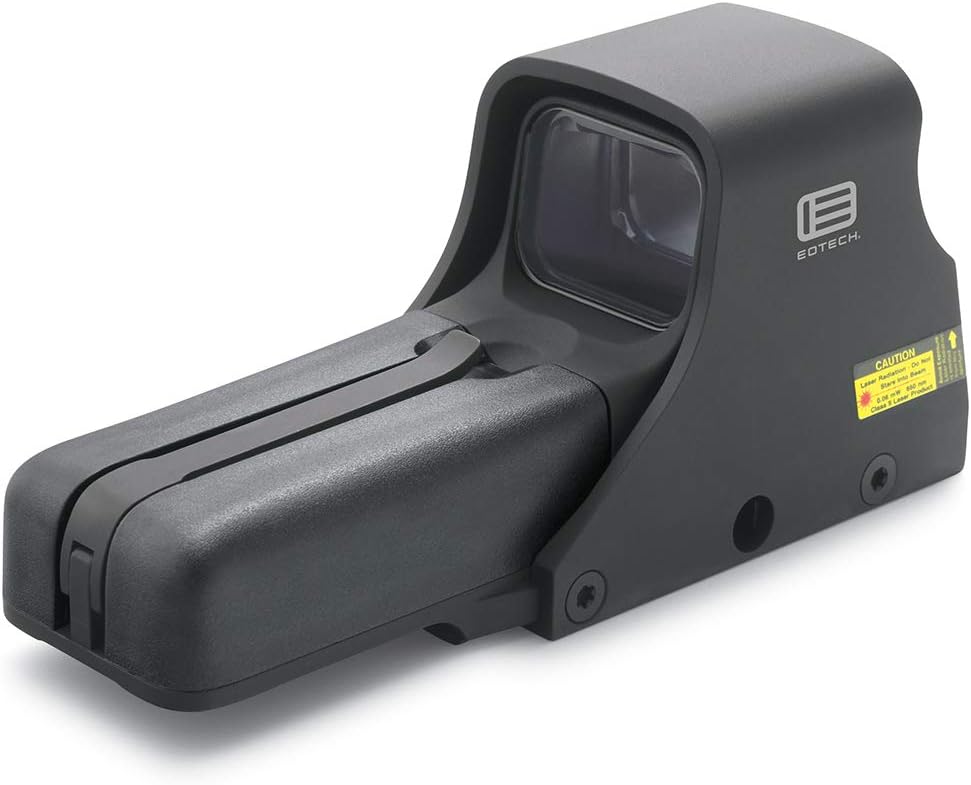
Figure 1: EOTECH 512 Holographic Weapon Sight (Model 512.A65)
The EOTECH 512.A65 Holographic Weapon Sight is a robust optical device featuring a black finish and a distinctive 68 MOA ring with a 1 MOA dot reticle. It is engineered for quick target acquisition and reliable performance in various lighting conditions.
安全情報
Always handle firearms and optical devices responsibly. Read and understand all safety warnings before using this product. Failure to follow these instructions may result in injury or damage to the device.
- Ensure the firearm is unloaded and safe before mounting or adjusting the sight.
- Do not look directly into the laser aperture. This device contains a Class 1 laser product.
- 電池はお子様の手の届かないところに保管してください。
- 電池は地域の規制に従って適切に廃棄してください。
パッケージ内容
パッケージにすべてのアイテムが揃っていることを確認します。
- EOTECH 512.A65 Holographic Weapon Sight
- ユーザーマニュアル(このドキュメント)
- 2 x AA Batteries (may be included or sold separately)
設定
バッテリーの取り付け
The EOTECH 512.A65 operates on two (2) AA batteries. For optimal performance and battery life, lithium batteries are recommended.
- Locate the removable battery compartment on the front of the sight.
- Lift the battery cap latch to open the compartment.
- 電池ボックス内の極性表示に従って単三電池 2 本を挿入します。
- Close the battery compartment securely, ensuring the latch clicks into place.

Figure 2: Key components of the EOTECH 512.A65, including the removable battery compartment and the 1" Weaver or MIL-STD-1913 rail mount.
This image highlights the battery cap latch, aluminum hood, removable battery compartment, and the compatible 1" Weaver or MIL-STD-1913 rail for mounting. Proper battery installation is crucial for the sight's functionality.
照準器の取り付け
The EOTECH 512.A65 is designed to fit both 1" Weaver and MIL-STD-1913 (Picatinny) rails.
- 銃器が空になっており、安全な方向を向いていることを確認してください。
- Loosen the mounting bolt(s) on the sight's base.
- Align the sight's base with the rail on your firearm.
- Slide the sight onto the rail until it is in the desired position.
- Tighten the mounting bolt(s) securely. Do not overtighten.
操作手順
電源のオン/オフ
- To turn on: Press either the UP or 下 arrow button located on the rear of the sight.
- To turn off: Press both the UP そして 下 arrow buttons simultaneously. The sight will also automatically shut off after 8 hours if no buttons are pressed.
明るさ調整
The EOTECH 512.A65 features 20 brightness settings to accommodate various lighting conditions.
- 明るさを上げるには: UP 矢印ボタン。
- 明るさを下げるには: 下 矢印ボタン。

図3: トップダウン view of the EOTECH 512.A65, illustrating the location of the UP and DOWN arrow buttons for power and brightness control.
この画像は、 view of the sight's top, highlighting the control buttons used for powering the unit on/off and adjusting the reticle's brightness. The windage and elevation adjustment knobs are also visible.
レチクル情報
The 512.A65 features a 68 MOA ring with a 1 MOA dot reticle. This design allows for rapid target acquisition while providing a precise aiming point.

Figure 4: EOTECH 68 MOA Ring and 1 MOA Dot Reticle Diagram.
This diagram illustrates the precise dimensions of the 68 MOA outer ring and the central 1 MOA dot, which together form the sight's aiming pattern.

図 5: レチクル view through the EOTECH 512.A65 sight.
This image demonstrates how the 68 MOA ring and 1 MOA dot reticle appear when viewed through the holographic sight, providing a clear aiming point against a background.
Zeroing the Sight (Windage and Elevation)
To achieve accuracy, the sight must be zeroed to your firearm. This involves adjusting the reticle's point of impact to match the bullet's point of impact.
- Locate the windage (horizontal) and elevation (vertical) adjustment knobs on the side of the sight (refer to Figure 3).
- Using a small flat-head screwdriver or a coin, turn the adjustment knobs. Each click typically represents a specific change in point of impact at a given distance (e.g., 1/2 MOA per click).
- 標高調整: Turning the knob clockwise moves the point of impact 下. Turning counter-clockwise moves it UP.
- 風偏調整: Turning the knob clockwise moves the point of impact 右. Turning counter-clockwise moves it 左.
- Perform adjustments incrementally and test fire to confirm changes until the sight is zeroed.
メンテナンス
クリーニング
Regular cleaning will ensure optimal performance and longevity of your sight.
- 外側の表面を拭くときは、柔らかく糸くずの出ない布を使用してください。
- For lenses, use a lens cleaning pen or a soft brush to remove dust, then gently wipe with a microfiber lens cloth and a small amount of lens cleaning solution if necessary.
- Avoid using abrasive materials or harsh chemicals, as they may damage the coatings.
バッテリー交換
Replace batteries when the reticle begins to dim or flicker, or if the sight fails to power on. Refer to the "Battery Installation" section under Setup for detailed steps.
- 常に新しい高品質の単三電池を使用してください。
- Remove old batteries promptly to prevent corrosion.
トラブルシューティング
| 問題 | 考えられる原因 | 解決 |
|---|---|---|
| Sight does not power on. | 電池が切れているか、正しく取り付けられていない。 | 正しい極性を確認して、新しい電池と交換してください。 |
| レチクルが暗くなったりちらついたりします。 | バッテリー残量が少なくなっています。 | 電池を交換してください。 |
| Reticle appears blurry or distorted. | Astigmatism (user's vision), dirty lens, or incorrect brightness setting. | Adjust brightness. Clean lenses. If issue persists, consult an optometrist as holographic sights can appear blurry to individuals with astigmatism. |
| Point of impact shifts. | Sight not securely mounted, or zeroing is off. | Check mounting bolts and re-tighten if necessary. Re-zero the sight. |
仕様
Detailed technical specifications for the EOTECH 512.A65 Holographic Weapon Sight:
- 寸法: 5.6インチ(長さ)×2.0インチ(幅)×2.5インチ(高さ)
- 重さ: 11.5オンス(309グラム)
- 耐水性: 10フィート(3メートル)
- 色: 黒
- マウント: Fits both 1" Weaver and MIL-STD-1913 Rail
- 明るさの設定: 20
- 電源: 単三電池2本
- バッテリー寿命: Up to 2500 continuous hours (lithium) or 2200 continuous hours (alkaline) at nominal setting 12
- レチクル: 68 MOA ring with 1 MOA dot
- Night Vision Compatible: いいえ
- 材料: アルミニウム
- 倍率: 1x (Fixed)
- 分野 View: 28メートル

Figure 6: EOTECH Holographic Weapon Sight Model Comparison.
This table provides a comparative overview of key features across different EOTECH HWS models, including the 512, 518, 552, and 558, highlighting differences in night vision capability, button operation, weight, water resistance, and mounting options.
保証とサポート
EOTECH stands behind its products with a comprehensive warranty.
- 保証: The EOTECH 512.A65 comes with a 10-year limited warranty. For full details and terms, please refer to the official EOTECH webサイトまたは製品に付属の保証情報をご覧ください。
- ユーザーマニュアル(PDF): ユーザーマニュアルのデジタル版は以下から入手できます。 ここ.
- カスタマーサポート: For technical assistance, service, or warranty claims, please contact EOTECH customer support directly. Visit the official EOTECH web連絡先情報のサイト。
Ask a question about this manual
Ask about setup, troubleshooting, compatibility, parts, safety, or missing instructions. Manuals+ will review the question and use this page’s manual context to help answer it.