
導入
This manual provides essential instructions for the safe and effective use of your Salter 9192 BK3R Curve Bluetooth Smart Electronic Scale. Please read this manual thoroughly before using the device and retain it for future reference.
The Salter 9192 BK3R Curve Bluetooth Smart Electronic Scale is designed to measure weight, body fat, body water, muscle mass, bone mass, Body Mass Index (BMI), and Basal Metabolic Rate (BMR). It features an easy-to-read LCD screen, memory for up to 8 users, and specialized modes for athletes and children. Data can be tracked and managed via the intuitive Salter Health (MiBody) application on your smartphone.
安全情報
- Always place the scale on a firm, flat surface. Uneven surfaces can affect accuracy.
- Do not use on wet or slippery floors.
- Do not immerse the scale in water or use chemical cleaning agents. Wipe with a damp 布。
- This scale is not intended for medical diagnosis or treatment. Consult a healthcare professional for any health concerns.
- Individuals with pacemakers or other internal medical devices should not use this scale as it uses Bio-electrical Impedance Analysis (BIA).
- Pregnant women should use the scale for weight measurement only, as BIA readings may not be accurate.
- 使用しないときは、子供の手の届かないところに保管してください。
設定
1. バッテリーの取り付け
- スケールの下側にある電池ボックスを見つけます。
- 電池ボックスのカバーを開きます。
- 正しい極性 (+/-) を確認して、単 4 電池 3 本を挿入します。
- 電池カバーをしっかりと閉じてください。
 詳細な view of the Salter 9192 BK3R scale's large, easy-to-read LCD display, indicating the current unit as kilograms (KG) and showing the control buttons for switching between metric and imperial measurements (KG, ST/LB). This image shows the display where battery status might be indicated.
2. アプリのダウンロードとペアリング
- Download the "Salter Health" (or "MiBody") app from your smartphone's app store (Apple App Store or Google Play Store).
- スマートフォンでBluetoothが有効になっていることを確認します。
- Open the Salter Health app and follow the on-screen instructions to create your user profile.
- The app will guide you through the pairing process with your scale. This typically involves stepping on the scale or pressing a button on the scale to activate Bluetooth.
- Once paired, your profile information (age, height, gender) will be synced to the scale, and the scale will be ready for use.
 An infographic detailing the Salter Health App's features, including data synchronization with Apple Health, setting personal goals, sharing challenges, automatic weigh-in reminders, profile sharing, and data export capabilities. The image also shows the scale and a smartphone displaying the app.
 An image highlighting the Salter Health App, showing a person interacting with a smartphone, with a dumbbell in the foreground, suggesting fitness tracking.
操作手順
測定を行う
- スケールを硬くて平らで安定した表面に置いてください。
- Gently tap the center of the scale with your foot to turn it on. The display will show "0.0 kg" (or your selected unit).
- Ensure the Salter Health app is open on your smartphone and Bluetooth is active for automatic data transfer.
- 裸足で体重計に乗り、体重を均等に分散させて静止します。
- The scale will display your weight, then cycle through other measurements such as body fat, body water, muscle mass, bone mass, BMI, and BMR.
- Your measurements will automatically sync to the Salter Health app.
 クローズアップ view of a foot stepping onto the Salter 9192 BK3R scale, emphasizing its durable toughened glass platform and the 'Step on for instant weight reading' functionality.
Switching Units (KG/ST/LB)
The unit conversion button is located on the underside of the scale. Press this button to cycle between kilograms (KG), stones (ST), and pounds (LB).
Athlete Mode and Child Mode
These modes can be activated within the Salter Health app during profile setup or editing. Athlete Mode is designed for individuals who engage in intense physical activity, while Child Mode provides appropriate measurements for younger users.
 An infographic illustrating the comprehensive health metrics measured by the Salter 9192 BK3R scale, including weight, body water, body fat, bone mass, BMI, BMR, and muscle mass, along with features like Athlete Mode, Child Mode, and support for 8 users.
Using the Salter Health App
このアプリでは次のことが可能です。
- View your measurement history and progress over time.
- Set personal health goals.
- Share your profile or challenge friends/family (Linked Accounts, Groups).
- Export your data in PDF or CSV formats.
- Receive automatic weigh-in reminders.
- Sync data with other health platforms like Apple Health.
 Screenshots from the Salter Health App demonstrating the user dashboard for tracking progress, the ability to link accounts for sharing data, and options to export data in PDF or CSV formats.
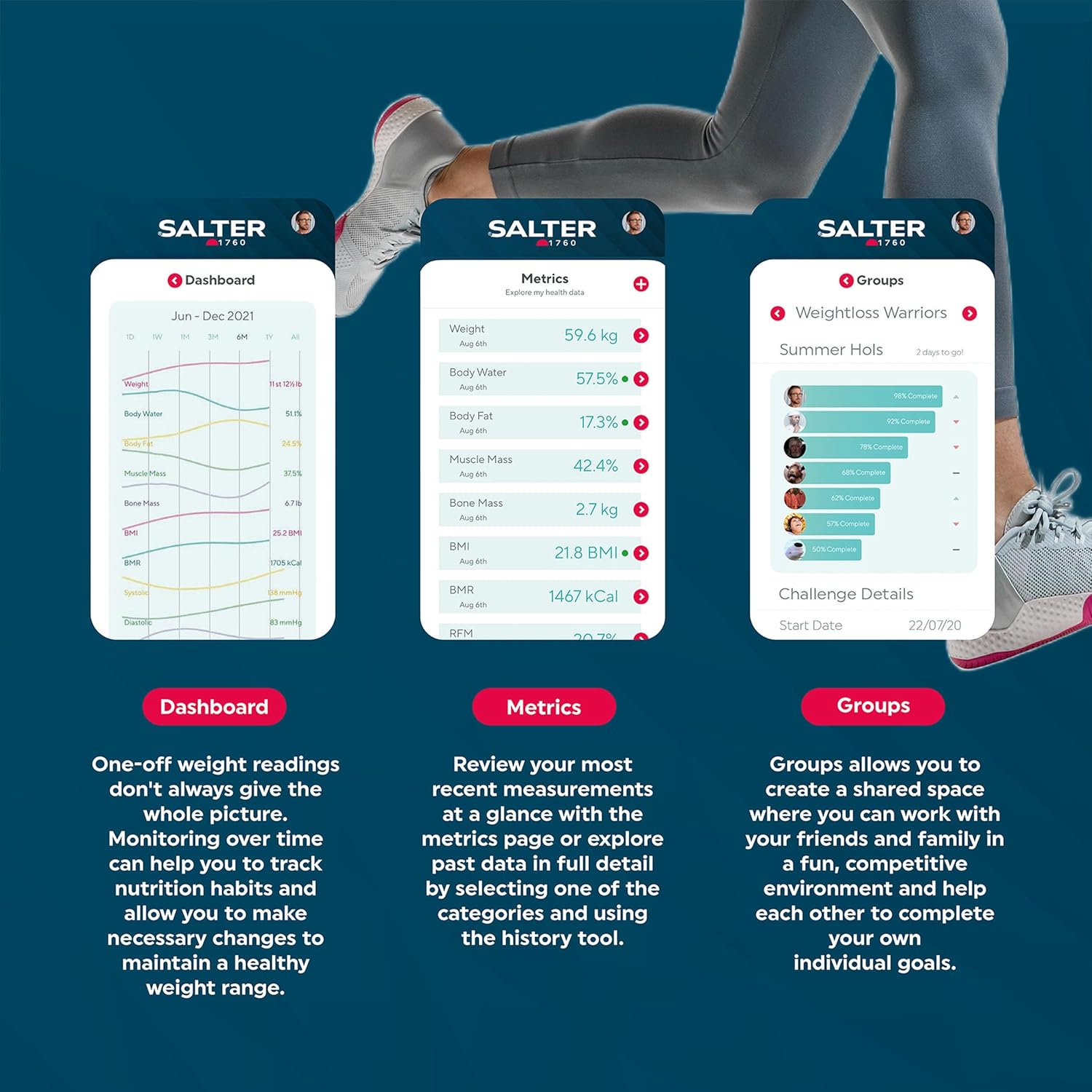 Screenshots from the Salter Health App illustrating the dashboard for overall progress, detailed metrics view with historical data, and the 'Groups' feature for shared challenges.
メンテナンス
クリーニング
スケールの表面を拭きますamp cloth and mild detergent if necessary. Do not use abrasive cleaners or immerse the scale in water. Ensure the scale is dry before storage or next use.
ストレージ
体重計は直射日光や極端な温度を避け、涼しく乾燥した場所に保管してください。使用していないときは、体重計の上に重い物を置かないでください。
 The Salter 9192 BK3R Curve Bluetooth Smart Electronic Scale is shown stored upright on a white shelf inside a bathroom cabinet, demonstrating its compact storage.
バッテリー交換
When the battery indicator appears on the display, replace all 3 AAA batteries with new ones. Dispose of old batteries responsibly.
トラブルシューティング
| 問題 | 考えられる原因 | 解決 |
|---|---|---|
| 不正確または一貫性のない読み取り | Scale not on a firm, flat surface; scale moved between readings; user not standing still; low battery. | Ensure scale is on a hard, flat floor. Do not move the scale. Stand still with weight evenly distributed. Replace batteries if low. Take measurements at the same time each day for consistency. |
| ディスプレイに「エラー」メッセージが表示される | Scale overload (exceeds 150 kg); improper use; internal error. | Ensure weight is within the maximum capacity (150 kg). Step off and then back on the scale correctly. If the error persists, remove batteries for 10 seconds and reinsert. |
| Bluetooth接続失敗 | Bluetooth not enabled on smartphone; app not open; scale not activated; interference. | Ensure Bluetooth is on. Open the Salter Health app. Tap the scale to activate it. Move closer to the scale. Try restarting your phone or the app. |
| No body composition readings (fat, water, muscle, bone) | User is wearing socks/shoes; profile not set up correctly in app; scale not recognizing user. | Step on the scale barefoot. Ensure your profile (age, height, gender) is accurately entered in the Salter Health app. Ensure you are selecting your user profile on the scale if it doesn't auto-detect. |
仕様
- ブランド: ソルター
- モデル番号: 9192 BK3R
- 色: 黒
- 寸法(長さ×幅×高さ): 30.6 cm x 33.6 cm x 3 cm
- 最大積載量: 150 kg (330 ポンド / 23 ストーン 8 ポンド)
- 測定精度: 100グラム
- 力: 単3電池XNUMX本(付属)
- 表示タイプ: 液晶
- プラットフォーム素材: 強化ガラス
- 特別な機能: Measures Weight, Body Fat, Body Water, Muscle Mass, Bone Mass, BMI, BMR; 8 User Memory; Athlete Mode; Child Mode; Bluetooth Connectivity.
- 商品の重量: 1.88キロ
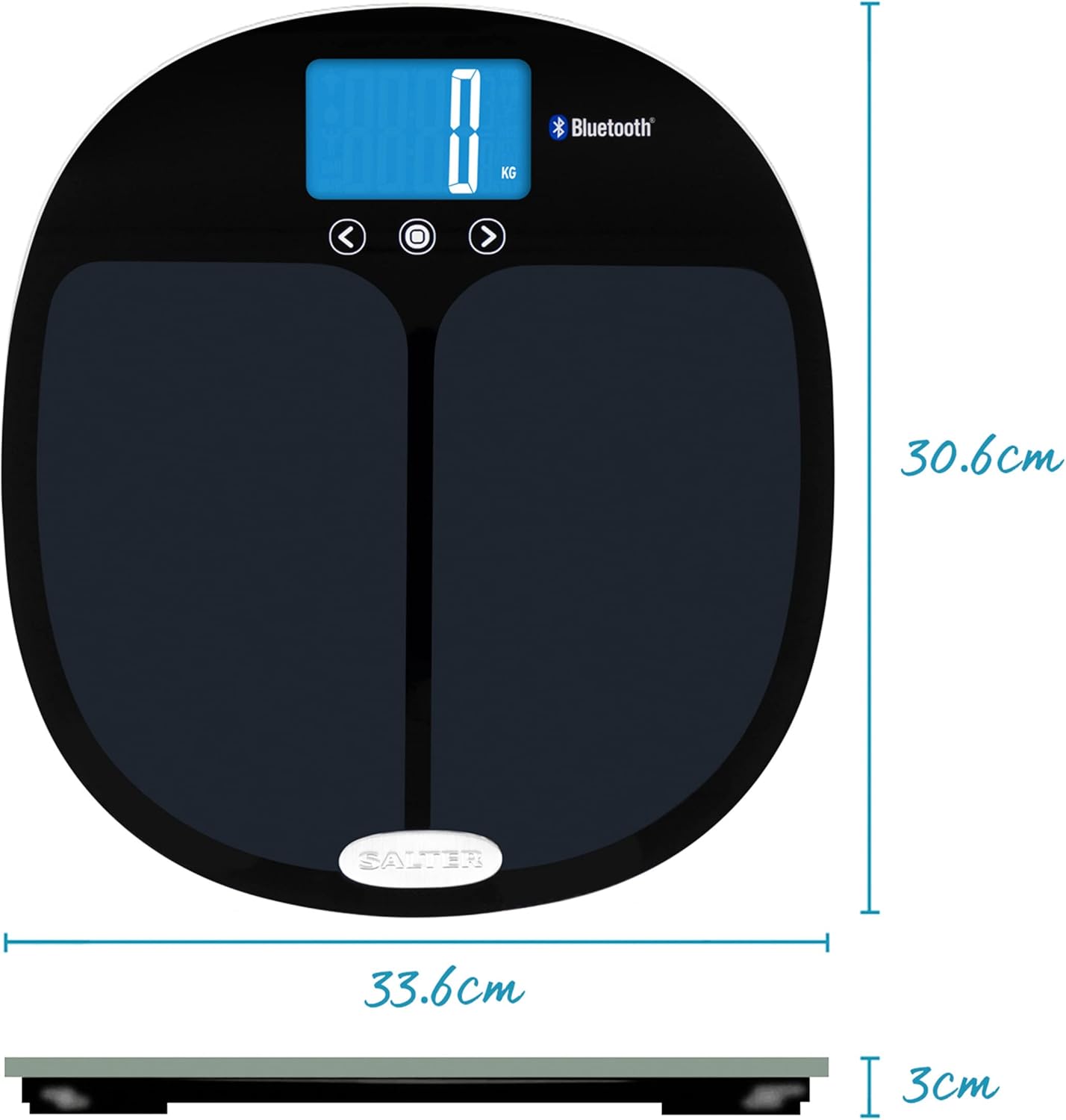 A technical diagram illustrating the physical dimensions of the Salter 9192 BK3R scale, with measurements of 33.6 cm in width, 30.6 cm in length, and 3 cm in height.
保証とサポート
保証情報
Specific warranty details for your Salter 9192 BK3R Curve Bluetooth Smart Electronic Scale are typically provided with your purchase documentation or can be found on the official Salter web包括的な保証条件については、これらのリソースを参照してください。
カスタマーサポート
For further assistance, technical support, or inquiries regarding your scale, please visit the official Salter website or contact their customer service department. Contact information can usually be found on the product packaging or the Salter webサイト。