
1. はじめに
This manual provides detailed instructions for the safe and effective use of your BTMETER BT-1500 Industrial Laser Thermometer Gun. This non-contact infrared thermometer is designed for accurate temperature measurement in various industrial and professional applications. Please read this manual thoroughly before operation and retain it for future reference.

図1: The BTMETER BT-1500 in use for diverse applications, including cooking, HVAC, and industrial processes.
2. 安全情報
WARNING: Class II Laser Product
- レーザー光線を直接見つめないでください。
- レーザーが直接目に当たらないようにしてください。
- 人や動物にレーザーを向けないでください。
- This device is intended for measuring the temperature of inanimate objects only. It is not designed for human or animal temperature measurement.
- お子様の手の届かない場所に保管してください。
- Use caution when operating near reflective surfaces, as the laser can reflect.
The BT-1500 uses a Class II laser with an optical power of <0.5mW and a wavelength of 630-670nm.
3.製品オーバーview
The BTMETER BT-1500 is a high-performance infrared thermometer featuring a wide temperature range, dual laser targeting, and multiple measurement modes for industrial applications.
3.1 主な特徴
- 広い温度範囲: -50°C ~ 1500°C (-58°F ~ 2732°F) を測定します。
- 高精度: Provides measurements with an accuracy of ±2% or ±2°C (±3.6°F).
- デュアルレーザーターゲティング: Two non-contact digital lasers for precise targeting and instant measurement within 0.25 seconds.
- 距離対スポット比(D:S): 30:1, allowing for accurate measurements from a safe distance.
- 複数の測定モード: Includes MIN (Minimum), MAX (Maximum), AVG (Average), and DIF (Difference) temperature readings.
- Adjustable Alarms: High/Low/Difference temperature alarms to alert users when temperatures exceed or fall below set thresholds.
- Backlit LCD Screen & Flashlight: Large, backlit display and integrated flashlight for visibility in low-light conditions.
- 自動電源オフ: バッテリー寿命を延ばします。
- 低電力インジケータ: バッテリー残量が少なくなると警告します。
3.2 コンポーネントの識別
Refer to the diagram below for identification of the main components of your BT-1500 thermometer.

図2: Labeled diagram of the BTMETER BT-1500 Infrared Thermometer, showing the LCD Display, Laser ON/OFF, Trigger, Backlight/UP button, Mode Select, T/UP button, Emissivity/Flashlight button, and Battery door.
- LCDディスプレイ
- レーザーオン/オフボタン
- 計測トリガ
- Backlight / Up Button
- モード選択ボタン
- Temperature Unit / Up Button
- Emissivity / Flashlight Button
- バッテリードア
4. セットアップ
4.1 バッテリーの取り付け
The BT-1500 requires one 9V battery (included). To install or replace the battery:
- Locate the battery door (8) at the bottom of the handle.
- バッテリードアを開きます。
- Connect the 9V battery to the terminal inside the compartment, ensuring correct polarity.
- Place the battery into the compartment and close the battery door securely.
A low power indicator will appear on the display when the battery needs replacement.
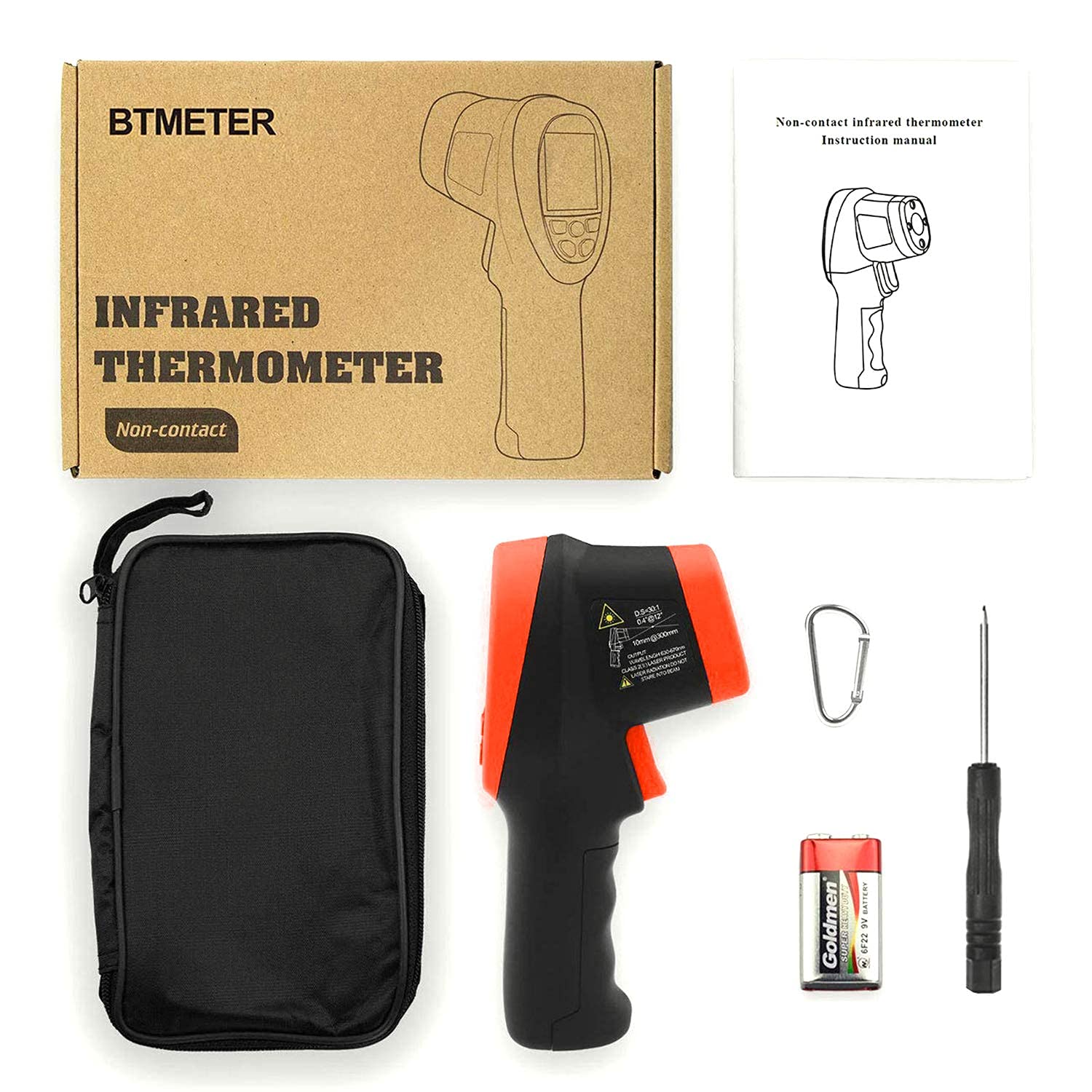
図3: Package contents, showing the BT-1500 thermometer, carrying case, 9V battery, and screwdriver.
5. 操作手順
5.1測定を行う
- 温度計を対象の表面に向けます。
- Press and hold the Measurement Trigger (3). The laser pointers will activate, indicating the measurement area.
- The measured temperature will be displayed on the LCD screen (1).
- トリガーを放すと、ディスプレイの測定値が保持されます。一定時間操作がないと、バッテリーを節約するために自動的に電源がオフになります。

図4: 閉じる view of the dual laser pointers on the BT-1500, indicating the measurement target area.
5.2 温度単位の切り替え(°C/°F)
摂氏 (°C) と華氏 (°F) を切り替えるには:
- While the device is on, press the T/UP button (6) to toggle the temperature unit.

図5: The BT-1500 display showing temperature readings in both Celsius and Fahrenheit, demonstrating the unit switchable feature.
5.3 Mode Selection (MIN/MAX/AVG/DIF)
Press the Mode Select button (5) repeatedly to cycle through the available measurement modes:
- 分: 連続測定中に記録された最低温度を表示します。
- MAX: 連続測定中に記録された最高温度を表示します。
- AVG: 連続測定中に記録された平均温度を表示します。
- 差異: 記録された最高気温と最低気温の差を表示します。

図6: The BT-1500 display illustrating the MIN, MAX, AVG, and DIF measurement modes, useful for tracking temperature variations.
5.4 高温/低温アラームの設定
The BT-1500 allows you to set high and low temperature alarms. When the measured temperature exceeds the high alarm or falls below the low alarm, an audible alert will sound.
- Press the Mode Select button (5) until the alarm setting mode is displayed (e.g., "HAL" for High Alarm, "LAL" for Low Alarm).
- Use the Backlight/UP button (4) and T/UP button (6) to adjust the alarm threshold values.
- Press the Mode Select button (5) again to confirm and exit the alarm setting.
5.5 懐中電灯の使用
To activate the built-in flashlight for illumination in dark environments:
- Press the Emissivity/Flashlight button (7). Press again to turn off.
6. 測定の原則
6.1 距離対スポット比(D:S)
The BT-1500 has a Distance to Spot (D:S) ratio of 30:1. This means that from a distance of 30 units, the thermometer will measure a spot diameter of 1 unit. For example, at 30 inches, it measures a 1-inch spot. To ensure accurate readings, make sure the target area is larger than the spot size at your measurement distance.

図7: Illustration of the 30:1 Distance to Spot ratio, showing how the measurement area expands with distance from the target.
6.2放射率
Emissivity (ε) is a measure of an object's ability to emit infrared energy. Different materials have different emissivity values. The BT-1500 has an adjustable emissivity setting to improve accuracy for various surfaces. The default emissivity is typically 0.95, suitable for most organic materials, painted surfaces, and plastics.
放射率を調整するには:
- Press the Emissivity/Flashlight button (7) to enter emissivity adjustment mode. The emissivity value will flash on the display.
- Use the Backlight/UP button (4) and T/UP button (6) to increase or decrease the emissivity value.
- Press the Emissivity/Flashlight button (7) again to confirm and exit.
Consult an emissivity table for common materials if precise measurements are required for specific surfaces.
7. メンテナンス
7.1 クリーニング
体温計を掃除するには、asingを柔らかく、damp cloth. Do not use abrasive cleaners or immerse the device in water. Keep the laser lens clean and free of dust or debris for accurate readings.
7.2 電池の交換
Replace the 9V battery when the low power indicator appears on the display. Refer to section 4.1 for battery installation instructions.
7.3 ストレージ
長期間使用しない場合は、電池を取り外し、直射日光や極端な温度を避け、涼しく乾燥した場所に温度計を保管してください。
8。 トラブルシューティング
| 問題 | 考えられる原因 | 解決 |
|---|---|---|
| デバイスの電源が入らない。 | バッテリーが切れているか、正しく取り付けられていません。 | 電池の極性を確認してください。新しい9V電池と交換してください。 |
| 不正確な測定値。 |
|
|
| Laser or flashlight not working. | 故障または電池残量不足。 | Ensure battery is fully charged. If problem persists, contact customer support. |
| Display shows "ERR" or other error codes. | Measurement outside range or internal error. | Ensure target temperature is within the device's specified range. If error persists, try resetting the device by removing and reinserting the battery. Contact support if the issue continues. |
9. 仕様
| 特徴 | 詳細 |
|---|---|
| モデル | BT-1500 |
| 温度範囲 | -50°C ~ 1500°C (-58°F ~ 2732°F) |
| 正確さ | ±2% または ±2°C (±3.6°F) |
| 距離対スポット比(D:S) | 30:1 |
| 応答時間 | 0.25秒 |
| Emissivity(放射率) | 調整可能 |
| レーザータイプ | Class II, <0.5mW, 630-670nm |
| 電源 | 1Vバッテリー9個(付属) |
| 自動電源オフ | はい |
| 表示タイプ | デジタル、バックライト付きLCD |
| 材料 | Metal (Outer Material Type) |
| アイテム重量 | 160グラム |
| 寸法(約) | 7.6インチ(長さ) |
| 認定資格 | CE、WEEE |
10. 保証とサポート
For warranty information and technical support, please contact BTMETER customer service. Details are typically available on the product packaging or the official BTMETER webサイトでご確認ください。購入証明として購入レシートを保管してください。
For general inquiries or assistance, you may visit the BTMETER official webサイトをご覧いただくか、サポート チャネルにお問い合わせください。