
1. はじめに
ご購入ありがとうございますasing the Vonyx CVB215 Active Speaker. This powerful 1600W speaker features dual 15-inch woofers, Bluetooth connectivity, and MP3 playback capabilities, making it ideal for various audio applications including music playback, parties, and public announcements. This manual provides essential information for safe operation, setup, and maintenance of your speaker. Please read it thoroughly before use and retain it for future reference.
2. 安全に関する注意事項
- 電源: Ensure the speaker is connected to a power outlet with the correct voltage (230V AC / 50Hz).
- 水分: Do not expose the speaker to rain or moisture to prevent electric shock.
- 換気: スピーカー周囲の換気を十分に確保してください。通気口を塞がないでください。
- 熱源: スピーカーは、ラジエーター、暖房送風口、ストーブ、その他の熱を発生する装置などの熱源から遠ざけてください。
- クリーニング: 清掃する前に電源を切ってください。乾いた布を使用してください。
- サービス: スピーカーの修理はご自身で行わないでください。修理はすべて資格を持ったサービス担当者にお任せください。
- 配置: スピーカーが落ちないように、安定した平らな面に置いてください。
3.製品オーバーview
The Vonyx CVB215 is a robust active speaker designed for high-quality audio output. It features a durable enclosure with a metal grille protecting the dual 15-inch woofers and tweeters. Integrated handles allow for easier transport.
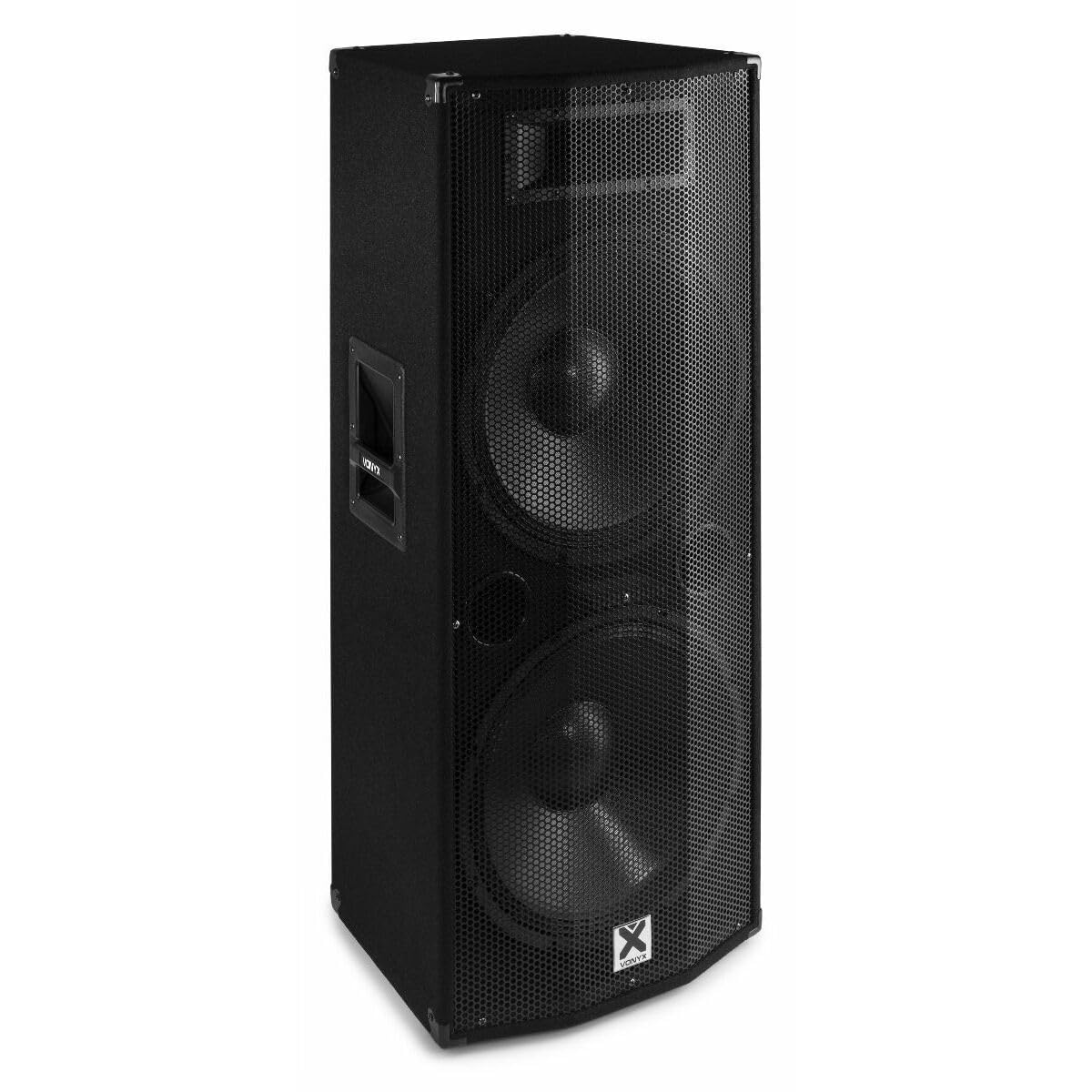
画像3.1: フロント view of the Vonyx CVB215 active speaker. This image displays the speaker's front, highlighting the protective metal grille and the Vonyx logo.
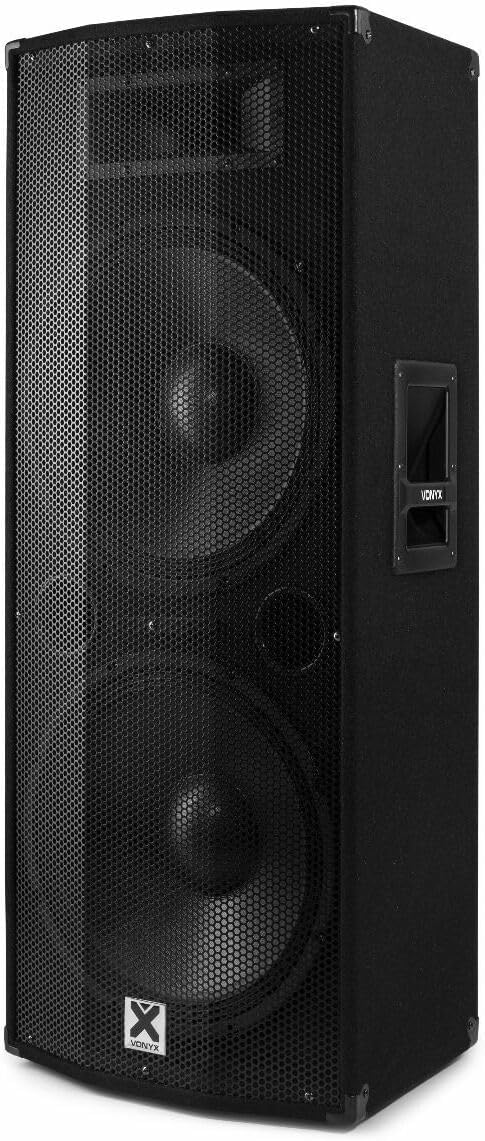
画像3.2: 角度付き view of the Vonyx CVB215 active speaker. This perspective shows the speaker's side with an integrated handle, designed for portability.
背面パネルのコントロールと接続
The rear panel houses all input/output connections and control knobs for audio adjustment.

画像3.3: Rear panel of the Vonyx CVB215 active speaker. This image provides an overview of all connections and controls located on the back of the unit.
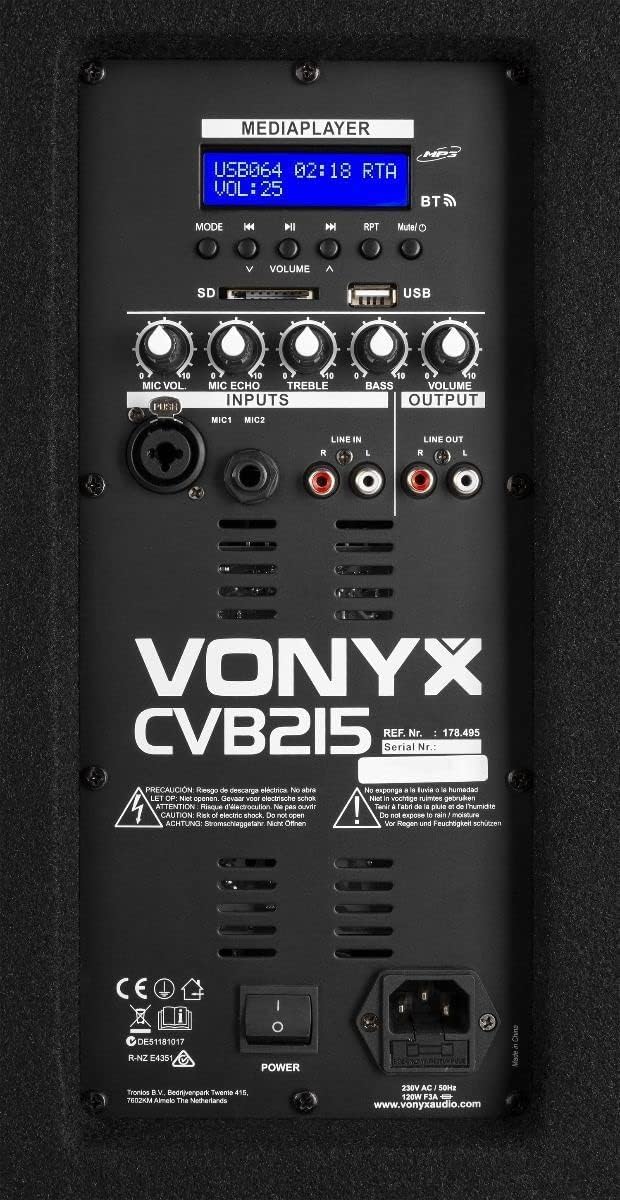
画像3.4: 詳細 view of the Vonyx CVB215 rear panel controls. This close-up highlights the media player interface, USB and SD card slots, microphone inputs (MIC1, MIC2), Line In (RCA), Line Out (RCA), and various adjustment knobs.
- MEDIAPLAYER Display: Shows current mode, track information, and volume level.
- USB/SD カードスロット: For MP3 playback from USB drives or SD cards.
- モードボタン: Switches between Bluetooth, USB, SD, and Line-in modes.
- VOLUME Knobs: Adjusts overall volume, microphone volume (MIC VOL), microphone echo (MIC ECHO), treble, and bass.
- MIC1/MIC2 入力: 6.3mm jack inputs for microphones.
- ライン入力(RCA): Stereo RCA inputs for connecting external audio sources (e.g., mixer, CD player).
- ライン出力(RCA): Stereo RCA outputs for connecting to another active speaker or amplifier。
- 電源スイッチ: スピーカーのオン/オフを切り替えます。
- AC入力: 電源ケーブルの接続。
リモートコントロール
The speaker comes with a remote control for convenient operation of the media player functions.

画像3.5: Remote control for the Vonyx CVB215 speaker. This image displays the layout of the remote control, including buttons for media playback, volume adjustment, and mode selection.
4. セットアップ
- 開梱: Carefully remove the speaker from its packaging. Retain the packaging for future transport or storage.
- 配置: Place the speaker on a stable, level floor. Ensure there is sufficient space around the speaker for proper ventilation. The speaker is designed for floorstanding use.
- 電源接続: Connect the supplied power cable to the AC IN socket on the rear panel of the speaker and then to a suitable power outlet.
- 初回電源オン: Ensure all volume controls are set to minimum before turning on the speaker using the POWER switch.
5.運用
5.1.Bluetooth接続
- スピーカーをオンにします。
- を押す モード button on the rear panel or remote control until "BT" (Bluetooth) appears on the MEDIAPLAYER display. The speaker will enter pairing mode.
- Bluetooth 対応デバイス (スマートフォン、タブレット、ラップトップ) で、利用可能な Bluetooth デバイスを検索します。
- Select "Vonyx" or a similar name from the list.
- Once paired, you will hear a confirmation sound, and the display will indicate a successful connection.
- You can now play audio from your device through the speaker. The Bluetooth range is approximately 10 meters (33 feet).
5.2. MP3 Playback (USB/SD)
- Insert a USB flash drive or SD card (containing MP3 files) を背面パネルの対応するスロットに挿入します。
- スピーカーは自動的にUSBまたはSDモードに切り替わり、最初のトラックの再生を開始します。切り替わらない場合は、 モード USB または SD モードを選択するボタン。
- Use the playback controls (Play/Pause, Previous, Next) on the rear panel or remote control to manage your music.
- 調整する 音量 knob to control the playback level.
5.3. Line-in Connection (RCA)
- Connect your external audio source (e.g., mixer, CD player, TV) to the LINE IN(RCA) inputs on the rear panel using appropriate RCA cables.
- を押す モード button until "LINE" or "AUX" appears on the display.
- Play audio from your connected device and adjust the main 音量 knob on the speaker.
5.4. マイクの使用方法
- Connect your microphone(s) to the MIC1 or MIC2 6.3mm jack inputs.
- 調整する マイクボリューム マイクの音量をコントロールするノブ。
- 使用 マイクエコー knob to add an echo effect to the microphone signal, if desired.
5.5.トーンコントロール
- 使用 高音 knob to adjust the high frequencies of the audio.
- 使用 BASS knob to adjust the low frequencies of the audio.
6. メンテナンス
- クリーニング: Disconnect the speaker from the power supply before cleaning. Use a soft, dry cloth to wipe the exterior surfaces. Do not use abrasive cleaners or solvents.
- ストレージ: If not in use for an extended period, store the speaker in a dry, dust-free environment. It is recommended to use the original packaging for protection.
- 検査: 電源ケーブルに損傷の兆候がないか定期的に確認してください。損傷している場合は、直ちに認定されたケーブルと交換してください。
7。 トラブルシューティング
| 問題 | 考えられる原因 | 解決 |
|---|---|---|
| 電源なし | Power cable not connected; Power switch off; Outlet fault | Check power cable connection; Turn power switch on; Test outlet with another device |
| 音声出力なし | Volume too low; Incorrect input mode selected; Audio source issue; Cables not connected properly | Increase master volume; Select correct input mode (Bluetooth, USB, Line); Check audio source; Ensure all cables are securely connected |
| Bluetoothが接続されない | Speaker not in pairing mode; Device too far; Bluetooth off on source device | Ensure speaker is in BT mode; Move device closer (within 10m); Enable Bluetooth on your device and re-scan |
| 歪んだオーディオ | Volume too high (clipping); Poor audio source quality; Damaged cables | Reduce volume on speaker and source; Use high-quality audio files; Replace damaged cables |
| MP3の再生に関する問題 | サポートされていません file format; Corrupt USB/SD card; Incorrect mode | 確保する files are MP3 format; Try a different USB/SD card; Select USB/SD mode |
8. 仕様

画像8.1: Dimensions of the Vonyx CVB215 active speaker. This diagram illustrates the height, width, and depth of the speaker for placement planning.
- ブランド: ヴォニクス
- モデル番号: 178.495
- 最大出力: 1600ワット
- スピーカータイプ: Multimedia, Active, Floorstanding
- ウーファーの直径: 2 x 15インチ
- オーディオ出力モード: ステレオ
- 接続技術: Bluetooth、RCA、USB
- Bluetooth範囲: 10メートル
- Total USB 2.0 Ports: 1
- 対応デバイス: Laptop, MP3-player, Smartphone, Tablet, Television
- 制御方法: リモートコントロール
- 電源: Corded Electric (230V AC / 50Hz)
- 製品寸法(長さ x 幅 x 高さ): 46.5 x 40 x 112.5 cm
- 含まれるコンポーネント: Handles, metal grille, remote control
9. 保証とサポート
保証情報およびテクニカルサポートについては、ご購入時に付属の説明書をご参照いただくか、販売店にお問い合わせください。保証請求の際に必要となるため、購入証明書は保管してください。