
1. はじめに
This manual provides detailed instructions for the installation, operation, and maintenance of your Axis Communications M3064-V Mini Dome Camera. This camera is designed for indoor surveillance, offering HDTV 720p video quality, dust resistance, and IK08 impact protection. Please read this manual thoroughly before using the product to ensure proper functionality and safety.
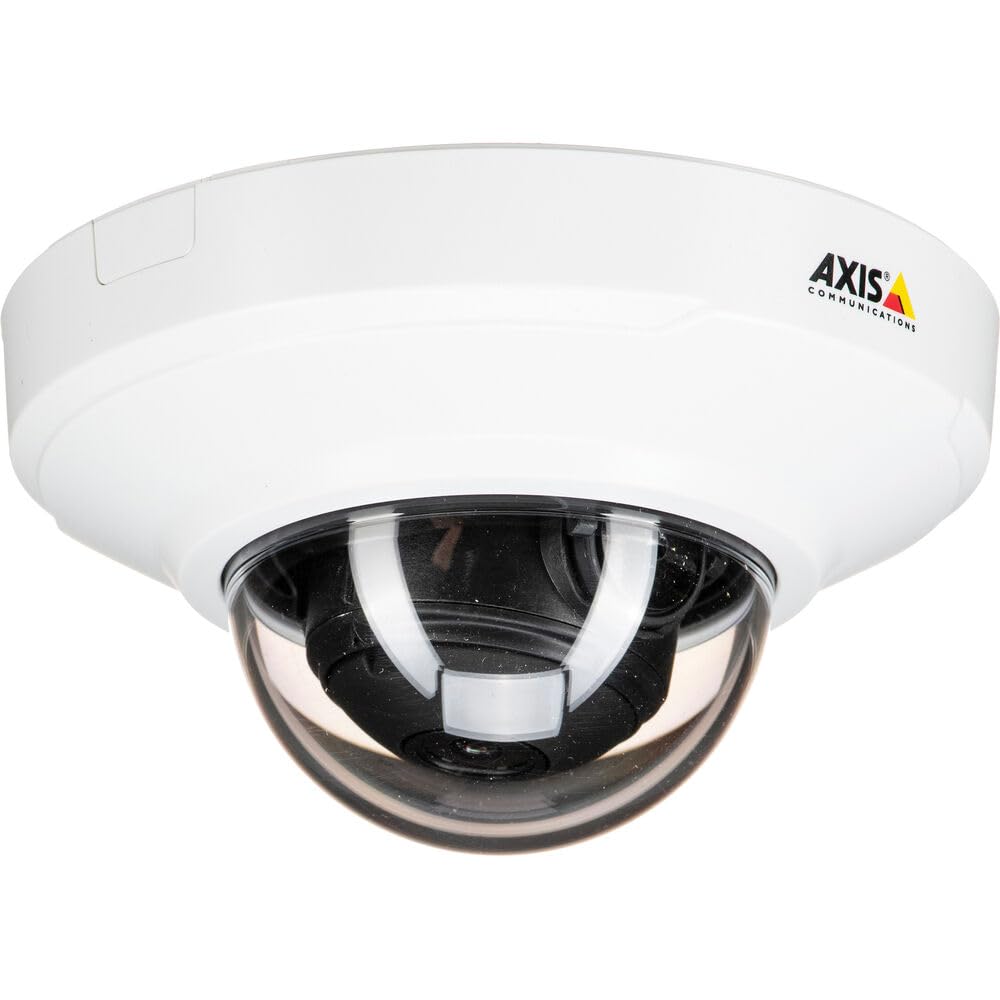
図1: 前面 view of the Axis M3064-V Mini Dome Camera. This image shows the compact dome design suitable for discreet indoor surveillance.
2. 安全情報
- 電源: Use only the specified power supply (AC/DC, 220 Volts, 1.6 Watts) to prevent damage or fire.
- インストール: Installation should be performed by qualified personnel and comply with all local electrical codes. Ensure the mounting surface can support the camera's weight.
- 環境: This camera is designed for indoor use. While dust-resistant and IK08 rated, avoid exposing it to extreme temperatures, direct water spray, or corrosive substances.
- クリーニング: 清掃する前に電源を切ってください。柔らかく乾いた布を使用してください。液体洗剤やエアゾール洗剤は使用しないでください。
- サービス: この製品を自分で修理しようとしないでください。 すべてのサービスを資格のあるサービス担当者に依頼してください。
3. パッケージ内容
Verify that all items are present in the package. If any items are missing or damaged, contact your supplier.
- Axis M3064-V Mini Dome Camera (1 unit)
- インストールガイド
- 取り付けブラケット
- 取り付けネジと壁プラグ
- Resistorx L-key
4. セットアップとインストール
4.1カメラの取り付け
The Axis M3064-V camera can be mounted on a ceiling or wall. Ensure the mounting surface is stable and can support the camera's weight.
- 表面を準備する: Choose a suitable location. Use the mounting bracket as a template to mark drill holes.
- ドリル穴: Drill pilot holes for the mounting screws. Insert wall plugs if necessary.
- ブラケットを取り付ける: 付属のネジを使用して取り付けブラケットを表面に固定します。
- ケーブルを接続する: Route the network cable (wired connectivity) through the bracket and connect it to the camera's Ethernet port.
- カメラを取り付ける: Secure the camera body to the mounting bracket. Ensure it clicks into place or is fastened according to the specific bracket design.

Figure 2: Illustrative diagram of the camera mounting process on a ceiling. This shows the steps from marking holes to securing the camera.
4.2 電源オンとネットワーク接続
- 有線接続: Connect an Ethernet cable from your network switch or router to the camera's Ethernet port. The camera supports Power over Ethernet (PoE), simplifying power delivery.
- Wi-Fi接続: The camera supports Wi-Fi connectivity. After initial wired setup, you can configure wireless settings via the camera's web インタフェース。
- 電源: If not using PoE, connect a compatible AC/DC power adapter (220V, 1.6W) to the camera's power input.
- 初期アクセス: Once powered, the camera will obtain an IP address from your network (DHCP). Use an Axis IP Utility tool or your network router's client list to find the camera's IP address.
5. 操作手順
5.1 カメラインターフェースへのアクセス
開く web browser (e.g., Chrome, Firefox) and enter the camera's IP address in the address bar. You will be prompted to create a new password for the root user upon first access. Follow the on-screen instructions.
5.2 ライブ View and Video Settings
- ライブ View: The main interface provides a live video feed. You can adjust the viewing angle remotely if the camera supports pan/tilt/zoom (PTZ) functions, though this model features a fixed dome with 3x optical zoom.
- 解決: The camera supports HDTV 720p video capture resolution. You can configure streaming profiles for different quality and frame rate needs.
- ナイトビジョン: The camera includes Night Color functionality, providing enhanced visibility in low-light conditions. This feature can be configured in the image settings.
- 光学ズーム: Utilize the 3x optical zoom feature through the web interface to focus on specific areas within the 83-degree view角度。
5.3 記録と保存
カメラはさまざまな録画オプションをサポートしています。
- エッジストレージ: The camera has 128 GB of flash memory installed for local recording. Insert a compatible microSD card (not included) for additional storage.
- ネットワークビデオレコーダー(NVR): Integrate the camera with an NVR or video management system (VMS) for centralized recording and management.
- イベントベースの録画: Configure motion detection or other event triggers to start recording, saving storage space.
6. メンテナンス
6.1 カメラのクリーニング
定期的にクリーニングすると、最適な画質を維持できます。
- 電源を切る: Always disconnect the camera from its power source before cleaning.
- レンズ: Gently wipe the lens cover with a soft, lint-free cloth. For stubborn dirt, slightly dampen the cloth with water or a mild lens cleaning solution. Avoid abrasive materials.
- ハウジング: Wipe the camera housing with a soft, dry cloth. Do not use strong detergents or solvents.
6.2ファームウェアアップデート
定期的にAxis Communicationsをチェックしてください website for firmware updates. Keeping your camera's firmware up-to-date ensures optimal performance, security, and access to new features. Follow the instructions provided with the firmware update package.
7。 トラブルシューティング
| 問題 | 考えられる原因 | 解決 |
|---|---|---|
| カメラの電源が入らない | No power supply; Faulty PoE switch/injector; Damaged cable. | Check power connection. Verify PoE functionality. Test with a different Ethernet cable or power adapter. |
| ビデオフィードなし | Network connectivity issue; Incorrect IP address; Firewall blocking access; Camera not configured. | Verify network connection. Confirm camera's IP address. Check firewall settings. Ensure camera is properly configured via its web インタフェース。 |
| 画質が悪い | レンズの汚れ、焦点の不一致、光量の不足、ネットワーク帯域幅の問題。 | Clean the lens. Adjust focus settings in the web interface. Ensure adequate lighting or verify Night Color settings. Check network bandwidth. |
| アクセスできません web インタフェース | Incorrect IP address; Network issue; Browser compatibility. | Confirm IP address. Ping the camera's IP. Try a different web ブラウザ。ブラウザのキャッシュをクリアします。 |
8. 仕様
| 特徴 | 詳細 |
|---|---|
| モデル名 | M3064-V |
| モデル番号 | 01716-001 |
| ブランド | アクシスコミュニケーションズ |
| フォームファクター | ドーム |
| 接続技術 | 有線、Wi-Fi |
| ビデオキャプチャ解像度 | 720p (HDTV) |
| 実効静止画解像度 | 64 MP (Note: This might refer to sensor resolution, actual video output is 720p) |
| フォトセンサー解像度 | 5 MP |
| View角度 | 83度 |
| 光学ズーム | 3x |
| ナイトビジョン | 夜の色 |
| 防水等級 | IP42 (Dust-resistant) |
| 衝撃保護 | IK08 |
| 電源 | AC/DC、PoE |
| 巻tage | 220ボルト |
| ワットtage | 1.6ワット |
| フラッシュメモリ搭載サイズ | 128ギガバイト |
| アイテムの寸法(LxWxH) | 3.98 x 3.98 x 2.2インチ |
| アイテム重量 | 150グラム |
| 色 | ブラック / ホワイト |
9. 保証とサポート
9.1製品保証
Axis Communications products typically come with a limited manufacturer's warranty. Please refer to the warranty card included with your product or visit the official Axis Communications website for detailed warranty terms and conditions specific to the M3064-V model. Keep your proof of purchase for warranty claims.
9.2 テクニカルサポート
For technical assistance, troubleshooting beyond this manual, or service inquiries, please contact Axis Communications customer support. You can find contact information, FAQs, and additional resources on the official Axis Communications support website. When contacting support, please have your product model number (M3064-V or 01716-001) and serial number ready.
オンラインリソース: www.axis.com/support