
導入
This manual provides essential information for the safe and efficient operation of your Domo DO157A Tower Fan. Please read these instructions carefully before use and retain them for future reference.
The Domo DO157A is a versatile appliance combining the functions of an air cooler, fan, and humidifier, designed to enhance your indoor comfort.

画像: 正面 view of the Domo DO157A Tower Fan.
安全情報
火災、感電、および人身傷害のリスクを軽減するために、電気製品を使用するときは常に基本的な安全上の注意事項を守ってください。
- ボリュームを確保するtagアプライアンスに表示されているeは、ローカルメインボリュームに対応していますtag接続する前にeを確認してください。
- アプライアンス、プラグ、コードを水やその他の液体に浸さないでください。
- Unplug from the outlet when not in use, before cleaning, or before moving the appliance.
- 本機器はお子様の手の届かない場所に保管してください。
- コードやプラグが損傷している機器、または機器が故障したり何らかの損傷を受けたりした後は、機器を操作しないでください。
- Refer to the official safety document for detailed safety guidelines: 安全情報(PDF).
製品構成
Familiarize yourself with the main parts of your Domo DO157A Tower Fan:
- Main Unit (Tower Fan)
- 7リットルの水タンク
- Washable Filter System (Honeycomb Cooling Membrane)
- リモートコントロール
- Coolpack (for enhanced cooling)
- LEDディスプレイ付きコントロールパネル
画像: View of the tower fan with the filter system removed, showing the honeycomb cooling membrane.
設定
- 開梱: Carefully remove the appliance from its packaging. Retain packaging for storage or disposal.
- 配置: Place the tower fan on a firm, level surface. Ensure there is adequate space around the unit for proper airflow.
- 水タンクの充填:
- 本体下部の背面から水タンクを引き出します。
- Fill the 7-liter water tank with clean, cold water. For enhanced cooling, place the included Coolpack (after freezing) into the water tank.
- Ensure the water level does not exceed the maximum fill line.
- カチッと音がするまで水タンクをユニット内に戻します。
- 電源接続: 電源コードを適切な電源コンセント (230V) に差し込みます。
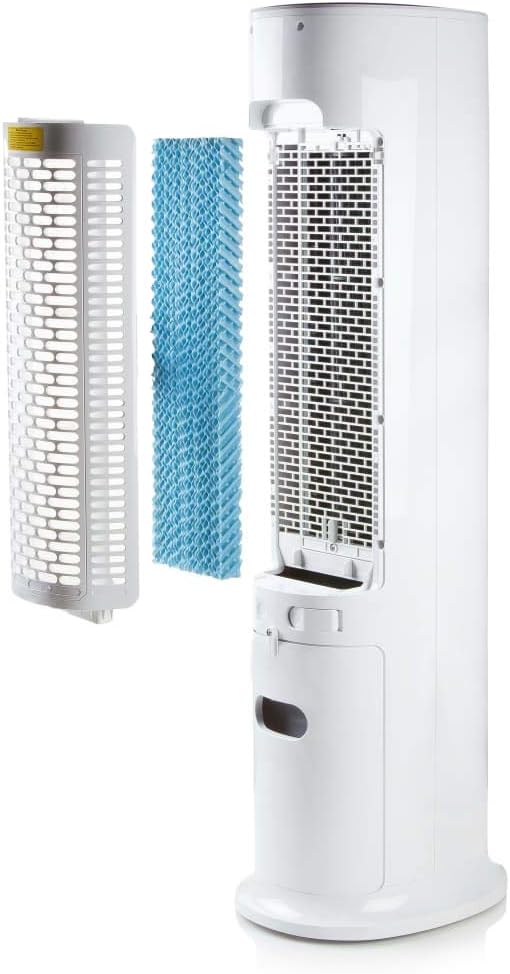
Image: Demonstrating the process of filling the water tank of the tower fan.
操作手順
The Domo DO157A can be operated using the control panel on top of the unit or the included remote control.
コントロールパネルとリモートコントロール機能

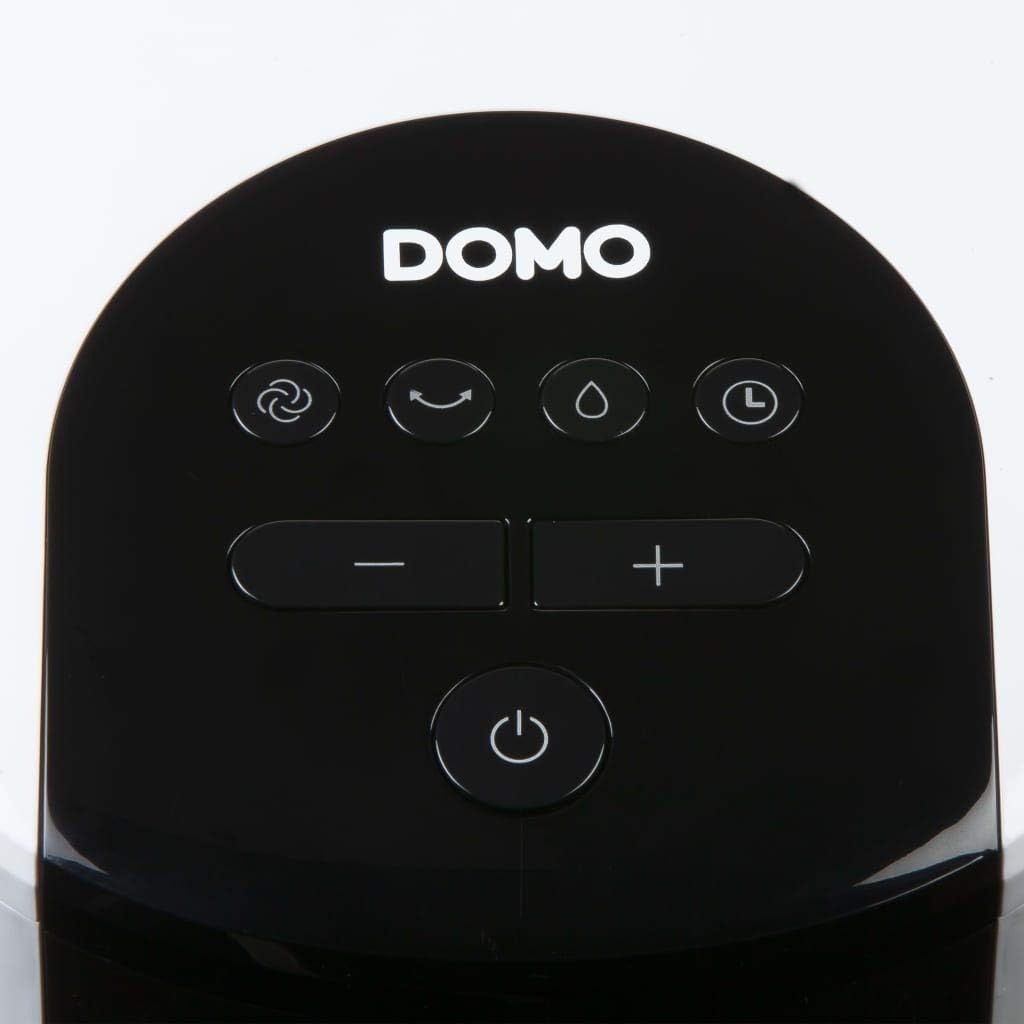
画像: クローズアップ view of the control panel on the top of the tower fan.
- 電源スイッチ (⏻): ユニットの電源をオンまたはオフにします。
- モードボタン(☺): Cycles through 3 ventilation modes:
- 普通: 選択した速度で一定の空気の流れを実現します。
- ナチュラル: ファン速度を変えて自然な風をシミュレートします。
- 寝る: Reduces fan speed and noise for quiet operation during sleep.
- スピードボタン(− / +): ファン速度を調整します(4段階)。
- Cooling/Humidifier Button (💧): Activates or deactivates the air cooling and humidifying function. This function requires water in the tank.
- タイマーボタン(⏱): Sets the operating timer for up to 10 hours. Each press adds 1 hour.
- 振動ボタン(↻): Activates or deactivates the oscillation function, allowing the fan to rotate and distribute air over a wider area.
初期操作
- Press the Power button to turn on the unit. The default mode is usually Normal.
- Use the Speed buttons to select your desired fan speed (1-4).
- To activate cooling/humidifying, press the Cooling/Humidifier button. Ensure the water tank is filled.
- Select a ventilation mode (Normal, Natural, Sleep) using the Mode button.
- Press the Oscillation button for wider air distribution.
- Set the timer if desired using the Timer button.

Image: The tower fan operating in a living room, illustrating the airflow direction.
メンテナンス
定期的なメンテナンスにより、最適なパフォーマンスが確保され、機器の寿命が延びます。
外装の清掃
- 清掃する前に必ずユニットのプラグを抜いてください。
- 外側の表面を柔らかい布で拭きます。amp 布で拭いてください。研磨剤や溶剤は使用しないでください。
- 内部コンポーネントに水が入らないようにしてください。
水タンクの掃除
- ユニットから水タンクを取り外します。
- 残っている水を捨てます。
- タンクを中性洗剤と水で洗浄し、よくすすいでください。
- タンクを再度挿入する前に、完全に自然乾燥させてください。
- 特に加湿機能を頻繁に使用する場合は、カビの発生を防ぐために水タンクを定期的に清掃してください。
フィルターシステムの清掃
- The high-quality filter system is washable.
- Carefully remove the filter (honeycomb cooling membrane) from the unit as shown in the "Product Components" section.
- フィルターを流水で洗い流し、ホコリやゴミを取り除きます。
- フィルターをユニットに再度挿入する前に、フィルターが完全に乾燥するまで待ってください。
- Regular cleaning of the filter is recommended, especially for allergy sufferers, to maintain hygiene and efficiency.
トラブルシューティング
If you encounter issues with your Domo DO157A, refer to the following common problems and solutions:
| 問題 | 考えられる原因 | 解決 |
|---|---|---|
| ユニットの電源が入らない。 | 電源がありません。 | 電源コードが機能しているコンセントにしっかりと差し込まれているかどうかを確認します。 |
| 冷却効果はありません。 | 水タンクが空であるか、冷却機能が作動していません。 | Fill the water tank. Press the Cooling/Humidifier button to activate the function. Ensure Coolpack is frozen and placed in the tank if desired. |
| 空気の流れが弱い。 | Fan speed is too low; air filter is dirty. | Increase the fan speed. Clean the air filter as per maintenance instructions. |
| 不快な臭い。 | Stagnant water in the tank or dirty filter. | Empty and clean the water tank. Clean the filter. Use fresh water. |
仕様
| 特徴 | 詳細 |
|---|---|
| ブランド | ドーモ |
| モデル名/番号 | DO157A |
| タイプ | Tower Fan, Air Cooler, Humidifier |
| 材料 | プラスチック |
| 取り付けタイプ | フリースタンディング |
| 色 | 白 |
| 風量容量 | 294.29 Cubic Feet per Minute (500 m³/h) |
| コントロールタイプ | リモコン、ユニット内コントロールパネル |
| 水タンク容量 | 7リットル |
| 推奨床面積 | 25平方メートル |
| 製品重量 | 11.2キログラム |
| ワットtage | 65ワット |
| 騒音レベル | 40デシベル |
| 速度の数 | 4 |
| 巻tage | 230ボルト |
| 寸法(D x W x H) | 34 cm x 26 cm x 106.5 cm |
| タイマー | 最大10時間 |
| 換気モード | 正常、自然、睡眠 |
| 特集 | Sleep mode, Washable filter system, Oscillation, Coolpack included |
保証とサポート
For warranty information, please refer to the documentation provided with your purchase or contact Domo customer support. Keep your proof of purchase for warranty claims.
If you require further assistance or have questions not covered in this manual, please contact Domo customer service through their official webサイトまたは製品に付属の連絡先詳細をご覧ください。