
1. はじめに
The Aerocool LUXPRO550 is a 550W power supply unit designed for desktop computers, offering reliable and efficient power delivery. This unit is 80 Plus 230V EU Bronze certified, ensuring over 88% efficiency. It features high-quality 105°C Japanese capacitors and a 14cm FDB fan for enhanced durability and optimized thermal performance. This manual provides essential information for the safe and correct installation, operation, and maintenance of your LUXPRO550 power supply.

Image 1.1: The Aerocool LUXPRO550 Power Supply Unit, highlighting its high efficiency and 80 Plus Bronze certification.
2. 安全上の注意
- Always disconnect the power cord from the wall outlet before installing or removing the power supply.
- 電源を開けないでください。asing. 高ボラティリティtag内部にガスや電気が存在し、感電の原因となる可能性があります。
- 電気的危険を防ぐために適切な接地を確保してください。
- 電源装置は、熱源や湿気から離れた、換気の良い場所に設置してください。
- 電源に付属のケーブルのみを使用してください。
- 本製品はコンピュータシステム専用に設計されています。他の用途には使用しないでください。
3.インストールガイド
The LUXPRO550 power supply supports all Intel ATX12V formats and features flat, black cables for optimized internal airflow and ease of installation.
3.1.インストールの準備
- コンピュータの電源をオフにし、電源コードを壁のコンセントから抜きます。
- パソコンのケースを開けてください。具体的な手順については、パソコンのケースのマニュアルを参照してください。
- 既存の電源装置を交換する場合は、古い PSU からすべてのケーブルを外し、ケースから取り外します。
3.2.電源の取り付け
- Carefully place the LUXPRO550 into the power supply bay of your computer case.
- 付属のネジを使用して電源をケースに固定します。
- Connect the 20+4 pin ATX motherboard power connector to your motherboard.
- Connect the 4+4 pin CPU power connector to your motherboard.
- Connect SATA power connectors to your storage drives (HDDs, SSDs) and optical drives.
- Connect PCIe 6+2 pin connectors to your graphics card(s) if required.
- Connect any other peripheral connectors (e.g., Molex) as needed for case fans or other components.
- Ensure all connections are secure. Use cable ties to manage cables for better airflow.
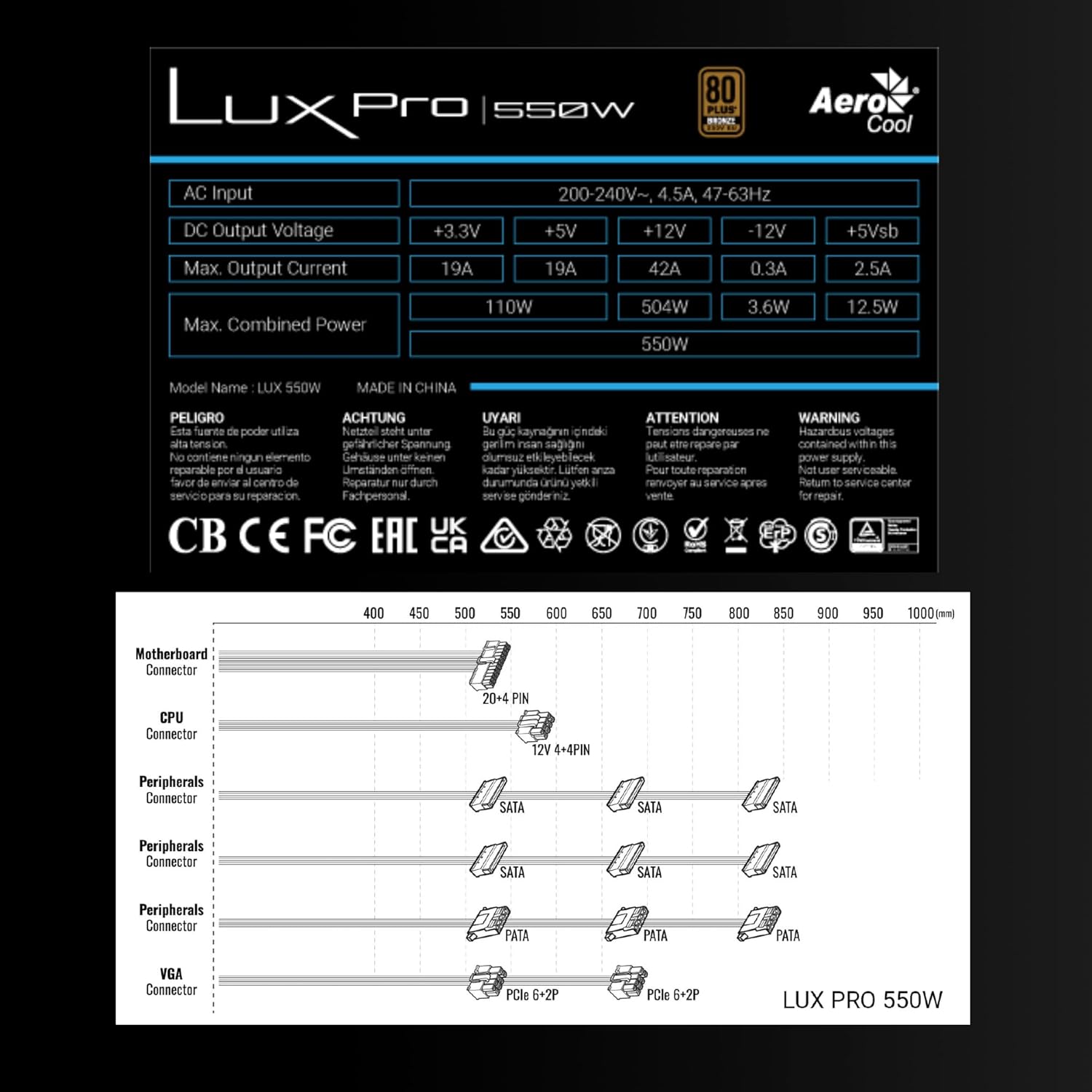
Image 3.1: Connector types and lengths for the LUXPRO550 power supply. This diagram illustrates the available connectors including Motherboard (20+4 PIN), CPU (12V 4+4 PIN), Peripherals (SATA, PATA), and VGA (PCIe 6+2 PIN).
3.3.最終ステップ
- コンピュータケースを閉じます。
- AC 電源コードを電源に接続し、次に壁のコンセントに接続します。
- PSU の背面にある電源スイッチを「オン」の位置に切り替えます。
- コンピュータの電源を入れます。
4. 操作手順
The Aerocool LUXPRO550 is designed for continuous and stable operation once correctly installed. Its 80 Plus Bronze certification ensures high energy efficiency, reducing power consumption and heat generation.
4.1. Active PFC Technology
The integrated Active Power Factor Correction (APFC) technology ensures efficient and reliable power distribution, contributing to overall system stability and energy savings.
4.2. ファンの動作
The 14cm FDB (Fluid Dynamic Bearing) fan features optimized thermal speed control. It operates silently, starting at less than 700 RPM, and only increases speed as the load approaches 40% at ambient temperatures of 25°C, ensuring quiet operation under typical loads.

Image 4.1: The 14cm FDB fan of the LUXPRO550, illustrating its optimized thermal speed control for efficient cooling.
5. メンテナンス
The LUXPRO550 is built with high-quality components, including 105°C Japanese capacitors, designed for maximum reliability and a long operational lifespan with minimal maintenance.

Image 5.1: High-quality 105°C Japanese capacitors, contributing to the power supply's reliability and extended lifespan.
5.1. 一般的なケア
- Keep the power supply and computer case free from dust. Dust accumulation can hinder cooling and reduce efficiency.
- Use compressed air to gently clean the fan and ventilation grilles periodically. Ensure the computer is powered off and unplugged before cleaning.
- Do not obstruct the airflow around the power supply.
内部にはユーザーが修理可能な部品はありません。ユニットを自分で開けたり修理したりしないでください。
6。 トラブルシューティング
If you encounter issues with your LUXPRO550 power supply, please follow these basic troubleshooting steps:
- 電源なし:
- AC 電源コードが電源装置と壁のコンセントの両方にしっかりと接続されていることを確認します。
- PSU 背面の電源スイッチが「オン」の位置にあることを確認します。
- 別のデバイスを接続して、壁のコンセントが機能していることを確認します。
- システムが起動しない:
- Double-check all power connections to the motherboard, CPU, graphics card, and storage devices.
- Ensure all components are properly seated in their slots.
- If possible, test the power supply with another known working system or test another power supply with your system to isolate the issue.
- 異常な音:
- A slight hum is normal. If you hear grinding or loud fan noises, ensure the fan is not obstructed by cables or dust.
- ノイズが続く場合は、カスタマー サポートにお問い合わせください。
If these steps do not resolve the issue, please contact Aerocool customer support or your retailer for further assistance. Do not attempt to repair the unit yourself.
7. 仕様
| 特徴 | 仕様 |
|---|---|
| モデル名 | LUXPRO550 |
| ブランド | エアロクール |
| ワットtage | 550ワット |
| 効率認証 | 80 Plus Bronze 230V EU (over 88% efficiency) |
| フォームファクター | ATTX |
| コンデンサ | Japanese 105°C |
| ファンタイプ | 14cm FDB (Fluid Dynamic Bearing) with thermal speed control |
| パーキンソン病 | アクティブPFC |
| 寸法(長さx幅x高さ) | 16 x 15 x 8.5 cm |
| 重さ | 1.4キロ |
| 対応デバイス | PC |
7.1. DC 出力ボリュームtageテーブル
The following table details the DC output voltages and maximum currents for the LUXPRO550:
| DC出力Voltage | +3.3V | +5V | +12V | -12V | +5Vsb |
|---|---|---|---|---|---|
| マックス 出力電流 | 19A | 19A | 42A | 0.3A | 2.5A |
| 最大結合された力 | 110W | 504W | 3.6W | 12.5W | |
| Total Combined Power | 550W | ||||
8. 保証とサポート
8.1. 保証情報
The Aerocool LUXPRO550 power supply comes with an extended 5年間保証, reflecting its high reliability and the quality of its components, such as the 105°C Japanese capacitors.
保証請求のために購入証明書を保管してください。
8.2. カスタマーサポート
For technical assistance, warranty claims, or any questions regarding your Aerocool LUXPRO550 power supply, please contact Aerocool customer support through their official webサイトまたはお近くの小売店にお問い合わせください。
Do not attempt to open or repair the power supply unit, as this will void the warranty.