
1. はじめに
This manual provides detailed instructions for the safe and effective operation of your PIXEL G1s RGB Video Light. Please read this manual thoroughly before use and retain it for future reference. The PIXEL G1s is a versatile and portable RGB video light designed for various photography and videography applications, featuring app control, a high-capacity battery, and multiple lighting effects.
2. パッケージ内容
下記のすべての品目がパッケージに含まれていることをご確認ください。不足または破損している品目がある場合は、販売店までご連絡ください。
- 1 x PIXEL G1s RGB Video Light
- 1 x 1/4” Screw
- ボールヘッドアダプター x 1
- タイプC充電ケーブル x 1
- ユーザーマニュアル x 1

Image: Contents of the PIXEL G1s package.
3 製品の特徴
- Convenient APP Control: Adjust hue (0-359°), saturation (0-100%), brightness (0-100%), and color temperature (2500K-8500K) via smartphone.
- 大容量バッテリー: Built-in 6400mAh battery provides over 210 minutes of runtime at 100% brightness. Full charge in approximately 2.5 hours via USB Type-C.
- 多彩な取り付け: 360° rotating arm with cold shoe allows for flexible positioning on cameras, microphones, or smartphones.
- 高精度LCDディスプレイ: Intuitive screen provides real-time readings of settings and battery level.
- 10 シーンエフェクト: Pre-programmed lighting effects for various creative scenarios.
- 耐久性のある構造: Aluminum alloy body ensures longevity and portability.

画像: 上view of the PIXEL G1s RGB Video Light.
4. セットアップ
4.1 初期充電
Before first use, fully charge the PIXEL G1s using the provided Type-C charging cable. Connect the cable to the USB Type-C port on the device and a compatible USB power source. The LCD display will indicate charging status.

Image: Charging the PIXEL G1s via USB Type-C.
4.2 Attaching the Ball Head Adapter
The included ball head adapter allows for versatile mounting. Screw the 1/4” screw into the bottom of the light, then attach the ball head adapter to the screw. This assembly can then be mounted onto tripods, light stands, or camera hot shoes.

Image: Demonstrating the 360° rotating arm and mounting options.
5. 操作手順
5.1 電源オン/オフ
To power on the device, slide the power switch located on the side of the unit. To power off, slide the switch back to the OFF position.
5.2 コントロールとディスプレイ
The PIXEL G1s features an intuitive LCD display on the back and control dials/buttons on the side for easy adjustment.

Image: LCD display and control buttons.
5.3 動作モード
The light offers several modes for different lighting needs:
- CCTモード(色温度): Adjust brightness from 0-100% and color temperature from 2500K (warm) to 8500K (cool).
- RGBモード: Adjust hue (0-359°), saturation (0-100%), and brightness (0-100%) to achieve any desired color.
- Special Effects Mode: Choose from 10 pre-programmed scene effects like lightning, ambulance, police, fire truck, candle light, and more.

Image: Visual guide for brightness, color temperature, and RGB adjustments.
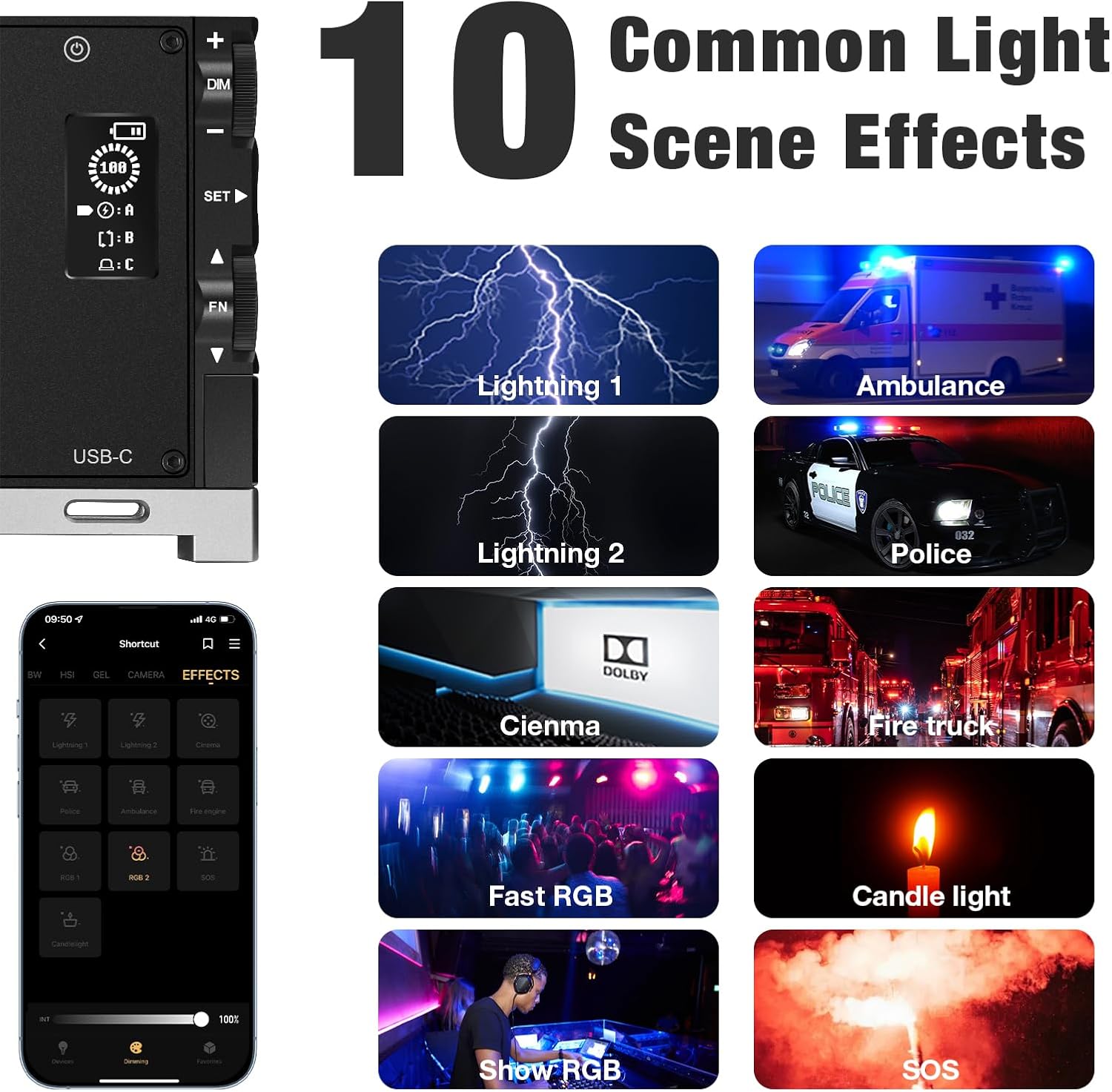
画像: Examples of the 10 common light scene effects.
5.4APPコントロール
Download the official PIXEL app to control the G1s light wirelessly via your smartphone. The app provides comprehensive control over all settings and effects, offering enhanced flexibility.

Image: Smartphone app interface for wireless control.
Official Product Video: PIXEL G1s RGB Video Light Overview
このビデオでは、view of the PIXEL G1s RGB Video Light's features and functionality.
6. 充電とバッテリー
The PIXEL G1s is equipped with a 6400mAh rechargeable Lithium-Ion battery. A full charge takes approximately 2.5 hours using the provided USB Type-C cable. The battery provides up to 210 minutes of continuous use at 100% brightness. The device includes built-in overheating protection for safe operation.
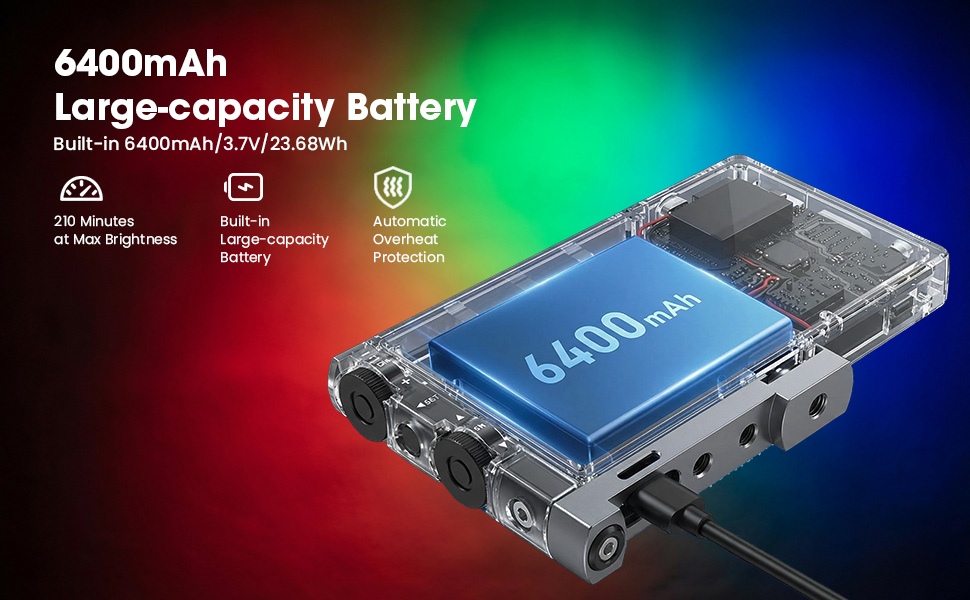
画像: バッテリーの仕様と充電の詳細。
7. 取り付けオプション
The PIXEL G1s is designed for flexible mounting:
- 1/4” Screw Hole: Standard screw hole for attaching to tripods, light stands, or other photography accessories.
- ボールヘッドアダプター: Use the included ball head adapter for 360° rotation and tilt, allowing precise light positioning.
- コールドシューマウント: The rotating arm features a cold shoe mount for attaching to cameras or other compatible devices.

Image: Different mounting and positioning exampレ。
8. メンテナンス
- デバイスを乾燥した状態に保ってください。湿気や雨にさらさないでください。
- ライトパネルと本体は、柔らかく乾いた布で拭いてください。刺激の強い化学薬品や研磨剤の使用は避けてください。
- デバイスを使用しないときは、涼しく乾燥した場所に保管してください。
- 落としたり、強い衝撃を与えないでください。
9。 トラブルシューティング
- ライトが点灯しない: Ensure the battery is charged. Check the power switch position.
- アプリ接続の問題: Ensure Bluetooth is enabled on your smartphone and the light. Restart both the app and the light.
- 明るさ/色の不一致: Check the settings on the LCD display or within the app. Ensure the device is not in a low power state.
10. 仕様
| 仕様 | 詳細 |
|---|---|
| ブランド | ピクセル |
| モデル番号 | G1s |
| 製品寸法 | 長さ5.1インチ x 幅0.6インチ x 高さ2.1インチ (5.1 x 0.6 x 2.7インチ) |
| アイテム重量 | 1.06ポンド |
| 電池のタイプ | リチウムイオン電池1個(付属) |
| バッテリー容量 | 6400mAh |
| バッテリー寿命 (100% 輝度) | 210 minutes |
| 充電時間 | 約2.5時間 |
| 色温度範囲 | 2500K-8500K |
| 接続技術 | USB |
| ハードウェアインターフェイス | USB |
11. 保証とサポート
For warranty information and customer support, please refer to the official PIXEL webご購入の際は、サイトをご覧いただくか、販売店にお問い合わせください。購入証明書としてレシートを保管してください。