
導入
This manual provides essential information for the safe and efficient operation of your Dual MCR 4 Portable DAB+/FM Radio. This device offers both digital DAB+ and analog FM radio reception, ensuring a wide range of listening options. Its color TFT display enhances usability by showing station names and additional information. With intuitive controls, auxiliary input, and headphone jack, the MCR 4 is designed for versatile and enjoyable audio experiences.
安全情報
- デバイスを使用する前に、すべての指示をよくお読みください。
- デバイスを水、湿気、高温から遠ざけてください。
- ユニットを分解したり改造したりしないでください。修理は必ず資格のある専門家にご依頼ください。
- Use only the provided power adapter or recommended battery types.
- 操作中はデバイスの周囲に適切な換気を確保してください。
- 電池は地域の規制に従って責任を持って廃棄してください。
パッケージ内容
パッケージにすべてのアイテムが揃っていることを確認してください:
- Dual MCR 4 Main Unit
- 電源アダプター
- ユーザーマニュアル
製品終了view
The Dual MCR 4 features a compact design with intuitive controls for easy access to its functions. Key components include:
- カラーTFTディスプレイ: ステーションの情報、時間、メニュー オプションを表示します。
- ロータリーノブ: For tuning, volume control, and menu navigation.
- メモリボタン: To save and recall your favorite radio stations.
- 伸縮アンテナ: 最適な無線信号受信を実現します。
- 補助入力(AUX-IN): Located at the back, for connecting external audio devices.
- ヘッドフォンジャック: Located at the back, for private listening.
- Mechanical On/Off Switch: Located at the back, for direct power control.
- Passive Membrane: Located at the back, contributing to exceptional sound quality.
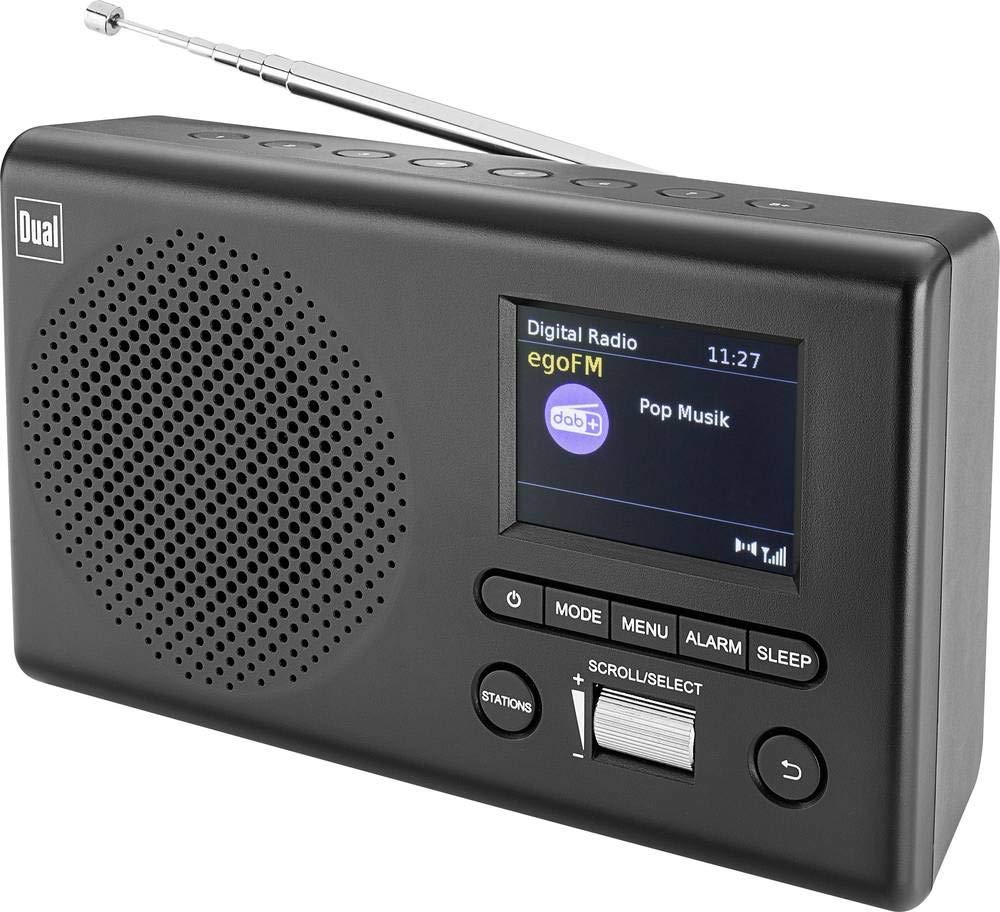
画像: 正面 view of the Dual MCR 4 Portable DAB+/FM Radio, showing the color TFT display, rotary knob, and control buttons. The radio has a black and silver finish.
設定
1. デバイスの電源供給
The Dual MCR 4 can be powered by either the included AC power adapter or batteries, offering portability.
- ACアダプターの使用: Connect the power adapter to the DC IN port on the back of the radio and plug the other end into a standard wall outlet.
- 電池の使用: Open the battery compartment on the bottom/back of the radio and insert the required batteries (type and quantity usually specified inside the compartment or in the full manual). Ensure correct polarity.
2. アンテナ調整
Extend the telescopic antenna fully for optimal reception of both DAB+ and FM radio signals. Adjust its position for the best signal quality.
3. Initial Power On and Station Scan
After connecting power, switch on the radio using the mechanical ON/OFF switch at the back. The radio will typically perform an automatic station scan upon first use, searching for available digital (DAB+) and analog (FM) radio stations. This process may take a few moments.
操作手順
1. 基本操作
- 電源オン/オフ: Use the mechanical switch at the back. For standby, a dedicated button on the front might be available (refer to physical unit).
- 音量コントロール: Rotate the main rotary knob to adjust the listening volume.
2. DAB+ラジオモード
- Selecting DAB+ Mode: Press the MODE button (if available) or navigate through the menu using the rotary knob until DAB+ mode is selected.
- ステーションの選択: After an automatic scan, use the rotary knob to scroll through the list of available DAB+ stations. Press the knob to confirm your selection.
- プリセットの保存: Tune to your desired station. Press and hold a memory button (e.g., 1-5) until the display confirms the station is saved.
- プリセットの呼び出し: Briefly press the corresponding memory button to recall a saved station.
- 情報を表示します。 The color TFT display will show station name, program information (DLS), and potentially station logos or slideshows.
3. FMラジオモード
- Selecting FM Mode: Press the MODE button or navigate through the menu until FM mode is selected.
- 手動チューニング: Rotate the tuning knob to manually adjust the frequency.
- 自動スキャン: Press and hold the tuning knob or a dedicated scan button to automatically search for the next available FM station.
- プリセットの保存: Tune to your desired FM station. Press and hold a memory button until the display confirms the station is saved.
- プリセットの呼び出し: Briefly press the corresponding memory button to recall a saved station.
4. Auxiliary Input (AUX-IN)
Connect an external audio device (e.g., smartphone, MP3 player) to the AUX-IN port on the back of the radio using a 3.5mm audio cable. Select AUX mode on the radio to play audio from the connected device.
5. ヘッドホンの使用
For private listening, plug standard 3.5mm headphones into the headphone jack located on the back of the unit. The internal speaker will automatically mute.
メンテナンス
- クリーニング: ラジオは柔らかく乾いた布で拭いてください。研磨剤入りの洗剤や溶剤は使用しないでください。
- ストレージ: If storing for an extended period, remove batteries and store the unit in a cool, dry place.
- アンテナのケア: 損傷を防ぐため、伸縮アンテナを丁寧に扱ってください。
トラブルシューティング
| 問題 | 考えられる解決策 |
|---|---|
| 電源なし |
|
| ラジオの受信状態が悪い |
|
| スピーカーから音が出ない |
|
仕様
| ブランド | デュアル |
| モデル番号 | 76074 |
| 色 | ブラック、シルバー |
| チューニング技術 | 軽打+、FM |
| 接続技術 | Auxiliary (AUX-IN) |
| 特集 | Portable, Color TFT Display |
| 対応デバイス | Headphones, External Audio Devices (via AUX-IN) |
| 電源 | 電源(ACアダプター)、バッテリー駆動 |
| 含まれるコンポーネント | Main Unit, Power Adapter, User Manual |
| 推奨用途 | 音楽 |
保証とサポート
For warranty information and technical support, please refer to the specific warranty card included with your product or contact Dual customer service. The included user manual provides detailed instructions and contact information.