
1. はじめに
This manual provides essential instructions for the installation, operation, and maintenance of your innr Puck Light PL 115 kit. The innr Puck Light system consists of three dimmable warm white LED puck lights (2700K) designed for smart home integration. These lights are compatible with Zigbee-certified hubs such as Philips Hue*, Amazon Echo Plus, and Samsung SmartThings. Please read this manual thoroughly before use to ensure proper functionality and safety.
*Note: Does not work with Apple HomeKit, Hue Entertainment, or Hue Secure.
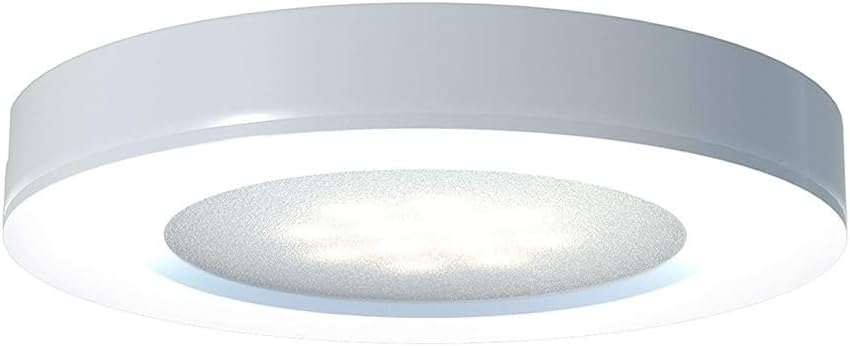
Image 1.1: The innr Puck Light PL 115, a smart LED puck light designed for various applications.
2. 安全情報
製品の損傷やご自身の怪我を防ぐために、次の安全上の注意事項を守ってください。
- 電気安全: Ensure the power supply is disconnected before installation or maintenance. Only use the provided power adapter.
- 屋内使用のみ: 本製品は乾燥した屋内での使用を目的として設計されています。水や高湿度にさらさないでください。
- 温度: Operate within the specified temperature range. Avoid extreme heat or cold.
- インストール: Install the puck lights securely. Do not cover the lights with materials that could impede heat dissipation.
- 調光: These lights are dimmable via a compatible smart home system. Do not attempt to dim with standard dimmer switches.
- 子供たち: お子様の手の届かない場所に保管してください。
- 廃棄: 製品を廃棄する際は、地域の電子廃棄物規制に従ってください。
3. パッケージ内容
The innr Puck Light PL 115 kit includes the following items:
- 3x innr LED Puck Lights (G4, 2700K Warm White)
- 電源アダプター x 1
- Cables (2 meters per puck light)
- Mounting hardware (screws, adhesive pads)
Additional puck lights can be purchased separately and added to this kit, up to a total of 5 puck lights per power adapter.

Image 3.1: The innr Puck Light PL 115 kit, showing three puck lights and packaging.
4. セットアップとインストール
4.1物理的な設置
- 場所を選択してください: Select a suitable indoor location for your puck lights, such as under cabinets, shelves, or in display cases.
- 取り付け:
- 表面実装: Use the provided screws or adhesive pads to secure the puck lights to the desired surface. Ensure cables are routed neatly and safely.
- 凹型マウント: If recessing, ensure the mounting hole size matches the puck light dimensions (refer to specifications). Secure the light into the opening.
- ライトを接続する: Connect each puck light to the provided cables, ensuring a secure connection.
- 電源アダプタを接続: 電源アダプタを標準のコンセントに差し込みます。

Image 4.1: A single innr Puck Light, showing its design for surface or recessed mounting.
4.2 スマートホーム統合
The innr Puck Lights are Zigbee-compatible and require a compatible bridge or hub for smart control. Supported systems include Philips Hue*, Amazon Echo Plus/Show (2nd Gen), and Samsung SmartThings.

Image 4.2: innr Puck Lights installed under a cabinet, demonstrating typical usage.
Pairing with Philips Hue Bridge:
- Ensure your Philips Hue Bridge is powered on and connected to your network.
- Open the Philips Hue app on your smartphone or tablet.
- Navigate to "Settings" > "Light setup" > "Add light".
- Select "Search" to find new lights.
- Power on your innr Puck Lights. The app should detect them. If not, try turning the lights off and on again.
- Once detected, you can name and assign the lights to rooms.
*Note: innr lights do not support Apple HomeKit, Hue Entertainment, or Hue Secure features.
Pairing with Amazon Alexa (Echo Plus/Show 2nd Gen):
- Ensure your Echo Plus or Echo Show (2nd Gen) device is powered on and connected to your Wi-Fi network.
- Say, "Alexa, discover my devices," or open the Alexa app and go to "Devices" > "Lights" > "Add Device".
- Power on your innr Puck Lights. Alexa should detect them.
- Once detected, you can control them via voice commands or the Alexa app.
Pairing with Amazon Alexa (Other Echo Devices with a Bridge):
For Echo Dot, Echo, Echo Show (1st Gen), and Echo Spot, a compatible bridge (e.g., Philips Hue Bridge, innr Bridge, or Samsung SmartThings Hub) is required.
- First, pair your innr Puck Lights with your chosen compatible bridge (e.g., Philips Hue Bridge) as described above.
- Ensure your Alexa device is linked to that bridge's skill in the Alexa app.
- Say, "Alexa, discover my devices," or use the Alexa app to find the lights connected through your bridge.
Pairing with Samsung SmartThings:
- Ensure your Samsung SmartThings Hub is powered on and connected.
- SmartThings アプリを開きます。
- Tap the "+" icon, then "Device", and select "Light" or "Generic Zigbee Device".
- Follow the on-screen instructions to put the hub into pairing mode.
- Power on your innr Puck Lights. The hub should detect them.
- Once detected, you can control them via the SmartThings app.

Image 4.3: Visual representation of innr's compatibility with major smart home platforms like Philips Hue, Amazon Alexa, Google Assistant, Homey, and Samsung SmartThings.
5. Operating Your innr Puck Lights
Once successfully paired with your smart home system, you can control your innr Puck Lights using the respective app or voice commands.
5.1 アプリコントロール
Use the Philips Hue, Amazon Alexa, or Samsung SmartThings app to:
- ライトをオン/オフにします。
- 明るさを調整します(調光)。
- Group lights for simultaneous control.
- スケジュールとタイマーを設定します。
- Create scenes for specific moods or activities.

Image 5.1: innr Puck Lights providing illumination in a kitchen setting, controllable via smart app.
5.2 音声コントロール(Alexa搭載)
If paired with Amazon Alexa, you can use voice commands:
- 「アレクサ、[ライト名] をオンにして。」
- 「アレクサ、[ライト名]をオフにして。」
- 「アレクサ、[ライト名] を 50% に暗くして。」
- "Alexa, set [Light Name] to warm white." (Note: These lights are fixed at 2700K warm white, so color change commands will not apply.)
6. メンテナンス
The innr Puck Lights are designed for low maintenance. Follow these guidelines:
- クリーニング: Disconnect power before cleaning. Use a soft, dry cloth to wipe the surface of the puck lights. Do not use liquid cleaners or abrasive materials.
- LED寿命: The integrated LED bulbs have a long lifespan and are not user-replaceable.
- ケーブル管理 Periodically check cables for any signs of wear or damage. Ensure they are not pinched or exposed to sharp edges.
7。 トラブルシューティング
If you encounter issues with your innr Puck Lights, refer to the following common problems and solutions:
- ライトがペアリングされない:
- ライトがオンになっていることを確認します。
- Verify your smart home bridge/hub is powered on and connected to your network.
- Bring the lights closer to the bridge/hub during the pairing process.
- Try a power cycle: turn the lights off for 10 seconds, then on again, and immediately initiate pairing.
- Confirm compatibility: Remember, these lights do not work with Apple HomeKit, Hue Entertainment, or Hue Secure.
- Lights unresponsive after pairing:
- Check the distance between the lights and your bridge/hub. Zigbee signals can be affected by obstacles.
- Ensure your bridge/hub's firmware is up to date.
- If using with Alexa, ensure the correct skill is enabled and the devices are discovered.
- A power cycle of the lights or the bridge/hub may resolve temporary communication issues.
- Consider the Zigbee mesh network: other Zigbee devices can strengthen the signal. If you have many non-innr Zigbee devices, there might be compatibility nuances (as noted in some user reviews)。
- Lights not dimming:
- Ensure you are using the smart home app or voice commands for dimming, not a physical dimmer switch.
- Verify the lights are properly paired and responsive to other commands (on/off).
- ライトがちらつく:
- Check power connections for looseness.
- 電源アダプターが正しく機能していることを確認してください。
- ちらつきが続く場合は、カスタマー サポートにお問い合わせください。
8. 仕様
| 特徴 | 詳細 |
|---|---|
| ブランド | 旅館 |
| モデル番号 | PL 115 /05 |
| 製品寸法(長さ x 幅 x 高さ) | 7 x 7 x 1.5 cm (per puck light) |
| アイテム重量 | 668グラム(キット全体) |
| ライトの数 | 3 |
| 色 | 白 |
| 光の色温度 | 2700ケルビン(温白色) |
| 光束 | 165 lm (per puck light) |
| ワットtage | 9 Watts (total for 3 lights) |
| 巻tage | 230ボルト |
| 特集 | 調光可能 |
| 制御方法 | Application (Smart Home App) |
| インストールタイプ | Surface Mount / Recessed Mount |
| ビーム角度 | 120度 |
| 演色評価数(CRI) | 82 |
| スイッチオン時間 | <0.5秒 |
| 接続性 | Zigbee (requires compatible bridge) |
9.保証とサポート
For warranty information and customer support, please refer to the documentation included with your purchase or visit the official innr website. If you experience any issues not covered in this manual, please contact innr customer service for assistance.
オンラインリソース: 最新情報、FAQ、サポートについては、 www.innr.com.


