
導入
This manual provides essential instructions for the proper use, setup, and maintenance of your BYTECH Lightning Cable (Model: CLMFCBLASST). This cable is designed for charging and data transfer with compatible Apple iOS devices, including iPhones, iPads, and iPods, as well as connecting to laptops and personal computers.
製品終了view
The BYTECH Lightning Cable is a durable accessory for your Apple devices. It features a Lightning connector on one end and a USB-A connector on the other, facilitating both power delivery for charging and data exchange. The cable supports fast charging capabilities for compatible devices.
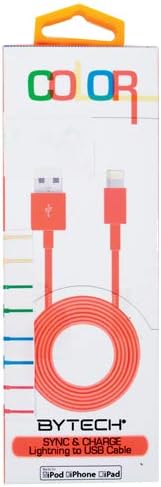
This image displays the retail packaging for the BYTECH Lightning to USB Cable. The packaging is white with 'COLOR' printed at the top in multi-colored letters. An orange Lightning to USB cable is visible through a clear window, coiled neatly. The bottom of the package indicates 'BYTECH SYNC & CHARGE Lightning to USB Cable' and compatibility with iPod, iPhone, and iPad.
コンポーネント:
- Lightningコネクタ: Connects to your Apple iOS device (iPhone, iPad, iPod).
- USB-Aコネクタ: Connects to a USB power adapter, computer USB port, or other USB charging source.
- ケーブル: The flexible cord connecting the two connectors, designed for durability and efficient power/data transfer.
設定
To begin using your BYTECH Lightning Cable, follow these steps:
- コネクタを識別します。 Locate the Lightning connector (smaller, 8-pin) and the USB-A connector (larger, rectangular).
- 電源またはコンピューターに接続します。
- For charging, insert the USB-A connector into a compatible USB wall adapter or car charger.
- For charging and data transfer, insert the USB-A connector into an available USB port on your laptop or personal computer.
- iOSデバイスに接続: Insert the Lightning connector into the charging port of your iPhone, iPad, or iPod. Ensure it is fully seated.
- 接続を確認します: Your device should indicate that it is charging or connected to a computer.
操作手順
デバイスの充電:
Once connected as described in the "Setup" section, your iOS device will begin charging automatically. The cable supports fast charging when paired with a compatible power adapter and device.
データ転送:
When connected to a computer, the cable enables data transfer between your iOS device and the computer. This allows for syncing media, documents, and other files using iTunes or Finder (macOS Catalina and later).
- Connect your iOS device to your computer using the BYTECH Lightning Cable.
- Unlock your iOS device and respond to any "Trust This Computer?" prompts by tapping "Trust" and entering your passcode if required.
- Open iTunes (Windows/older macOS) or Finder (macOS Catalina and later) on your computer.
- Select your device within the application to manage and transfer data.
メンテナンス
Proper care extends the life of your cable:
- ストレージ: 使用しない時は、ケーブルを緩く巻いてください。特にコネクタ付近では、きつく巻いたり、急激に曲げたりしないでください。内部の配線が損傷する恐れがあります。
- クリーニング: ケーブルとコネクタは、柔らかく乾いた布で優しく拭いてください。液体クリーナーや研磨剤は使用しないでください。
- 取り扱い: ケーブルを抜き差しする際は、必ずコネクタの先端部分を掴んでください。ケーブル自体を直接引っ張らないでください。
- 環境: ケーブルを極端な温度、直射日光、湿気から遠ざけてください。
トラブルシューティング
If you encounter issues with your BYTECH Lightning Cable, consider the following:
- デバイスが充電されない:
- ケーブルの両端がしっかりと接続されていることを確認してください。
- Try a different USB power adapter or computer USB port.
- Check the charging port on your iOS device for debris or lint.
- Test the cable with a different compatible iOS device, if available.
- データ転送の問題:
- Ensure your iOS device is unlocked and you have tapped "Trust This Computer" when prompted.
- Restart both your iOS device and your computer.
- Update iTunes or Finder to the latest version.
- コンピュータの別のUSBポートを試してください。
- ケーブルの損傷: Inspect the cable for any visible signs of damage, such as fraying, cuts, or bent connectors. Discontinue use if damage is found.
仕様
| 属性 | 詳細 |
|---|---|
| ブランド | バイテック |
| モデル番号 | CLMFCBLASST |
| 欧州連合 | 805112016938 |
| コネクタタイプ | Lightning (Male) to USB-A (Male) |
| ケーブルタイプ | 稲妻 |
| 対応デバイス | iPhone, iPad, iPod, Laptop, Personal Computer |
| 特集 | 急速充電 |
| 推奨用途 | Charging, data transfer for iOS devices |
| ピンの数 | 8 (Lightning) |
| アイテム重量 | 1.76オンス |
| 製品寸法 | 1 x 1 x 1インチ(パッケージ) |
保証とサポート
For warranty information or technical support regarding your BYTECH Lightning Cable, please refer to the official Bytech web公式サイトをご覧いただくか、カスタマーサービスに直接お問い合わせください。保証請求のために購入時のレシートを保管してください。
一般的なお問い合わせは、 Bytech brand page on Amazon.