
導入
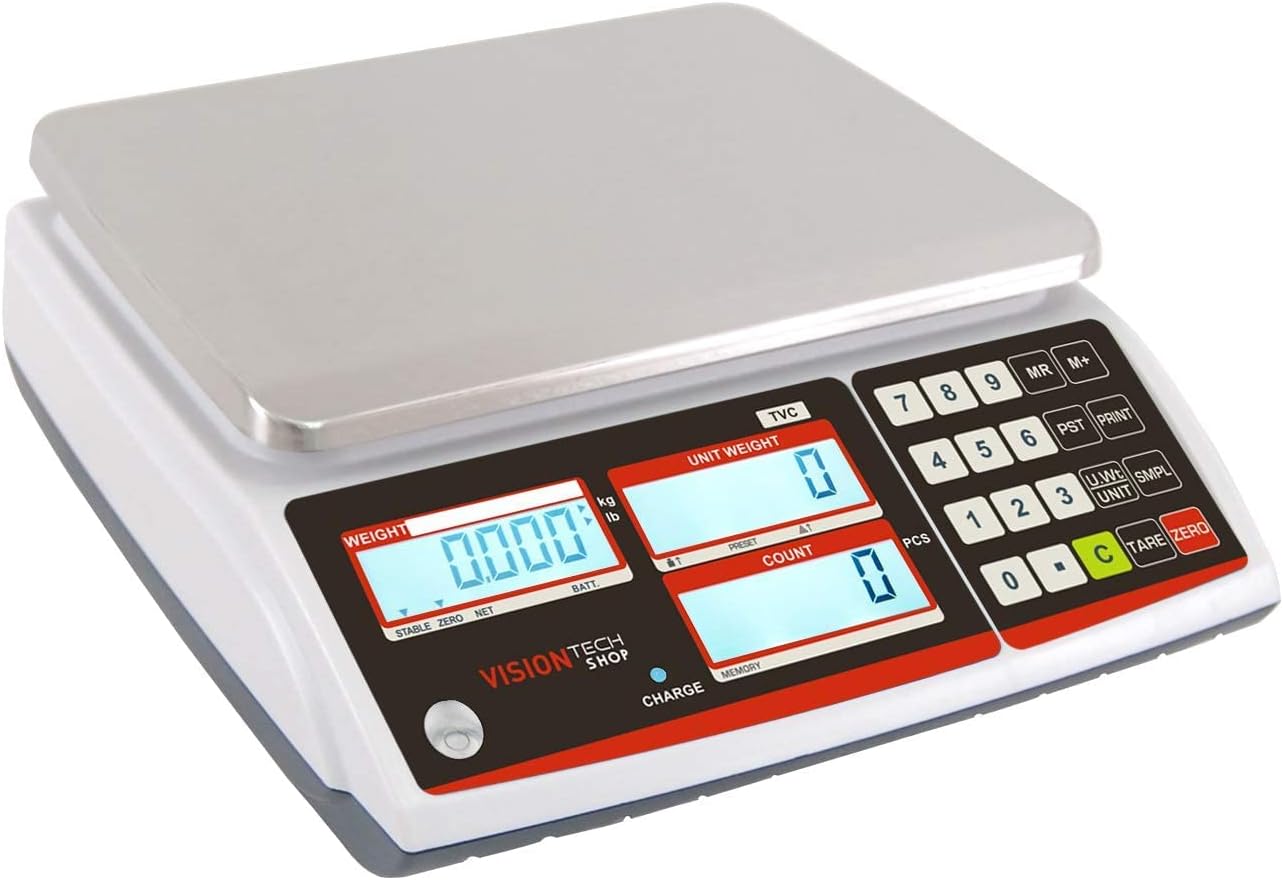
This manual provides comprehensive instructions for the setup, operation, maintenance, and troubleshooting of your VisionTechShop TVC-60 Counting Scale. Please read this manual thoroughly before using the device to ensure proper functionality and longevity.
設定
開梱と設置
Carefully remove the TVC-60 Counting Scale from its packaging. Place the scale on a stable, level surface to ensure accurate measurements. Avoid locations with excessive vibration, drafts, or extreme temperature fluctuations.
プラッターの取り付け
Place the stainless steel platter securely onto the scale's weighing platform. Ensure it is centered and stable.
電源接続
Connect the provided power adapter to the scale and a suitable power outlet. The scale can also operate on its internal battery for portability. Ensure the battery is charged for cordless operation.
物理的寸法
The TVC-60 scale has dimensions of approximately 11 inches (width) x 12 inches (depth) x 4 inches (height).

操作手順
電源オン/オフ
を押す オン/オフ button to power the scale on or off.
Unit Switching (Lb/Kg)
The scale supports both pounds (Lb) and kilograms (Kg). Press the ユニット key to switch between these units.
スケールの風袋引き
To zero out the weight of a container or tray, place the empty container on the platter and press the 風袋 key. The display will show 0.000, indicating the container's weight has been deducted.
カウント機能
The TVC-60 scale is designed for efficient counting of small parts or coins.
- Place an empty tray on the scale and press the 風袋 key to zero the display.
- 既知の数のsを配置するample pieces (e.g., 5 coins) onto the tray.
- Once the weight is stable, use the numeric keypad to enter the quantity of your sample pieces (e.g., '5').
- を押す SMPL (Sample) key. The scale will calculate the average unit weight and display it in the "Unit Weight" section. The "Count" section will show the number of sampルの部分。
- You can verify the accuracy by adding a few more pieces. The "Count" display should update accordingly.
- To accumulate count data, press the M+ key after each count.
- To recall the accumulated memory, press the MR 鍵。
- To clear the accumulated data, press the C 鍵。

Connectivity and Print Functions
The TVC-60 features a standard RS-232C interface, allowing connection to a computer or printer for data output.

Video Tutorial: Counting Coins
メンテナンス
クリーニング
The stainless steel platter is removable for easy cleaning. Use a soft, damp cloth with mild detergent to clean the platter and the scale's body. Avoid abrasive cleaners or excessive moisture.

ダストカバー
A dust cover is included to protect the scale from dust and debris when not in use. Place the dust cover over the scale after each use to maintain its condition.

トラブルシューティング
不正確な読み取り
- スケールが安定した水平な面上にあることを確認してください。
- Check for any obstructions under or around the platter.
- Verify that the scale has been properly tared before weighing or counting.
Ask a question about this manual
Ask about setup, troubleshooting, compatibility, parts, safety, or missing instructions. Manuals+ will review the question and use this page’s manual context to help answer it.
Ask a question about this manual
Ask about setup, troubleshooting, compatibility, parts, safety, or missing instructions. Manuals+ will review the question and use this page’s manual context to help answer it.