
導入
Welcome to your new EZICLEAN Map Robot Vacuum. This manual provides essential information for the setup, operation, and maintenance of your device to ensure optimal performance and longevity. Please read this manual thoroughly before using the robot vacuum.
重要な安全情報
To reduce the risk of injury or damage, always observe basic safety precautions when installing, using, and maintaining your robot vacuum.
- アプライアンスを操作する前に、すべての指示をお読みください。
- ロボット掃除機で子供を遊ばせないでください。
- このマニュアルに記載されているとおりにのみ使用してください。
- ロボット掃除機を湿気の多い環境や濡れた表面で使用しないでください。
- 髪の毛、ゆったりとした衣服、指、および体のすべての部分を開口部や可動部分から遠ざけてください。
- タバコ、マッチ、熱い灰など、燃えているものや煙が出ているものを拾わないでください。
- ダストビンやフィルターを取り付けない状態で使用しないでください。
- 充電ベースが壁に沿った平らな面に設置され、周囲に十分なスペースがあることを確認してください。
パッケージ内容
パッケージにすべてのアイテムが揃っていることを確認します。
- EZICLEAN Map Robot Vacuum
- 充電ベース
- 電源アダプター
- サイドブラシ(2組)
- 高効率フィルター(プリインストール)
- クリーニングツール
- ユーザーマニュアル
製品終了view
Familiarize yourself with the main components of your EZICLEAN Map Robot Vacuum.
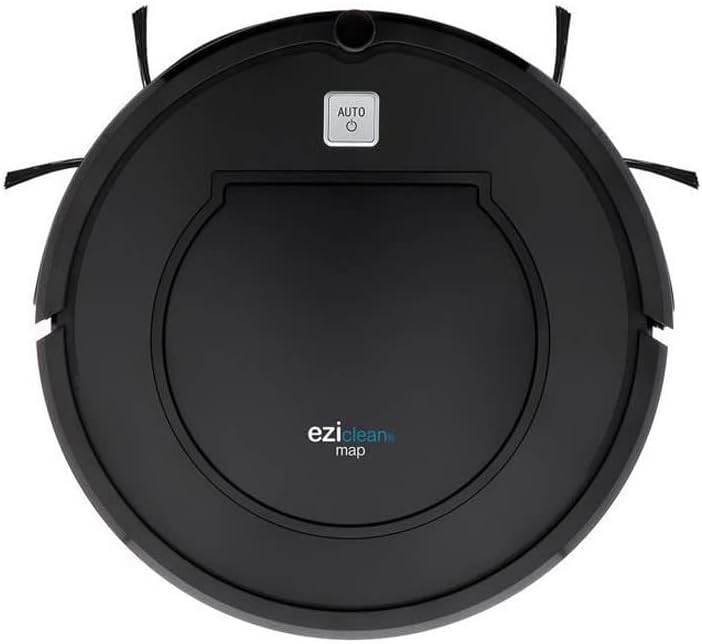
図1: トップ view of the EZICLEAN Map Robot Vacuum. This image displays the circular robot vacuum from above, highlighting the central dustbin access panel and the 'AUTO' power button. The two side brushes are visible extending from the front sides of the unit.
The robot features a compact, circular design with integrated sensors for navigation and obstacle avoidance. The main power button is located on the top surface, providing easy access for starting and stopping cleaning cycles.
設定
1. 充電ベースの設置
Place the charging base against a wall in an open, uncluttered area. Ensure there is at least 1 meter (3 feet) of clear space to the front and 0.5 meters (1.5 feet) to each side of the charging base. Plug the power adapter into the charging base and then into a wall outlet.
2. 初期充電
Place the robot vacuum on the charging base, ensuring the charging contacts align. The indicator light on the robot will illuminate to show it is charging. For first-time use, charge the robot for at least 5-6 hours until fully charged.
ロボット掃除機の操作
開始と停止
- 始めること: Press the 'AUTO' button on the top of the robot. The robot will begin cleaning in automatic mode.
- 一時停止するには: Press the 'AUTO' button again during cleaning.
- 止まる: Press and hold the 'AUTO' button for a few seconds, or place the robot back on its charging base.
クリーニングモード
The EZICLEAN Map Robot Vacuum is designed to clean various floor types efficiently.
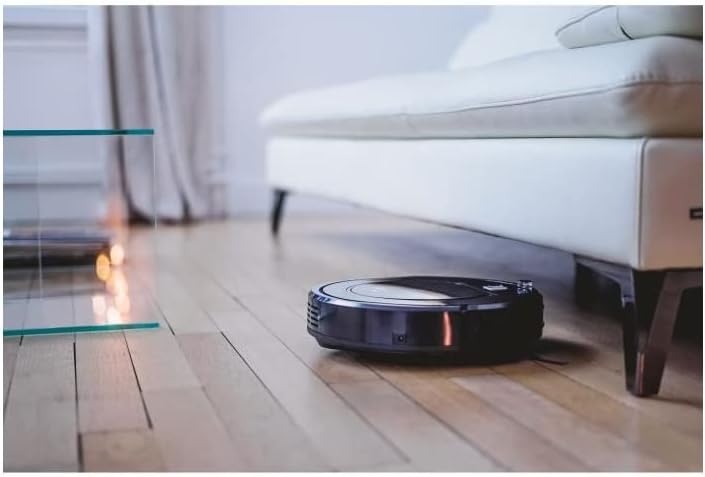
図2: The robot vacuum cleaning under a sofa. This image shows the low-profile design of the robot, allowing it to easily access and clean dust and debris in hard-to-reach areas beneath furniture.

図3: The robot vacuum operating in a bedroom. The robot is shown on a light-colored wooden floor, demonstrating its ability to navigate and clean open spaces effectively.
ナビゲーション
The robot uses intelligent navigation to cover up to 120m² efficiently. It is equipped with sensors to detect obstacles and prevent falls.

図4: The robot vacuum performing edge cleaning. This image illustrates the robot's capability to clean close to walls and baseboards, ensuring thorough coverage of the room.

図5: The robot vacuum cleaning near a sleeping cat. This image highlights the quiet operation of the robot, allowing it to clean without disturbing pets or household activities.
メンテナンス
Regular maintenance is crucial for the optimal performance and longevity of your robot vacuum.
1. ゴミ箱を空にする
Empty the dustbin after each cleaning cycle or when the 'Dustbin Full' indicator (if available) illuminates. Open the top cover, remove the dustbin, and dispose of the collected debris.
2. 洗浄ブラシ
Periodically check and clean the main brush and side brushes. Remove any tangled hair or debris using the provided cleaning tool. Replace worn-out side brushes as needed.
3. フィルターの清掃
Tap the high-efficiency filter to remove dust. Do not wash the high-efficiency filter with water. The foam filter can be rinsed with water; ensure it is completely dry before reinserting.
4. センサーのクリーニング
Wipe the cliff sensors, wall sensors, and charging contacts with a clean, dry cloth to ensure proper functionality.
トラブルシューティング
If your robot vacuum encounters an issue, refer to the table below for common problems and their solutions.
| 問題 | 考えられる原因 | 解決 |
|---|---|---|
| ロボットが起動しない | 電池残量が少ない;電源ボタンが押されていない;障害物がある | Charge the robot; Press the 'AUTO' button; Clear any obstructions. |
| ロボットが充電ベースを見つけられない | 充電ベースが妨害されています。ロボットがベースから離れすぎています | Ensure clear space around base; Manually place robot closer to base. |
| 洗浄性能が悪い | Full dustbin; Clogged filter; Tangled brushes | ゴミ箱を空にする、フィルターを清掃/交換する、ブラシを清掃する。 |
| ロボットが頻繁に動けなくなる | Loose cables/rugs; Narrow spaces | Clear obstacles; Block off problematic areas. |
技術仕様
| 仕様 | 価値 |
|---|---|
| ブランド | EZICLEAN |
| モデル番号 | EZI3760190144980 |
| 色 | 黒 |
| 製品寸法(長さ x 幅 x 高さ) | 32 x 32 x 8.5 cm |
| アイテム重量 | 2.8キログラム |
| 材料 | プラスチック |
| 騒音レベル | 60デシベル |
| バッテリー寿命 | 90 minutes |
| 特集 | コードレス |
| フィルタータイプ | カートリッジ |
| 電源 | 電池駆動 |
| 含まれるコンポーネント | Filter, Battery |
保証とカスタマーサポート
Your EZICLEAN Map Robot Vacuum comes with a standard manufacturer's warranty. For detailed warranty information, please refer to the warranty card included in your product packaging or visit the official EZICLEAN website. If you encounter any issues not covered in the troubleshooting section or require further assistance, please contact EZICLEAN customer support through their official channels. Keep your purchase receipt as proof of purchase for warranty claims.