
EARISE M37
EARISE M37 Wooden Box PA System User Manual
モデル: M37
1.製品オーバーview
The EARISE M37 is a portable 100W PA system designed for various audio applications, including home parties, small events, and karaoke. It features a wooden cabinet for enhanced acoustics, built-in Bluetooth connectivity, and comes with two wireless microphones for immediate use. The system supports multiple audio inputs including AUX and USB, offering versatile playback options.

Image: The EARISE M37 PA system, showcasing its wooden box design and two included wireless microphones.
2. 安全情報
- 火災や感電を防ぐため、ユニットを雨や湿気にさらさないでください。
- キャビネットを開けないでください。内部にはユーザーが修理できる部品はありません。修理はすべて資格のある担当者にご依頼ください。
- ユニット周囲の換気を良好に保ち、通気口を塞がないようにしてください。
- ラジエーター、暖房口、ストーブ、その他の機器(電気を含む)などの熱源の近くにユニットを置かないでください。 amp熱を発生する装置。
- 特にプラグ、コンセント、および装置から出ている部分で、電源コードが踏まれたり挟まれたりしないように保護してください。
- 雷雨のときや長期間使用しない場合は、この装置のプラグを抜いてください。
3. パッケージ内容
パッケージに以下の項目が含まれているか確認してください。
- EARISE M37 PA System Unit
- 2xワイヤレスマイク
- リモートコントローラー
- 電源アダプター
- ユーザーマニュアル(このドキュメント)

Image: A visual representation of key features and included accessories: wireless microphone, Bluetooth 4.2, USB auto-play, and remote controller.
4. 製品の特徴と構成
Familiarize yourself with the main components and controls of your EARISE M37 PA System.

Image: The control panel of the EARISE M37, showing various inputs and adjustment knobs. Key controls include: Mode, Previous/Next Track, Play/Pause, Record, EQ, Light, Mic 1/2 inputs, AUX In/Out, USB, TF card slot, DC Power In, ON/OFF switch, Charging indicator, ECHO, DELAY, MIC VOL, MASTER VOL, TREBLE, EXTRA BASS, and BASS.
コントロールパネルの機能:
- モード: 入力モード(Bluetooth、AUX、USB、TF カード)を切り替えます。
- 前/次のトラック: メディアの再生中にトラックを移動します。
- 再生/一時停止: メディアの再生を制御します。
- 記録: Initiates or stops recording (requires USB/TF storage).
- EQ: イコライゼーション設定を調整します。
- ライト: Controls the integrated LED lighting.
- マイク1 / マイク2: Inputs for wired microphones (if used).
- AUX IN / AUX OUT: Audio input and output jacks for external devices.
- USB: USB port for media playback or recording.
- TF: TF (MicroSD) card slot for media playback or recording.
- DC Power IN: 充電および操作用の電源入力。
- オンオフ: ユニットの電源スイッチ。
- 充電インジケーター: 充電状態を示すライト。
- エコー: マイクのエコー効果を調整します。
- 遅れ: マイクの遅延効果を調整します。
- MIC VOL: マイクの音量を調整します。
- マスターボリューム: Controls the overall master volume of the system.
- 高音: 高周波オーディオ出力を調整します。
- エクストラベース: 低周波オーディオ出力を強化します。
- ベース: 低周波オーディオ出力を調整します。
5. セットアップ
5.1 PAシステムの充電
Before first use, fully charge the PA system. Connect the provided power adapter to the "DC Power IN" port on the unit and plug it into a standard wall outlet. The charging indicator light will show the charging status. A full charge provides up to 7 hours of play time.

Image: Illustration highlighting the 3600mAh battery capacity, providing up to 7 hours of continuous play time.
5.2 ワイヤレスマイクのセットアップ
The two wireless microphones are pre-paired with the PA system. Insert AA batteries (not included) into each microphone. Turn on the microphones using their respective power switches. They should automatically connect to the PA system.
5.3 オーディオソースの接続
Bluetooth接続:
- Turn on the EARISE M37 PA system.
- を押す モード button until the display shows "Bluetooth" or a Bluetooth icon.
- モバイル デバイス (スマートフォン、タブレットなど) で Bluetooth を有効にし、利用可能なデバイスを検索します。
- Select "EARISE M37" from the list. Once connected, you will hear a confirmation sound.

Image: A hand holding a smartphone displaying a Bluetooth connection screen, indicating the ease of pairing with the EARISE M37 PA system.
USB/TFカード再生:
MP3オーディオが入ったUSBフラッシュドライブまたはTF(MicroSD)カードを挿入します files into the respective port. The system will automatically detect and begin playing music. Use the Previous/Next Track and Play/Pause buttons to control playback.
AUX入力:
外部オーディオデバイス(MP3プレーヤー、コンピュータなど)を AUX IN port using a 3.5mm audio cable (not included). Press the モード button until AUX input is selected.
6. 操作手順
6.1 電源オン/オフ
To turn the unit on or off, use the オン/オフ コントロールパネルにあるスイッチ。
6.2 音量とエフェクトの調整
- マスターボリューム: Rotate this knob to adjust the overall volume of the PA system.
- MIC VOL: 接続されたマイクの音量を調整します。
- ECHO / DELAY: Use these knobs to add or reduce echo and delay effects to the microphone sound.
- TREBLE / BASS / EXTRA BASS: これらのノブを調整して、オーディオ出力の高周波数と低周波数を微調整します。
6.3 マイクの使用
Once the wireless microphones are powered on and connected, speak into them. Adjust the マイクボリューム, エコー、 そして 遅れ knobs on the PA system to achieve the desired sound. For optimal performance, hold the microphone a few inches from your mouth.

Image: Two individuals enjoying karaoke with the EARISE M37 PA system and its wireless microphones, demonstrating typical usage.
6.4 録音機能
To record audio (e.g., microphone input or music playback), ensure a USB flash drive or TF card is inserted into the corresponding slot. Press the 記録 button to start recording. Press it again to stop. Recorded files will be saved to the inserted storage device.
7. メンテナンス
- 本体は柔らかく乾いた布で拭いてください。研磨剤入りの洗剤や溶剤は使用しないでください。
- PA システムは、直射日光や極端な温度を避け、涼しく乾燥した場所に保管してください。
- If the unit will not be used for an extended period, fully charge the battery before storage and recharge it every few months to maintain battery health.
8。 トラブルシューティング
| 問題 | 考えられる原因 | 解決 |
|---|---|---|
| 電源なし | バッテリーが消耗しています。電源ケーブルが接続されていません。 | ユニットを充電します。電源ケーブルがしっかりと接続されていることを確認します。 |
| マイクから音が出ない | Microphones off; Batteries low/dead; MIC VOL too low. | Turn on microphones; Replace batteries; Increase MIC VOL. |
| Bluetoothが接続されない | PA system not in Bluetooth mode; Device too far; Interference. | Press MODE button to select Bluetooth; Move device closer; Restart both devices. |
| USB/TFカードが再生されない | 正しくない file フォーマット; カード/ドライブが正しく挿入されていない; 破損している files. | 確保する files are MP3; Reinsert card/drive; Try different files/device. |
9. 仕様
| 特徴 | 詳細 |
|---|---|
| ブランド | イーライズ |
| モデル | M37 |
| 出力ワットtage | 100ワット |
| 電源 | 電池駆動 |
| 接続技術 | ブルートゥース、USB、AUX |
| Bluetoothバージョン | 4.2 (from image) |
| オーディオ入力 | Wireless Microphone, AUX |
| チャンネル数 | 2 |
| アイテム重量 | 11.62ポンド |
| パッケージ寸法 | 18.7 x 12 x 11.9インチ |
| 製品寸法(約) | 32.5 cm (12.8 in) H x 25.5 cm (10 in) W x 23.8 cm (9.4 in) D |
| 色 | 黒 |
| 取り付けタイプ | テーブルトップ |
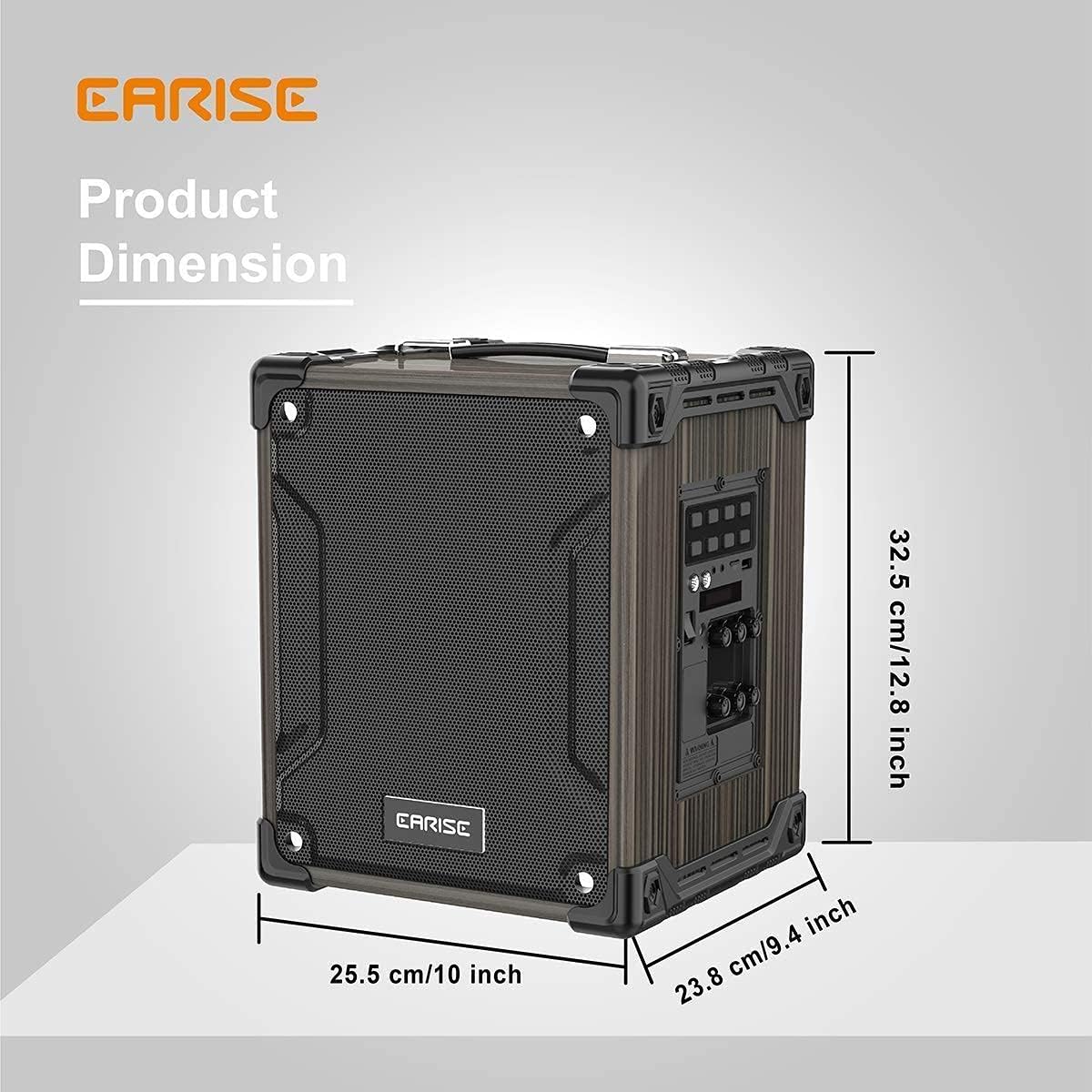
Image: Product dimensions of the EARISE M37, measuring approximately 32.5 cm (12.8 inches) in height, 25.5 cm (10 inches) in width, and 23.8 cm (9.4 inches) in depth.
10. 保証とサポート
For warranty information or technical support, please refer to the contact details provided with your purchase or visit the official EARISE webサイトでご確認ください。保証請求に備えて購入証明書を保管してください。
Ask a question about this manual
Ask about setup, troubleshooting, compatibility, parts, safety, or missing instructions. Manuals+ will review the question and use this page’s manual context to help answer it.