
Gigaset S30852-H2810-B101
Gigaset A690 Wireless DECT Phone User Manual
Model: S30852-H2810-B101
ブランド: Gigaset
導入
This manual provides comprehensive instructions for the setup, operation, and maintenance of your Gigaset A690 wireless DECT phone. Please read this manual carefully to ensure proper use and to take full advantagすべての機能の e。
The Gigaset A690 is a reliable and user-friendly cordless phone featuring a large, illuminated black and white graphic display, hands-free calling with adjustable sound profiles, and a phonebook capacity of up to 100 entries.
1. セットアップ
1.1 開梱と初期検査
Carefully unpack all components and check for any signs of damage. Retain the packaging for future transport or service needs. The package should contain:
- One Gigaset A690 Handset
- One Gigaset A690 Base Station
- Two AAA rechargeable batteries
- One power adapter for the base station
- One telephone line cord
- This user manual (or a quick start guide)
1.2 バッテリーの取り付け
Before first use, install the two supplied AAA rechargeable batteries into the handset.
- 受話器の背面にある電池ボックスのカバーを開きます。
- Insert the two AAA rechargeable batteries, observing the correct polarity (+/-).
- 電池カバーをしっかりと閉じてください。
注記: Only use the rechargeable batteries specified for this device. Non-rechargeable batteries or other battery types may damage the device or cause malfunction.
1.3 ベースステーションの接続
Place the base station on a flat, stable surface, away from heat sources and direct sunlight. Ensure it is within reach of a power outlet and a telephone wall jack.
- Connect the telephone line cord to the "LINE" port on the base station and to your telephone wall jack.
- Connect the power adapter to the "POWER" port on the base station and plug it into a power outlet.
重要: 付属の電源アダプタと電話回線コードのみを使用してください。
1.4 初期充電と端末登録
Place the handset into the base station's charging cradle. The display will show a charging indicator. Allow the handset to charge for at least 6-8 hours before first use to ensure optimal battery performance.

Figure 1: Gigaset A690 handset securely placed in its charging base, showing the illuminated black and white display.
The handset is typically pre-registered to the base station at the factory. If the handset displays "Register Handset" or similar, follow these steps:
- On the base station, press and hold the registration/paging button (usually a small button on the side or back) for approximately 3 seconds. The base station will enter registration mode.
- On the handset, navigate to the "Settings" or "Registration" menu (refer to the display for prompts).
- Select "Register Handset" and enter the system PIN (default is usually 0000).
- 端末は登録が成功したことを確認します。
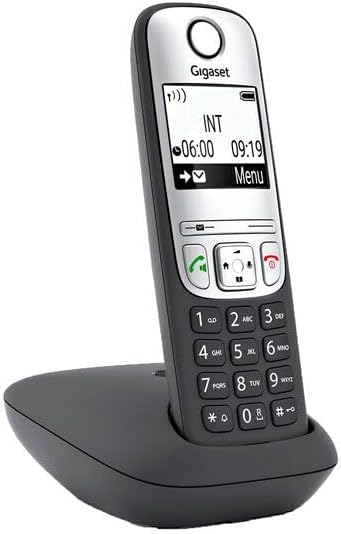
図2: 角度付き view of the Gigaset A690 handset in its charging base, highlighting its ergonomic design.
2. 操作手順
2.1 電話をかけたり受けたりする
電話をかける:
- Lift the handset from the base or press the green call key (Call/Talk button).
- キーパッドを使用して希望の電話番号をダイヤルします。
- Press the green call key (Call/Talk button) もう一度押して通話を開始します。
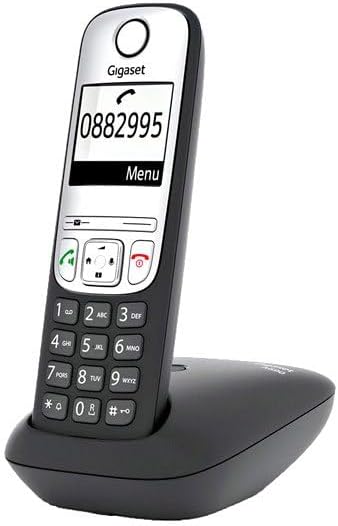
Figure 3: The Gigaset A690 display showing a phone number being entered, illustrating the clear black and white graphic display.
電話を受ける:
When the phone rings, press the green call key (Call/Talk button) 電話に出る。
通話を終了する:
Press the red end call key (End Call button) or place the handset back into the base station.
2.2 ハンズフリー通話
The Gigaset A690 supports hands-free calling, allowing you to talk without holding the handset.
- During a call, press the hands-free key (Speaker button). The speakerphone will activate.
- To switch back to handset mode, press the hands-free key again.
You can adjust the emphasis of higher or lower frequencies for hands-free profiles to suit your preference, ensuring optimal speech quality.
2.3電話帳
The phonebook can store up to 100 entries, each with a name and number.
エントリの追加:
- Press the "Menu" key.
- Navigate to "Phonebook" or "Directory" and select "New Entry".
- Enter the name using the alphanumeric keypad.
- 電話番号を入力してください。
- エントリを保存します。

Figure 4: The Gigaset A690 display showing a contact name, demonstrating the phonebook functionality.
電話帳からの通話:
- Press the "Phonebook" key (often a dedicated button or accessible via "Menu").
- ナビゲーション キーを使用してエントリをスクロールします。
- Once the desired entry is highlighted, press the green call key (Call/Talk button).
2.4 ディスプレイとメニューナビゲーション
The large, illuminated black and white graphic display provides clear information. Use the navigation keys (up/down/left/right) and the "OK" or "Menu" soft keys to navigate through the phone's functions and settings.

図5:背面 view of the Gigaset A690 handset in its charging base, showing the battery compartment and overall design.
3. メンテナンス
3.1 クリーニング
To clean your phone, use a soft, slightly damp 布で拭いてください。研磨剤入りの洗剤や溶剤は表面を傷つける恐れがあるため使用しないでください。
- Wipe the handset and base station gently.
- 開口部に湿気が入らないようにしてください。
3.2バッテリーケア
To prolong the life of your rechargeable batteries:
- Always place the handset in the base station when not in use to ensure it is charged.
- Avoid completely discharging the batteries frequently.
- If the phone will not be used for an extended period, remove the batteries.
3.3 ストレージ
Store the phone in a cool, dry place, away from extreme temperatures and humidity. If storing for a long period, remove the batteries from the handset.
4。 トラブルシューティング
If you encounter issues with your Gigaset A690, refer to the following common problems and solutions:
| 問題 | 考えられる原因 | 解決 |
|---|---|---|
| 発信音が聞こえない / 電話をかけられない | 電話回線コードが接続されていないか故障しています。 電源アダプタが接続されていません。 Handset not registered. | すべてのケーブル接続を確認してください。 Ensure power adapter is plugged in. Register the handset to the base station (see Section 1.4). |
| 端末のディスプレイが空白です | Batteries are discharged or not inserted correctly. | Place handset in the base station to charge. バッテリーの極性を確認してください。 Replace old batteries if necessary. |
| 音質が悪い / 雑音がある | Handset too far from base station. 他の電子機器からの干渉。 | ベースステーションに近づいてください。 Relocate the base station away from other electronics (Wi-Fi routers, microwaves, etc.). |
| 端末が充電されない | Handset not properly seated in cradle. 充電接点が汚れています。 Batteries are at end of life. | Ensure handset is correctly placed in the base. 端末とベースの両方の充電接点を乾いた布で清掃します。 電池を交換してください。 |
これらの解決策を試しても問題が解決しない場合は、カスタマー サポートにお問い合わせください。
5. 仕様
| 特徴 | 詳細 |
|---|---|
| モデル番号 | S30852-H2810-B101 |
| 製品寸法 | 6.3 x 4.33 x 3.54インチ |
| アイテム重量 | 6.7オンス(190グラム) |
| バッテリー | 2 AAA rechargeable batteries required |
| 電話の種類 | コードレスDECT電話 |
| 色 | 黒 |
| 材料 | プラスチック |
| 電源 | 電池駆動(ハンドセット)、ACアダプタ(ベース) |
| ダイヤラの種類 | シングルキーパッド |
| 留守番電話システムの種類 | Digital (Note: The product description doesn't explicitly state an answering machine, but the spec does. I'll include it as per spec.) |
| 電話帳の容量 | 最大 100 件のエントリー |
| 画面 | Large, illuminated black and white graphic display |
6. 保証とサポート
6.1 保証情報
Gigaset products are designed for reliability and performance. For specific warranty terms and conditions applicable to your region, please refer to the warranty card included with your product or visit the official Gigaset website. International products may have separate terms and may differ from local products.
6.2 カスタマーサポート
For technical assistance, troubleshooting beyond this manual, or service inquiries, please contact Gigaset customer support. You can find contact information on the official Gigaset webサイトまたは製品を購入した小売店を通じて購入できます。
Visit the official Gigaset Store on Amazon for more information and products: Gigaset Store
Ask a question about this manual
Ask about setup, troubleshooting, compatibility, parts, safety, or missing instructions. Manuals+ will review the question and use this page’s manual context to help answer it.