
導入
This manual provides essential information for setting up, operating, maintaining, and troubleshooting your Xiaomi Redmi Note 8 Pro smartphone. Please read this guide carefully to ensure optimal performance and longevity of your device.
設定
パッケージ内容
パッケージに次のアイテムが含まれていることを確認してください。
- Xiaomi Redmi Note 8 Proスマートフォン
- Earphone Kit
- 充電ブロック
- USB Type-Cケーブル
- ユーザーガイド
SIM カードの挿入
The Redmi Note 8 Pro supports dual Nano-SIM cards. Use the provided SIM ejector tool to open the SIM tray located on the side of the device. Carefully place your Nano-SIM cards into the designated slots, ensuring the gold contacts face downwards. Reinsert the tray firmly.
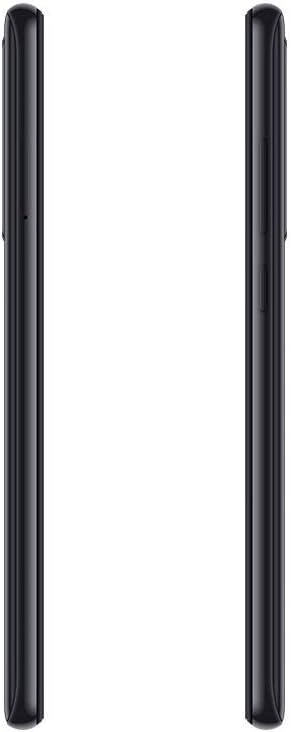
画像: サイド view of the Redmi Note 8 Pro, illustrating the location of the SIM card tray and physical buttons.
初期電源投入と基本設定
Press and hold the Power button until the Xiaomi logo appears. Follow the on-screen instructions to select your language, connect to a Wi-Fi network, and set up your Google account. This process will guide you through essential settings to prepare your device for use.
デバイスの操作
ディスプレイとナビゲーション
Your Redmi Note 8 Pro features a 6.53-inch FHD+ Dot Drop Display with a resolution of 2340 x 1080 pixels. Navigate the interface using touch gestures. The power button is located on the right side, along with the volume rocker. The device runs on Android with Xiaomi's MIUI interface, offering a customizable user experience.

画像: 正面 view of the Redmi Note 8 Pro, showcasing its 6.53-inch FHD+ Dot Drop Display.
カメラ機能
The device is equipped with a 64MP AI Quad Camera system on the rear, allowing for versatile photography in various scenarios. The camera module includes multiple lenses for wide-angle, macro, and depth sensing. Open the Camera app to explore different modes and settings.

画像: 背面 view of the Redmi Note 8 Pro, highlighting the 64MP AI Quad Camera system.
バッテリーと充電
The Redmi Note 8 Pro features a 4500mAh high-capacity battery. Use the provided USB Type-C cable and charging block to charge your device. For optimal battery life, avoid extreme temperatures and fully discharging the battery frequently.
接続性
The smartphone supports 4G cellular networks and NFC (Near Field Communication) for contactless payments and quick pairing with compatible devices. Bluetooth and Wi-Fi connectivity are also available for wireless communication and internet access.

画像: 上部と下部 view of the Redmi Note 8 Pro, showing the USB-C port, 3.5mm headphone jack, and speaker grille.
メンテナンス
デバイスのクリーニング
Use a soft, lint-free cloth to clean the screen and body of your smartphone. Avoid using harsh chemicals or abrasive materials, as these can damage the device's finish. For stubborn smudges, lightly damp布に水または電子機器専用のスクリーンクリーナーを含ませて拭いてください。
耐水性
The Xiaomi Redmi Note 8 Pro is 防水ではありません. Avoid exposing the device to water, rain, or excessive humidity. Liquid damage is not covered under warranty.
ソフトウェアアップデート
Regularly check for and install software updates to ensure your device has the latest features, security patches, and performance improvements. You can usually find this option in the device's settings under "About phone" or "System updates."
トラブルシューティング
よくある問題と解決策
- デバイスの電源が入らない: Ensure the battery is charged. Connect the device to its charger and wait a few minutes before attempting to power it on again. If it still doesn't turn on, try holding the power button for an extended period (10-15 seconds).
- 充電に関する問題: Check if the charging cable and adapter are securely connected. Try using a different cable or adapter to rule out faulty accessories. Ensure the charging port is clean and free of debris.
- Camera focus problems: Ensure the camera lens is clean and free from smudges. In some low-light conditions, autofocus may be slower. Try tapping on the screen to manually focus on your subject.
- パフォーマンスが遅い: Close unused applications running in the background. Clear cache data for apps that are frequently used. Consider restarting your device periodically. If performance issues persist, a factory reset might be necessary (back up your data first).
工場出荷時設定にリセット
A factory reset will erase all data from your device and restore it to its original factory settings. This can resolve persistent software issues. Before performing a factory reset, ensure you have backed up all important data. The option is typically found in Settings > System > Reset options.
仕様
| ブランド | 小米 |
| モデル名 | レッドミーノート8プロ |
| オペレーティング·システム | アンドロイド |
| ラム | 6ギガバイト |
| ストレージ容量 | 128ギガバイト |
| 画面サイズ | 6.53インチ |
| ディスプレイ解像度 | 2340 x 1080(FHD+) |
| セルラーテクノロジー | 4G |
| 接続技術 | 非対称 |
| SIM カードスロット | デュアルSIM |
| SIMカードのサイズ | ナノ |
| 耐水性レベル | 防水ではありません |
| ヘッドホンジャック | 3.5ミリメートル |
| リアカメラ解像度 | 64 Megapixels (Quad Camera) |
| バッテリー容量 | 4500mAh |
| プロセッサ | G90T liquidcool System |
保証情報
The Xiaomi Redmi Note 8 Pro comes with a 2年間のメーカー保証 from the date of purchase. This warranty covers defects in materials and workmanship under normal use. It does not cover damage caused by accidents, misuse, unauthorized modifications, or liquid exposure. Please retain your proof of purchase for warranty claims.
サポート
For further assistance, technical support, or to inquire about service and repairs, please visit the official Xiaomi website or contact their customer service. You can find detailed support resources, FAQs, and contact information on their official support pages.
公式Xiaomi Webサイト: www.mi.com/global/support