
導入
This manual provides essential information for the setup, operation, and maintenance of your HCDZ Universal Replacement Remote Control. This remote is designed as a direct replacement for various television models and requires no programming.
設定
バッテリーの取り付け
The HCDZ Replacement Remote Control requires two (2) AAA alkaline batteries (not included).
- リモコンの背面にある電池収納部を見つけます。
- 電池ケースのカバーを下または外側にゆっくりとスライドさせて開きます。
- 単 4 電池 2 本を挿入し、プラス (+) とマイナス (-) の端子がコンパートメント内のマークと正しく揃っていることを確認します。
- 電池ボックスのカバーを、カチッと音がするまで元の位置に戻してしっかりと閉めます。

画像の説明: クローズアップ view of the back of the HCDZ replacement remote control, showing the rectangular battery compartment cover. The cover is black and blends seamlessly with the remote's design.
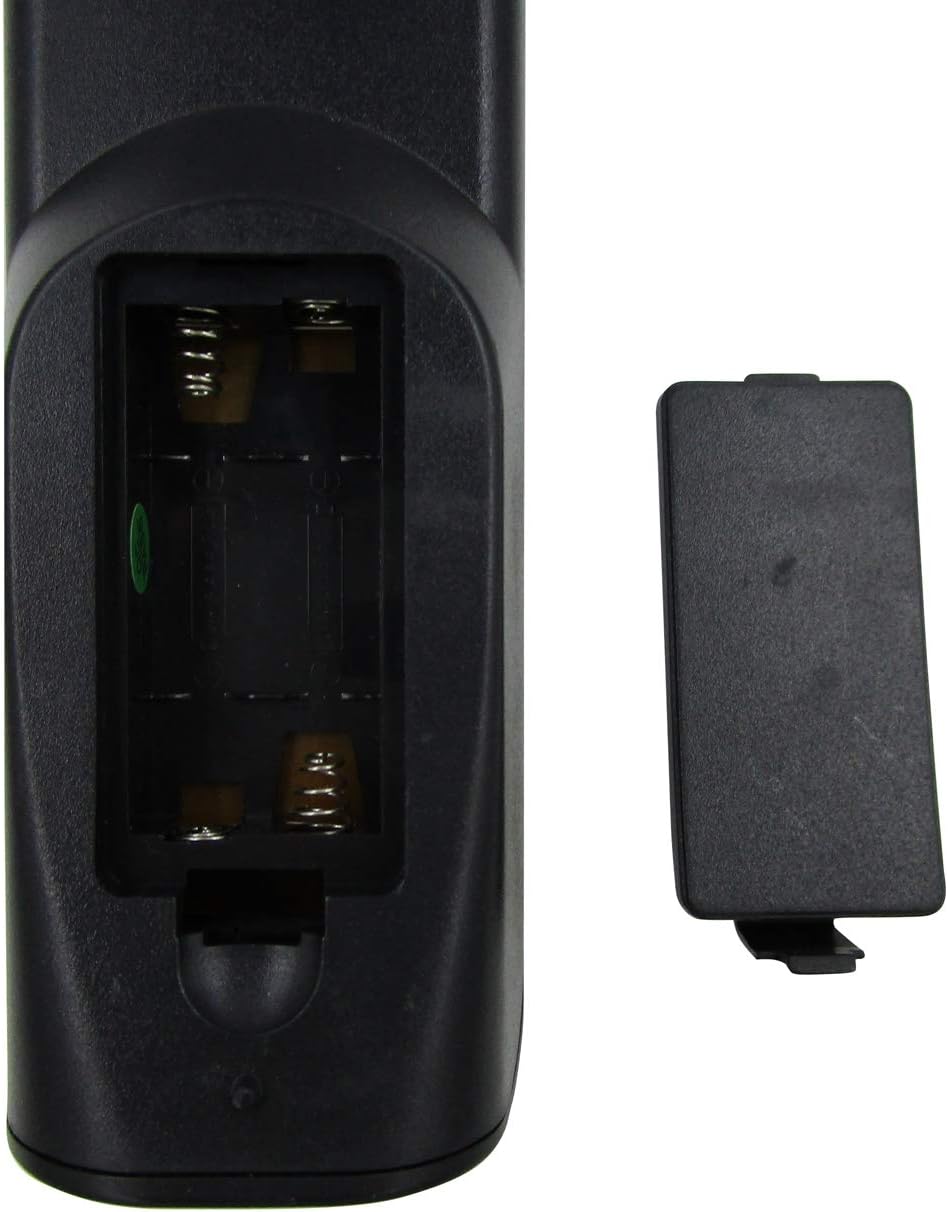
画像の説明: クローズアップ view of the HCDZ replacement remote control with the battery compartment open. Two empty slots for AAA batteries are visible, along with the metal spring contacts. The detached battery cover is shown next to the open compartment.
操作手順
基本操作
This remote control operates using infrared (IR) technology. Ensure there is a clear line of sight between the remote and your television's IR receiver for optimal performance.
- 力: Press the Power button to turn your television on or off.
- チャンネル選択: Use the number buttons to directly enter channel numbers or the Channel Up/Down buttons to navigate sequentially.
- 音量コントロール: 音量アップ/ダウンボタンを使用して音量を調整します。
- ミュート: Press the Mute button to silence the television audio.
- 入力/ソース: Use the Input or Source button to switch between different video inputs (e.g., HDMI, AV).
動作範囲
The remote control has a maximum operating range of approximately 10 meters (33 feet). Performance may vary depending on environmental factors and battery condition.
メンテナンス
クリーニング
リモコンを清掃する際は、柔らかく乾いた布をご使用ください。液体クリーナーや研磨剤は使用しないでください。リモコンの表面や内部部品を損傷する恐れがあります。
バッテリー交換
Replace batteries when the remote's response becomes sluggish or stops functioning. Always replace both batteries simultaneously with new AAA alkaline batteries. Do not mix old and new batteries, or different types of batteries.
トラブルシューティング
よくある問題と解決策
- リモコンが応答しない:
- 電池が正しい極性で正しく挿入されているかどうかを確認してください。
- 電池を新しい単4アルカリ電池と交換してください。
- リモコンとテレビの赤外線受信機の間に障害物がないことを確認してください。
- リモコンがテレビに直接向けられていることを確認してください。
- 一部のボタンが機能しません:
- 電池残量が少ない可能性があります。電池を交換してください。
- Ensure the remote is compatible with your specific television model. Refer to the product listing for compatible models.
If issues persist after following these steps, please contact HCDZ customer support.
仕様
製品仕様
| 特徴 | 詳細 |
|---|---|
| ブランド | HCDZ |
| モデル | ユニバーサル交換用リモコン |
| 対応デバイス | Television (Majestic TVDB826BKHK, SANSUI STY0632C, ACONATIC AN-LT3233, etc.) |
| 接続技術 | 赤外線(IR) |
| 最大サポートデバイス数 | 1 |
| コントローラータイプ | ボタンコントロール |
| 最大動作範囲 | 10メートル(33フィート) |
| 電池が必要 | 単4アルカリ電池2本(別売) |
| 特集 | No programming needed, ready to use |
保証情報
限定保証
HCDZ products are typically covered by a limited warranty against defects in materials and workmanship. For specific warranty terms and conditions, please refer to the original product packaging or contact HCDZ customer support. Keep your purchase receipt as proof of purchase.
カスタマーサポート
お問い合わせ
For further assistance, technical support, or warranty inquiries, please visit the official HCDZ webサイトまたは顧客サービス部門に連絡してください。
オンラインサポート: HCDZ Store on Amazon
注記: Specific contact details may vary. Please refer to the product packaging or the HCDZ official web最新情報のサイト。