
1. はじめに
This instruction manual provides detailed information on the installation, operation, and maintenance of your Pioneer DEH-5600 car audio system. Please read this manual thoroughly before using the product to ensure correct usage and to prevent accidents. Keep this manual in a safe place for future reference.
2. 安全情報
怪我や製品の損傷を防ぐために、次の安全上の注意事項を守ってください。
- 安全運転の妨げになるような方法でシステムを操作しないでください。
- Ensure proper installation by a qualified technician to prevent electrical shorts or other hazards.
- Do not disassemble or modify the unit. This may result in electric shock, fire, or other malfunctions.
- 緊急車両のサイレンなど、外部の音が聞こえる程度の音量にしてください。
- 指定されたアクセサリと部品のみを使用してください。
3. パッケージ内容
パッケージにすべてのアイテムが揃っていることを確認します。
- Main Unit (DEH-5600)
- ワイヤハーネス
- ハンズフリーマイク
- Installation Screws Set
- Remote Control (with CR2025 Lithium Battery)
- 取扱説明書(本書)
- 保証書
4. セットアップとインストール
Proper installation is crucial for optimal performance and safety. It is recommended to have this unit installed by a professional.
4.1配線接続
Connect the wiring harness according to your vehicle's specifications. Ensure the ground wire is securely connected to a metal part of the vehicle chassis or the battery's negative terminal.
重要: Connect the vehicle-specific harness to the main unit harness before installation. Ensure all connections are secure to prevent short circuits.
4.2 ユニットの取り付け
Install the DEH-5600 into a 1DIN opening in your vehicle's dashboard. Use the provided installation screws to secure the unit.
4.3 Hands-free Microphone Installation
Mount the hands-free microphone in a location that allows clear voice pickup, typically near the driver's sun visor or on the steering column. Route the cable carefully to avoid interference with driving controls.
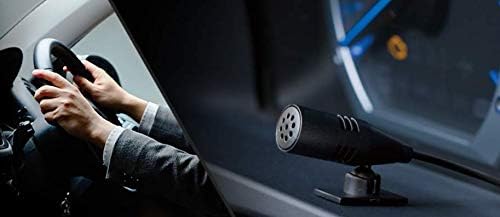
Image: Hands-free microphone for clear communication during calls.
5. 操作手順
5.1 基本操作
- 電源オン/オフ: SRC/OFF ボタンを押して、ユニットの電源をオンまたはオフにします。
- 音量コントロール: Rotate the rotary knob to adjust the volume.
- ソースの選択: Press the SRC/OFF button repeatedly to cycle through available sources (CD, Bluetooth, USB, iPhone, AUX, Tuner).
5.2 CD再生
Insert a CD into the disc slot. Playback will start automatically. Use the track skip buttons to navigate between tracks.
5.3 チューナーの操作
Select the Tuner source. Use the seek buttons to find radio stations. Press and hold a preset button to store a station.
6.オーディオ設定
The DEH-5600 features a high-performance DSP for precise sound customization.
6.1 Time Alignment
Adjust the time alignment settings to ensure that sound from all speakers reaches the listener at the same time, creating a more focused sound stage. Refer to the on-screen menu for detailed adjustments.
6.2 13バンドグラフィックイコライザー
Utilize the 13-band graphic equalizer to fine-tune the audio frequency response. This allows for detailed sound shaping to match your preferences and vehicle acoustics.

Image: The 13-band graphic equalizer interface for detailed sound adjustments.
7. Bluetooth接続
The DEH-5600 supports Bluetooth for hands-free calling and audio streaming.
7.1 Bluetoothデバイスのペアリング
- Turn on the Bluetooth function on your smartphone or other device.
- On the DEH-5600, navigate to the Bluetooth settings menu.
- 「ペアリング」または「デバイスの追加」を選択します。
- 検索する "DEH-5600" on your device and select it.
- ペアリングコードの確認を求められた場合は、それを確認します。
7.2ハンズフリー通話
Once paired, you can make and receive calls through the DEH-5600. Use the dedicated call buttons on the unit or remote control. Your voice will be picked up by the external microphone.
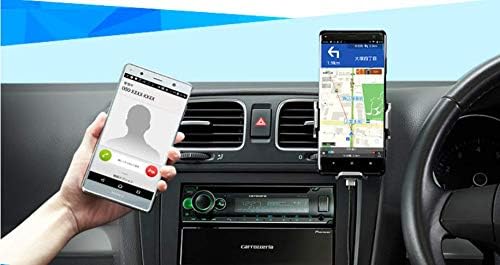
Image: Hands-free calling functionality with a connected smartphone.
7.3 Bluetoothオーディオストリーミング
Select the Bluetooth Audio source to stream music from your paired device. Use the unit's controls to play, pause, and skip tracks.
8. USB/iPod/iPhone Playback
Connect your USB device, iPod, or iPhone to the USB Type-A port for direct audio playback and charging.
- Supported formats for USB: WMA, MP3, WAV, AAC, FLAC.
- For iPhone/iPod, use a compatible USB cable. The unit supports iOS control.

Image: Various media playback options including iPhone, Android smartphone, and USB device.
9. メンテナンス
To ensure long-lasting performance of your DEH-5600:
- クリーニング: Wipe the unit's front panel with a soft, dry cloth. Do not use abrasive cleaners or solvents.
- ディスクケア: CDは端を持って扱ってください。清潔に保ち、傷がつかないようにしてください。
- ファームウェアの更新: パイオニアをチェック webお使いのモデルに利用可能なファームウェア アップデートがあるかどうか、定期的にサイトを確認してください。
10。 トラブルシューティング
| 問題 | 考えられる原因 | 解決 |
|---|---|---|
| 電源なし | 配線ミス、ヒューズ切れ | 電源接続を確認し、必要に応じてヒューズを交換します。 |
| 音が出ない | 音量が低すぎる、ミュートが有効、スピーカー配線に問題がある | 音量を上げ、ミュートを解除し、スピーカーの接続を確認します。 |
| Bluetoothペアリングが失敗する | デバイスがペアリングモードではありません。干渉があります。 | Ensure device Bluetooth is on and in pairing mode; Try pairing again. |
| CDがスキップしたり再生されない | Dirty or scratched disc; Unit vibration | Clean or replace disc; Ensure unit is securely mounted. |
If the problem persists after trying these solutions, contact Pioneer customer support or a qualified service center.
11. 仕様
- モデル名: DEH-5600
- ブランド: 開拓
- 製品寸法: 16.5 x 17.8 x 5 cm(奥行きx幅x高さ)
- 製品重量: 1.32キロ
- 取り付けサイズ: 1 DIN
- 接続技術: ブルートゥース、USB
- コントローラタイプ: iOS (for compatible devices)
- 特別な機能: DSP, WAZE (via smartphone app)
- サポートされているメディア: CD, USB (WMA, MP3, WAV, AAC, FLAC), iPhone, iPod, AUX
- Amplifier: Power MOS FET 50W x 4 channels
- オーディオ処理: Time Alignment, 13-Band Graphic Equalizer
- 色: ブラック/グリーン
12. 保証とサポート
Your Pioneer DEH-5600 comes with a manufacturer's warranty. Please refer to the included warranty card for details regarding coverage period and terms. For technical support, service, or inquiries, please visit the official Pioneer website or contact your local Pioneer customer service center.
オンラインリソース: パイオニアカロッツェリア公式 Webサイト