
1. はじめに
Thank you for choosing the BEPER BF.640 Multifunction Convection Oven. This appliance is designed for versatile and healthy cooking, allowing you to roast, bake, steam, toast, and grill with minimal oil or fat. Its innovative design ensures efficient heat distribution for consistent results. Please read this manual thoroughly before first use to ensure safe operation and optimal performance.

Image 1.1: The BEPER BF.640 Multifunction Convection Oven, showcasing its design and a typical meal prepared.
2. 重要な安全上の注意事項
火災、感電、および人身傷害のリスクを軽減するために、電気製品を使用するときは常に基本的な安全上の注意事項に従ってください。
- 機器を使用する前にすべての説明書をお読みください。
- Do not touch hot surfaces. Use handles or knobs. Always use oven mitts or gloves when handling hot components.
- To protect against electrical shock, do not immerse the cord, plugs, or the main unit (lid with controls) in water or other liquid.
- いかなる機器も、子供が使用したり、子供の近くで使用したりする場合には、厳重な監視が必要です。
- 使用していないときや清掃する前には、コンセントからプラグを抜いてください。部品の取り付けや取り外しは、冷めてから行ってください。
- コードやプラグが損傷している機器、または故障や何らかの損傷を受けた機器は使用しないでください。点検、修理、調整については、カスタマーサービスまでご連絡ください。
- 機器メーカーが推奨していない付属品を使用すると、けがをする可能性があります。
- 屋外では使用しないでください。
- コードをテーブルやカウンターの端から垂らしたり、熱い表面に触れたりしないでください。
- 高温のガスバーナーや電気バーナーの上や近く、または加熱されたオーブンの中に置かないでください。
- 熱い油やその他の熱い液体が入った器具を移動させるときは、細心の注意を払う必要があります。
- 必ず最初にプラグを機器に接続し、次にコードを壁のコンセントに差し込んでください。取り外すには、いずれかのコントロールを「オフ」にしてから、プラグを壁のコンセントから抜いてください。
- 機器を本来の用途以外に使用しないでください。
- Ensure the glass bowl is placed securely on the metal base before operating.
- 操作中は絶対に機器を放置しないでください。
3.製品コンポーネント
The BEPER BF.640 Convection Oven comes with several components designed to enhance your cooking experience:
- 本体(蓋): Contains the heating element, fan, temperature control, and timer.
- ガラスボウル: The primary cooking chamber, with a capacity of 12 liters.
- メタルベース: Provides stable support for the glass bowl.
- Extension Ring: Increases the glass bowl capacity to 18 liters for larger items.
- ローラック: For cooking smaller items or for roasting.
- ハイラック: For cooking larger items or for grilling closer to the heating element.
- トング: For safely handling hot racks and food.
- Pizza and Frying Tray: Non-stick tray for baking pizzas or frying.
画像3.1: 以上view of the BEPER BF.640 Convection Oven accessories, including racks, extension ring, and tongs.
4. セットアップ
Before using your convection oven for the first time, follow these steps:
- 開梱: すべての部品をパッケージから慎重に取り出してください。パッケージは保管または輸送のために保管してください。
- クリーン: Wash the glass bowl, racks, extension ring, and other accessories in warm, soapy water. Rinse thoroughly and dry completely. Wipe the main unit (lid) with a damp 布で拭いてください。本体を水に浸さないでください。
- 組み立て: Place the metal base on a stable, heat-resistant surface. Carefully place the clean glass bowl into the metal base. If using the extension ring, place it on top of the glass bowl before placing the lid.
- 初期バーンオフ: For the first use, it is recommended to operate the oven empty for about 10-15 minutes at 150°C (300°F) to burn off any manufacturing residues. Ensure good ventilation during this process.
5. 操作手順
The BEPER BF.640 Convection Oven features simple controls for temperature and time, allowing for precise cooking.
5.1. コントロールview
- 温度ダイヤル: 調理温度を250℃まで調節します。
- タイマーダイヤル: 調理時間は最長60分まで設定できます。タイマーがゼロになると、オーブンは自動的に電源が切れます。
- 電源インジケータライト: オーブンの電源がオンになると点灯します。
- 熱表示ライト: Illuminates when the heating element is active. It will cycle on and off to maintain the set temperature.
5.2. 調理工程
- 食べ物を用意します: Place your food on the appropriate rack (low or high) or in the pizza/frying tray.
- オーブンの投入: Carefully place the rack with food into the glass bowl. If cooking larger items, use the extension ring.
- 安全な蓋: Place the main unit (lid) securely on top of the glass bowl (or extension ring). Ensure the handle is fully lowered, as the oven will not operate if the handle is raised.
- 設定温度: 温度ダイヤルを回して、希望の調理温度に合わせてください。
- タイマーの設定: Turn the timer dial to the desired cooking time. The oven will start operating, and the power and heat indicator lights will illuminate.
- モニター調理: The transparent glass bowl allows you to monitor your food without opening the oven, helping to maintain consistent temperature.
- 完了: Once the timer reaches zero, the oven will automatically shut off, and a bell will sound.
- 食べ物を取り除く: Carefully lift the main unit (lid) by its handle and place it on a heat-resistant surface. Use the provided tongs and oven mitts to safely remove the hot food and racks from the glass bowl.

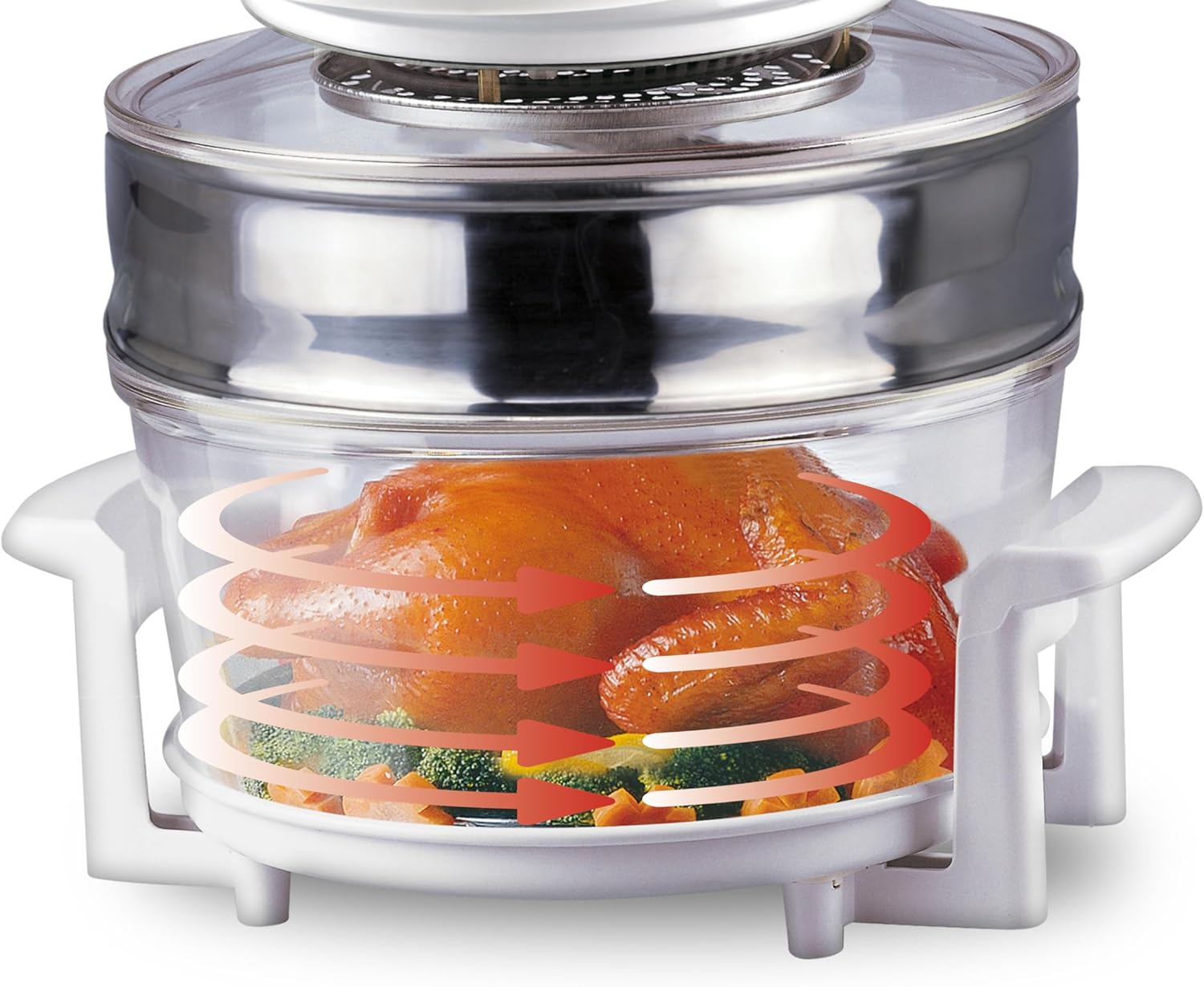
Image 5.1: The convection oven in action, illustrating the hot air circulation for even cooking of a whole chicken.
6. 清掃とメンテナンス
Regular cleaning ensures the longevity and hygienic operation of your BEPER BF.640 Convection Oven.
6.1. セルフクリーニング機能
The oven is equipped with a special self-cleaning system:
- Remove any large food residues from the glass bowl.
- Pour approximately 15 cm of cold water into the glass bowl, adding a small amount of detergent.
- Place the lid on the glass bowl and set the thermostat to the "Defrost/Wash" position.
- Set the timer for 10-15 minutes. The oven will heat the water and circulate it, helping to loosen grime.
- After the cycle, unplug the oven and allow it to cool completely. Carefully empty the water and wipe the interior with a sponge or cloth.
6.2.一般的なクリーニング
- クリーニングの前に、必ずアプライアンスのプラグを抜き、完全に冷ましてください。
- The glass bowl, racks, and other accessories can be washed by hand in warm, soapy water or in a dishwasher.
- Wipe the exterior of the main unit (lid) with a damp cloth. Do not use abrasive cleaners or immerse the lid in water.
- Ensure all parts are thoroughly dry before reassembling or storing the oven.
7。 トラブルシューティング
If you encounter any issues with your BEPER BF.640 Convection Oven, please refer to the following common problems and solutions:
| 問題 | 考えられる原因 | 解決 |
|---|---|---|
| オーブンの電源が入らない。 | 1.電源コードが差し込まれていません。 2. Timer not set. 3. Lid handle not fully lowered. | 1. 電源コードが正常に動作しているコンセントにしっかりと差し込まれていることを確認します。 2. Turn the timer dial to the desired cooking time. 3. Ensure the lid handle is fully pressed down to activate the safety switch. |
| 食べ物が均一に調理されていません。 | 1. Food overcrowded. 2. Incorrect rack position. 3. Temperature too low/high. | 1. Avoid overcrowding the oven; cook in smaller batches if necessary. 2. Use the appropriate rack for the food type and desired cooking method. 3. Adjust temperature as needed. Convection ovens often cook faster than conventional ovens. |
| 初めて使用したときに煙が出たり、異臭がしたりします。 | 製造残留物の焼却。 | This is normal for the first use. Ensure good ventilation. If it persists after initial burn-off, contact customer service. |
| Lid is difficult to remove after cooking. | Vacuum seal created by heat. | Allow the oven to cool slightly, or gently rock the lid to break the seal. Always use caution and oven mitts. |
If the problem persists after trying these solutions, please contact BEPER customer service for further assistance.
8. 仕様
Technical details for the BEPER BF.640 Multifunction Convection Oven:
| 特徴 | 仕様 |
|---|---|
| モデル番号 | BF.640 |
| ブランド | ビーパー |
| 力 | 1400ワット |
| 容量 | 12 Liters (expandable to 18 Liters with extension ring) |
| 温度範囲 | 最高250℃ |
| タイマー | 自動電源オフで最大60分 |
| 寸法(長さ×幅×高さ) | 33 x 43 x 31.5 cm |
| 重さ | 5キログラム |
| 材料 | ABS/Glass |
| コントロールタイプ | Button Control (Dials) |
| 特集 | Glass bowl with 18L total capacity (with extension ring) |

画像8.1: 次元 view of the BEPER BF.640 Convection Oven.
9. 保証とサポート
Your BEPER BF.640 Multifunction Convection Oven is covered by a manufacturer's warranty. Please refer to the warranty card included with your purchase for specific terms and conditions. For technical support, spare parts, or any inquiries regarding your product, please contact BEPER customer service through their official website or the retailer where you purchased the appliance.