
1. はじめにview
This manual provides detailed instructions for the installation, operation, and maintenance of your Dasaita 10.2-inch Android 10.0 Car Stereo Receiver, Model 25-CP. This unit is specifically designed for Nissan X-Trail and Qashqai J11 models manufactured between 2014 and 2018, replacing the original car radio with a 7-inch screen. It integrates advanced features such as Carplay, Android Auto, Bluetooth, GPS, WiFi, FM/AM radio, steering wheel control, DSP, and support for 360-degree cameras.
Please read this manual thoroughly before installation and use to ensure proper function and to maximize your driving experience.
2. セットアップとインストール
2.1. 互換性チェック
Ensure your vehicle's AC part matches the compatible models. This unit is designed for Nissan X-Trail Qashqai J11 (2014-2018) with an original 7-inch screen. If your vehicle has a 4.3-inch screen or no screen, or if it is a 2019-2020 model, a different unit may be required.
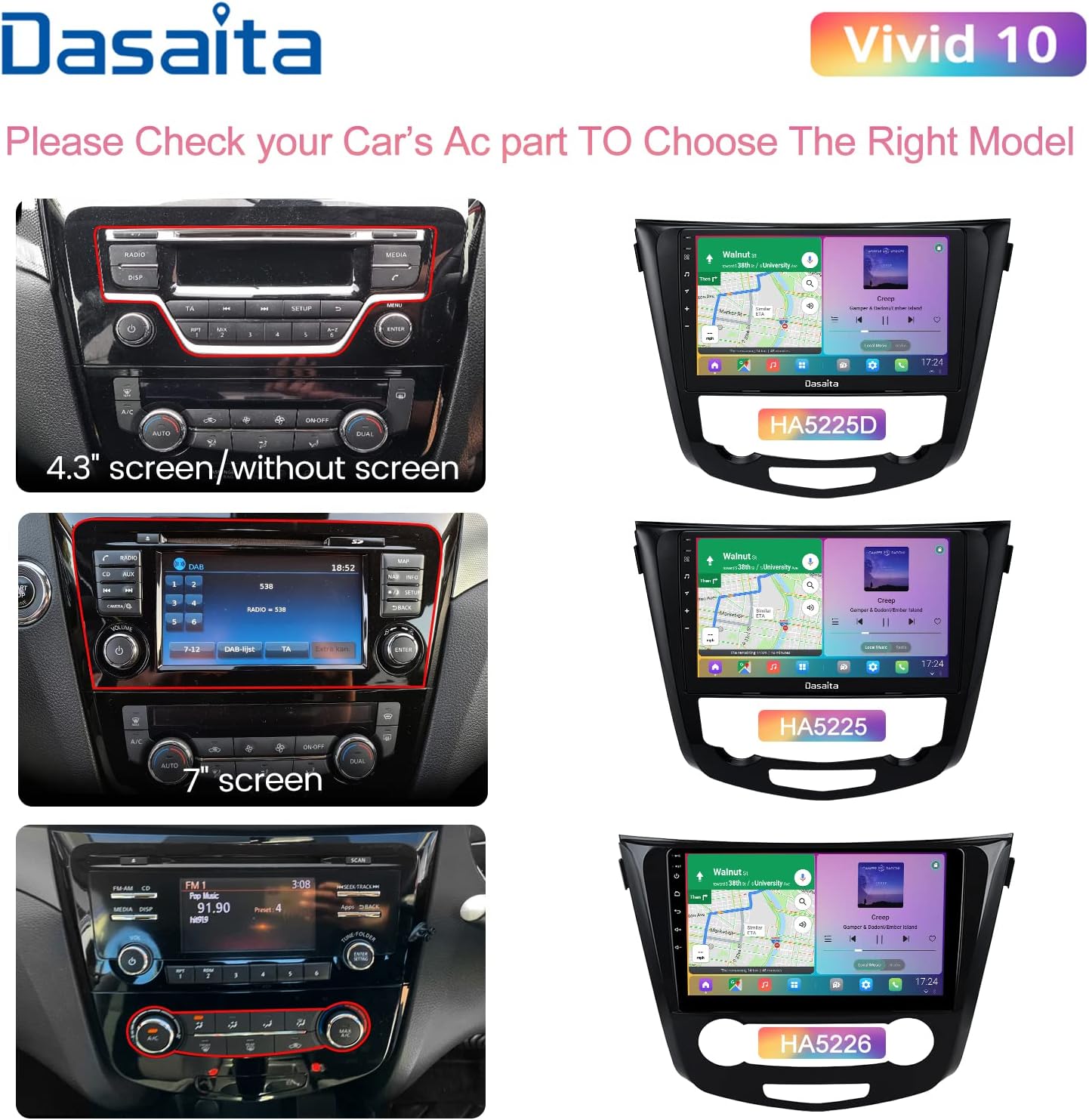
Figure 1: Vehicle AC Part Compatibility Guide
2.2. パッケージ内容
Before installation, verify that all components are present in the box:
- ヘッドユニット
- オーディオ出力ケーブル
- AUX In & Camera In Cables
- Single USB Cable
- デュアルUSBケーブル
- GPSアンテナ
- マイクロフォン
- WiFiアンテナ
- 電源ケーブル
- CANbusデコーダー
- USBアダプタ

Figure 2: Contents of the Product Box
2.3。 外形寸法
The head unit has a 10.2-inch display. Refer to the dimension diagram for precise measurements to ensure fitment in your vehicle's dashboard.
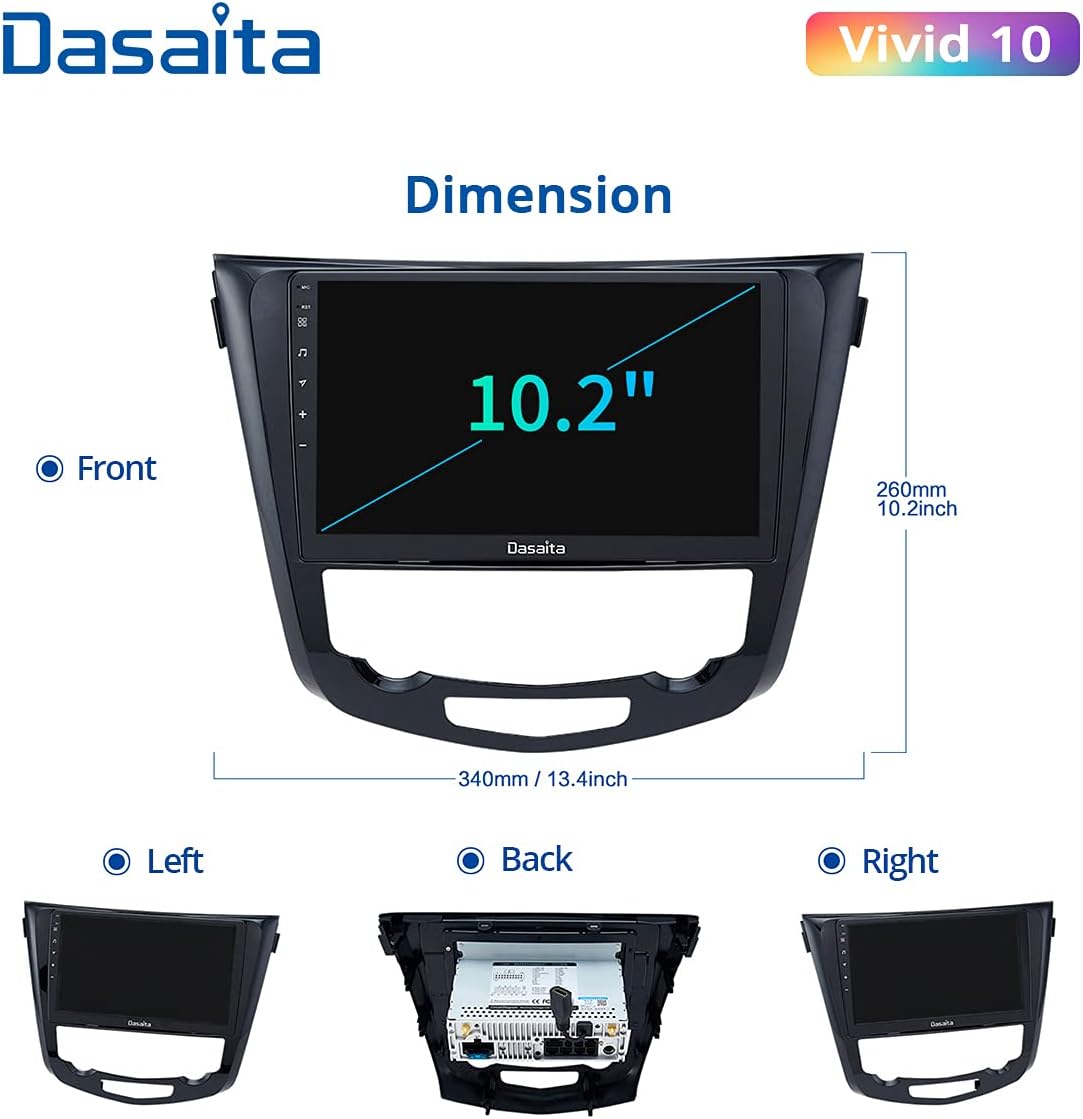
図3: ヘッドユニットの寸法
2.4. インストールプロセス
Installation typically involves removing the original car stereo and connecting the new Dasaita unit using the provided wiring harnesses. Most connections are plug-and-play. It is recommended to consult vehicle-specific installation guides or professional assistance if you are unfamiliar with car audio installations. Online video tutorials can also provide visual guidance.

Figure 4: Appearance After Installation
3. 操作手順
3.1.基本機能
- 電源オン/オフ: ユニットの電源ボタンを長押しするか、車両のイグニッションを使用します。
- 音量コントロール: 物理的なノブ/ボタンまたは画面上のコントロールを使用して調整します。
- タッチスクリーンインターフェイス: Navigate through menus and applications by tapping and swiping on the 10.2-inch HD capacitive touchscreen.
3.2. CarPlayとAndroid Auto
The unit supports both wired and wireless Apple CarPlay and wired Android Auto. Connect your compatible smartphone via USB for wired connection or enable Bluetooth and Wi-Fi for wireless CarPlay.
- 有線接続: Connect your smartphone to the unit's USB port using a high-quality USB cable. The Z-Link app will launch automatically.
- ワイヤレスカープレイ: Ensure Bluetooth is enabled on your iPhone and the head unit. Connect to the head unit's Wi-Fi hotspot. The Z-Link app will then facilitate the wireless connection.
This feature allows you to access navigation (Google Maps, Waze), music, calls, and messages directly from your car stereo display, enhancing focus on the road.

図5: CarPlayとAndroid Autoのインターフェース
3.3. Bluetooth接続
Bluetooth 経由でスマートフォンをペアリングすると、ハンズフリー通話やオーディオ ストリーミングが可能になります。
- ハンズフリー通話: Make and receive calls directly from the head unit. The built-in and external microphones ensure clear communication.
- Bluetooth音楽: 携帯電話から車のスピーカーにオーディオをストリーミングします。

Figure 6: Hands-Free Calling Interface
3.4. GPSナビゲーション
The unit supports various navigation applications like Google Maps and Waze. Download your preferred navigation app from the Google Play Store.
3.5. ラジオ(FM/AM)
Access FM and AM radio stations. The integrated RDS receiver provides station information where available.
3.6. Digital Sound Processor (DSP) and Equalizer
Utilize the integrated DSP and 15-band equalizer to customize your audio experience. Adjust sound settings for various music genres (Pop, Rock, Jazz, Classical, Flat, User, Voice) to match your preferences.
3.7. Google Play Store and Apps
As an Android-based unit, you can download and install a wide range of applications from the Google Play Store, including streaming services, social media, and utility apps.

図7: Google Playストアへのアクセス
3.8. ステアリングホイールコントロール
このユニットはオリジナルのステアリングホイールコントロールをサポートしており、ハンドルから手を離さずにオーディオ、通話、その他の機能を管理できます。
4. メンテナンス
4.1. 画面のクリーニング
柔らかく糸くずの出ない布でタッチスクリーンを優しく拭いてください。頑固な汚れには、軽くamp布を水または画面に安全なクリーナーで拭いてください。研磨剤や刺激の強い化学薬品の使用は避けてください。
4.2. ソフトウェアの更新
Periodically check for software updates to ensure optimal performance and access to new features. Updates can typically be performed via Wi-Fi connection through the unit's system settings.
5。 トラブルシューティング
5.1. よくある問題と解決策
- ユニットの電源が入らない: すべての電源接続を確認してください。車両のイグニッションがオンになっていることを確認してください。ヒューズを確認してください。
- 音が出ない: Check speaker connections. Verify volume levels and DSP settings. Ensure the correct audio source is selected.
- CarPlay/Android Autoが接続されない:
- For wired connection, try a different, high-quality USB cable.
- For wireless CarPlay, ensure Bluetooth and Wi-Fi are active on both the phone and the head unit. Confirm the phone is connected to the head unit's Wi-Fi hotspot.
- Restart both the phone and the head unit.
- GPS信号損失: GPSアンテナが正しく取り付けられ、クリアな視界があることを確認してください。 view 空の。
- Hotspot connection issues (iPhone): If experiencing difficulty connecting to an iPhone hotspot, try changing the hotspot password to a numeric one and manually adding the network on the Dasaita unit. This can sometimes resolve issues related to WPA3 encryption.
- ステアリングホイールのコントロールが機能しない: Verify the Canbus decoder is correctly connected and configured in the unit's settings.
5.2. 工場出荷時設定にリセット
If persistent issues occur, a factory reset may resolve them. Be aware that a factory reset will erase all user data and settings. Consult the unit's system settings for the factory reset option.
6. 仕様
| 特徴 | 仕様 |
|---|---|
| モデル番号 | 25-CP |
| オペレーティング·システム | Android 10.0 PIE |
| プロセッサ | Rockchip PX6 64-bit Quad-core 1.4GHz + Dual-core 1.8GHz |
| ラム | 4GB DDR3 |
| ロム | 64ギガバイト |
| 画面サイズ | 10.2インチ |
| スクリーンタイプ | IPS静電容量式タッチスクリーン |
| 解決 | 1280 x 720 (HD) |
| オーディオ出力 | 4 x 50W Max (TDA 7850 Sound Chip) |
| オーディオチャンネル | 4.1 Surround Sound Configuration |
| 接続性 | Auxiliary, Bluetooth, Wi-Fi, 3G/4G Network Support |
| 特集 | DAB, 15-band Equalizer (DSP), RDS Radio, Mirror Link, Steering Wheel Control, JBL Amplifier Support, Front Camera Support, 360 Camera Support |
| USBポート | 3 |
| HDMI出力 | 1 |
| サブウーファー出力 | 1RCA |
| 対応デバイス | スマートフォン |
| Supported Video Encoding | H.264、H.265/HEVC |
7. 保証とサポート
Specific warranty information for the Dasaita Car Stereo Receiver Model 25-CP is not provided in the product details. For warranty claims, technical support, or further assistance, please contact Dasaita customer service directly or refer to the documentation included with your purchase.