
導入
This manual provides instructions for the Calvas Universal Remote Control, designed for use with various Fujitsu air conditioner models, including AR-BB1, AR-BB2, AR-DB4, AR-DB3, AR-DB7, and AR-BB9. This remote control offers direct replacement functionality without requiring complex programming. Each unit is tested for perfect functionality before delivery. The package contains one remote control; batteries are not included. Key features include infrared wireless communication, a single channel, and a 433 MHz frequency.
設定
1. バッテリーの取り付け
リモコンには単4電池2本(別売)が必要です。電池の取り付けは以下の手順に従ってください。
- リモコンの背面にある電池コンパートメントカバーを開きます。
- 単 4 電池 2 本を挿入し、プラス (+) とマイナス (-) の端子が電池室内のインジケータと一致していることを確認します。
- 電池カバーをしっかりと閉じてください。
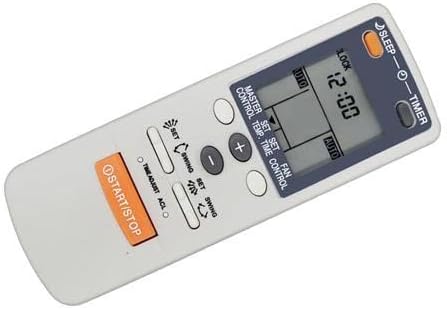
An angled perspective of the remote control, illustrating its compact and user-friendly design. This view provides a good sense of the remote's physical form and where the battery compartment is typically located on the back.
2.初期使用
Once batteries are installed, the remote is ready for use. Point the remote directly at your Fujitsu air conditioner unit. No programming is typically required for compatible models.
操作手順
ボタンとその機能について理解しておきましょう。
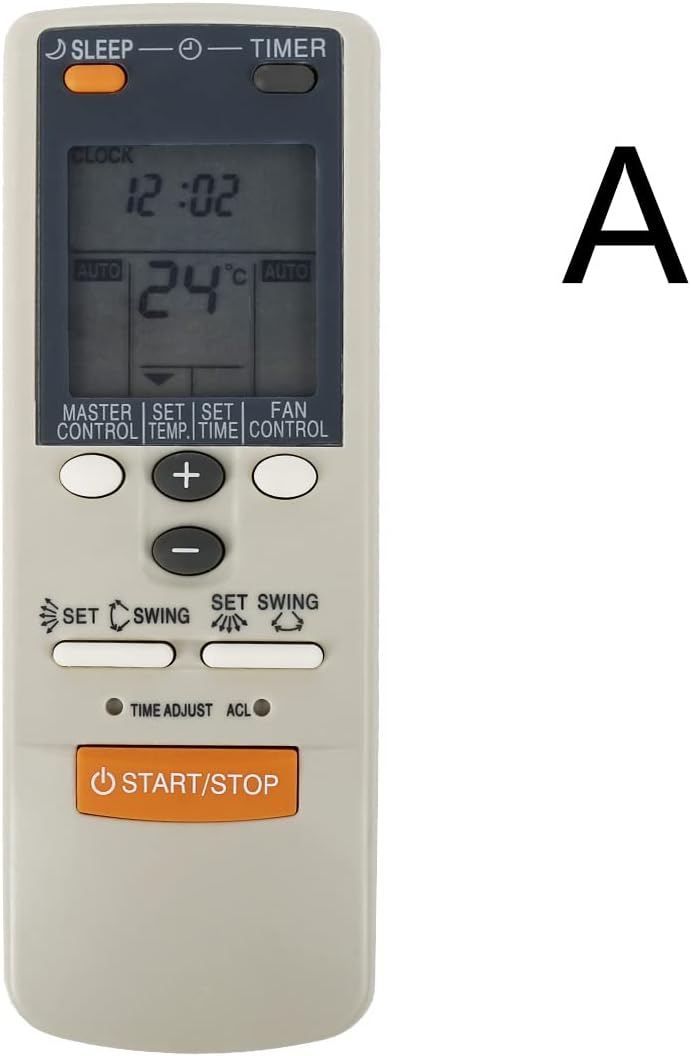
This image displays the front of the remote control, highlighting the LCD screen and the arrangement of its primary function buttons, including START/STOP, temperature controls, mode, fan, and swing settings.
- 起動停止: 押すとエアコンユニットの電源をオンまたはオフにします。
- 温度ボタン(+/-): これらのボタンを使用して、希望する温度設定を上げたり下げたりします。
- MASTER CONTROL (Mode): Cycles through operating modes such as Auto, Cool, Dry, Fan, and Heat (if supported by your AC unit).
- FAN CONTROL (Fan Speed): ファン速度を調整します (例: 自動、低、中、高)。
- SWING (Airflow Direction): Activates or deactivates the automatic swing function for vertical airflow. Some models may have a separate button for horizontal swing.
- タイマー: Used to set the ON/OFF timer for the air conditioner. Refer to your AC unit's manual for specific timer programming details.
- 寝る: スリープ モードを有効にします。このモードでは通常、快適な睡眠と省エネのために温度とファン速度が調整されます。
- ロック: (If present) Locks the remote control buttons to prevent accidental changes.
- クロック: (If present) Used to set the current time on the remote's display.
- セット: (Often used in conjunction with TIMER or CLOCK) Confirms a setting.
- 時間調整: (If present) Adjusts time settings.
- ACL: (If present) A small reset button, often requiring a pointed object to press, used to reset the remote to factory defaults.
メンテナンス
バッテリー交換
リモコンの届く範囲が狭くなったり、ディスプレイが暗くなったりした場合は、電池を交換してください。必ず2本の電池を同時に新しい単4電池に交換してください。古い電池と新しい電池、または異なる種類の電池を混ぜて使用しないでください。
クリーニング
Wipe the remote control with a soft, dry cloth. Do not use liquid cleaners, abrasive pads, or chemical solvents, as these can damage the remote's surface or internal components.
ストレージ
リモコンを長期間使用しない場合は、液漏れや損傷を防ぐため、電池を取り外してください。リモコンは直射日光や極端な温度を避け、涼しく乾燥した場所に保管してください。
トラブルシューティング
- リモコンが応答しない:
- 電池が正しく取り付けられ、十分に充電されていることを確認してください。必要に応じて交換してください。
- リモコンとエアコンの受信機の間に障害物がないことを確認してください。
- Point the remote directly at the air conditioner unit.
- 動作範囲の制限:
- 電池を新しいものと交換してください。
- Ensure no strong light sources (e.g., direct sunlight, fluorescent lights) are interfering with the infrared signal.
- エアコンが期待通りの機能を発揮しない:
- ご使用のエアコン モデルがこのリモコンと互換性があるかどうかを確認してください。
- Consult your air conditioner's original manual for specific functions and settings.
仕様
| ブランド | ハゲスポット |
| 対応機種 | Fujitsu AR-BB1, AR-BB2, AR-DB4, AR-DB3, AR-DB7, AR-BB9 |
| 無線通信 | 赤外線(IR) |
| 頻度 | 433 MHz |
| チャネル | 1 |
| 最大範囲 | 10メートル |
| ボタンの数 | 9 (primary functions) |
| 電源 | 2 x AAA電池(別売) |
保証
This Calvas remote control comes with a 3-month warranty from the date of purchase. This warranty covers manufacturing defects under normal use. It does not cover damage resulting from misuse, accident, unauthorized modification, or battery leakage. Please retain your proof of purchase for warranty claims. Batteries are not covered under warranty.
サポート
For technical assistance, troubleshooting beyond this manual, or warranty inquiries, please contact your product retailer. You may also visit the official Calvas support website for additional resources, if available. When contacting support, please have your product model information and proof of purchase ready.