
1. はじめに
The ELEPHAS BL128 Mini Projector is a compact and versatile device designed for home entertainment, gaming, and portable presentations. Featuring advanced projection technology, it delivers a high-quality visual and audio experience in a small, lightweight package.
This manual provides detailed instructions for setting up, operating, and maintaining your projector to ensure optimal performance and longevity.
2. パッケージ内容
以下の項目のボックスにチェックを入れてください。
- ELEPHAS BL128 Mini Projector x1
- リモコンx1
- レンズキャップ×1
- AC電源ケーブルx1
- HDMIケーブルx1
- 3-in-1 AVケーブル×1
- ユーザーマニュアル(日本語)x1
- 三脚x1
- Dedicated Carry Bag x1

Image: All items included in the ELEPHAS BL128 Mini Projector package.
3 製品の特徴
- 超コンパクト&軽量設計: Measuring 15.4 x 12 x 6 cm and weighing only 420g, this projector is highly portable, offering a home theater experience in a palm-sized device.
- High-Quality 1080P Native Resolution: Equipped with German LED projection technology and the latest LCD display, it delivers native 1080P resolution with an 8000:1 contrast ratio and 24-bit color support for vivid, detailed images.
- Large Screen Projection & Zoom Function: Project images from 30 to 200 inches. The 50% to 100% zoom function allows for flexible screen size adjustment. Ceiling projection is also supported.
- Built-in HIFI Stereo Speaker: Enjoy immersive audio with the integrated HIFI stereo speaker, providing a surround sound effect for movies, games, and videos.
- 幅広い互換性: Features HDMI, USB, AV, and 3.5mm ports for connection to various devices including Fire Stick TV, Chromecast, PCs, laptops, external speakers, TV Boxes, DVD players, PS3, PS4, and USB memory.
- 高度な冷却システム: An upgraded cooling system with an innovative fan ensures low noise operation and excellent quietness, allowing for focused viewing。

Image: Internal components illustrating the advanced lens and display technology.
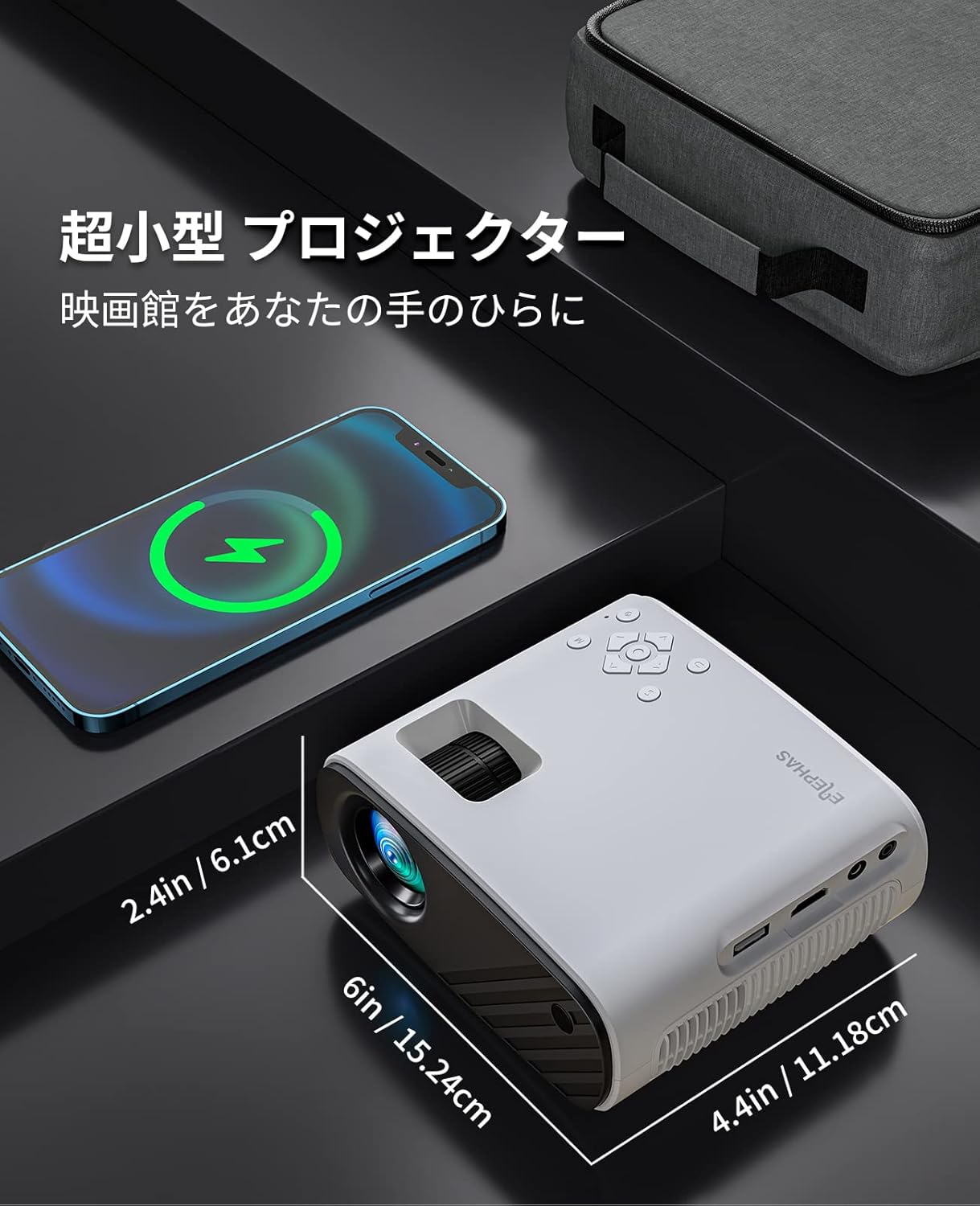
Image: The compact size of the ELEPHAS BL128 Mini Projector compared to a smartphone.

Image: Illustration of the projector's efficient heat dissipation system.
4. セットアップ
- プロジェクターを開梱します。 パッケージからすべてのコンポーネントを慎重に取り出します。
- 電源接続: Connect the AC power cable to the projector and then to a power outlet.
- 配置:
- プロジェクターを安定した平らな面に設置します。
- For ceiling projection, use the included tripod or a compatible ceiling mount.
- Ensure the projector lens is facing the desired projection surface (wall or screen).
- 電源オン: プロジェクターまたはリモコンの電源ボタンを押して電源を入れます。
- フォーカス調整: 画像が鮮明になるまでプロジェクター レンズのフォーカス リングを回転させます。
- キーストーン補正: Adjust the keystone setting (if available, typically in the menu) to correct any trapezoidal distortion of the image.

Image: Projector setup in a living room demonstrating large screen projection.

Image: Visual representation of the projector's 50-100% zoom function.
5. 操作手順
- 電源オン/オフ: プロジェクターまたはリモコンの電源ボタンを押します。
- 入力ソースの選択: Use the 'Source' button on the remote or projector to cycle through available input options (HDMI, USB, AV).
- メニューナビゲーション: Use the arrow keys and 'OK' button on the remote or projector to navigate the on-screen menu for settings adjustments.
- 音量コントロール: Adjust the volume using the '+' and '-' buttons on the remote or projector.
- ズーム機能: Access the zoom function through the projector's menu to adjust the screen size from 50% to 100% without moving the projector.
Video: A demonstration of the KITELY M8 projector, showcasing its features and operation. This video is relevant for understanding general projector functionality.
Video: A product display for the HY300Ultra projector, illustrating its design and projection capabilities. This video provides a visual overview of a similar projector type.
Video: An actual product display video for the HY300 Pro+ projector, showing its physical aspects and projection quality. This video helps visualize the projector in use.
6. 接続性
The ELEPHAS BL128 Mini Projector offers multiple connectivity options to suit various devices:
- HDMIポート: Connect to laptops, PCs, game consoles (PS3, PS4), streaming devices (Fire Stick TV, Chromecast), and TV Boxes using the included HDMI cable.
- USBポート: メディアを再生するにはUSBメモリを挿入します file直接。
- AVポート: Use the 3-in-1 AV cable to connect to older devices like DVD players.
- 3.5mmオーディオジャック: 外部スピーカーまたはヘッドフォンを接続してオーディオを強化します。
- Wireless Connectivity (Screen Mirroring): The projector supports screen mirroring via Miracast (Android) and AirPlay (iOS) for smartphones and tablets. Navigate to the 'My Apps' section and select the appropriate screen mirroring option.
注記:
- Due to HDCP copyright protection, direct playback of content from Netflix, Amazon Prime, and Hulu is not supported. Please connect a Fire TV Stick or similar streaming device to the HDMI port for viewing these services.
- For iOS/Android smartphone connection, an HDMI adapter (Lightning to HDMI or Micro USB/Type-C to HDMI) may be required and is sold separately.

画像: 上view of the projector's connectivity ports and compatible devices.

Image: Demonstrating compatibility with Fire TV Stick for streaming services.
Video: A guide on how to connect a projector to a PC, useful for beginners. This video demonstrates the connection process for external devices.
7. メンテナンス
- レンズクリーニング: 柔らかく糸くずの出ない布またはレンズクリーニングペーパーを使用して、プロジェクターレンズを優しく拭いてください。研磨剤入りのクリーナーの使用や過度の力で拭かないでください。
- ダストフィルターのクリーニング: Regularly check and clean the dust filter (if accessible) to prevent overheating and maintain optimal performance. Refer to the Japanese user manual for specific instructions on filter access.
- ストレージ: When not in use, store the projector in a cool, dry place, preferably in its dedicated carry bag, to protect it from dust and damage.
8。 トラブルシューティング
| 問題 | 考えられる原因 | 解決 |
|---|---|---|
| 画像が投影されない |
|
|
| 画像がぼやけている |
|
|
| 音が出ない |
|
|
| リモコンが動作しない |
|
|
9. 仕様
| 特徴 | 詳細 |
|---|---|
| ブランド | エレファス |
| モデル番号 | BL128 |
| 表示タイプ | 液晶 |
| ネイティブ解像度 | 1920 x 1080 (1080P フルHD) |
| コントラスト比 | 8000:1 |
| 投影サイズ | 30~200インチ |
| 推奨投影距離 | 0.8~2.2メートル |
| ズーム機能 | 50% - 100% |
| 接続技術 | HDMI, USB, AV, 3.5mm Audio Jack, Wireless (Screen Mirroring) |
| HDMIポート | 1 |
| USBポート | 1 |
| 内蔵スピーカー | Yes (HIFI Stereo) |
| 製品寸法(長さ x 幅 x 高さ) | 15.4 x 12 x 6 cm |
| 製品重量 | 0.42キログラム |
| リフレッシュレート | 60Hz |
| 電源 | AC電源コード |
10. 保証とサポート
The ELEPHAS BL128 Mini Projector comes with a 2年間保証 購入日より。
During the warranty period, ELEPHAS provides dedicated customer service and technical support. In the event of repair difficulties, we offer a free exchange or refund.
For any inquiries, technical assistance, or warranty claims, please contact our customer support team through the following channels:
- メールアドレス: support@elephas.com (元ample)
- Webサイト: www.elephas.com/support (元ample)
Please have your product model number (BL128) and purchase date ready when contacting support.