
1. はじめに
This manual provides detailed instructions for the setup, operation, and maintenance of your Natec TURBOT Wireless Keyboard with Touchpad (model NKL-0968). This device is designed to enhance your experience with Smart TVs, cellphones, and other compatible devices, offering convenient wireless control via 2.4 GHz technology.
適切な機能を確保し、損傷を防ぐために、製品を使用する前にこのマニュアルをよくお読みください。
2. パッケージ内容
パッケージにすべてのアイテムが揃っていることを確認します。
- Natec TURBOT Wireless Keyboard with Touchpad
- USB 2.4 GHz レシーバー
- ユーザーマニュアル(このドキュメント)
- (Note: 2 AAA batteries are required and may not be included)
3.セットアップガイド
3.1. バッテリーの取り付け
The Natec TURBOT keyboard requires two (2) AAA batteries for operation. Locate the battery compartment on the underside of the keyboard. Open the cover, insert the batteries according to the polarity markings (+/-), and close the cover securely.
3.2. USBレシーバーの接続
The USB 2.4 GHz receiver is typically stored in a dedicated compartment on the keyboard itself for safekeeping. Carefully remove the receiver from its storage slot.

Figure 1: USB receiver stored in the keyboard compartment.
Insert the USB receiver into an available USB port on your Smart TV, computer, or other compatible device. The device should automatically detect and install the necessary drivers.
3.3. キーボードの電源を入れる
Locate the power switch on the side of the keyboard. Slide the switch to the "ON" position. The keyboard should now be ready for use.
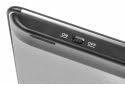
Figure 2: Power switch on the keyboard.
4. 操作手順
4.1. キーボードの機能

Figure 3: Natec TURBOT Wireless Keyboard Layout.
The keyboard features a standard QWERTY layout for typing. It also includes dedicated function keys (F1-F12) which may have secondary multimedia functions (e.g., volume control, media playback). These secondary functions are often accessed by holding down the Fn キーを押し、対応するファンクション キーを押します。
- キャップスロック: Toggles uppercase/lowercase letters.
- シフト: Used for uppercase letters and secondary symbols.
- Ctrl / Alt / Win: Standard modifier keys for various shortcuts depending on the operating system.
- バックライト: The keyboard features a backlight for improved visibility in low-light conditions. Refer to your device's operating system or the keyboard's specific function key combinations (often involving the Fn key) to activate or adjust the backlight.
4.2. タッチパッドの機能
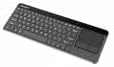
Figure 4: Integrated Touchpad.
The integrated touchpad allows for mouse-like navigation. It supports various gestures:
- シングルフィンガータップ: Functions as a left-click.
- XNUMX本指タップ: Functions as a right-click.
- 2本指スクロール: Drag two fingers up or down to scroll through content.
- 物理ボタン: Below the touchpad, there are two physical buttons. The left button acts as a left-click, and the right button acts as a right-click.
Touchpad sensitivity and other settings may be adjustable through your connected device's operating system settings.
5. メンテナンス
- クリーニング: Use a soft, dry cloth to clean the keyboard and touchpad. For stubborn dirt, a slightly damp cloth with mild cleaning solution can be used, ensuring no liquid enters the device.
- バッテリー交換: Replace batteries when the keyboard's performance degrades or it stops responding. Always use fresh AAA batteries.
- ストレージ: When not in use for extended periods, turn off the keyboard to conserve battery life. Store the USB receiver in its designated compartment to prevent loss.
- 極端な状況を避ける: Do not expose the keyboard to extreme temperatures, direct sunlight, or high humidity.
6。 トラブルシューティング
6.1. キーボードが反応しない
- キーボードの電源がオンになっていることを確認してください。
- 電池が正しく取り付けられ、十分に充電されていることを確認してください。必要に応じて交換してください。
- Verify that the USB receiver is securely plugged into a working USB port on your device.
- USB レシーバーを別の USB ポートに接続してみてください。
- Restart your connected device (Smart TV, computer, etc.).
6.2. タッチパッドが動作しない
- キーボードの電源がオンになっていて接続されていることを確認します。
- Clean the touchpad surface to remove any dirt or obstructions.
- Check your device's settings for any touchpad-related configurations.
6.3. 断続的な接続
- Ensure there are no large metallic objects or other 2.4 GHz wireless devices causing interference between the keyboard and the USB receiver.
- キーボードを USB レシーバーに近づけます。
7. 仕様
| ブランド | Natec |
| モデル番号 | NKL-0968 |
| 接続技術 | 2.4GHzワイヤレス |
| 対応デバイス | Smart TV, Cellphone |
| オペレーティングシステムの互換性 | Android 10.0 (and compatible systems) |
| 特集 | Integrated Touchpad, Backlit Keys |
| キーボードの説明 | マルチメディア |
| 色 | ブラック/シルバー |
| 材料 | アクリロニトリルブタジエンスチレン(ABS) |
| 電源 | 単2電池XNUMX本 |
8. 保証とサポート
For warranty information, technical support, or further assistance, please refer to the official Natec web公式サイトをご覧いただくか、カスタマーサービス部門にお問い合わせください。保証請求のために購入時のレシートを保管してください。
Natec does not provide specific information regarding spare parts availability or software updates beyond the initial purchase.