
1. はじめに
Thank you for choosing the Kungfuking Surge Protector Power Strip with USB Ports. This device is designed to provide convenient power access and surge protection for your electronic devices. It features two AC outlets and two USB ports, along with a 6.56 ft extension cord and a flat plug for versatile placement. This manual provides essential information for safe installation, operation, and maintenance of your power strip.

Figure 1: Kungfuking Surge Protector Power Strip (Model: Kungfuking 2AC+2USB)
2. 重要な安全上の注意事項
本製品をご使用になる前に、すべての安全に関する指示をよくお読みになり、理解してください。指示に従わない場合、感電、火災、または重傷を負う可能性があります。
- しないでください exceed the electrical ratings of 120V, 12A, 60Hz, and 2.1A for USB ports.
- しないでください use in wet environments or near water.
- しないでください disassemble or modify the device.
- しないでください use with aquariums or other water-related products.
- しないでください 別の再配置可能な電源タップに接続します。
- しないでください use if the cord or plug is damaged.
- お子様の手の届かない場所に保管してください。
- プラグが壁のコンセントに完全に差し込まれていることを確認してください。
- この製品は屋内専用です。
3 製品の特徴
The Kungfuking Surge Protector Power Strip is designed for convenience and safety, offering multiple power options in a compact form factor.
- 2つのACアウトレット: Provides standard power for electronic devices.
- 2つのUSB-Aポート: Delivers 5V/2.1A for charging smartphones, tablets, and other USB-powered devices.
- 6.56フィート延長コード: Offers flexibility in placement, reaching distant outlets.
- フラットプラグ設計: Minimizes obstruction and allows furniture to be placed closer to the wall.
- サージ保護: 接続されたデバイスを電力サージやスパイクから保護します。
- 耐久性のある構造: Built with fireproof ABS+PC materials for enhanced safety.
- 取り付け可能なデザイン: Can be easily mounted on or under desks, walls, or other surfaces.

図2: 主な機能と仕様

Figure 3: All-in-One Charging Station in use
4. セットアップとインストール
The power strip can be installed in various locations to suit your needs. Mounting screws are included for secure installation.
4.1取り付けオプション
The power strip offers flexible mounting options:
- Under Desk/Table: Mount horizontally or vertically under a desk or table to keep surfaces clear.
- ウォールマウント: Secure to a wall for convenient access, such as near a TV or bedside.
- Side of Cabinets/Headboards: Install vertically on the side of furniture for discreet power access.

Figure 4: Installation Options and Dimensions
4.2 インストール手順
- 場所を選択: Select a flat, stable surface for mounting, ensuring it is within reach of a wall outlet and your devices.
- ネジ穴をマークする: Place the power strip in the desired position and mark the locations for the mounting screws using a pencil.
- 下穴を開ける(オプション): For wood surfaces, you may pre-drill small pilot holes to prevent wood splitting.
- Secure the Power Strip: Use the provided screws to firmly attach the power strip to the surface. Ensure it is securely fastened before use.
- 電源に接続: Plug the power strip's flat plug into a standard 120V wall outlet. The flat plug design allows for placement behind furniture.
4.3例ampleインストール
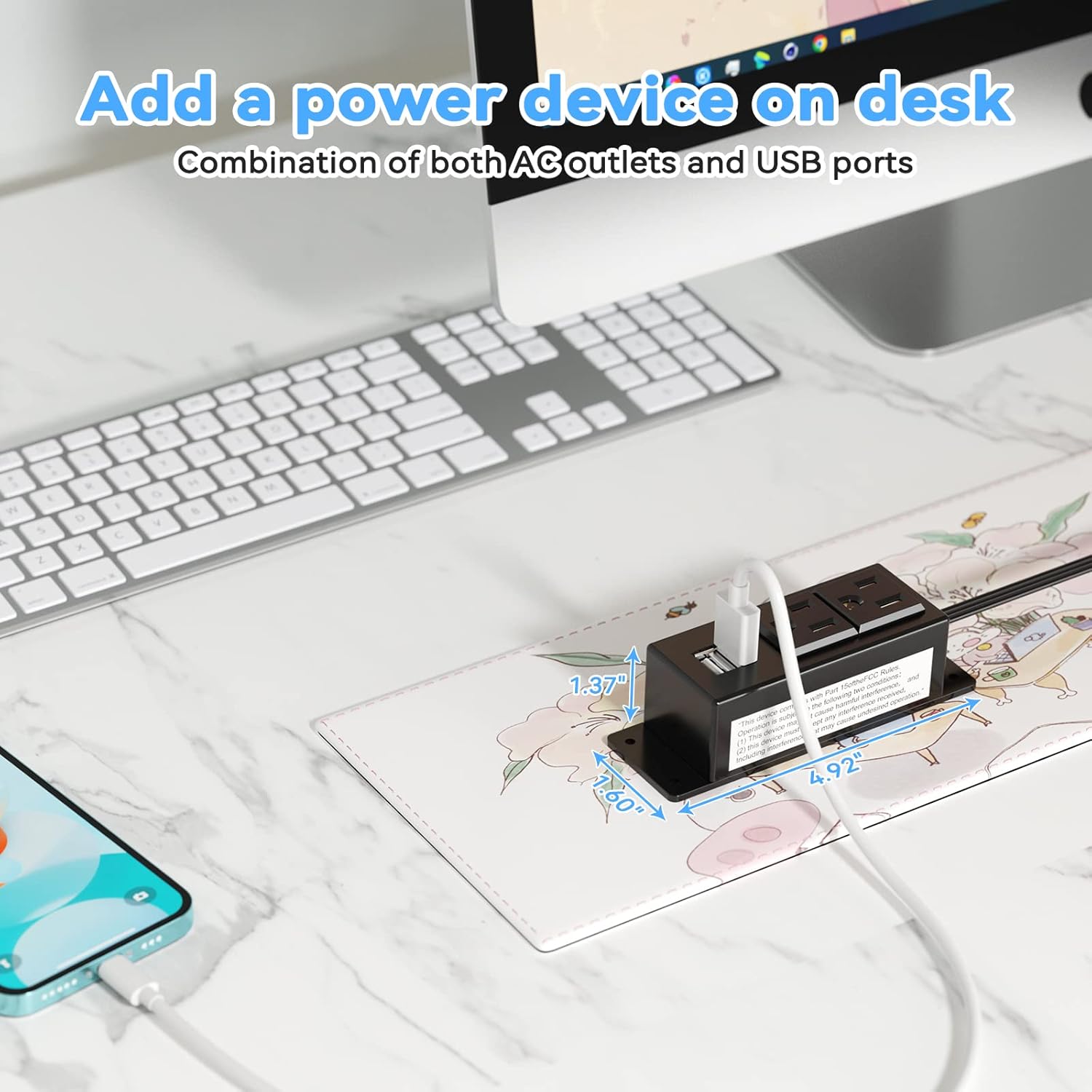
Figure 5: Desk Surface Installation

Figure 6: Under-Desk Installation

Figure 7: Wall-Mounted for TV

Figure 8: Nightstand Installation

Figure 9: Kitchen Cabinet Installation

Figure 10: Flat Plug for Space-Saving Placement
5. 操作手順
Using your Kungfuking Surge Protector Power Strip is straightforward:
- 壁のコンセントに差し込みます: Ensure the power strip's flat plug is securely connected to a grounded 120V AC wall outlet.
- AC デバイスを接続する: Insert the power cords of your electronic devices into the two AC outlets.
- USBデバイスを接続する: Plug your USB charging cables into the two USB-A ports to charge compatible devices.
- 電源オン: The power strip is designed for continuous operation once plugged in. There is no on/off switch.
- 使用状況の監視: Avoid overloading the power strip by ensuring the total power consumption of connected devices does not exceed the rated capacity (12A, 120V).
6。 トラブルシューティング
If you encounter issues with your power strip, refer to the following common problems and solutions:
| 問題 | 考えられる原因 | 解決 |
|---|---|---|
| ACコンセントまたはUSBポートから電源が供給されません。 |
|
|
| USB デバイスが充電されません。 |
|
|
| 電源タップが熱く感じます。 |
|
|
7. 仕様
| 特徴 | 詳細 |
|---|---|
| モデル | Kungfuking 2AC+2USB |
| ACアウトレット | 2 |
| USBポート | 2 (USB-A) |
| 入力ボリュームtage | 120V 交流 |
| AC定格電流 | 12A |
| 頻度 | 60Hz |
| USB出力 | 5V / 2.1A(合計) |
| コードの長さ | 6.56フィート(2メートル) |
| プラグタイプ | フラットプラグ |
| 材料 | 耐火ABS+PC |
| 寸法(約) | 4.92 x 3.74 x 1.37インチ(L x W x H) |
| 重量(約) | 10.5オンス |
| 特集 | Surge Protection, Mountable Design |
8. メンテナンス
適切なメンテナンスを行うことで、電源タップの寿命が長くなり、安全に動作することができます。
- クリーニング: 清掃する前に、電源タップを壁のコンセントから抜いてください。表面は乾いた柔らかい布で拭いてください。液体洗剤やスプレーは使用しないでください。
- 検査: Periodically inspect the power cord, plug, and housing for any signs of damage, such as cuts, fraying, or cracks. If damage is found, discontinue use immediately.
- ストレージ: 長期間使用しない場合は、電源タップを直射日光や湿気を避け、涼しく乾燥した場所に保管してください。
9. 保証とサポート
Kungfuking products are designed for reliability and performance. For warranty information, technical support, or any questions regarding your product, please refer to the contact information provided at the point of purchase or visit the official Kungfuking webサイト。
保証請求のために購入証明書を保管してください。