
導入
This manual provides comprehensive instructions for the setup, operation, and maintenance of your Zerone Universal Remote Control. This remote is designed to function with various Pioneer DVD player models, offering a convenient replacement or secondary control unit.
互換性
The Zerone Universal Remote Control is compatible with the following Pioneer DVD player models:
- パイオニア VXX2811
- パイオニア VXX2914
- パイオニア VXX3218
- パイオニア VXX2801
- パイオニア VXX2800
- パイオニア VXX2913
For optimal performance, ensure your DVD player model is listed above.
設定
1. バッテリーの取り付け
- リモコンの背面にある電池収納部を見つけます。
- バッテリーカバーを下方向にスライドするか、ラッチを押して持ち上げて開きます。
- Insert two (2) AA 1.5V batteries, ensuring the positive (+) and negative (-) terminals align correctly with the markings inside the compartment.
- 電池カバーをカチッと音がするまで元の位置に戻して、しっかりと固定します。
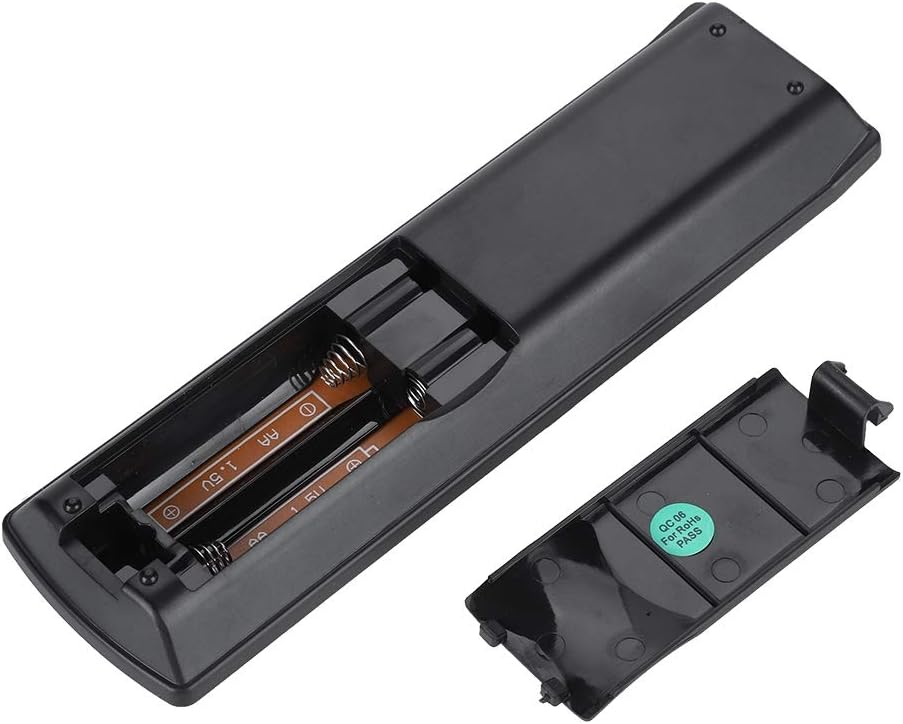
画像: 背面 view of the Zerone remote control, showing the battery compartment cover.

Image: The battery compartment of the remote control with two AA batteries correctly inserted.
No programming or setup is required. Once batteries are installed, the remote is ready for use with compatible Pioneer DVD players.
操作手順
Point the remote control directly at your Pioneer DVD player. The effective control distance is typically over 8 meters (approximately 26 feet), though this may vary based on environmental factors and the specific DVD player model.

画像: 正面 view of the Zerone Universal Remote Control, displaying all buttons and their labels.
主な機能:
- スタンバイ/オン: DVD プレーヤーの電源をオンまたはオフにします。
- 開閉: ディスクトレイを開閉します。
- オーディオ: オーディオ トラックまたは言語を選択します。
- 字幕: 字幕オプションを切り替えたり選択したりします。
- 角度: 変更する viewing angle if supported by the DVD.
- 数字ボタン(0-9): トラックの直接選択または入力。
- クリア: Clears numerical input.
- 入る: 選択を確定します。
- トップメニュー: Accesses the main menu of the DVD.
- メニュー: ディスク メニューにアクセスします。
- ホームメニュー: Navigates to the home menu of the DVD player.
- 戻る: 前の画面またはメニューに戻ります。
- 方向パッド(上、下、左、右)と Enter キー: メニューを移動し、選択を確定します。
- 再生コントロール (再生、一時停止、停止、早送り、巻き戻し、早送り、巻き戻し): 標準的なメディア再生機能。
- プレイモード: 再生モード(繰り返し、シャッフルなど)を選択します。
- 囲む: サラウンドサウンドの設定を調整します。
- ズーム: ビデオを拡大または縮小します。
- 表示: 画面上の表示情報を表示します。

Image: A hand holding the Zerone remote control, demonstrating its ergonomic design and ease of use.

Image: The remote control positioned in front of a television displaying content, illustrating its intended use.

Image: A visual representation of the remote control's effective operating distance, indicating a range of over 8 meters.
メンテナンス
- クリーニング: リモコンは柔らかく乾いた布で拭いてください。液体クリーナーや研磨剤は使用しないでください。
- バッテリー交換: リモコンの反応が鈍くなったり、動作しなくなった場合は、電池を交換してください。必ず2つの電池を同時に新しいものに交換してください。
- ストレージ: リモコンは、直射日光や極端な温度を避け、涼しく乾燥した場所に保管してください。
- ダメージを避ける: Do not drop the remote or expose it to water.
トラブルシューティング
- リモコンが応答しない:
- 電池が正しい極性で正しく取り付けられていることを確認してください。
- 古い電池を新しい単三電池と交換してください。
- Check for any obstructions between the remote control and the DVD player's infrared sensor.
- Ensure you are within the effective operating range (typically within 8 meters).
- 特定の機能が動作しません:
- Verify that your Pioneer DVD player model is listed in the compatibility section.
- Some advanced functions may be specific to the original remote or not supported by all DVD player models.
仕様
| シェル素材 | High-grade ABS |
| 制御距離 | > 8 meters (316 inches) |
| 電池のタイプ | 2 x AA 1.5V Batteries (Not included) |
| 寸法 | 約174 x 49 x 20 mm(6.85 x 1.93 x 0.79インチ) |
| 重さ | 約75g(2.46オンス) |
| モデル番号 | 743562180017 |
保証とサポート
For warranty information or technical support, please refer to the documentation provided with your purchase or contact the manufacturer, Zerone, directly through their official channels. Keep your purchase receipt as proof of purchase.