
TEKMAGIC 43528-116657
TEKMAGIC 10ATM Waterproof Digital Scuba Diving Watch User Manual
モデル:43528-116657
導入
This manual provides detailed instructions for the operation and maintenance of your TEKMAGIC 10ATM Waterproof Digital Scuba Diving Watch. Please read this manual thoroughly to ensure proper use and to maximize the lifespan of your watch.
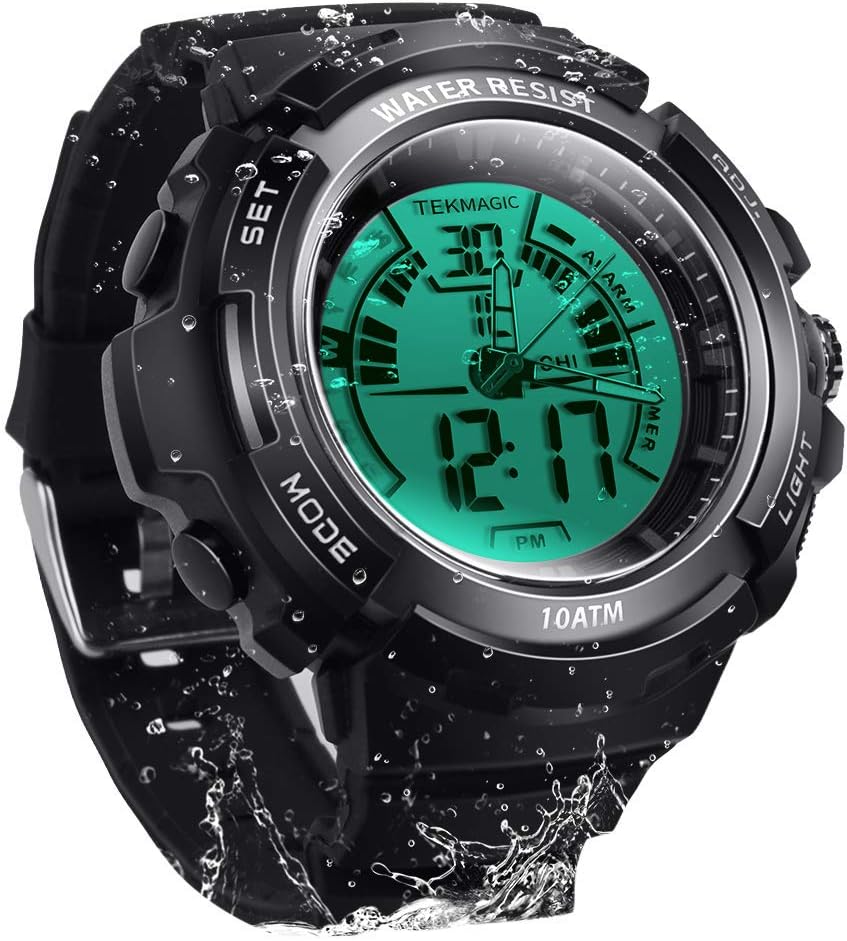
画像: 正面 view of the TEKMAGIC 10ATM Waterproof Digital Scuba Diving Watch, showcasing its digital and analog display with water droplets.
主な特徴
- 10 ATM防水: Designed for underwater operation up to 100 meters (328 feet), suitable for swimming, snorkeling, and recreational scuba diving.
- デュアルタイム表示: Features both digital and analog movements for versatile timekeeping.
- 複数の機能: Includes chronograph (stopwatch), countdown timer, dual time zone, alarm, and hourlyチャイム。
- 発光ディスプレイ: Positive electro luminescent backlight and luminous hands for visibility in low-light conditions.
- 時間形式のオプション: 12 時間形式と 24 時間形式をサポートします。
- 耐久性のある構造: High transparency resin dial window, ABS plastic case, and comfortable PU band strap.
- 耐衝撃性: 衝撃に耐えられるよう作られています。
コンポーネントとボタンの機能
Your watch features four primary buttons for navigation and setting. Refer to the image below for button identification.

画像: 詳細 view of the watch dial, buttons, and strap. Labels indicate "SET", "MODE", "ADJ", and "LIGHT" buttons, along with dial width, thickness, strap width, and total length measurements.
- SETボタン(左上): 設定を入力および確認するために使用します。
- MODEボタン(左下): さまざまな時計モード (時間、クロノグラフ、カウントダウン、アラーム、デュアルタイム) を切り替えます。
- ADJボタン(右上): Adjusts values during setting.
- ライトボタン(右下): バックライトを点灯します。
セットアップ: 初期時刻と日付の設定
- 時間モードでは、 セット 秒が点滅し、設定モードになるまでボタンを押します。
- を押す モード ボタンを押すと、設定が切り替わります: 秒 → 時間 → 分 → 年 → 月 → 日 → 12/24 時間形式。
- 使用 調整済み ボタンを押すと点滅している数値が増加します。 調整済み より速い調整が可能になります。
- すべての設定が正しければ、 セット 設定モードを終了するボタン。
- The analog hands will automatically synchronize with the digital time after setting. If they do not, manually adjust them by pulling out the crown (if present, otherwise refer to specific analog adjustment instructions if available, or assume automatic synchronization).
動作モード
1.時間モード
これは現在の時刻、日付、曜日を表示するデフォルトの表示モードです。

Image: The watch display showing both normal and LED luminous modes, highlighting the "Light Button" for activation.
- を押す ライト button to activate the electro luminescent backlight for approximately 3 seconds.
- To switch between 12-hour and 24-hour format, enter time setting mode (as described in Setup) and use the 調整済み button when the 12/24 hour indicator is flashing.
2. クロノグラフ(ストップウォッチ)モード
クロノグラフは経過時間を測定します。

Image: A person running on a track, with an overlay of the watch displaying the stopwatch function, indicating its use for tracking activity.
- 時間モードから、 モード button repeatedly until "STW" or "CHRONO" appears on the display.
- を押す 調整済み ストップウォッチを開始するボタン。
- プレス 調整済み もう一度一時停止します。
- プレス 調整済み 再開します。
- To reset, while paused, press the セット ボタン。
3. カウントダウンタイマーモード
カウントダウン タイマーを使用すると、特定の時間が経過するとアラームが鳴るように設定できます。
- 時間モードから、 モード button repeatedly until "TMR" or "COUNTDOWN" appears.
- カウントダウン時間を設定するには、 セット 時間が点滅し始めるまでボタンを押します。
- 使用 モード ボタンを使って時間、分、秒を選択します。 調整済み ボタンをクリックして値を調整します。
- プレス セット to confirm the setting and exit.
- を押す 調整済み カウントダウンを開始するボタン。
- プレス 調整済み もう一度押すと一時停止/再開します。
- カウントダウンがゼロになるとアラームが鳴ります。アラームを止めるには、いずれかのボタンを押してください。
4. Dual Time Zone Mode
この機能を使用すると、第 2 のタイムゾーンを追跡できます。

Image: Two watches side-by-side, each displaying a different time, superimposed over images of famous landmarks from different time zones (e.g., Moscow and Paris), illustrating the dual time zone feature.
- 時間モードから、 モード button repeatedly until "T2" or "DUAL TIME" appears.
- を押し続けます セット 時間が点滅し始めるまでボタンを押します。
- 使用 モード ボタンで時間または分を選択します。 調整済み ボタンをクリックして値を調整します。
- プレス セット to confirm the setting and exit.
5.アラームモード
毎日特定の時間にアラームが鳴るように設定します。

Image: A hand reaching for the watch on a bedside table, with lightning bolt icons indicating an alarm sounding, demonstrating the alarm feature.
- 時間モードから、 モード 「ALM」または「ALARM」が表示されるまでボタンを繰り返し押します。
- を押し続けます セット 時間が点滅し始めるまでボタンを押します。
- 使用 モード ボタンで時間または分を選択します。 調整済み ボタンをクリックして値を調整します。
- プレス セット to confirm the setting and exit.
- アラームのオン/オフを切り替えるには、 調整済み button while in Alarm Mode (not in setting mode). An alarm icon will appear/disappear on the display.
6. ホurlyチャイム
ほurly chime provides a short beep every hour on the hour.
- While in Alarm Mode, press the モード button once to toggle the hourlチャイムのオン/オフ。チャイムアイコンが表示されたり消えたりします。
耐水性(10 ATM / 100 m)
Your TEKMAGIC watch is rated for 10 ATM (Atmospheres) water resistance, equivalent to 100 meters (328 feet). This means it is suitable for:

Image: The watch submerged in water, with text indicating "100m Underwater Waterproof" and "Diving grade waterproof standard," emphasizing its water resistance.
- Daily use, including hand washing and rain.
- シャワーと入浴。
- 水泳とシュノーケリング。
- Recreational scuba diving.
重要: Do not operate any buttons while the watch is submerged in water, as this can compromise the water resistance seal. Avoid exposing the watch to extreme temperature changes (e.g., hot showers followed by cold water) as this can also affect seals.
メンテナンス
バッテリー交換
The watch uses a CR2025 battery. The operating battery life is approximately 1.5 to 2 years. If the watch stops working or the display becomes unclear, the battery may need replacement.
- Battery replacement should ideally be performed by a qualified watch technician to ensure the water resistance seal is properly maintained.
- If replacing yourself, carefully open the back case, replace the CR2025 battery, and ensure the gasket is correctly seated before securely closing the case.
クリーニング
定期的に時計を柔らかくて清潔な布で拭いてください。amp 布で拭いてください。頑固な汚れには、中性洗剤を薄めた溶液を使用し、きれいな水で洗い流して完全に乾燥させてください。刺激の強い化学薬品や研磨剤は使用しないでください。
トラブルシューティング
| 問題 | 考えられる原因 / 解決策 |
|---|---|
| Watch not working / Display unclear | Battery may be low or depleted. Replace the CR2025 battery. |
| Analog hands do not match digital time | Ensure digital time is set correctly. The analog hands should synchronize automatically. If not, check for a manual adjustment crown or consult a technician. |
| 時計内部の水 | 防水性能が低下している可能性があります。水中でのボタン操作は避けてください。さらなる損傷を防ぐため、直ちに専門家に修理をご依頼ください。 |
| ボタンが反応しない | Ensure the watch is not in a locked mode (if applicable, though not specified for this model). A low battery can also affect button responsiveness. |
仕様
| 特徴 | 詳細 |
|---|---|
| モデル番号 | 43528-116657 |
| 耐水性 | 10 ATM(100メートル/328フィート) |
| 動き | デジタルとアナログ |
| 時間の精度 | 月±30秒 |
| 電池のタイプ | CR2025 |
| バッテリー寿命 | 1.5~2年 |
| 文字盤窓素材 | High Transparency Resin |
| ケース素材 | ABSプラスチック |
| バンド素材 | PU Band (Rubber) |
| ケース直径 | 45ミリメートル |
| ケースの厚さ | 17ミリメートル |
| バンド幅 | 20ミリメートル |
| 最大手首周囲径 | 210ミリメートル |
| 最小手首周囲径 | 155ミリメートル |
| 製品寸法 | 2.17 x 0.79 x 6.5 インチ; 5.6 オンス |

Image: Diagram illustrating the watch's dimensions, including dial width, dial thickness, strap width, total length, and maximum/minimum wrist circumferences.
保証とサポート
For warranty information or technical support, please refer to the documentation included with your purchase or contact TEKMAGIC customer service through their official webサイトでご確認ください。購入証明として購入レシートを保管してください。
関連文書 - 43528-116657
 |
Allen + Roth Pendant Light Fixture Installation and Warranty Guide Comprehensive guide for installing and maintaining the Allen + Roth pendant light fixture. Includes safety information, assembly instructions, troubleshooting tips, and a three-year limited warranty. |
 |
デルタ チルドレン 6-in-1 ベビーベッド 組み立て説明書と安全ガイド Comprehensive assembly instructions and safety guidelines for the Delta Children 6-in-1 Crib, including conversion to toddler and full-size bed. Features JPMA certification and safety tips. |
 |
デルタ チルドレン 6 in 1 ベビーベッドの組み立て説明書 Delta Children 6 in 1ベビーベッドの包括的な組み立て手順と安全ガイド。このマニュアルには、組み立て手順、幼児用ベッドやフルサイズベッドへの変更手順、そして赤ちゃんの睡眠と家具の使用に関する重要な安全上のヒントが詳細に記載されています。 |
 |
ゲイツウォーターポンプ部品番号カタログ Gates ウォーター ポンプの部品番号の包括的なカタログ。自動車用途の詳細な画像と部品識別が記載されています。 |
 |
GROTHE Preisliste Gesamtsortiment 2025 | Sicherheitstechnik & Überwachung 最高の技術、アラーム、および操作システムを分類するための詳細リストを作成します。ギュルティッヒ・アプ・メルツ 2025。 |
 |
LEGO Katalog 2026: Entdecken Sie die neuesten Sets für Kinder und Erwachsene Entdecken Sie den offiziellen LEGO Katalog für Januar-Juni 2026. Finden Sie die neuesten LEGO DUPLO, LEGO City, LEGO Star Wars, LEGO Harry Potter, LEGO Marvel und viele weitere Sets für alle Altersgruppen. |
Ask a question about this manual
Ask about setup, troubleshooting, compatibility, parts, safety, or missing instructions. Manuals+ will review the question and use this page’s manual context to help answer it.