
1. はじめに
The Alpine X308U Mech-Less Navigation Receiver is designed to provide advanced smartphone integration and a reliable built-in navigation system for your vehicle. This manual provides essential information for the proper installation, operation, and maintenance of your device.
主な特徴:
- 8-inch WVGA High-Resolution Capacitive Touch Display
- Compatibility with Apple CarPlay and Android Auto
- Embedded Navigation with 3D & 2D mapping and Pinch-to-Zoom interface
- Bluetoothハンズフリー通話とオーディオストリーミング
- Built-In HD Radio Tuner and SiriusXM Satellite Radio readiness
- Multiple connectivity options including HDMI input/output and USB
- Advanced audio tuning features: 9-band parametric EQ and 6-channel time correction
- Support for FLAC, AAC, MP3, WMA, HE-AC Playback
- Accessory Control Ready (KAC-001 Required) and iDatalink Maestro Module compatibility
2.製品オーバーview

図2.1: 前面 View with Navigation Display. This image shows the Alpine X308U unit with its 8-inch high-resolution capacitive touch display active, presenting a detailed 3D navigation map. The screen displays street names, distances, and navigation icons, demonstrating the unit's integrated GPS capabilities. Control buttons are visible along the bottom edge of the screen.

図2.2: 前面 View with Media Interface. This image illustrates the Alpine X308U's user interface for media playback and radio tuning. The display shows current FM radio frequency (105.8 MHz), preset stations, and options for HDMI, Music, Pandora, and Bluetooth Audio. Album art and song information are also visible, highlighting the unit's multimedia capabilities.

Figure 2.3: Audio Settings Interface. This image displays the "BASS ENGINE SQ" audio adjustment screen on the Alpine X308U. Users can select from various sound presets like Standard, Punch, Rich, Mid Bass, and Low Bass, and adjust levels for Bass Engine, Navi Audio, and Back Audio. This interface demonstrates the unit's comprehensive audio customization options.

図 2.4: 背面パネルの接続。 この画像は詳細な view of the rear panel of the Alpine X308U, highlighting its various input and output ports. Visible connections include GPS antenna input, USB ports, HDMI In, HDMI Out, and the main wiring harness connector. A cooling fan is also visible on the left side, indicating thermal management features.
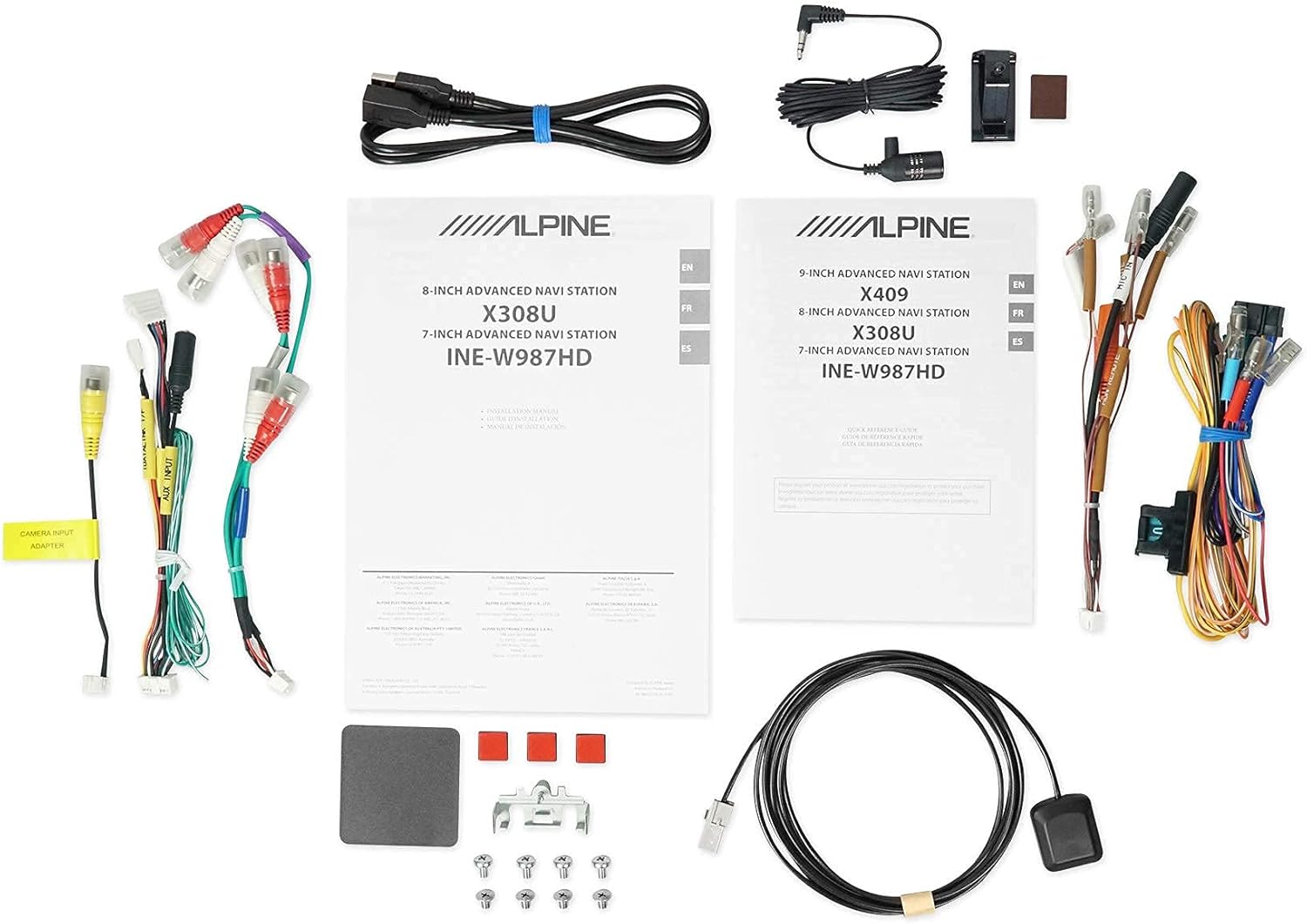
図 2.5: 含まれるコンポーネント。 This image displays a selection of cables and accessories that come with the Alpine X308U unit. These include various wiring harnesses, RCA cables for audio/video connections, a USB extension cable, and a GPS antenna. These components are essential for the proper installation and functionality of the receiver.
3. セットアップとインストール
Proper installation is crucial for the optimal performance of your Alpine X308U. It is highly recommended that installation be performed by a qualified professional car audio installer.
3.1. インストール前のチェックリスト:
- 「箱の内容」セクションに記載されているすべてのコンポーネントが揃っていることを確認します。
- 電気作業を始める前に、車両のバッテリーのマイナス端子を外してください。
- Review your vehicle's specific wiring diagrams and dash disassembly instructions.
3.2. 配線接続:
Connect the main wiring harness to the vehicle's power, ground, and speaker wires. Utilize the provided connectors for a secure fit. Refer to the wiring diagram included with your unit for specific color codes and pin assignments.
- 電源接続: Connect the yellow wire (constant 12V), red wire (switched 12V), and black wire (ground).
- スピーカー出力: Connect the speaker wires to the corresponding vehicle speakers. Ensure correct polarity.
- HDMI入力/出力: Use the HDMI ports for connecting external video sources or outputting video to a rear entertainment system. Note that HDMI output functionality may be limited to specific Alpine accessories.
- USB入力: Connect USB devices for media playback or smartphone integration (CarPlay/Android Auto).
- カメラ入力: リアを接続しますview camera to the dedicated input for enhanced safety. The unit supports up to 3 cameras with the optional KCX-C250MC Multi-camera selector.
- 事前amp 出力: Utilize the 6-channel pre-amp 外部接続用出力 amplifiers。
- GPSアンテナ: GPSアンテナは、障害物のない場所に設置してください。 view of the sky for optimal navigation performance.
3.3. ユニットの取り付け:
Securely mount the X308U in your vehicle's dashboard using the provided mounting hardware. Ensure adequate ventilation around the unit to prevent overheating.
4. 操作手順
4.1.基本操作:
- 電源オン/オフ: ユニットの電源をオンまたはオフにするには、電源ボタン (通常は前面パネルにあります) を長押しします。
- 音量コントロール: Adjust volume using the dedicated volume buttons or on-screen controls.
- タッチスクリーンインターフェイス: Navigate through menus and select functions by tapping icons on the capacitive touch display. The unit supports 4-Way Swipe Action Control.
- メニューボタン: Access the main menu to switch between different sources and settings.
4.2. ナビゲーションシステム:
- ナビゲーションへのアクセス: メインメニューの「ナビゲーション」アイコンをタップします。
- 目的地の入力: Use the on-screen keyboard to input addresses, points of interest, or select from recent destinations.
- 地図 View: Switch between 2D and 3D map views. Use pinch-to-zoom gestures to adjust the map scale.
- 音声ガイド: Follow spoken turn-by-turn directions for guidance.
4.3. Smartphone Integration (CarPlay & Android Auto):
- スマートフォンを接続する: Connect your compatible iPhone or Android phone to the unit's USB port using a certified USB cable.
- Activating CarPlay/Android Auto: Once connected, the respective interface will automatically launch or prompt you to activate it on the screen.
- アプリの使用: Access supported navigation, music, messaging, and communication apps directly from the unit's display.
4.4. Bluetooth Functions:
- デバイスのペアリング: Go to the Bluetooth settings menu, enable pairing mode on the X308U, and search for the unit on your smartphone. Select "Alpine X308U" and confirm the pairing code.
- ハンズフリー通話: Make and receive calls directly through the unit's microphone and vehicle speakers.
- オーディオストリーミング: ペアリングしたスマートフォンから音楽をワイヤレスでストリーミングします。
4.5. オーディオ設定:
- イコライザー: Access the 9-band parametric EQ to fine-tune audio frequencies.
- 時間修正: Adjust the sound stage for optimal listening position using the 6-channel time correction feature.
- TuneIt App: For advanced audio tuning and sharing settings, download and use the Alpine TuneIt App on your smartphone.
5. メンテナンス
Regular maintenance ensures the longevity and optimal performance of your Alpine X308U.
- 画面のクリーニング: Use a soft, lint-free cloth specifically designed for electronic screens to gently wipe the display. Do not use abrasive cleaners or solvents.
- 一般的な清掃: 本体を埃やゴミから守ってください。外側は柔らかく乾いた布で拭いてください。
- ソフトウェアアップデート: アルパインを定期的にチェックする website for firmware updates to ensure your unit has the latest features and bug fixes. Follow the instructions provided with the update carefully.
- 環境条件: ユニットを極端な温度、長時間の直射日光、過度の湿気にさらさないでください。
6。 トラブルシューティング
If you encounter issues with your Alpine X308U, refer to the following common troubleshooting steps before contacting support.
| 問題 | 考えられる原因 | 解決 |
|---|---|---|
| 電源が入らない/ユニットがオンになりません。 | 電源接続の緩み、ヒューズの切れ、車両バッテリーの問題。 | Check all power wiring connections. Inspect and replace any blown fuses. Ensure vehicle battery is charged. |
| スピーカーから音が出ない。 | Speaker wires disconnected, incorrect audio settings, unit in mute mode. | Verify speaker wire connections. Check audio settings (e.g., fader/balance, EQ). Ensure unit is not muted. |
| Navigation not working or inaccurate. | GPS アンテナが正しく接続されていないか、遮られているか、地図データが古くなっています。 | GPSアンテナがしっかりと接続され、 view 空の。利用可能な地図の更新を確認してください。 |
| Bluetoothデバイスがペアリングできません。 | デバイスがペアリング モードになっていない、ペアリング手順が正しくない、干渉が発生している。 | 両方のデバイスがペアリングモードになっていることを確認してください。以前のペアリングを削除して、もう一度お試しください。デバイスに近づいてください。 |
| タッチスクリーンが反応しない。 | 一時的なソフトウェアの不具合です。画面の調整が必要です。 | Perform a soft reset (refer to manual for specific method). If issue persists, contact support. |
7. 仕様
| 特徴 | 詳細 |
|---|---|
| モデル番号 | X308U |
| 画面サイズ | 8インチ(対角21cm) |
| 表示タイプ | WVGA High-Resolution Capacitive Touch Display |
| 最大出力 | 50ワット×4チャンネル |
| CTA-2006 Power Rating | 18ワット×4チャンネル |
| 事前amp 出力 | 3 (4-Volt) |
| 接続技術 | Bluetooth、USB、HDMI |
| マップタイプ | Satellite, North America (Built-in 3D & 2D Navigation) |
| 製品寸法 | 12 x 12 x 12インチ |
| アイテム重量 | 6.4ポンド |
| 含まれるコンポーネント | HDMI input, USB input, composite A/V input, rear-view camera input, HDMI output, 6-channel preamp outputs, USB source |
8. 保証とサポート
This product is covered by a manufacturer's warranty. Please refer to the warranty card included with your purchase for specific terms and conditions, including warranty period and coverage details.
カスタマーサポート:
For technical assistance, troubleshooting beyond this manual, or warranty claims, please contact Alpine customer support. Visit the official Alpine web最新の連絡先情報とサポート リソースについては、こちらのサイトをご覧ください。
注意: 保証を有効にするために購入証明書を保管してください。