
製品終了view
The PPLEE Emergency Weather Radio is a versatile and essential device designed for emergency preparedness and outdoor activities. It integrates multiple functions including AM/FM/SW/NOAA weather radio reception, a powerful flashlight, a reading lamp, an SOS alarm, and a power bank for charging mobile devices. With five different power sources, this radio ensures reliable operation even during prolonged power outages。

Figure 1: The PPLEE Emergency Weather Radio, showcasing its compact design and smartphone charging capability.
安全情報
警告:
- Do not listen to the radio while charging to prevent crackly radio static.
- Avoid prolonged exposure to water. The device is IPX6 water-resistant but not designed for submersion.
はじめる
パッケージ内容
パッケージにすべてのアイテムが揃っていることを確認します。
- 1x PPLEE Emergency Weather Radio with 5000mAh Built-in Rechargeable Battery
- 1x Portable Handy Braid Belt
- 1x Carabiner & Compass
- 1x USB充電ケーブル
- 取扱説明書 (本書) x 1
初期充電
Before first use, it is recommended to fully charge the radio's internal 5000mAh battery using the USB charging method.
- Connect the provided USB charging cable to the radio's DC IN 5V port.
- USB ケーブルのもう一方の端を標準の USB 電源アダプタ (別売) またはコンピュータの USB ポートに接続します。
- The charging indicator light will illuminate. The radio is fully charged when the indicator light changes or turns off (refer to the radio's specific charging indicator behavior).
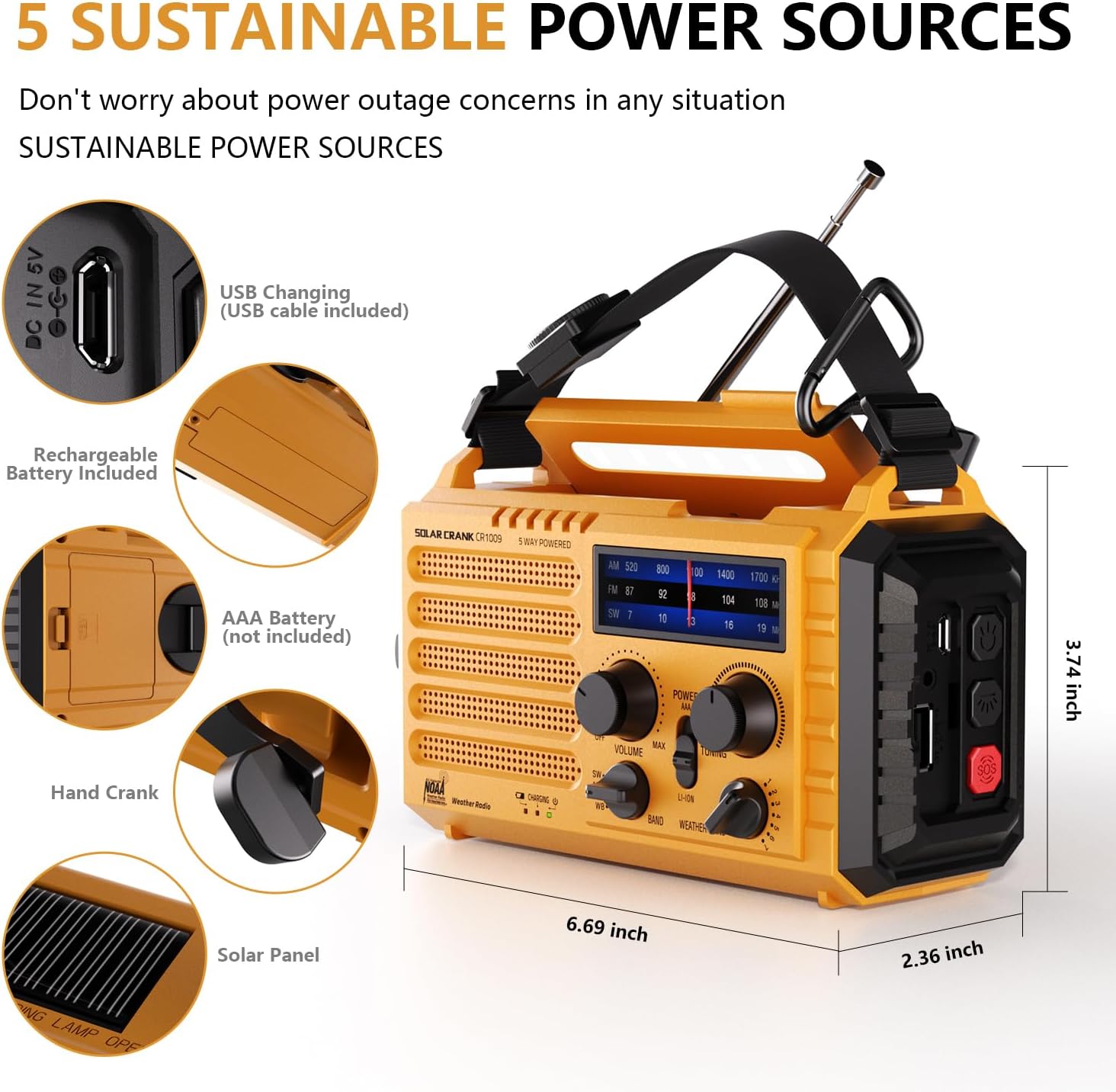
Figure 2: Illustration of the five sustainable power sources for the radio.
操作手順
ラジオの電源
The radio offers five methods for power:
- 5000mAh充電式バッテリー内蔵: 主な電源。
- USB入力(5V): For charging the internal battery via a USB cable.
- ハンドクランク: Rotate the hand crank clockwise or counter-clockwise at a steady pace (approx. 130-150 RPM) to generate power. One minute of cranking can provide several minutes of radio use or flashlight operation.
- ソーラーパネル: Place the radio in direct sunlight to charge the internal battery. This method is primarily for maintaining charge or slow charging.
- 3x AAA Batteries (Not Included): Insert three AAA batteries into the designated compartment for an alternative power source.
Radio Functions (AM/FM/SW/NOAA)
ラジオを操作するには:
- を回す パワー/ボリューム ノブを時計回りに回すとラジオがオンになり、音量が調整されます。
- Select the desired band (AM, FM, SW, or WB for NOAA Weather Band) using the バンド セレクタースイッチ。
- 特に FM および SW バンドの場合、最適な受信状態を得るために伸縮アンテナを伸ばします。
- 回転する チューニング knob to find your desired station. The frequency display will show the current tuning.
- For NOAA Weather Band (WB), select one of the 7 available channels to find your local weather station.

Figure 3: Frequency ranges for AM, FM, SW, and NOAA Weather Band.

Figure 4: The radio provides clear AM/FM reception for entertainment and information.
ヘッドホンジャック
A 3.5mm headphone jack is provided for private listening. Insert standard headphones (not included) into the jack located on the side of the radio.

図 5: 3.5mm ヘッドフォン ジャックを使用すると、他の人に迷惑をかけずに個人的に聴くことができます。
懐中電灯と読書 Lamp
- 懐中電灯: Press the dedicated flashlight button on the side of the radio to turn on the 3W LED flashlight. Press again to cycle through brightness levels or turn off.
- 読書Lamp: Flip up the solar panel on top of the radio to reveal the 2.5W LED reading lamp読書や全体照明用の周囲光を提供します。

Figure 6: The radio features a powerful flashlight and a convenient reading lamp.
SOSアラーム機能
緊急時には、SOS アラームを発動してください。
- を押す SOS button (usually red) on the side of the radio.
- The radio will emit a loud siren sound (116dB) and a flashing red light to attract attention.
- Press the SOS button again to deactivate the alarm.

Figure 7: The SOS alarm provides a loud siren and flashing light for emergency signaling.
パワーバンク機能(外部機器の充電)
The built-in 5000mAh battery can be used to charge external USB-powered devices:
- Connect your smartphone or other small electronic device to the radio's USB OUT port using your device's charging cable.
- ラジオがデバイスの充電を開始します。
- この機能は停電時に特に役立ちますtages to keep essential communication devices operational.

Figure 8: The radio functions as a power bank to charge mobile phones and other small electronics.
お手入れとメンテナンス
- クリーニング: ソフトでラジオを拭くdamp 布で拭いてください。強力な化学薬品や研磨剤入りの洗剤は使用しないでください。
- ストレージ: Store the radio in a cool, dry place away from direct sunlight and extreme temperatures. If storing for an extended period, ensure the internal battery is charged to about 50-70% to prolong its lifespan.
- バッテリーのケア: Regularly charge the internal battery, even if not in use, to prevent deep discharge.
- 耐水性: While the radio is IPX6 water-resistant, it is not waterproof. Do not submerge it in water. Protect it from heavy rain or prolonged exposure to moisture.
トラブルシューティング
| 問題 | 考えられる原因 | 解決 |
|---|---|---|
| ラジオがオンになりません。 | Battery is depleted; Power knob is off. | Charge the internal battery via USB, hand crank, or solar. Ensure the POWER/VOLUME knob is turned on. Check if AAA batteries are inserted correctly and have charge. |
| ラジオの受信状態が悪い。 | アンテナが伸びていない、信号が弱い、干渉がある。 | Fully extend the telescopic antenna. Try repositioning the radio. Tune slowly to find the clearest signal. |
| 懐中電灯/読書灯amp 動作しません。 | Battery is depleted; Lamp/flashlight button not pressed correctly. | Charge the internal battery. Ensure the respective button is pressed firmly. |
| 外部デバイスを充電できません。 | Radio battery is too low; Incorrect cable; Device not compatible. | Ensure the radio's internal battery has sufficient charge. Use the correct USB cable for your device. The radio is designed for small electronic devices. |
| SOSアラームが作動しません。 | SOSボタンが正しく押されていません。 | Press the SOS button firmly. |
仕様
| 特徴 | 詳細 |
|---|---|
| モデル番号 | PPLEE-1009-Y |
| 製品寸法 | 6.69 x 3.74 x 2.36 インチ (17 x 9.5 x 6 cm) |
| アイテム重量 | 1ポンド(0.45 kg) |
| Battery Type (Internal) | 5000mAh 充電式リチウムイオンバッテリー |
| External Battery Support | 単3電池XNUMX本(別売) |
| 電源 | Hand Crank, Solar Panel, USB Input (5V), Internal Rechargeable Battery, AAA Batteries |
| ラジオバンド | AM、FM、短波(SW)、NOAA気象バンド(WB) |
| 懐中電灯の力 | 3W LED |
| 読書Lamp 力 | 2.5W LED |
| SOS Alarm Decibel | 116デシベル |
| 接続性 | USB (for charging in/out), 3.5mm Headphone Jack |
| 耐水性 | IPX6(防滴) |
保証とサポート
For product support, technical assistance, or warranty inquiries, please contact the manufacturer:
メーカー: PPLEE E-COMMERCE CO.,LTD
Please refer to the contact information provided with your purchase or visit the official PPLEE web最新のサポート詳細については、サイトをご覧ください。