
1. はじめに
The Dual DAB 3A Digital Radio Adapter is designed to upgrade your existing audio system with modern digital radio reception and Bluetooth streaming capabilities. This adapter allows you to enjoy DAB+ and FM radio broadcasts with clear digital quality and stream audio wirelessly from compatible devices. Its user-friendly interface and remote control ensure convenient operation.
2. 安全情報
- 電源: Use only the provided AC power adapter. Ensure the voltage はアダプタに指定された要件と一致します。
- 水と湿気: Do not expose the device to rain, moisture, or dripping/splashing liquids. Keep it away from water sources.
- 換気: Ensure adequate ventilation around the unit. Do not block ventilation openings. Avoid placing the device on soft surfaces that may obstruct airflow.
- 熱源: デバイスをラジエーター、暖房送風口、ストーブ、その他の熱を発生する器具などの熱源から遠ざけてください。
- クリーニング: 清掃する前に電源を切ってください。柔らかく乾いた布を使用してください。液体クリーナーやエアゾールスプレーは使用しないでください。
- サービス: この製品を自分で修理しようとしないでください。 すべてのサービスを資格のあるサービス担当者に依頼してください。
3. パッケージ内容
下記のすべてのアイテムがパッケージに含まれていることを確認してください。
- Dual DAB 3A Digital Radio Adapter
- AC電源アダプター
- リモートコントロール
- 取扱説明書
- 外部ワイヤアンテナ
4.製品オーバーview
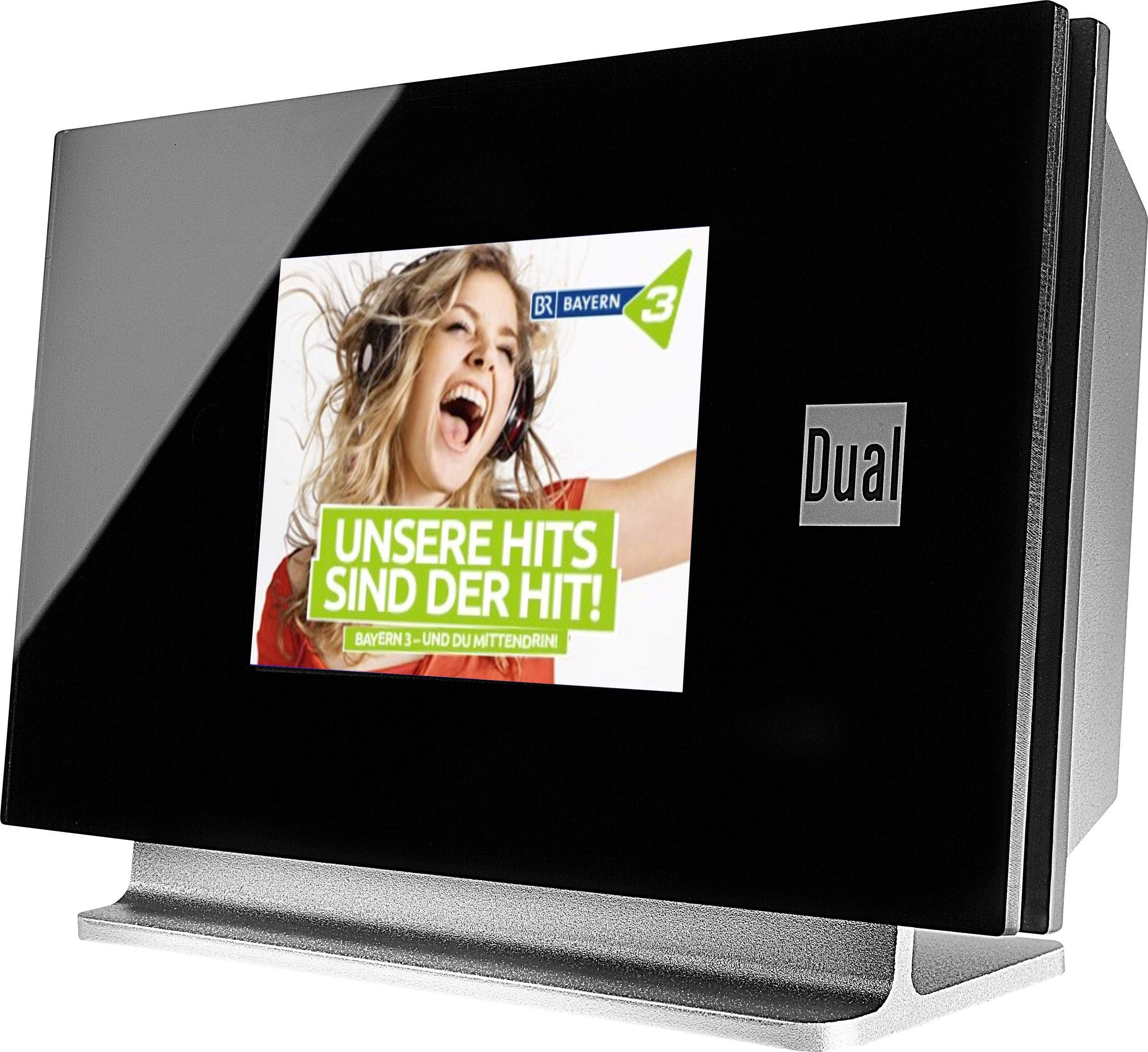
This image displays the Dual DAB 3A Digital Radio Adapter from a front-side angle. The front features a large, black TFT color display showing a radio station's album art and text. The side view indicates the product dimensions: 15 cm (width), 6 cm (depth), and 10.49 cm (height).
フロントパネル
- TFTカラーディスプレイ: Shows station information, track details, album art, and menu options.
背面パネルの接続
- アンテナ入力: For connecting the external wire antenna or a commercially available antenna.
- AUX-OUT: Audio output for connecting to an external ampライファイアまたはオーディオシステム。
- 電源入力: AC電源アダプターを接続します。
リモートコントロール
The included remote control provides full functionality for navigating menus, changing stations, adjusting volume, and selecting input modes.
5. セットアップ
- アンテナを接続する: Connect the supplied external wire antenna to the antenna input on the rear panel of the DAB 3A adapter. For optimal reception, extend the antenna fully.
- オーディオシステムに接続: Use an appropriate audio cable (not included) to connect the AUX-OUT port on the rear of the DAB 3A to an available audio input (e.g., AUX-IN, Line-IN) on your existing ampリファーまたはステレオシステム。
- 接続電源: Plug the AC power adapter into the power input on the rear of the DAB 3A, then plug the adapter into a wall outlet.
- 電源オン: Press the Power button on the unit or the remote control to turn on the adapter. The display will illuminate.
- 初期スキャン(DAB+): Upon first power-on, the unit may automatically perform a scan for available DAB+ stations. Allow this process to complete.
6.運用
電源オン/オフ
- を押す 力 button on the unit or remote control to turn the device on or off.
DAB+ Radio Mode
- を押す モード button on the remote control until DAB+ mode is selected.
- If no stations are found or you wish to rescan, navigate to the 'Full Scan' option in the menu and confirm. The adapter will search for available DAB+ stations.
- 使用 上/下 navigation buttons on the remote to browse through the list of available stations.
- プレス OK / Enter ステーションを選択します。
- The TFT display will show station name, program information, and potentially album art or weather data.
FMラジオモード
- を押す モード button on the remote control until FM mode is selected.
- 自動的に放送局をスキャンするには、 スキャン button (or equivalent on remote). The adapter will tune to the next strong station.
- 手動で調整するには、 上/下 navigation buttons to adjust the frequency.
Bluetoothモード
- を押す モード button on the remote control until Bluetooth mode is selected. The display will show 'Bluetooth Pairing' or similar.
- スマートフォンまたはタブレットで Bluetooth を有効にし、利用可能なデバイスを検索します。
- Select 'Dual DAB 3A' from the list of devices to pair.
- Once paired, you can stream audio from your device to the DAB 3A adapter.
AUX-INモード
- Connect an external audio source (e.g., MP3 player, CD player) to the AUX-IN port on the rear of the DAB 3A using a 3.5mm audio cable (not included).
- を押す モード button on the remote control until AUX-IN mode is selected.
- Audio from the connected external device will now play through your audio system.
7. メンテナンス
- ユニットのクリーニング: Disconnect the power adapter before cleaning. Use a soft, dry, lint-free cloth to wipe the surface of the unit. Do not use abrasive cleaners, waxes, or solvents.
- ディスプレイの掃除: Gently wipe the TFT display with a soft, dry microfiber cloth. Avoid pressing hard on the screen.
- ストレージ: ユニットを長期間保管する場合は、電源から外し、直射日光や極端な温度を避けて、涼しく乾燥した場所に保管してください。
8。 トラブルシューティング
| 問題 | 考えられる原因 | 解決 |
|---|---|---|
| 電源なし | 電源アダプターが接続されていないか、コンセントに障害があります。 | 電源アダプタがユニットと機能している電源コンセントにしっかりと接続されていることを確認します。 |
| DAB+/FMの受信状態が悪い | Antenna not properly connected or poor signal strength. | Ensure the antenna is fully extended and properly connected. Try repositioning the antenna or the unit. Consider using a stronger external antenna if available. |
| Bluetoothペアリングが失敗する | Bluetooth not enabled on source device or adapter is not in pairing mode. | Ensure Bluetooth is enabled on your smartphone/tablet and the DAB 3A is in Bluetooth mode. Try restarting both devices. |
| 音が出ない | 音量が低すぎる、間違った入力が選択されました amplifier, or audio cable issue. | Increase the volume on both the DAB 3A and your ampライフファイア。 amplifier is set to the correct input (e.g., AUX-IN). Check the audio cable connections. |
9. 仕様
- モデル: 75862
- チューナー技術: DABプラス、FM
- 接続性: ブルートゥース
- サポートされている無線帯域: FM、DAB+
- 表示タイプ: カラーディスプレイ
- 電源: ACアダプター
- ハードウェアインターフェイス: ブルートゥース
- 対応デバイス: スマートフォン、ノートパソコン
- 特別な機能: Bluetooth、リモコン
- 製品寸法: 15 x 6 x 10.5 cm
- 商品の重量: 540グラム
10. 保証とサポート
This product comes with a standard manufacturer's warranty. For detailed warranty information, please refer to the warranty card included in your package or visit the official Dual website. For technical support, troubleshooting assistance, or service inquiries, please contact Dual customer support through their official channels.