
1.製品オーバーview
The Integra DRX-3.3 is a 9.2-channel network A/V receiver designed to deliver immersive audio and video performance for your home entertainment system. It features advanced signal processing and high-current power for dynamic speaker control, ensuring pure, rich, and authentic sound. The receiver supports multi-zone audio distribution and network multi-room audio capabilities.
主な特徴:
- Integra Power: Delivers 100 watts per channel (8 ohms, 20 Hz–20 kHz, 0.08% THD, 2 channels driven) with 30 Amps of high instantaneous current capability.
- Smooth Analog Signal: Incorporates Vector Linear Shaping Circuitry (VLSC) to remove pulse noise generated during D/A conversion, reproducing sound waves with high fidelity. This feature is applied to the front left and right channels, which are also bi-ampできる。
- Flexible Zone 2 Audio: Offers powered Zone 2 for audio distribution to speakers in a second room, Zone 2 line out for external amplifiers, and a Zone 2 DAC for SPDIF (PCM), network, and USB audio sources. Includes 7.2 Channel pre-outs (with 2 subwoofer pre-outs) and adjustable maximum power/power on volume settings for both main and Zone 2.
- Object-Based Sound: Supports Dolby Atmos and DTS:X for an immersive three-dimensional sound experience, with an up-mixer for non-Dolby Atmos content.
箱の中身:
- Integra DRX-3.3 A/V Receiver
2. セットアップと接続
This section guides you through the initial setup and connection of your Integra DRX-3.3 receiver.
フロントパネルオーバーview:

図2.1: 前面 view of the Integra DRX-3.3 receiver, showing the display, input selection buttons, volume knob, and front panel connections like headphones and auxiliary HDMI input.
リアパネルの接続:
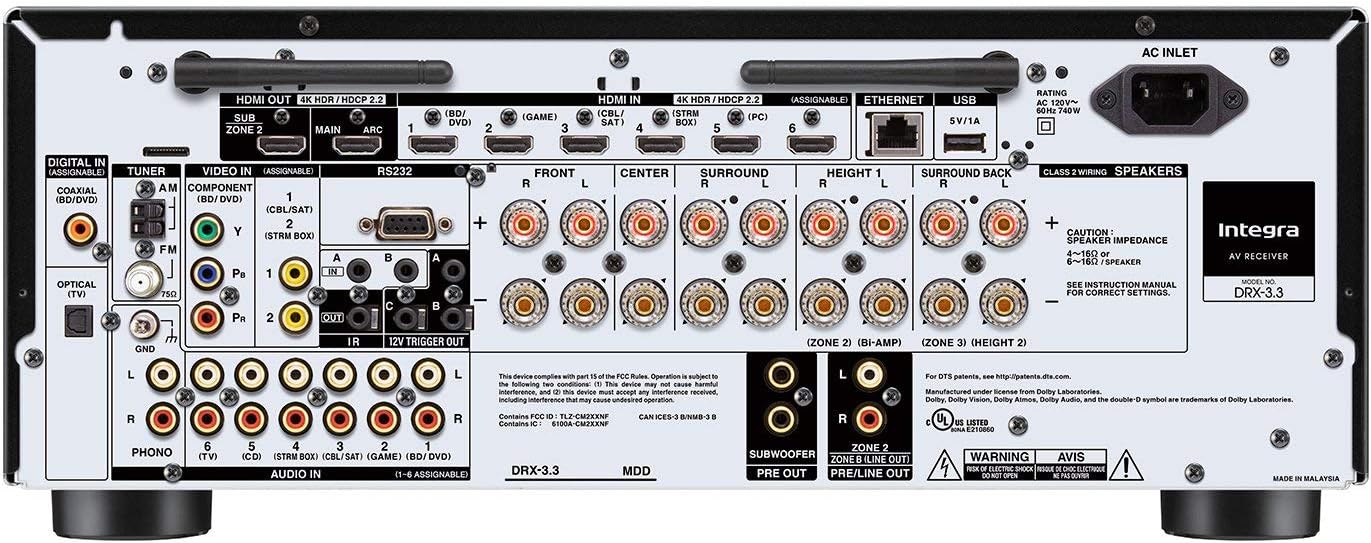
図2.2:背面 view of the Integra DRX-3.3 receiver, illustrating various input and output ports including HDMI, digital audio, analog audio, and speaker terminals.
スピーカー接続:
Connect your speakers to the appropriate terminals on the rear panel. Ensure correct polarity (positive to positive, negative to negative) for optimal sound quality. The DRX-3.3 supports a 9.2 channel configuration, allowing for various surround sound setups including Dolby Atmos and DTS:X.
HDMI接続:
Connect your video sources (e.g., Blu-ray player, gaming console, streaming device) to the HDMI input ports. Connect your TV or projector to the HDMI OUT (MAIN) port. The receiver features 7 HDMI input ports.
Network and Wireless Setup:
The receiver supports 802.11AC (MIMO) Wi-Fi for network multi-room audio. Connect the receiver to your home network via Ethernet or Wi-Fi for access to streaming services and firmware updates. Bluetooth connectivity is also available for wireless audio streaming from compatible devices.
3. 操作手順
This section details the basic operation of your Integra DRX-3.3 receiver.
電源オン/オフ:
を押す 待機して button on the front panel or the remote control to power the unit on or off. The Hybrid Standby indicator will illuminate when the unit is in standby mode.
入力選択:
Use the input selector buttons on the front panel (e.g., BD/DVD, Game, CBL/SAT, PC, CD, TV, Tuner, NET, Bluetooth) or the remote control to switch between connected audio/video sources.
音量コントロール:
Adjust the Master Volume knob on the front panel or use the VOL +/- buttons on the remote control to increase or decrease the volume.
リスニングモード:
The receiver offers various listening modes to optimize your audio experience. Use the リスニングモード buttons on the front panel or remote to cycle through options like Movie/TV, Music, and Game modes. The Dolby Surround up-mixer processes content not mixed for Dolby Atmos to fill flexible speaker layouts.
Multi-Zone Audio:
The DRX-3.3 supports up to three-zone audio distribution. Use the ゾーン2 そして ゾーン3 buttons on the front panel or remote to control audio in different rooms. Refer to the on-screen display for detailed zone setup and control.
リモートコントロール:

Figure 3.1: The remote control for the Integra DRX-3.3 receiver, featuring dedicated buttons for power, input selection, volume, listening modes, and multi-zone control.
4. メンテナンス
Proper maintenance ensures the longevity and optimal performance of your Integra DRX-3.3 receiver.
クリーニング:
- 外側の表面は、柔らかく乾いた布で拭いてください。
- 仕上げを傷める恐れがあるため、研磨剤入りの洗剤、ワックス、溶剤は使用しないでください。
換気:
Ensure adequate ventilation around the receiver. Do not block the ventilation slots on the top, sides, or rear of the unit. Overheating can lead to performance issues or damage. Maintain at least 6 inches (15 cm) of clear space above the unit.
ファームウェアの更新:
Periodically check for firmware updates to ensure your receiver has the latest features and bug fixes. Updates can typically be performed via the network connection.
5。 トラブルシューティング
This section addresses common issues you might encounter with your DRX-3.3 receiver.
サウンド出力なし:
- すべてのスピーカー接続が適切に装着され、極性が正しいことを確認します。
- 正しい入力ソースが選択されていることを確認してください。
- 音量がミュートされていないか、または低く設定されすぎないことを確認します。
- Confirm that the speaker impedance matches the receiver's specifications.
Video Display Issues (e.g., No Picture, Flickering):
- すべての HDMI ケーブルがしっかりと接続されていることを確認します。
- Try using different HDMI cables, especially high-speed certified ones for 4K content.
- Verify that your display device (TV/projector) is set to the correct HDMI input.
- If experiencing issues with 4K@120Hz, ensure all components in the signal chain (source, cables, receiver, display) fully support this specification. Some older chipsets may have limitations.
静電気または不要なノイズ:
- Check for loose or damaged speaker wires.
- Ensure proper grounding of all audio components.
- If using analog inputs, ensure cables are shielded and away from power cords.
- For VLSC-enabled channels (front L/R), ensure the feature is active if desired for noise reduction.
ネットワーク接続の問題:
- Wi-Fi ネットワークがアクティブであり、パスワードが正しいことを確認します。
- If using Ethernet, ensure the cable is connected and your router is functioning.
- ルータと受信機を再起動します。
6. 仕様
| 特徴 | 仕様 |
|---|---|
| モデル番号 | DRX-3.3 |
| 製品寸法 | 14.82 x 17.13 x 6.85インチ |
| アイテム重量 | 28.5ポンド |
| オーディオ出力モード | 囲む |
| サラウンドサウンドチャンネル構成 | 9.2チャンネル |
| 合計HDMIポート | 7 |
| 接続技術 | Bluetooth, USB, Wireless (802.11AC MIMO Wi-Fi) |
| コントローラータイプ | Voice, Bluetooth |
| 特集 | Equalizer, Pandora, Spotify, VLSC, Dolby Atmos, DTS:X |
| 対応デバイス | スピーカー |
| ビデオエンコーディング | H.264、H.265/HEVC、VP9 |
7. 公式製品ビデオ
この公式ビデオを見て、view of the Integra DRX-3.3 9.2-Channel Receiver.
Video 7.1: A detailed look at the Integra DRX-3.3 9.2-Channel Receiver, highlighting its features and design. This video provides a visual guide to the product's capabilities and aesthetics.
8. 保証とサポート
For warranty information, technical support, or service inquiries, please refer to the official Integra webご購入の際は、ウェブサイトをご覧いただくか、カスタマーサービスまでお問い合わせください。保証請求の際は、購入証明としてレシートを保管してください。