
ZIPRO Neon (Model 1592673)
ZIPRO ネオン マグネティック エリプティカル トレーナー ユーザーマニュアル
Model: Neon (1592673)
1. はじめに
Thank you for choosing the ZIPRO Neon Magnetic Elliptical Trainer. This elliptical is designed for effective home workouts, allowing you to train endurance and strengthen muscles. Its compact size makes it ideal for smaller living spaces. The user-friendly computer tracks key workout parameters such as speed, distance, calories, and pulse. Featuring a robust construction, anti-slip footrests, and ergonomic handles, it ensures a comfortable and safe exercise experience. The internal magnetic mechanism provides smooth and quiet operation with 8 adjustable resistance levels to suit your individual training needs.

Image: The ZIPRO Neon Magnetic Elliptical Trainer, showcasing its sleek black design with green accents.
2. 重要な安全情報
Please read all instructions carefully before using this product. Failure to follow these instructions may result in injury or damage to the equipment.
- 特に既存の健康状態に問題がある場合は、運動プログラムを開始する前に医師に相談してください。
- 動作中は子供やペットを装置に近づけないでください。
- Place the elliptical trainer on a flat, stable surface with adequate clearance around it.
- Wear appropriate exercise clothing and athletic footwear. Avoid loose clothing that could get caught in moving parts.
- Before each use, ensure all bolts, nuts, and connections are securely tightened.
- 使用者の最大体重容量 120 kg (264 ポンド) を超えないようにしてください。
- If you experience dizziness, chest pain, or any other abnormal symptoms, stop your workout immediately and consult a physician.
- Do not attempt to service the elliptical trainer beyond the maintenance steps described in this manual. Contact customer support for assistance.
3. パッケージ内容
組み立てを始める前に、すべての部品が揃っていることを確認してください。部品が不足または破損している場合は、カスタマーサポートまでご連絡ください。
| アイテム | 量 |
|---|---|
| メインフレームアセンブリ | 1 |
| フロントスタビライザーバー | 1 |
| リアスタビライザーバー | 1 |
| ハンドルバーの移動 | 2 |
| Fixed Handlebar Post | 1 |
| フットペダル | 2 |
| コンソールユニット | 1 |
| ウォーターボトルホルダー | 1 |
| ハードウェアキット(ボルト、ワッシャー、ナット、工具) | 1セット |
| ユーザーマニュアル | 1 |
4. 組み立てとセットアップ
4.1 開梱
Carefully remove all components from the packaging. Lay them out on a clean, flat surface to ensure all parts are accounted for and to prevent scratching.
4.2組み立て手順
- スタビライザーバーを取り付けます。 付属のボルトとワッシャーを使用して、フロントとリアのスタビライザーバーをメインフレームに固定します。安定性を確保するために、しっかりと締め付けてください。
- Install Pedal Arms and Moving Handlebars: Connect the pedal arms to the main crank assembly and then attach the moving handlebars to the pedal arms. Pay attention to left and right markings.
- Mount Console Post and Fixed Handlebars: Attach the console post to the main frame. Then, secure the fixed handlebars to the console post. Ensure all wiring for the console is routed correctly and connected.
- Attach Console Unit: Carefully connect the sensor wires from the console post to the back of the console unit. Then, mount the console onto its designated bracket on the console post.
- フットペダルの取り付け: Secure the foot pedals to the pedal arms. Ensure they are oriented correctly and tightened to prevent wobbling during use.
- ウォーターボトルホルダーを取り付ける: Mount the water bottle holder to the designated spot on the frame.
- 最終チェック: Review all connections and ensure all bolts are tightened. Test the elliptical for smooth movement and stability. Adjust the leveling caps on the stabilizer bars if the unit is uneven.
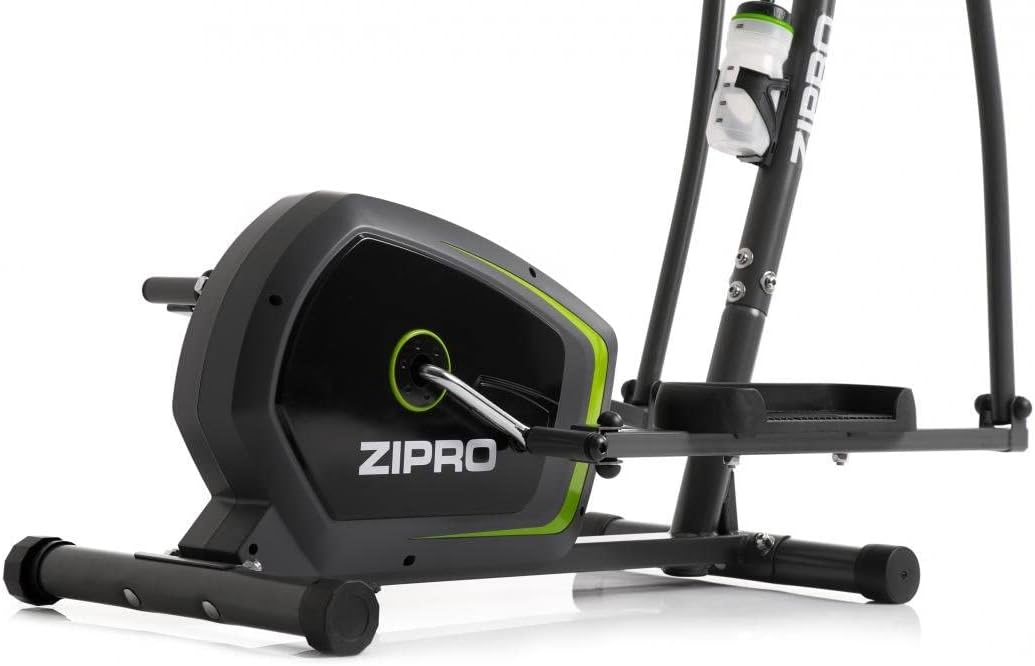
Image: Detail of the sturdy base and flywheel housing.

画像: サイドプロfile of the elliptical, showing the pedal arms and handlebars.

画像: 正面 view, highlighting the console post and handlebars.
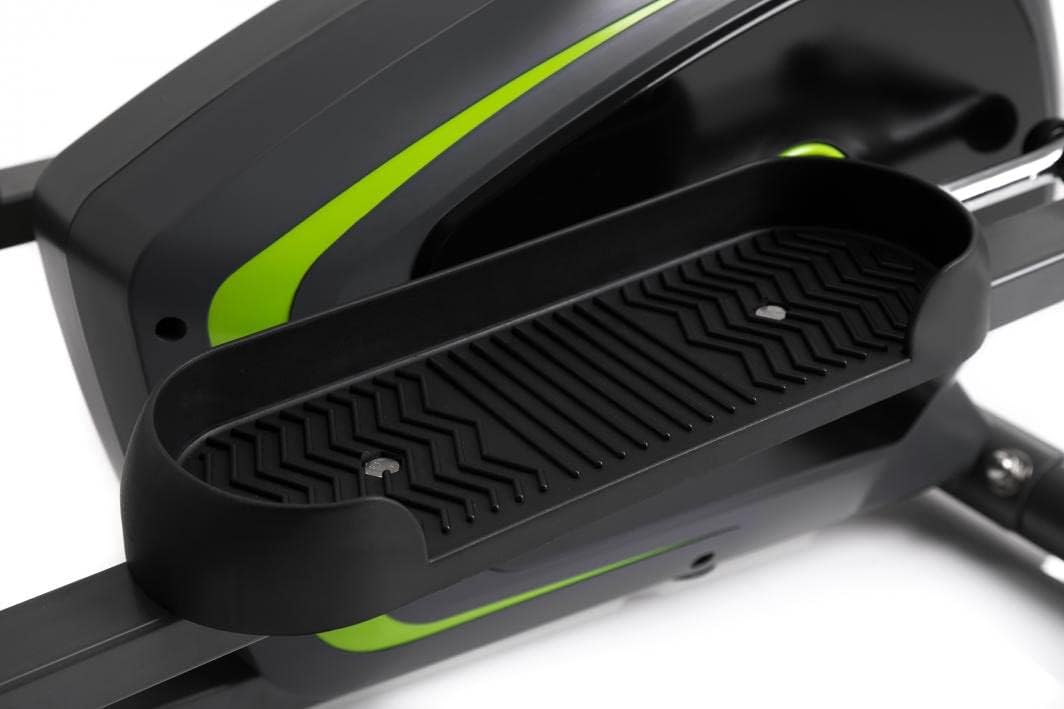
Image: Detail of the textured, anti-slip foot pedal surface.

Image: The integrated water bottle holder on the elliptical frame.

Image: The rear stabilizer bar with built-in transport wheels for easy relocation.
5. 操作手順
5.1 コンソール機能
The integrated console provides real-time feedback on your workout. It typically displays:
- 時間: ワークアウトの継続時間。
- スピード: 現在の速度(km/h または mph)。
- 距離: ワークアウト中に移動した合計距離。
- カロリー: 推定消費カロリー。
- パルス: Your heart rate (measured via hand pulse sensors on fixed handlebars).
- スキャン: すべての表示機能を自動的に切り替えます。
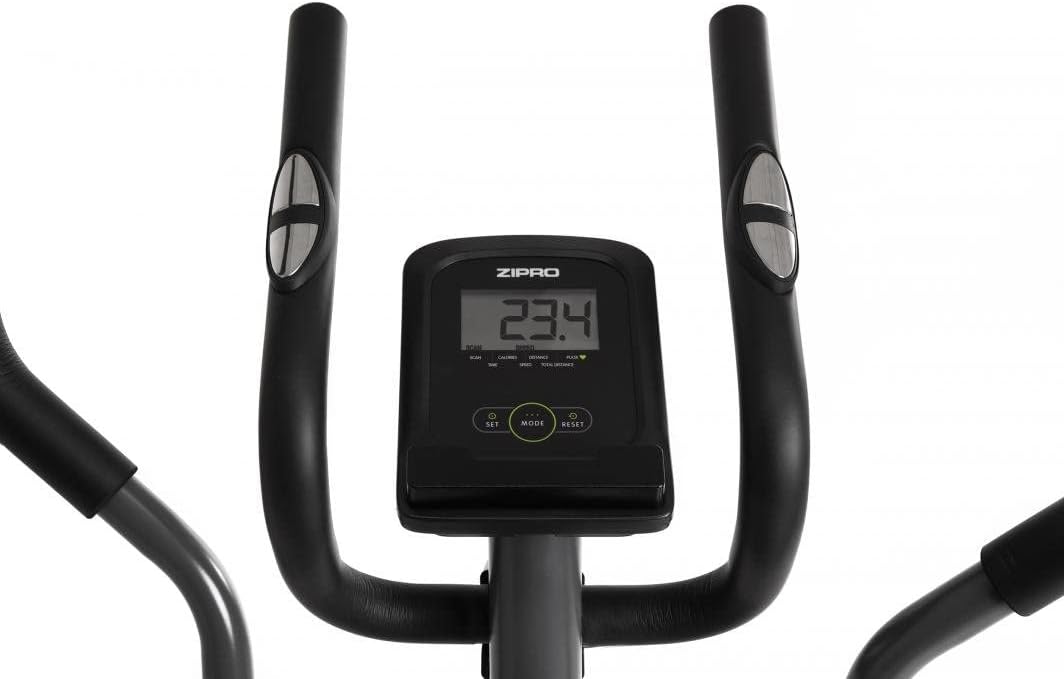
Image: The digital console displaying workout metrics.
Use the 'MODE' button to select a specific display function or 'SCAN' mode. 'RESET' will clear all workout data.
5.2抵抗の調整
The ZIPRO Neon Elliptical Trainer features 8 levels of magnetic resistance. To adjust the resistance, turn the tension control knob located on the main frame. Turn clockwise to increase resistance for a more challenging workout, and counter-clockwise to decrease resistance for an easier workout.

Image: The resistance control knob with settings from 1 to 8.
5.3 Using the Device Holder
The elliptical is equipped with a convenient shelf for mobile devices, allowing you to place your smartphone or tablet while exercising. This is located just below the console.

Image: The device holder, capable of holding a tablet or smartphone for entertainment during workouts.
5.4 Workout Guidelines
- 準備し始める: Begin each workout with 5-10 minutes of light exercise and stretching.
- いい結果: Maintain a steady pace and resistance level for 20-30 minutes, or as recommended by your fitness plan.
- クールダウン: Finish with 5-10 minutes of slower pedaling and stretching.
- 水分補給: Use the integrated bottle holder to keep water accessible and stay hydrated during your workout.
6. メンテナンスとケア
Regular maintenance will extend the life of your elliptical trainer.
- クリーニング: 機器を広告で拭くamp 使用後は毎回布で汗やほこりを拭き取ってください。研磨剤入りの洗剤や溶剤は使用しないでください。
- 潤滑: Periodically check moving parts for friction. Apply a silicone-based lubricant to pivot points and joints if squeaking occurs.
- ファスナーを締めます: Regularly inspect all bolts, nuts, and screws to ensure they are tight. Tighten as necessary to prevent noise and ensure stability.
- ストレージ: エリプティカルは、直射日光や極端な温度を避け、乾燥した涼しい場所に保管してください。
7。 トラブルシューティング
If you encounter issues with your elliptical trainer, refer to the table below for common problems and solutions.
| 問題 | 考えられる原因 | 解決 |
|---|---|---|
| きしみ音や擦れる音 | 緩んだボルト、潤滑不足、摩耗した部品。 | Tighten all visible bolts. Apply silicone lubricant to pivot points. If noise persists, contact support. |
| コンソールにデータが表示されない | Batteries low or dead; loose sensor connection. | Replace console batteries. Check all sensor cables are securely connected. |
| 抵抗は変化しない | 抵抗ケーブルが外れているか破損しています。 | Inspect the resistance cable connection to the knob and the flywheel mechanism. Reconnect if loose. |
| Elliptical feels unstable/wobbly | Uneven surface; loose stabilizer bar bolts. | Adjust the leveling caps on the stabilizer bars. Ensure all stabilizer bar bolts are tightened. |
8. 技術仕様
| 特徴 | 仕様 |
|---|---|
| モデル名 | ネオン |
| ブランド | ジプロ |
| 色 | 黒 |
| 製品寸法(長さ x 幅 x 高さ) | 107 x 67 x 152 cm(42.1 x 26.4 x 59.8インチ) |
| アイテム重量 | 29.8 kg (65.7 ポンド) |
| 材料 | Durable Steel Frame, Plastic Components |
| 抵抗メカニズム | 磁気 |
| 最大重量の推奨 | 120 kg (264 ポンド) |
| 最大歩幅 | 27 cm (10.6 インチ) |
| 抵抗レベルの数 | 8 |
| 含まれるコンポーネント | Elliptical Trainer, Water Bottle Holder |
| 電池付属 | はい |
| メーカー | Morele.net Sp。 z oo |
| モデル番号 | 1592673 |
9. 保証とサポート
Your ZIPRO Neon Magnetic Elliptical Trainer comes with a standard manufacturer's warranty covering defects in materials and workmanship. Please refer to the warranty card included in your package for specific terms and conditions, including the warranty period.
For technical support, replacement parts, or warranty claims, please contact ZIPRO customer service. Have your model number (1592673) and proof of purchase ready when contacting support.
連絡先:
Please visit the official ZIPRO webあなたの地域の最新の連絡先の詳細については、こちらのサイトをご覧ください。
Ask a question about this manual
Ask about setup, troubleshooting, compatibility, parts, safety, or missing instructions. Manuals+ will review the question and use this page’s manual context to help answer it.