
1.製品オーバーview
The TP-Link Archer T4U Plus is an AC1300 Dual Band Wireless USB Adapter designed to provide high-speed Wi-Fi connectivity for desktop computers. It supports the 802.11ac Wi-Fi standard, offering speeds of up to 867 Mbps on the 5 GHz band and 400 Mbps on the 2.4 GHz band. Equipped with dual high-gain antennas and a USB 3.0 interface, it aims to enhance wireless range and data transfer efficiency.

The TP-Link Archer T4U Plus USB WiFi Adapter, featuring two high-gain antennas and a USB 3.0 cable for connection to a computer.
2. パッケージ内容
パッケージに次のアイテムが含まれていることを確認してください。
- AC1300 デュアルアンテナ高利得ワイヤレスUSBアダプター(Archer T4U Plus)
- 1メートルのUSB 3.0ケーブル
- クイックインストールガイド
- Resource CD (for drivers)
3. セットアップ手順
3.1 ハードウェアのインストール
- アダプタを開梱します。 Carefully remove the Archer T4U Plus adapter and its USB cable from the packaging.
- USB ケーブルを接続します。 Connect one end of the provided 1-meter USB 3.0 cable to the USB 3.0 port on the Archer T4U Plus adapter.
- コンピュータに接続します: Plug the other end of the USB 3.0 cable into an available USB 3.0 port on your desktop computer. For optimal performance, use a USB 3.0 port (typically blue inside).
- アダプタの位置: Place the adapter in a location that allows for good signal reception, ideally away from obstructions. The adjustable antennas can be rotated and angled for best performance.

The Archer T4U Plus adapter shown connected to a USB port via its included cable, illustrating its desktop placement.
3.2 ドライバのインストール
The Archer T4U Plus requires drivers to function correctly. Drivers can be installed via the included Resource CD or by downloading them from the TP-Link webサイト。
For Windows Operating Systems (Windows 11/10/8.1/8/7/XP):
- リソース CD の使用: Insert the Resource CD into your computer's CD-ROM drive. Follow the on-screen instructions to install the drivers.
- TP-Linkからダウンロード Webサイト: If your computer lacks a CD-ROM drive, visit the official TP-Link support website, search for "Archer T4U Plus", and download the latest drivers for your specific Windows version. Run the downloaded installer and follow the prompts.
- Automatic Installation (Windows 10/11): In some cases, Windows 10 or 11 may automatically detect and install the necessary drivers upon connecting the adapter. Verify installation in Device Manager under "Network Adapters".
For Mac OS (10.15 and earlier):
- TP-Linkからダウンロード Webサイト: TP-Linkの公式サポートをご覧ください website, search for "Archer T4U Plus", and download the latest drivers for your Mac OS version.
- ドライバーのインストール: ダウンロードした file and follow the installation instructions. You may need to restart your computer after installation.
4. 操作手順
4.1 ワイヤレスネットワークへの接続
Once the drivers are successfully installed, you can connect to a Wi-Fi network:
- ネットワーク設定にアクセスします:
- ウィンドウズ: システム トレイ (画面の右下隅) の Wi-Fi アイコンをクリックします。
- マックOS: メニューバー(画面の右上隅)の Wi-Fi アイコンをクリックします。
- ネットワークを選択: 利用可能なワイヤレスネットワークの一覧が表示されます。ご希望のネットワーク(SSID)を選択してください。
- パスワードを入力してください: プロンプトが表示されたら、ネットワークの Wi-Fi パスワード (セキュリティ キー) を入力します。
- 接続する: 「接続」をクリックしてワイヤレス接続を確立します。
4.2 Dual Band Operation
The Archer T4U Plus supports both 2.4 GHz and 5 GHz Wi-Fi bands. You can choose the band that best suits your needs:
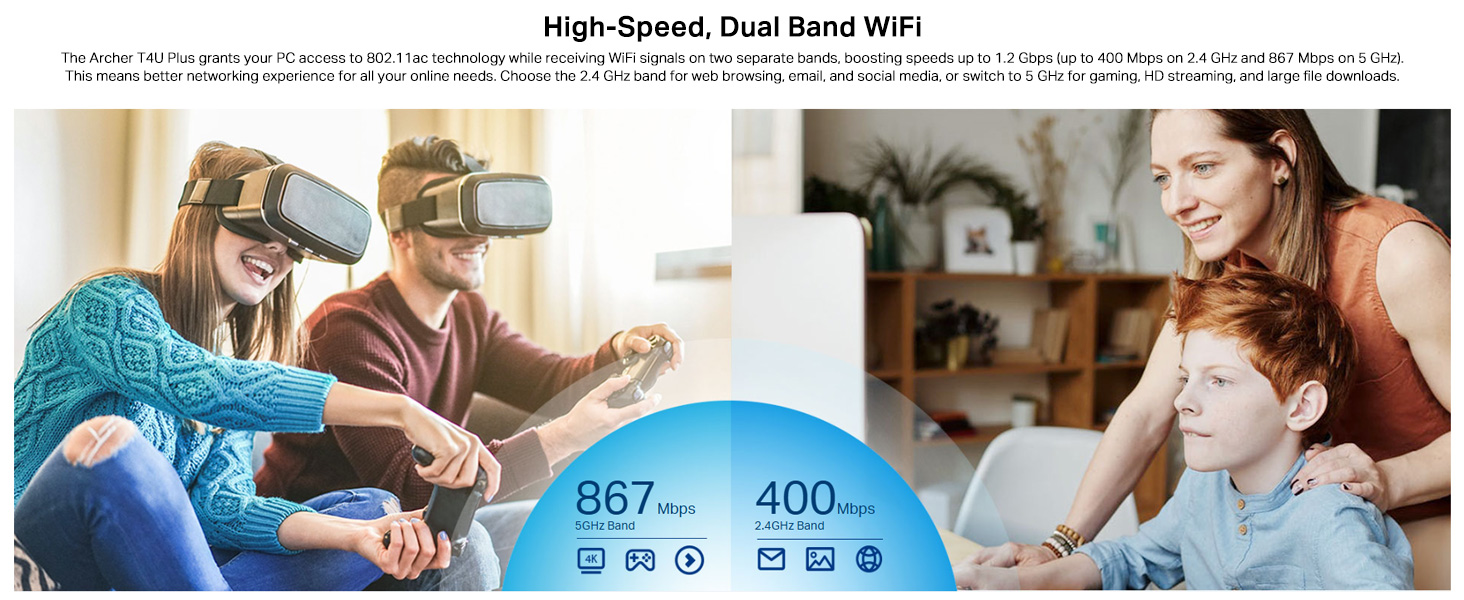
- 2.4GHz帯: Offers broader coverage and better penetration through walls, suitable for general internet use like web ブラウジングとメール。
- 5GHz帯: Provides faster speeds and less interference, ideal for bandwidth-intensive activities such as online gaming, HD video streaming, and large file 転送。
Your router may broadcast separate SSIDs for each band (e.g., "MyWiFi_2.4GHz" and "MyWiFi_5GHz"). Select the appropriate network from the available list.

An image illustrating the dual-band capabilities of the adapter, showing 867 Mbps on the 5GHz band for activities like 4K streaming and gaming, and 400 Mbps on the 2.4GHz band for web ブラウジングとメール。
4.3 Enhanced Coverage and MU-MIMO
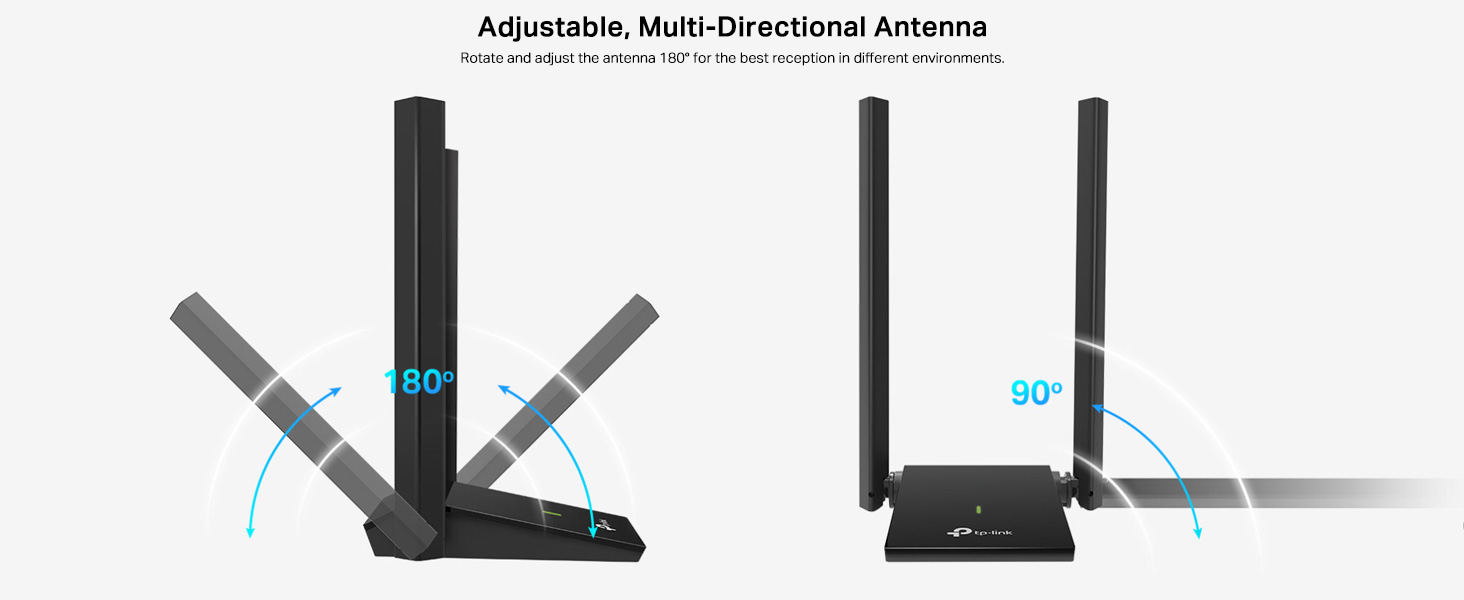
The dual high-gain antennas are designed to improve signal transmission and reception, extending your wireless coverage. For optimal performance, adjust the antennas to point towards your wireless router.
Illustrates the flexibility of the adapter's antennas, which can be rotated 180 degrees and adjusted 90 degrees for optimal signal reception.
The adapter also supports MU-MIMO technology. When used with a compatible MU-MIMO router, this technology allows the adapter to communicate with multiple devices simultaneously, improving network throughput and efficiency.
A visual representation of MU-MIMO technology, showing how the Archer T4U Plus adapter, when paired with a compatible router, can communicate with multiple devices simultaneously for improved network efficiency.
5. メンテナンス
- ドライバーを最新の状態に保つ: TP-Linkサポートを定期的にチェックする web最適なパフォーマンスと互換性を確保するために、最新のドライバーについては、サイトをご覧ください。
- デバイスをクリーニングします。 アダプターの清掃には、柔らかく乾いた布をご使用ください。液体クリーナーや溶剤の使用は避けてください。
- 適切な配置: Ensure the adapter is placed in a well-ventilated area and not covered, to prevent overheating.
- 安全な接続: Ensure the USB cable is securely connected to both the adapter and your computer to prevent intermittent disconnections.
6。 トラブルシューティング
- Wi-Fi接続なし:
- Ensure the adapter is properly connected to a USB port.
- Verify that the drivers are correctly installed. Check Device Manager (Windows) or System Information (Mac OS) for the adapter's status.
- コンピュータとルーターを再起動します。
- 別のUSBポートに接続してみてください。
- Wi-Fi速度が遅い:
- Ensure you are connected to the 5 GHz band if available and your router supports it, for faster speeds.
- 信号受信を改善するためにアダプタのアンテナを調整します。
- アダプタとルータ間の物理的な障害物を最小限に抑えます。
- 他のデバイス(電子レンジ、コードレス電話など)からの干渉がないか確認してください。
- アダプタのドライバーを最新バージョンに更新してください。
- 頻繁な切断:
- USBケーブルが緩んでいないことを確認してください。
- 別の USB ポート (できれば USB 3.0 ポート) を試してください。
- 更新されたドライバーを確認してください。
- アダプタが過熱していないことを確認してください。
- ドライバーのインストールに関する問題:
- Disable any antivirus or firewall software temporarily during installation.
- Download drivers directly from the official TP-Link web特定のオペレーティング システムのサイト。
- For Linux users, specific driver installation steps may be required, often involving command-line instructions. Refer to community forums or TP-Link's support for detailed guidance.
7. 仕様
| 特徴 | 説明 |
|---|---|
| ブランド | TPリンク |
| モデル番号 | アーチャーT4Uプラス |
| ハードウェアインターフェイス | USB3.0 について |
| ワイヤレス標準 | 802.11ac |
| データ転送速度 | 1300 Mbps (867 Mbps on 5GHz, 400 Mbps on 2.4GHz) |
| アンテナ | デュアル高利得5dBiアンテナ |
| オペレーティングシステム | Windows 11/10/8.1/8/7/XP, Mac OS 10.15 and earlier |
| 寸法(長さ×幅×高さ) | 8.4L x 15.6W x 1.9H センチメートル |
| アイテム重量 | 100グラム |
| 色 | 黒 |
8. 保証と技術サポート
8.1 保証情報
この製品には、 3年間のメーカー保証保証請求のために購入証明書を保管してください。
8.2 テクニカルサポート
For technical assistance, driver downloads, or further inquiries, please contact TP-Link support:
- TP-Link India Private Limited
- 住所: グリーン工業団地、Dongri Pada、Poman、Kaman-Bhiwandi Road、Vasai East、Palghar、マハラシュトラ州 – 401208
- フリーダイヤル: 1800 2094 168
- メールサポート: support.in@tp-link.com
- メーカー: TP-Link Corporation、南ビル、No.5 Keyuan Road、Central Zone、Science & Technology Park、Nanshan、Shenzhen、PR China
For the most up-to-date support information and resources, please visit the official TP-Link webサイト。


