
重要な安全上の注意事項
Please read this manual carefully before operating the fan and retain it for future reference. Failure to follow these instructions may result in electric shock, fire, or serious injury.
- 電源のボリュームを確認してくださいtage はファンの定格ラベルと一致します。
- ファン、プラグ、コードを水やその他の液体に浸さないでください。
- ファンを使用していないとき、ファンを別の場所へ移動するとき、および清掃する前には、ファンのプラグをコンセントから抜いてください。
- ファンは子供やペットの手の届かない場所に保管してください。
- コードやプラグが損傷した状態でファンを操作しないでください。
- ファンが作動しているときは、グリルに指やその他の物を入れないでください。
- ファンが倒れないように、安定した平らな場所に置いてください。
製品構成
Familiarize yourself with the parts of your Midea FS40-15AR Pedestal Fan.

画像: The Midea FS40-15AR Pedestal Fan, showing its main body, fan head, base, and the included remote control.
- ファンヘッド: Includes front and rear grilles, fan blades, and motor housing.
- コントロールパネル: Located on the fan body, with LED display and control buttons.
- 調整可能なスタンド: Allows for height adjustment.
- ベース: ファンの安定性を実現します。
- リモートコントロール: 離れた場所からでも操作が便利です。
セットアップと組み立て
Follow these steps to assemble your Midea FS40-15AR Pedestal Fan.
- ベースアセンブリ: Attach the fan stand to the base. Ensure it is securely fastened.
- 高さ調整: The fan features an adjustable stand. Loosen the height adjustment knob, extend or retract the stand to the desired height, and then tighten the knob securely.

画像: Illustration of the fan's adjustable height mechanism, showing arrows indicating upward and downward movement.
- ファン ヘッド アセンブリ: Secure the rear grille, fan blades, and front grille to the motor housing according to the diagrams in the full manual (not provided here). Ensure all components are correctly aligned and locked into place.
- 配置: 組み立てたファンをしっかりとした平らな面に置きます。ファンの周囲に十分なスペースを確保し、空気の流れと振動を最適に保ちます。
- 電源接続: 電源コードを適切な電源コンセント(220~240V)に差し込みます。
操作手順
Your Midea FS40-15AR fan can be operated using the control panel on the unit or the included remote control.
コントロールパネル


画像: Icons illustrating key features: 3 modes, 26 speeds, and a low noise level of 30 dB.
- 電源ボタン: 押すとファンのオン/オフが切り替わります。
- 速度調整: Use the speed control buttons to select from 26 available speed settings. The current speed will be displayed on the LED screen.
- モードボタン: Cycle through the available modes:
- 通常モード: Provides continuous airflow at the selected speed.
- ナチュラルモード: ファン速度を変化させて自然な風をシミュレートします。
- スリープモード: Operates at a very low speed and noise level (as low as 27 dB) for quiet operation, ideal for sleeping.
- エコモード: Adjusts fan speed automatically based on room temperature to optimize energy consumption.
- オシレーションボタン: Press to activate or deactivate the 80-degree oscillation function, which distributes air across a wider area.
- タイマーボタン: Set the fan to automatically turn off after a specified period, up to 12 hours. Each press typically increases the timer by 1 hour.
リモートコントロール
The remote control allows for convenient operation of all fan functions from a distance.

画像: The remote control for the Midea FS40-15AR fan, highlighting the power button and the 12-hour timer function.

画像: A hand holding the remote control, pointing towards the Midea FS40-15AR fan, demonstrating wireless operation.
- Insert batteries into the remote control (type and orientation usually indicated inside the battery compartment).
- Point the remote control towards the fan's receiver for optimal response.
- コントロール パネルで利用できるすべての機能は、リモート コントロールからもアクセスできます。
メンテナンス
定期的な清掃とメンテナンスにより、ファンの最適なパフォーマンスと寿命が確保されます。
- 外装の清掃:
- 掃除する前に必ずファンのプラグを抜いてください。
- 外側の表面を柔らかい布で拭きます。amp 布で拭いてください。研磨剤や溶剤は使用しないでください。
- モーターハウジングや電気部品に水が入らないようにしてください。
- グリルとブレードのクリーニング:
- Periodically remove the front grille (refer to assembly instructions for removal) to clean dust from the fan blades.
- Use a soft cloth or a vacuum cleaner with a brush attachment to remove dust.
- ファンを再度組み立てて操作する前に、すべての部品が完全に乾いていることを確認してください。
- ストレージ:
- ファンを長期間保管する場合は、徹底的に清掃してください。
- Store it in its original packaging or cover it to protect it from dust.
- 涼しく乾燥した場所に保管してください。
トラブルシューティング
If you encounter any issues with your Midea FS40-15AR fan, refer to the following common problems and solutions.
| 問題 | 考えられる原因 | 解決 |
|---|---|---|
| ファンが作動しません。 | 電源がありません。 電源コードが正しく差し込まれていません。 | 電源コンセントが機能しているかどうかを確認してください。 Ensure the power cord is securely plugged into the outlet and the fan. |
| 空気の流れが弱い。 | ファン速度の設定が低すぎます。 Grilles or blades are dusty. | ファン速度設定を上げます。 ファンのプラグを抜き、メンテナンス手順に従ってグリルとブレードを清掃します。 |
| ファンが異常な音を立てます。 | 部品が緩んでいる。 ファンブレードの詰まり。 | Unplug the fan and check for any loose components or foreign objects. Ensure the fan is on a stable surface. |
| リモコンが機能しない。 | 電池切れ。 リモコンとファンの間に障害物があります。 | リモコンの電池を交換してください。 リモコンとファンの受信機の間に障害物のない見通し線があることを確認してください。 |
| 振動が動作しません。 | 発振機能はオフです。 機械的閉塞。 | 振動ボタンを押して起動します。 ファンヘッドの回転を妨げる障害物がないか確認します。 |
これらの解決策を試しても問題が解決しない場合は、カスタマー サポートにお問い合わせください。
仕様
Technical details for the Midea FS40-15AR DC Pedestal Fan.
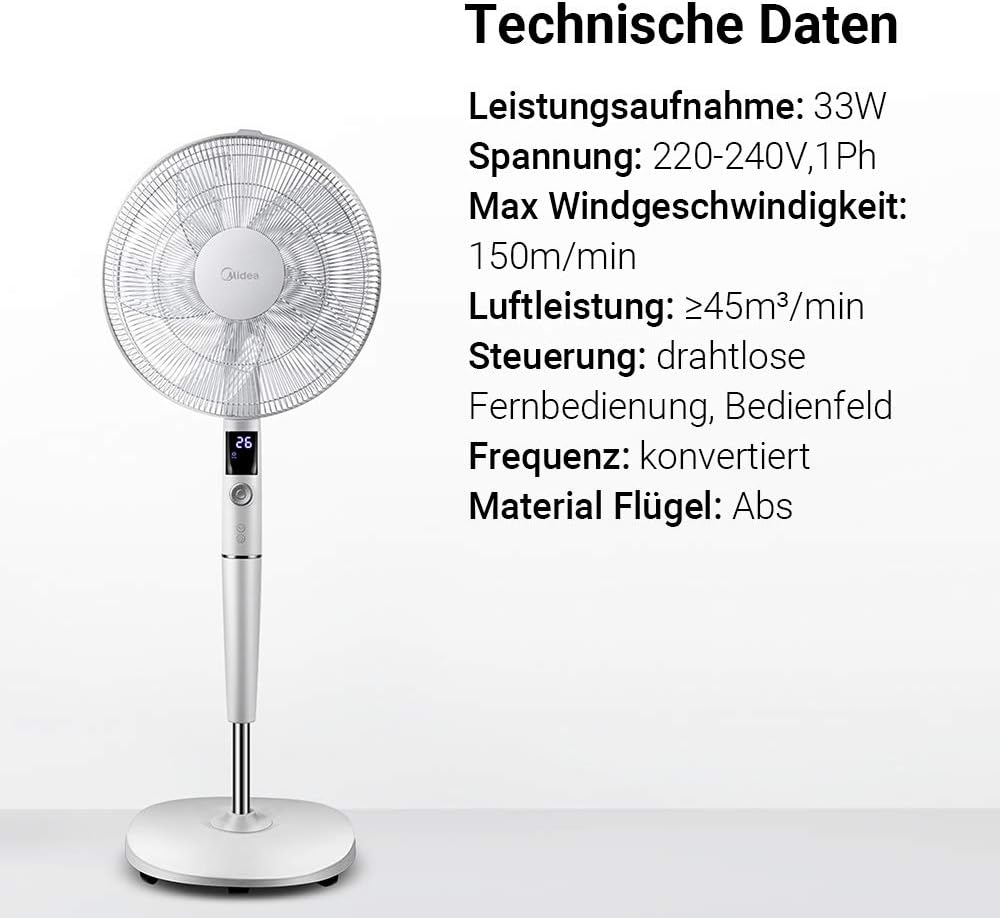
画像: A visual representation of the Midea FS40-15AR fan alongside its technical data, including power consumption, voltage, and control methods.
| 特徴 | 詳細 |
|---|---|
| モデル番号 | FS40-15AR |
| ブランド | 美的 |
| タイプ | DC台座ファン |
| 消費電力 | 30ワット |
| 巻tage | 220-240V |
| 最大風速 | 150m/分 |
| 気流 | ≥45 m³/min |
| 速度の数 | 26 |
| 騒音レベル | 27 Decibels (min) |
| 振動角度 | 80度 |
| タイマー機能 | 最大12時間 |
| 制御方法 | Wireless Remote Control, On-unit Control Panel |
| 材質(ブレード) | ABSプラスチック |
| 製品寸法(長さ x 幅 x 高さ) | 45.3 x 40 x 137 cm |
| 重さ | 7.8キロ |
| 特集 | Adjustable Height, Tiltable Head, ECO Mode, Sleep Mode |
保証とサポート
保証情報とカスタマーサポートについては、製品に付属の保証書を参照するか、Mideaの公式ウェブサイトをご覧ください。 webサイトでご確認ください。購入証明として購入レシートを保管してください。
For technical assistance or service inquiries, please contact Midea customer service through their official channels.
- オンラインサポート: www.midea.com/global/support
- 連絡先: Refer to your regional Midea web地元の連絡先の詳細については、サイトをご覧ください。