
1. はじめに
The Bluefin Fitness Blade 2.0 Magnetic Rower is designed to provide a realistic and effective rowing experience for your home gym. This advanced performance rowing machine offers a full-body workout, combining abdominal exercise with endurance training, while being low impact and high intensity. It features a smooth belt drive, 8 levels of magnetic resistance, an LCD digital fitness console, and integrated smartphone app compatibility.
2. セットアップ
Your Bluefin Fitness Blade 2.0 Magnetic Rower arrives part assembled. A tool kit for set up and maintenance is included in the box. Please follow the detailed assembly instructions provided in the physical manual for step-by-step guidance.

Image: The Bluefin Fitness Blade 2.0 Rower shown in its operational state with a smartphone connected, and also in its upright, folded storage position.
2.1 Folding Mechanism for Storage
The Blade 2.0 features an innovative folding design for easy storage. To stow the magnetic rower away when not in use, gently lift the base. The machine rotates on its axis and stands fully upright, allowing for compact storage. The folded dimensions are approximately 29 inches (width) x 65 inches (height) x 20 inches (depth).
Video: This video demonstrates the key features of the Bluefin Fitness Blade 2.0 Rower, including its magnetic resistance, smooth belt drive, digital console, ergonomic design, and the convenient lift-and-tilt folding mechanism for easy storage.
3. 操作手順
3.1 Magnetic Resistance and Braking System
The rower features 8 levels of magnetic powered resistance. Use the tension control knob located on the machine to adjust the resistance from low to high, suiting all levels of fitness and stamina. Increase the tension over time as your rowing fitness improves.
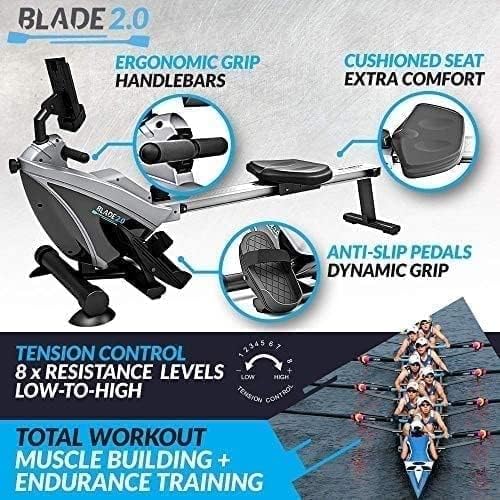
画像: クローズアップ view highlighting the ergonomic grip handlebars, padded cushioned seat, anti-slip secure foot pedals, and the 8-level tension control knob on the Bluefin Fitness Blade 2.0 Rower.
3.2 LCD Digital Fitness Console
The backlit multifunctional LCD display allows you to measure time, distance, calories burned, and strokes per minute. Use the console to track your progress and work towards your workout goals. The console also features a tablet shelf for convenience.
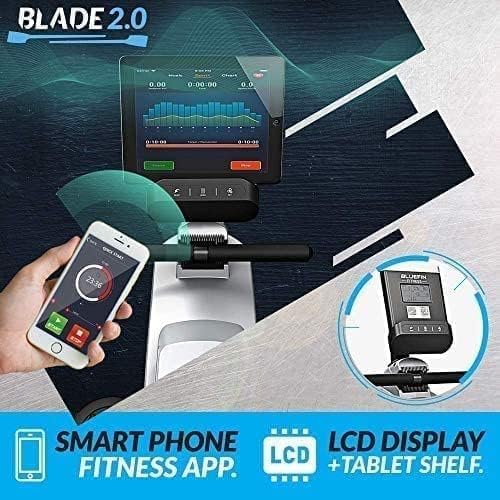
Image: The LCD digital fitness console of the Bluefin Fitness Blade 2.0 Rower, showing its integration with a smartphone fitness app and a tablet shelf.
3.3 Kinomapアプリの統合
The rower is compatible with the Kinomap App. Connect your mobile or tablet via Bluetooth to track and analyze your workout data on your personal fitness dashboard. The app offers video training, races, challenges, and structured workouts to enhance your exercise routine.
3.4 人間工学と快適性
The Bluefin Fitness Blade 2.0 is designed for comfort during your workout. It features ergonomic grip handlebars, anti-slip secure foot pedals with adjustable straps, and a padded cushioned seat to ensure a comfortable and stable rowing experience.
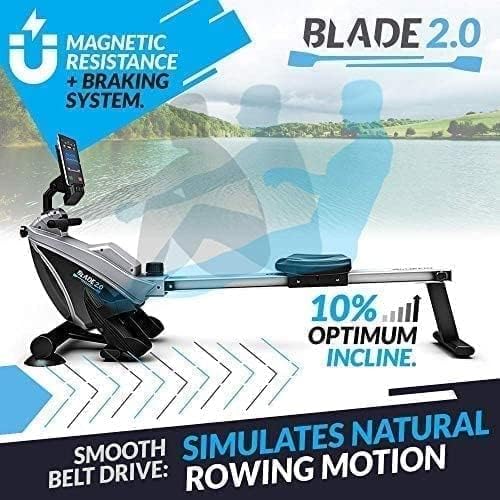
Image: The Bluefin Fitness Blade 2.0 Rower illustrating its smooth belt drive for natural rowing motion and the 10% optimum incline for added resistance.
4. メンテナンス
Regular maintenance ensures the longevity and optimal performance of your Bluefin Fitness Blade 2.0 Rower. A tool kit is provided for basic setup and maintenance tasks.
4.1 クリーニング
広告でマシンを拭きますamp cloth after each use to remove sweat and dust. Avoid using abrasive cleaners or solvents that could damage the finish or electronic components.
4.2 接続の確認
Periodically check all bolts, nuts, and moving parts to ensure they are securely fastened. Tighten any loose connections to prevent wear and tear and ensure safe operation.
4.3 Belt and Seat Rail
Inspect the drive belt for any signs of fraying or damage. Keep the seat rail clean and free of debris to ensure smooth movement of the padded seat. You may apply a small amount of silicone-based lubricant to the seat rollers if movement becomes stiff.
5。 トラブルシューティング
If you encounter any issues with your Bluefin Fitness Blade 2.0 Rower, please refer to the following common troubleshooting tips:
- LCDディスプレイが動作しない: Ensure batteries are correctly installed and not depleted. Check all cable connections to the console.
- 抵抗の問題: Verify the tension control knob is properly engaged and rotating smoothly. If magnetic resistance feels inconsistent, check for any obstructions or damage to the magnetic system.
- 異常な音: Inspect all moving parts for loose connections or foreign objects. Lubricate the seat rail if squeaking occurs.
- Bluetooth 接続の問題: Ensure Bluetooth is enabled on your mobile device and the Kinomap app is updated. Restart both the rower console and your device.
ここで説明されていない問題が解決しない場合は、カスタマー サポートにお問い合わせください。
6. 仕様
| 特徴 | 詳細 |
|---|---|
| ブランド | ブルーフィンフィットネス |
| モデル名 | ブレード2.0 |
| 特集 | Compact, Foldable |
| 色 | 黒 |
| 抵抗メカニズム | 磁気 |
| 緊張レベル | 8 |
| 製品寸法(長さx幅x高さ) | 奥行き65.35インチ x 幅20.08インチ x 高さ29.33インチ |
| 最大重量の推奨 | 100キログラム |
| 測定された指標 | Calories Burned, Distance, Time |
| フレーム素材 | 合金鋼 |
| アイテム重量 | 21キログラム |
| 材料 | 合金鋼、プラスチック |
| 電源 | コード式電気 |
| 電池の数 | 製品固有の電池が必要です。 |
| 表示タイプ | LCD, backlit, digital |
| 欧州連合 | 016027095714 |
| メーカー | クロマグロ取引 |
| 含まれるコンポーネント | Bluefin Fitness Blade 2.0 Rowing Machine |
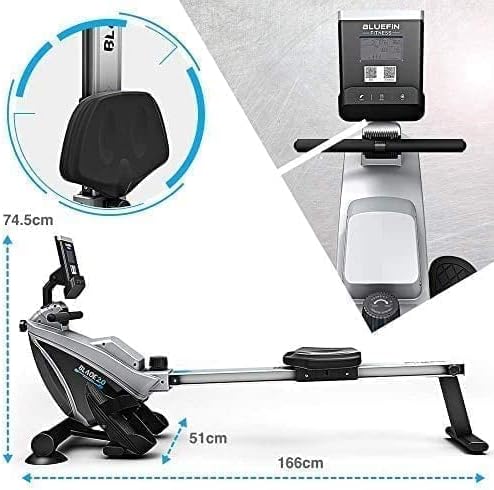
Image: The Bluefin Fitness Blade 2.0 Rower displaying its key dimensions: 166cm length, 51cm width at the base, and 74.5cm height to the top of the console.
7. 保証
The Bluefin Fitness Blade 2.0 Magnetic Rower comes with a 12-month warranty. Please retain your proof of purchase for any warranty claims.
8. サポート
For any questions, assistance, or further support regarding your Bluefin Fitness Blade 2.0 Rower, please contact Blue Sky Distribution customer support. Details can be found on the product's purchase page or within the included documentation.