
1. はじめに
The Cooler Master MWE 600 White 230V V2 power supply unit (PSU) provides a reliable and efficient power solution for your computer system. Designed with 80 PLUS White 230V EU efficiency, a DC-to-DC + LLC circuit design, a single +12V rail, active PFC, and a temperature-sensitive HDB fan, this PSU delivers stable and consistent power. This manual will guide you through the installation, operation, maintenance, and troubleshooting of your MWE 600 White 230V V2 PSU.
2. 安全情報
Please read and understand all safety instructions before installing or operating this product. Failure to do so may result in personal injury or damage to the product and connected components.
- 危険な巻tage: Do not open the power supply cover. There are no user-serviceable parts inside. Opening the unit will void the warranty.
- 電源: 設置またはメンテナンスを行う前に、必ず電源が AC コンセントから外されていることを確認してください。
- 換気: 電源装置の通気口を塞がないでください。装置周囲に十分な空気の流れを確保してください。
- 環境: Install the power supply in a dry, well-ventilated area, away from heat sources, moisture, and direct sunlight.
- 接地: Ensure the power supply and your computer system are properly grounded.
- 互換性: Use only the cables provided with this power supply. Ensure all connections are secure and correctly oriented.
3. パッケージ内容
パッケージにすべてのアイテムが含まれていることを確認します。
- Cooler Master MWE 600 White 230V V2 Power Supply Unit
- AC電源コード
- 取り付けネジ
- ユーザーマニュアル(このドキュメント)
4.製品オーバーview
The MWE 600 White 230V V2 is designed for optimal performance and reliability. Key features include:
- 600 Watts Exceptional Efficiency: Exceeds 80 PLUS 230V EU energy efficiency standards, outperforming generic 80 PLUS Bronze competitors at medium load.
- Silent HDB Fan: The integrated 120mm fan utilizes superior hydro-dynamic bearings (HDB) to minimize noise levels (below 35.5 dBA at 1500 RPM max).
- 安定した電力供給: Supports Intel's low power states for motherboard protection and features a DC-DC with LLC circuit for efficient 12V to 3V and 5V conversion without energy loss.
- シングル +12V レール: Ensures all system components receive consistent power from a single, stable source.
- Compact Cabling: Non-modular flat black cables save space and offer flexibility, ideal for smaller cases and maintaining internal airflow.

図 4.1: 全体 view of the Cooler Master MWE 600 White 230V V2 Power Supply Unit.

Figure 4.2: Close-up of the quiet Hydro-Dynamic Bearing (HDB) fan, designed for minimal noise.
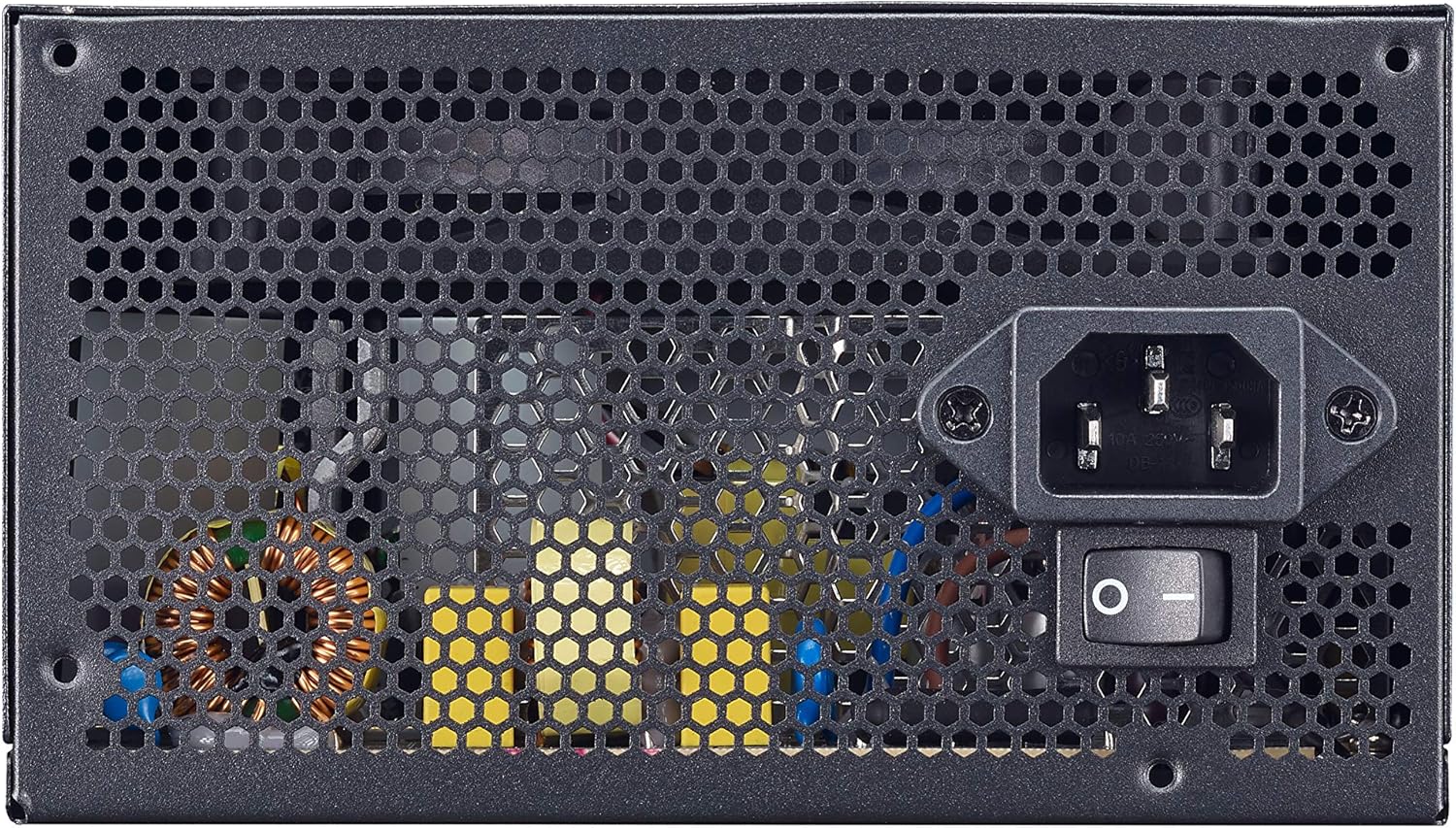
Figure 4.3: Rear panel showing the AC power input and the main power switch.

図 4.4: 分解 view illustrating the internal layout and components of the power supply unit.
5. セットアップとインストール
Follow these steps to properly install your Cooler Master MWE 600 White 230V V2 power supply:
- システムを準備する: コンピュータの電源が完全にオフになっており、壁のコンセントからプラグが抜かれていることを確認してください。コンピュータのケースを開けてください。
- 古い PSU を削除します (該当する場合)。 古い電源装置からすべてのケーブルを外し、ケースから取り外します。
- 新しいPSUをインストールします。 Carefully place the MWE 600 White 230V V2 into the PSU mounting bay of your computer case. Ensure the fan is oriented correctly (usually facing downwards or upwards, depending on your case design, for optimal airflow). Secure the PSU with the provided mounting screws.
- マザーボードの電源を接続します: Connect the 24-pin ATX power cable to your motherboard's 24-pin connector. Ensure it clicks into place.
- CPU電源を接続: 4+4 ピン EPS/ATX 12V ケーブルをマザーボードの CPU 電源コネクタに接続します。
- Connect Graphics Card Power (PCI-e): If your graphics card requires additional power, connect the appropriate 6+2-pin PCI-e power cables from the PSU to your graphics card.
- SATA/周辺機器電源を接続: Connect SATA power cables to your storage drives (HDDs, SSDs) and other peripherals as needed.
- ケーブル管理 Utilize the flat black cables to manage and route them efficiently within your case to improve airflow and aesthetics.
- ケースを閉じてAC電源を接続します。 Close your computer case. Connect the AC power cord to the PSU's AC inlet and then plug the other end into a wall outlet.
6. 操作手順
インストールが成功したら、電源装置の操作は簡単です。
- 電源オン: Ensure the main power switch on the back of the PSU (Figure 4.3) is in the "I" (On) position. Then, press the power button on your computer case.
- 電源を切る: To turn off your computer, use the operating system's shutdown procedure. For a complete power cycle, switch the PSU's main power switch to the "O" (Off) position after shutting down the system.
- 通常操作: The PSU will automatically regulate power delivery to your components. The HDB fan will operate as needed to maintain optimal temperatures, adjusting its speed based on load and temperature.
7. メンテナンス
定期的なメンテナンスを行うことで、電源装置の寿命が長くなり、最適なパフォーマンスが確保されます。
- ダストクリーニング: Periodically (e.g., every 3-6 months), power off and unplug your computer. Use compressed air to gently clean dust from the PSU's fan grille and ventilation openings. Hold the fan blades to prevent them from spinning rapidly during cleaning, which can damage the bearings.
- ケーブル検査: 定期的にすべての電源ケーブルの接続を確認し、安全で損傷がないことを確認してください。
- 環境チェック: Ensure the computer's environment remains clean, cool, and dry to prevent dust buildup and overheating.
8。 トラブルシューティング
電源に問題が発生した場合は、次の一般的なトラブルシューティング手順を参照してください。
- 電源なし:
- AC 電源コードが PSU と壁のコンセントの両方にしっかりと差し込まれていることを確認します。
- Verify the main power switch on the PSU is in the "I" (On) position.
- 別のデバイスを使用して壁のコンセントをテストし、電力が供給されていることを確認します。
- Check all internal power connections (24-pin, CPU, PCI-e, SATA) to ensure they are firmly seated.
- システムの不安定性/ランダムなシャットダウン:
- This could indicate insufficient power or a faulty component. Ensure your system's power requirements do not exceed the PSU's 600W capacity.
- Check for overheating. Ensure the PSU fan and case fans are operating correctly and are free of dust.
- If possible, test the PSU with a different system or a PSU tester.
- ファンの騒音が大きい:
- While the HDB fan is designed for quiet operation, excessive noise might indicate dust buildup. Clean the fan as described in the Maintenance section.
- Ensure the PSU is not under extreme load, which can cause the fan to spin faster.
If problems persist after trying these steps, please contact Cooler Master support.
9. 仕様
Detailed technical specifications for the Cooler Master MWE 600 White 230V V2 power supply:
| 特徴 | 価値 |
|---|---|
| ブランド | クーラーマスター |
| モデル名 | MWE White-v2 |
| モデル番号 | MPE-6001-ACABW-EU |
| 色 | ホワイトV2 |
| フォームファクター | ATTX |
| 出力電力 | 600ワット |
| 冷却方法 | エア(120mm HDBファン) |
| 効率認証 | 80 PLUS 230V EU White |
| 寸法(長さ×幅×高さ) | 14 x 15 x 8.6 cm |
| アイテム重量 | 1.5キログラム |
| 対応デバイス | パソコン |
| コネクタタイプ | SATA (and other standard ATX connectors) |
DC Output Table

Figure 9.1: Detailed DC output specifications for the MWE 600 White 230V V2.
| DC出力 | +5V | +3.3V | +12V | -12V | +5Vsb |
|---|---|---|---|---|---|
| 電流(A) | 18A | 18A | 49A | 0.3A | 3A |
| 電力 (W) | 120W | 120W | 588W | 3.6W | 15W |
| 総パワー | 600W | ||||
10. 保証とサポート
The Cooler Master MWE 600 White 230V V2 power supply comes with a standard limited manufacturer's warranty.
- 保証期間: 購入日から3年。
- 保証範囲: This warranty covers defects in materials and workmanship under normal use. It does not cover damage resulting from accident, misuse, abuse, improper installation, unauthorized repairs, or modifications.
- テクニカルサポート: For technical assistance, warranty claims, or further information, please visit the official Cooler Master webサイトにアクセスするか、カスタマー サポートにお問い合わせください。
クーラーマスター公式 Webサイト: www.coolermaster.com