
1. はじめにview
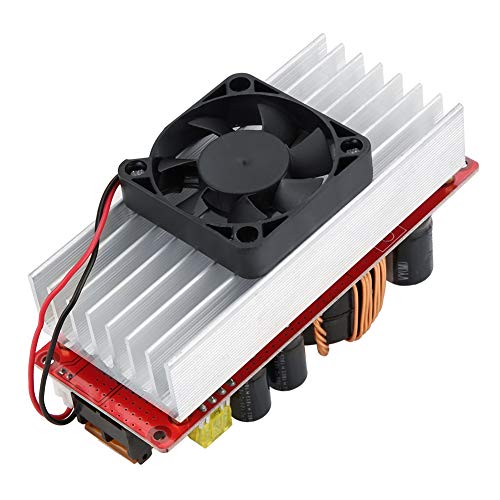
This manual provides essential information for the safe and effective use of your Walfront 10-60V to 12-97V 1500W 30A DC-DC Step-Up Converter Module. This non-isolated DC power converter is designed for high-power applications, offering stable and efficient voltage conversion with advanced protection features.
主な特徴:
- ハイパワー出力: Converts 10-60VDC input to a stable 12-97VDC output, supporting up to 1500W.
- 高い変換効率: Achieves 92%-97% efficiency, minimizing energy loss.
- 複数の保護機能: Includes overcurrent protection, short circuit protection, and reverse input protection for enhanced safety.
- インテリジェント温度制御: Features a fan that automatically activates at approximately 60°C and stops below 60°C to maintain optimal operating temperature and extend lifespan.
- 幅広い応用範囲: Suitable for solar street light drivers, LED lighting, vehicle power supplies, DIY adjustable power supplies, and battery charging.
2. 安全情報
Please read and understand all safety warnings before operating this device. Failure to follow these instructions may result in electric shock, fire, or serious injury.
- 電気による危険: This module operates with high voltage and current. Always disconnect power before making any connections or adjustments.
- 適切な換気: Ensure adequate airflow around the module, especially the heatsink and fan, to prevent overheating.
- 正しい極性: Always connect input and output with correct polarity. Reverse polarity can damage the module and connected devices.
- 絶縁: Ensure all connections are properly insulated to prevent short circuits.
- 専門家による設置: If you are not familiar with electrical wiring, seek assistance from a qualified professional.
- 環境条件: モジュールを湿気、極端な温度、腐食性の環境にさらさないでください。
3. パッケージ内容
パッケージを開封したら、すべてのアイテムが揃っていて良好な状態であることを確認してください。
- 1 x Walfront 10-60V to 12-97V 1500W 30A DC-DC Step-Up Converter Module
- ユーザーマニュアル(このドキュメント)
4. セットアップ手順
Follow these steps to set up your DC-DC converter module.
- コンポーネントを識別する: Familiarize yourself with the input/output terminals, voltage/current adjustment potentiometers, and protection features.

- 入力接続: Connect your DC power source (10-60V) to the input terminals labeled 'Input +' and 'Input -' (or 'Input GND'). Ensure correct polarity. Use appropriate gauge wires for the expected current.
- 出力接続: Connect your load or device to the output terminals labeled 'Output +' and 'Output -' (or 'Output GND'). Ensure correct polarity.
- Initial Adjustment (Voltage): Before applying power to the load, turn the CV (Constant Voltage) potentiometer (labeled 'CV電圧調整' or 'w204') counter-clockwise to its minimum setting.
- Initial Adjustment (Current): Turn the CC (Constant Current) potentiometer (labeled 'cc定電流制御') counter-clockwise to its minimum setting.
- 電源オン: Apply power to the input of the module.
- 出力ボリュームの設定tage: Using a multimeter, measure the output voltage. Slowly turn the CV potentiometer clockwise until the desired output voltage (12-97V) is reached.
- Set Output Current (Optional, for constant current applications): If using constant current mode (e.g., for battery charging), connect your load. Then, slowly turn the CC potentiometer clockwise until the desired output current is reached. If not using constant current, this step may be skipped, or the CC can be set to maximum to allow the voltage to regulate freely.
- ファン接続: The module includes a temperature-controlled fan. Connect the fan to the designated fan connector (labeled 'ファン接続'). The fan will operate automatically when the module temperature reaches approximately 60°C.
5. 操作手順
Once set up, the module operates automatically. Observe the following guidelines for optimal performance:
- 温度を監視: The intelligent fan will manage the module's temperature. Ensure the fan is not obstructed.
- 負荷管理: Do not exceed the maximum output power (1500W) or current (30A) to prevent damage.
- 巻tage and Current Stability: The module is designed to provide stable output. If fluctuations occur, check input power stability and load conditions.
6. メンテナンス
Regular maintenance helps ensure the longevity and reliable operation of your module.
- クリーニング: Periodically clean the module, especially the heatsink and fan blades, to remove dust and debris. Use a soft brush or compressed air. Ensure power is disconnected before cleaning.
- 接続チェック: すべての配線接続が安全で腐食がないことを確認するために定期的に点検してください。
- 環境チェック: 動作環境が指定された温度と湿度の範囲内であることを確認してください。
7。 トラブルシューティング
If you encounter issues with your module, refer to the following common problems and solutions:
| 問題 | 考えられる原因 | 解決 |
|---|---|---|
| 出力なしvoltage | No input power; Incorrect input polarity; Blown fuse; Output short circuit; Undervoltage プロテクションが作動しました。 | Check input power supply; Verify input wiring polarity; Replace fuse if necessary; Check output for short circuits; Ensure input voltageはアンダーボリュームより上tage 保護しきい値。 |
| 出力ボリュームtag低すぎる/高すぎる | CV potentiometer incorrectly set; Input voltag低すぎる/高すぎる。 | Adjust CV potentiometer; Ensure input voltageは10〜60Vの範囲内です。 |
| No output current (in CC mode) | CC potentiometer incorrectly set; Load resistance too high; Overcurrent protection activated. | Adjust CC potentiometer; Check load for open circuit; Reduce load or ensure it's within current limits. |
| モジュールの過熱 | Insufficient ventilation; Excessive load; Fan malfunction. | Ensure proper airflow; Reduce load; Check fan operation and clear obstructions. |
8. 技術仕様
Detailed specifications for the Walfront DC-DC Step-Up Converter Module:
| パラメータ | 価値 |
|---|---|
| ブランド | ウォルフロント |
| モデル番号 | Wal front9sbfz08351 |
| 入力ボリュームtage | DC 10-60V |
| 出力巻tage | DC 12-97V(調整可能) |
| 出力電力 | 1500W(最大) |
| 出力電流 | 30A(最大) |
| 変換効率 | 92% - 97% |
| 動作温度 | -40°C ~ 85°C |
| スイッチング周波数 | 150KHz |
| Module Size (with copper pillars and fan) | 130mm x 52mm x 84mm |
| Module Size (without copper pillars and fan) | 130mm x 52mm x 67mm |
| 製品重量 | 0.37キロ |
| 欧州連合 | 750086417451 |
| ASIN | B07RMT9W7D |
| 原産国 | 中国 |

9. 保証情報
Walfront products are manufactured to high-quality standards. This product is covered by a standard manufacturer's warranty against defects in materials and workmanship. The warranty period typically begins from the date of purchase. Please retain your proof of purchase for warranty claims.
以下の原因による損傷は保証の対象外となります。
- 不適切な設置または使用。
- 許可されていない改造または修理。
- 事故、虐待、または怠慢。
- Operating outside the specified environmental or electrical parameters.
For specific warranty terms and conditions, please refer to the product packaging or contact Walfront customer support.
10. カスタマーサポート
If you have any questions, require technical assistance, or need to make a warranty claim, please contact Walfront customer support through the following channels:
- オンラインサポート: Visit the official Walfront webFAQ、サポート リソース、お問い合わせフォームのサイト。
- メールアドレス: Refer to your product packaging or the Walfront web適切なサポート メール アドレスについては、サイトをご覧ください。
- 小売業者サポート: 小売店から購入された場合は、その小売店のカスタマー サービスに問い合わせてサポートを受けることもできます。
When contacting support, please have your product model number (Wal front9sbfz08351) and proof of purchase readily available.