
EOTECH XPS2-0
EOTECH XPS2 ホログラフィックウェポンサイト XPS2-0 ユーザーマニュアル
Brand: EOTECH | Model: XPS2-0
1.製品オーバーview & 特徴
The EOTECH XPS2-0 Holographic Weapon Sight is a compact and robust optic designed for rapid target acquisition and reliable performance. Its advanced holographic technology provides a clear and precise aiming solution for various shooting scenarios.
- EOTECH XPS2-0: Holographic Weapon Sight in black with 68MOA ring and (1) 1 MOA dot reticle.
- 取り付けの多様性: Compatible with both 1" weaver and MIL-STD 1913 rails, offering flexible mounting options.
- 調整可能な明るさ: Features 20 brightness settings to ensure optimal visibility in any lighting condition, from bright daylight to low-light environments.
- コンパクトなデザイン: Its small footprint leaves ample rail space for additional accessories such as rear iron sights or magnifiers.

2. セットアップ
2.1 照準器の取り付け
The XPS2-0 is designed for easy mounting on any 1" Weaver or MIL-STD 1913 rail. Ensure the rail is clean and free of debris before mounting. Use the provided thumb-bolt or Allen-type bolt to securely fasten the sight to your firearm's rail. Tighten the bolt firmly to prevent movement under recoil.

2.2 バッテリーの取り付け
The XPS2-0 uses a single CR123 battery. To install or replace the battery:
- Unscrew the battery cap located on the front right side of the sight.
- Insert the CR123 battery with the positive (+) end facing forward.
- バッテリーキャップをしっかりと締めます。
The sight will flash when the battery is at 20% capacity, indicating it's time for replacement soon.
3. Operating the Sight
3.1 Power On/Off & Brightness Adjustment
The control buttons are located on the rear of the sight:
- 電源を入れるには: Press either the 'Up' (▲) or 'Down' (▼) button.
- 明るさを調整するには: Press the 'Up' (▲) button to increase brightness or the 'Down' (▼) button to decrease brightness. There are 20 settings available.
- 電源を切るには: Simultaneously press both the 'Up' (▲) and 'Down' (▼) buttons.

3.2 Reticle Description
The XPS2-0 features a 68 MOA (Minute of Angle) ring with a 1 MOA dot in the center. This reticle design allows for quick target acquisition while maintaining precision.
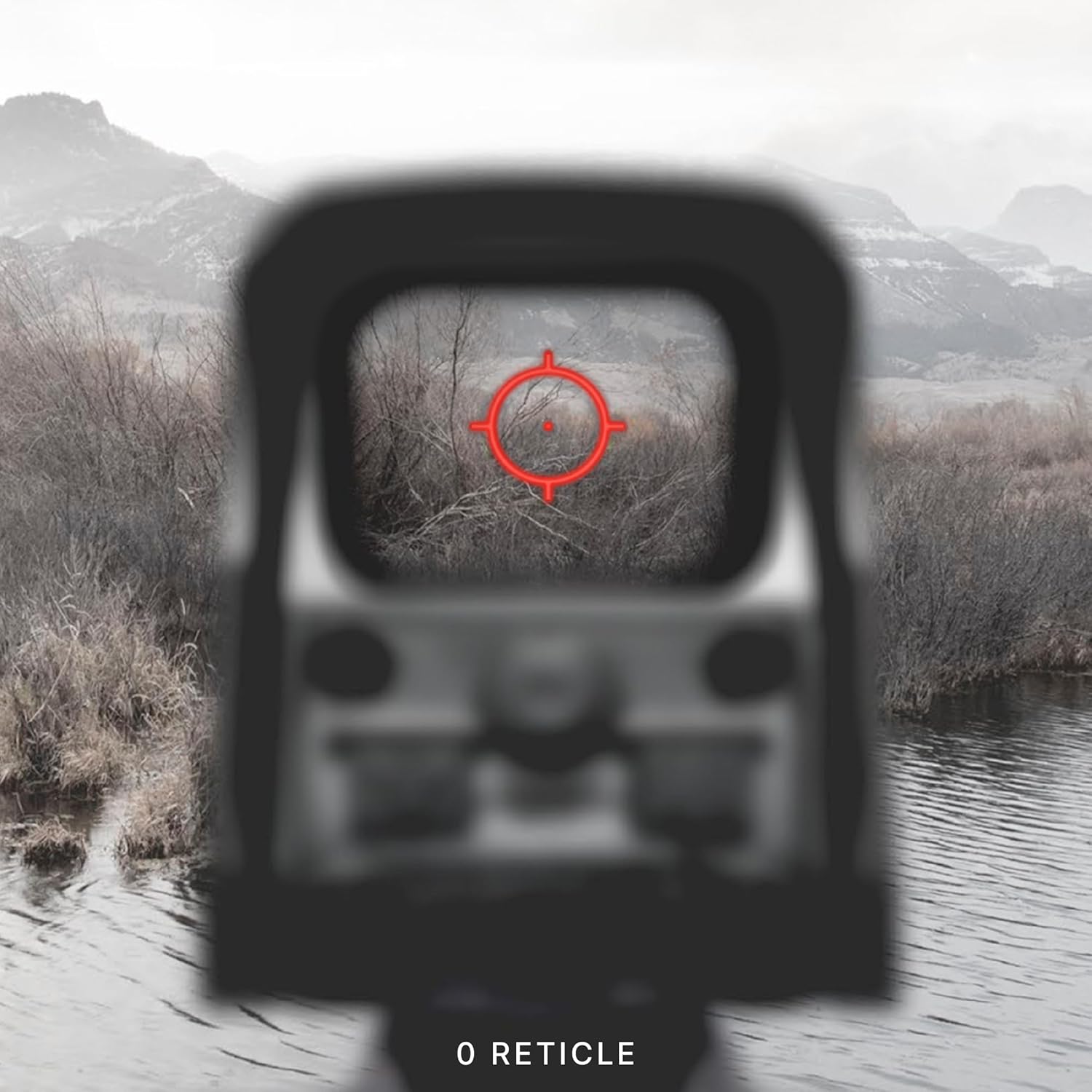

3.3 風偏と仰角の調整
Adjustments for windage (left/right) and elevation (up/down) are located on the side of the sight. Each click provides a precise adjustment to the point of impact.

4. メンテナンス
To ensure the longevity and optimal performance of your EOTECH XPS2-0, regular maintenance is recommended:
- レンズのクリーニング: Use a soft, lint-free cloth and lens cleaning solution to gently wipe the optical surfaces. Avoid abrasive materials or excessive pressure.
- クリーニングボディ: Wipe the sight's body with a damp 布で汚れや油汚れを拭き取ってください。刺激の強い化学薬品は使用しないでください。
- ストレージ: Store the sight in a dry, cool place away from direct sunlight and extreme temperatures. Remove the battery if storing for extended periods.
5。 トラブルシューティング
5.1 低バッテリーインジケーター
When the battery life reaches approximately 20%, the reticle will flash upon power-up to indicate a low battery condition. Replace the CR123 battery promptly to ensure continued operation.
5.2 Reticle Blinking Under Recoil
If the reticle blinks or flickers during recoil, this is another indication of a low battery. Replace the battery to resolve this issue.
6. 仕様
| 特徴 | 詳細 |
|---|---|
| ブランド | イオテック |
| モデル名 | XPS2-0 |
| 色 | 黒 |
| スタイル | XPS2-0 |
| アイテム重量 | 226.79グラム |
| 材料 | プラスチック |
| 倍率最大 | 1x |
| 倍率最小 | 1x |
| 対応デバイス | ライフル |
| 取り付けタイプ | ウィーバーマウント |
| ナイトビジョン対応 | いいえ |
| 寸法(長さx幅x高さ) | 3.8インチ x 2.1インチ x 2.5インチ |
| 電池のタイプ | CR123 |
7.保証とサポート
The EOTECH XPS2-0 Holographic Weapon Sight comes with a 10-year limited warranty from the manufacturer, covering defects in materials and workmanship under normal use. For warranty claims or technical support, please refer to the official EOTECH webサイトをご覧いただくか、カスタマー サービスに直接お問い合わせください。
It is recommended to register your product online to ensure you are contacted in the event of any product issues and to facilitate warranty service.
8. 重要な安全情報
警告:この製品には、カリフォルニア州で癌や先天性欠損症、またはその他の生殖障害を引き起こすことが知られている化学物質が含まれています。
Ask a question about this manual
Ask about setup, troubleshooting, compatibility, parts, safety, or missing instructions. Manuals+ will review the question and use this page’s manual context to help answer it.