
1. はじめにview
Thank you for choosing the Lorex Analog 4K Weatherproof Indoor/Outdoor HD Wired Add-On Security Camera. This manual provides essential information for the proper installation, operation, and maintenance of your new security camera. This camera is designed as an add-on unit and requires a compatible Lorex recorder (DVR/NVR) for full functionality.
This camera features 4K resolution for superior image clarity, robust weatherproof construction for reliable indoor and outdoor use, and advanced deterrence features such as motion-activated lights and remote-triggered sirens. Its long-range night vision ensures comprehensive surveillance even in low-light conditions.
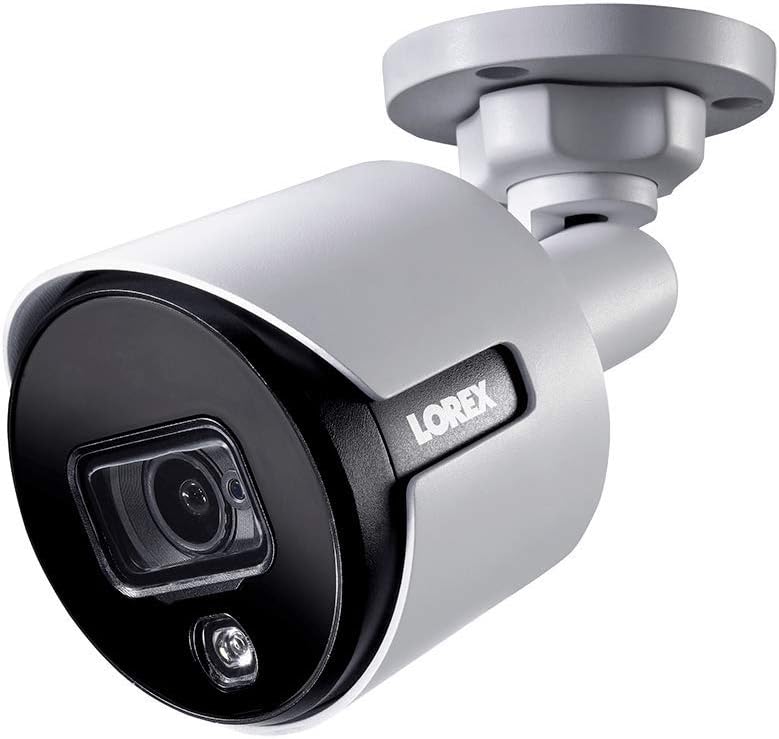
図1.1:正面アングル view of the Lorex 4K Weatherproof Security Camera. This image shows the camera's bullet form factor, lens, and integrated light.
2. パッケージ内容
The Lorex Analog 4K Weatherproof Indoor/Outdoor HD Wired Add-On Security Camera package includes:
- 1 x Lorex Analog 4K Weatherproof Indoor/Outdoor HD Wired Add-On Security Camera (Model: LBV8543XW)
- 取り付けキット(ネジと壁プラグ)
- Allen Key (for adjustment)
Note: This is an add-on camera. Video cables, power adapters, and a compatible Lorex recorder are sold separately and are required for operation.
3. 主な特徴
- 4K ウルトラ HD 解像度: Provides exceptional detail and clarity with an 8MP effective still resolution.
- 耐候性設計(IP67): Durable metal housing ensures reliable performance in various weather conditions, suitable for both indoor and outdoor installation.
- Long Range Night Vision: See clearly up to 150 feet (45m) in ambient night conditions and up to 98 feet (30m) in total darkness. Features Color Night Vision for enhanced detail in low light.
- 動きを感知して点灯する警告灯: Integrated LED light can be triggered by motion to deter intruders.
- 遠隔作動式サイレン: Activate a loud siren directly from your Lorex recorder or connected app to scare away unwanted visitors.
- Wired Connectivity (BNC): Ensures a stable and secure connection to your Lorex DVR/NVR system.
- 広範囲の動作温度: Functions reliably in temperatures up to 60 degrees Celsius.
4. セットアップとインストール
Before installation, ensure you have a compatible Lorex recorder (DVR/NVR) and necessary video/power cables.
4.1 場所の選択
希望するサービスを提供する場所を選択してください viewing angle and is within reach of your Lorex recorder and a power source. Consider areas prone to intrusion, such as entry points or vulnerable perimeters. The camera is suitable for ceiling mount and wall mount applications.

図4.1:側面 view of the Lorex 4K Weatherproof Security Camera, showing its adjustable mounting base.
4.2カメラの取り付け
- ドリル穴をマークする: 取り付けテンプレート (付属している場合) またはカメラ ベースを使用して、穴あけの位置をマークします。
- ドリル穴: Drill pilot holes for the mounting screws. If mounting on drywall or masonry, insert the provided wall plugs.
- 安全なカメラ: カメラベースをドリルで開けた穴に合わせて、付属のネジを使用して固定します。
- 角度の調整: Loosen the adjustment screws on the camera body using the Allen key to position the camera for the optimal view角度を調整したらネジを締めます。
4.3カメラを接続する
- ビデオケーブルを接続します: Connect one end of the BNC video cable (not included) to the camera's BNC port and the other end to an available video input channel on your Lorex recorder.
- 接続電源: Connect the camera's power input to a compatible power adapter (not included). Ensure the power adapter is connected to a power outlet.
- Power On Recorder: Ensure your Lorex recorder is powered on and properly configured.
5. 操作手順
Once the camera is physically installed and connected to your Lorex recorder, you can begin operation.
5.1 Viewライブフィード中
Access your Lorex recorder's interface (via monitor, Lorex Home app, or client software) to view the live video feed from the camera. Ensure the correct channel is selected.

図 5.1: 拡大図 view of the Lorex 4K Weatherproof Security Camera's lens and integrated light.
5.2 Motion Detection and Smart Deterrence
Your Lorex recorder manages motion detection settings. Refer to your recorder's manual for detailed instructions on configuring motion zones and sensitivity.
- Motion-Activated Light: The camera's integrated light can be set to activate automatically upon motion detection. This setting is typically configured within your Lorex recorder's deterrence or alarm settings.
- 遠隔作動式サイレン: You can manually activate the camera's siren through your Lorex recorder's interface or the Lorex Home app. This feature is useful for immediate deterrence.

Figure 5.2: The Lorex 4K Weatherproof Security Camera mounted on a brick wall at night, demonstrating its motion-activated light feature.
5.3 ナイトビジョン
The camera automatically switches to night vision mode in low-light conditions. The infrared (IR) LEDs provide illumination for clear black and white video. Color Night Vision (CNV) may be available if there is sufficient ambient light, providing full-color video in low-light scenarios.
6. メンテナンス
定期的なメンテナンスにより、セキュリティ カメラの最適なパフォーマンスと寿命が確保されます。
- クリーニング: カメラのレンズとハウジングを定期的に柔らかくてきれいな布で拭いてください。amp 布で拭いてください。仕上げやレンズを傷める可能性のある研磨剤入りの洗剤や溶剤は使用しないでください。
- 接続を確認してください: Ensure all cable connections (BNC and power) are secure and free from corrosion, especially for outdoor installations.
- ファームウェアの更新: Lorexを定期的にチェックする website or your recorder's settings for available firmware updates for your camera and recorder to ensure the latest features and security enhancements.
- 環境条件: While weatherproof, extreme conditions outside the specified operating temperature range (up to 60°C) may affect performance.
7。 トラブルシューティング
If you encounter issues with your Lorex camera, refer to the following common troubleshooting steps:
| 問題 | 考えられる原因 | 解決 |
|---|---|---|
| カメラからのビデオフィードがありません | ケーブル接続の緩み カメラに電源が入らない Incorrect channel selected on recorder | Check BNC and power connections. 電源アダプターが動作しており、接続されていることを確認します。 Verify the correct input channel on your Lorex recorder. |
| 画質が悪い / 動画がぼやけている | 汚れたレンズ 不適切なフォーカス(調整可能な場合) Cable interference/damage | カメラのレンズは柔らかい布で拭いてください。 Ensure the camera is properly focused (if applicable). Check video cable for damage or interference. Use high-quality cables. |
| 夜間視力が機能しない | IR LEDs obstructed 電力不足 カメラ設定 | Ensure nothing is blocking the IR LEDs. 安定した電源供給を確認します。 Check night vision settings on your Lorex recorder. |
| モーション検出が作動しない | Incorrect motion zone setup 感度が低すぎる 障害物 view | Review and adjust motion detection zones on your recorder. 動きの感度を高めます。 Clear any obstructions from the camera's field of view. |
For more advanced troubleshooting, consult your Lorex recorder's user manual or visit the Lorex support webサイト。
8. 仕様
| 特徴 | 仕様 |
|---|---|
| モデル番号 | LBV8543XW |
| ビデオキャプチャ解像度 | 4K(8MP有効静止画解像度) |
| 接続技術 | BNC (Wired) |
| 屋内/屋外での使用 | 屋内、屋外 |
| 国際保護格付け | IP67(耐候性) |
| 暗視範囲 | 150フィート(45m) |
| 特集 | Motion Sensor, Night Vision, Motion Activated Lights, Remote-Triggered Siren |
| フォームファクター | 弾丸 |
| 材料 | 金属 |
| 動作温度(上限) | 摂氏60度 |
| 製品寸法(長さ x 幅 x 高さ) | 16 x 6 x 6インチ |
| アイテム重量 | 0.01オンス |
| 欧州連合 | 695529017136 |
| 制御方法 | App, Remote (via compatible Lorex recorder) |
9. 保証とサポート
Lorex products are designed for reliability and performance. For information regarding your product's warranty, please refer to the warranty policy available on the official Lorex website or the documentation included with your Lorex recorder.
For technical support, product registration, or to download the latest software and firmware updates, please visit the official Lorex support page or the Lorex Store:
- Lorex Store: Visit the Lorex Store on Amazon
- ユーザーガイド(PDF): PDF 形式の包括的なユーザー ガイドもダウンロードできます。 ユーザーガイドのダウンロード
When contacting support, please have your product model number (LBV8543XW) and serial number ready.