
導入
This manual provides instructions for the proper setup, operation, and maintenance of your Calvas 2020B0-B1 remote control. This remote is designed to be compatible with Shaw LCD LED televisions, offering a convenient replacement or secondary control unit. Please read this manual thoroughly before using the device.

画像: 正面 view of the Calvas 2020B0-B1 remote control.
設定
1. バッテリーの取り付け
- リモコンの背面にある電池収納部を見つけます。
- ラッチを押し下げて、バッテリーカバーをスライドさせて外します。
- 単 4 電池 2 本 (別売) を挿入し、プラス (+) とマイナス (-) の端子がコンパートメント内のマークと正しく揃っていることを確認します。
- バッテリーカバーをカチッと音がするまで所定の位置に戻します。

画像: 裏面 view 電池ケースを開いた状態でのリモコンの。
2. Quick Setup for TV Control
The remote features a quick setup function for initial pairing with your television. Follow these steps:
- を押し続けます 設定 button until the LED light blinks twice.
- を押す TVパワー ボタン。
- を押し続けます OK ボタン。
- リリース OK key when your TV turns off. This indicates successful pairing.
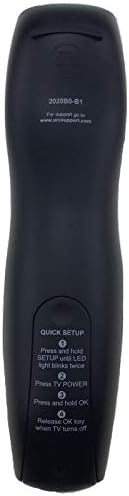
Image: Back of the remote control displaying quick setup instructions.
Note: If the TV does not turn off, repeat the steps or consult the TV's manual for specific remote programming codes if available.
操作手順
The Calvas 2020B0-B1 remote control utilizes infrared (IR) technology. Ensure a clear line of sight between the remote's IR emitter and your TV's IR receiver for optimal performance.
ボタンの機能:
- 力: テレビの電源をオンまたはオフにします。
- VOL +/-: 音量を増減します。
- CH +/-: チャネルを上下に変更します。
- ミュート: テレビの音声をミュートまたはミュート解除します。
- 数字パッド(0~9): チャンネル番号を直接入力します。
- ガイド: 番組ガイドを表示します。
- メニュー: テレビのメインメニューにアクセスします。
- 情報: 現在のプログラムに関する情報を表示します。
- OK / ナビゲーション矢印: 選択を確定し、メニュー間を移動します。
- EXIT: 現在のメニューまたは画面を終了します。
- 過去: 以前の状態に戻る viewedチャンネル。
- DAY +/-: Navigates through days in the program guide.
- MUSIC / FAV: Accesses music channels or favorite channels (functionality may vary by TV model).
メンテナンス
クリーニング:
- リモコンは柔らかく乾いた布で拭いてください。
- 頑固な汚れには、軽くamp布に水または刺激の少ない非研磨性の洗剤をつけて拭いてください。
- 強力な化学薬品、溶剤、研磨剤入りのクリーニングパッドは使用しないでください。リモコンの表面や内部コンポーネントが損傷する可能性があります。
バッテリー交換:
- Replace batteries when the remote's response becomes sluggish or the LED indicator fails to light up.
- 必ず両方の電池を同時に新しい AAA 電池に交換してください。
- 古い電池と新しい電池、または異なる種類の電池を混ぜないでください。
- リモコンを長期間使用しない場合は、液漏れを防ぐために電池を取り外してください。
ストレージ:
- リモコンは、直射日光や極端な温度を避け、涼しく乾燥した場所に保管してください。
- リモコンを落としたり、過度の湿気にさらしたりしないでください。
トラブルシューティング
- リモコンが応答しない:
- 電池が正しく挿入され、消耗していないことを確認してください。必要に応じて交換してください。
- Ensure there is a clear line of sight between the remote and the TV's IR receiver. Remove any obstructions.
- Try re-pairing the remote with the TV using the "Quick Setup" steps.
- 一部のボタンのみが機能します:
- This might indicate a partial pairing issue or a specific button malfunction. Try re-pairing the remote.
- Clean the remote's surface, especially around the unresponsive buttons, to ensure no debris is interfering.
- 短い動作範囲:
- 新しい電池と交換してください。
- 強い光源(直射日光や明るい蛍光灯など)が IR 信号に干渉していないことを確認してください。
仕様
| ブランド | ハゲスポット |
| モデル番号 | 2020B0-B1 (Mfr Part Number: CLS-D41D8CD98F00B204E9800998ECF8427E) |
| 対応デバイス | Television (Shaw LCD LED TVs) |
| 接続技術 | 赤外線(IR) |
| コントローラータイプ | ボタンコントロール |
| サポートされるデバイスの最大数 | 1 |
| 最大範囲 | 10メートル |
| 特集 | 人間工学に基づいたデザイン |
保証情報
This product is typically covered by a limited warranty provided by the seller or manufacturer. Please refer to your purchase documentation or contact the retailer directly for specific warranty terms and conditions. Keep your proof of purchase for any warranty claims.
サポート
For further assistance, technical support, or inquiries regarding your Calvas 2020B0-B1 remote control, please contact the seller or manufacturer through the platform where the product was purchased. Provide your model number (2020B0-B1) and any relevant purchase details when seeking support.