
1. はじめに
This manual provides essential information for the safe and effective use of your Pioneer FH-8500DVS 6.8-inch Display Audio System. Please read it thoroughly before installation and operation, and keep it for future reference.
The FH-8500DVS is a 2DIN display audio system offering a wide range of media playback options and smartphone integration. Key features include Apple CarPlay, Android Auto, CD/DVD playback, USB connectivity, Bluetooth, AUX input, and a built-in DSP for enhanced audio control.

画像1.1:正面 view of the Pioneer FH-8500DVS Display Audio System.
2. 安全情報
Always prioritize safety. Improper installation or operation can lead to accidents or injury. Observe the following precautions:
- Do not operate the system in a way that distracts you from driving.
- Ensure proper wiring and connections to prevent electrical shorts or damage.
- 手順が不明な場合は、インストールの専門家にご相談ください。
- 外部の交通音が聞こえる程度の音量にしてください。
- ユニットを極端な温度や湿気にさらさないでください。
3. パッケージ内容
パッケージにすべてのアイテムが揃っていることを確認します。
- Pioneer FH-8500DVS Main Unit
- Code Unit (1 pc)
- 取り付けネジ(1セット)
- USB Connection Cable (1.5m) (1 pc)
- Hands-Free Calling Microphone (1 pc)
- リモコン(1個)
- 取扱説明書(本書)
- 保証書

Image 3.1: Pioneer FH-8500DVS product packaging, showing the unit and included accessories.
4. セットアップ
4.1 インストール
The FH-8500DVS is designed for 2DIN installation. Ensure your vehicle has a compatible mounting space. Professional installation is recommended.
- Connect the power and speaker wires according to the wiring diagram provided in the separate installation guide.
- Secure the main unit using the supplied mounting screws.
- Connect the USB cable, hands-free microphone, and any other external devices.
4.2初期構成
Upon first power-on, the system may prompt you to set basic preferences such as language and time. Follow the on-screen instructions.
5. 操作手順
5.1 基本的な制御
The unit features a 6.8-inch wide VGA touchscreen display and physical buttons for common functions.

画像5.1: 角度付き view of the FH-8500DVS, highlighting the touchscreen and physical controls.
5.2リモコン
Use the included remote control (model CXE7073) for convenient operation of various functions.
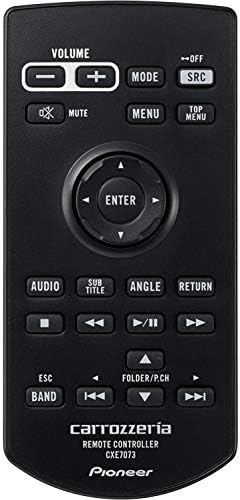
Image 5.2: The included remote control for the FH-8500DVS.
5.3 Apple CarPlayとAndroid Auto
Connect your iPhone or Android smartphone via USB to access Apple CarPlay or Android Auto. These platforms allow you to use compatible apps for navigation, music, messaging, and more directly on the unit's display.
- アップルカープレイ: Requires iPhone with iOS 7.1 or later.
- Androidオート: Requires Android smartphone with Android OS 5.0 or later and the Android Auto app installed.

Image 5.3: iPhone connected for Apple CarPlay functionality.

Image 5.4: Android smartphone connected for Android Auto functionality.
5.4 メディア再生
The FH-8500DVS supports various media sources:
- DVD/CD: Insert discs into the slot. Supports DVD-R/RW, CD-R/RW.
- USB: Connect USB devices (flash drives, portable HDDs) to the USB port. Supports various audio and video formats, including FLAC (up to 192kHz/24bit via USB).
- Bluetoothオーディオ: Stream music wirelessly from your smartphone or other Bluetooth-enabled devices. Supports A2DP/AVRCP profiles.
- 補助: Connect external audio players via the 3.5mm AUX input.
- 無線: Built-in FM/AM tuner.

Image 5.5: The FH-8500DVS supports diverse media formats for music and movies.
5.5 オーディオ設定(DSP)
Utilize the integrated Digital Signal Processor (DSP) to fine-tune your audio experience. Access settings for equalizer, time alignment, and crossover adjustments.

Image 5.6: Time alignment settings screen for optimizing sound staging。

Image 5.7: Equalizer settings screen for custom sound profiles.
6. メンテナンス
To ensure longevity and optimal performance of your FH-8500DVS unit:
- 画面の掃除: 柔らかく乾いた布でタッチスクリーンを優しく拭いてください。頑固な汚れには、軽く拭いてください。amp布を水または電子機器用のスクリーンクリーナーで拭いてください。研磨剤や刺激の強い化学薬品の使用は避けてください。
- ユニットのクリーニング: 本体の外側は柔らかく乾いた布で拭いてください。液体が本体内に入らないようにしてください。
- ディスクケア: Handle CDs and DVDs by their edges. Keep them clean and free of scratches.
- ファームウェアの更新: パイオニアを定期的にチェックする website for available firmware updates to ensure the best performance and compatibility.
7。 トラブルシューティング
問題が発生した場合は、次の一般的な問題と解決策を参照してください。
| 問題 | 考えられる原因 | 解決 |
|---|---|---|
| 電源なし | 配線ミス、ヒューズ切れ | Check power connections, inspect vehicle's fuse box. |
| 音が出ない | Volume too low, incorrect source selected, speaker wiring issue | Increase volume, select correct input source, check speaker connections. |
| Apple CarPlay/Android Autoが接続されない | Faulty USB cable, incompatible phone OS, app not installed | Use a certified USB cable, ensure phone OS is up-to-date, install necessary apps. |
| ディスク再生の問題 | Dirty or scratched disc, incompatible disc format | Clean disc, try a different disc, ensure format is supported. |
| Bluetooth接続が不安定 | Interference, device too far, device not paired correctly | Ensure no interference, keep device close, re-pair the Bluetooth device. |
これらの解決策を試しても問題が解決しない場合は、パイオニア カスタマー サポートにお問い合わせください。
8. 仕様
| 特徴 | 仕様 |
|---|---|
| モデル名 | FH-8500DVS |
| メーカー | 開拓 |
| 製品寸法 | 16.4 x 17.8 x 10 cm |
| アイテム重量 | 1.78キログラム |
| 営業巻tage | DC 14.4V (10.8V - 15.1V usable) |
| 最大消費電流 | 10A |
| 接地方法 | ネガティブグラウンド |
| 動作温度 | -10℃~+60℃ |
| 画面サイズ | 6.78-inch Wide VGA Monitor |
| ピクセル数 | 1,152,000 pixels (800 H × 480 V × 3 RGB) |
| 表示方法 | TFTアクティブマトリックス |
| バックライト | LED光源 |
| 最大オーディオ出力 | 50W × 4ch / 4Ω (or 50W × 2ch / 4Ω + 70W × 1ch / 2Ω with subwoofer) |
| 負荷インピーダンス | 4Ω (4Ω - 8Ω, 2Ω × 1 usable) |
| 接続技術 | ブルートゥース、USB |
| コントローラータイプ | アンドロイド |
| コネクタタイプ | HDMI、3.5mmジャック |
| 特集 | AM Tuner, Android Auto, Apple CarPlay, Built-in Bluetooth, DSP, FM Tuner, Hands-free calling |
| 対応デバイス | スマートフォン |
| チャンネル数 | 4 |
| 出力電力 | 200ワット |
| バッテリー | 1 CR2 バッテリー (付属) |
9. 保証とサポート
9.1 保証情報
The Pioneer FH-8500DVS comes with a 1年間のメーカー保証保証請求の際は、購入証明書を保管してください。保証は、通常の使用における材料および製造上の欠陥を対象とします。誤用、事故、不正な改造、不適切な取り付けによる損傷は保証の対象外となります。
For detailed warranty terms and conditions, refer to the warranty card included in your product package.
9.2 カスタマーサポート
If you require technical assistance, have questions about your product, or need to initiate a warranty claim, please contact Pioneer customer support through their official webサイトまたは保証書に記載されている連絡先情報を参照してください。
You can also visit the official Pioneer website for FAQs, software updates, and additional product information: Pioneer Car Audio