
導入
Thank you for choosing the Baseus 10W Automatic Clamping Wireless Car Charger Mount. This device is designed to provide convenient and fast wireless charging for your Qi-enabled smartphone while securely holding it in your vehicle. Please read this manual carefully before use to ensure proper operation and to maximize the product's lifespan.
安全情報
- 製品を分解したり改造したりしないでください。
- 水、火気、高温に近づけないでください。
- 強い衝撃を与えたり、デバイスを落としたりしないでください。
- 使用中は充電器の周囲を適切に換気してください。
- Use only with compatible power sources (QC 3.0 car charger recommended for fast charging).
パッケージ内容
- Baseus Wireless Car Charger Mount
- Air Vent Clip (1x)
- Micro USB Cable (4.9ft)
- ユーザーマニュアル
製品終了view
The Baseus Wireless Car Charger Mount features an automatic clamping mechanism, Qi wireless charging, and an air vent mounting system. It is designed for easy one-hand operation.
主要コンポーネント:
- 充電パッド: The surface where the phone rests for wireless charging.
- 自動Clamp武器: Securely hold the phone in place.
- Infrared Induction Sensor: Detects the phone for automatic clamping。
- One-Tap Release Button: Located on the side, releases the clamp腕を。
- エアベントクリップ: Attaches the mount to your car's air vent.
- マイクロUSBポート: 電源入力用。
セットアップ手順
1. Attaching the Air Vent Clip
- Unscrew the nut on the back of the charger mount.
- Insert the ball joint of the air vent clip into the nut, then into the socket on the back of the charger.
- Tighten the nut to secure the clip to the charger.
2. Mounting to the Car Air Vent
- Choose a suitable air vent in your vehicle. The clip is designed for various vent types, as shown in the image below.
- Gently push the air vent clip onto one of the vent blades until it is securely attached.
- Adjust the angle of the charger mount for optimal viewing。

This image illustrates the different types of car air vents that are compatible with the charger mount's clip. Ensure your car's vent matches one of the compatible designs for secure installation.
3. 電源の接続
- Connect the Micro USB cable to the charging port on the bottom of the charger mount.
- Plug the other end of the USB cable into a car charger (not included). For 10W fast charging, a QC 3.0 car charger is required. Standard 5V/2A car chargers will provide 5W charging.
- The indicator light on the charger will illuminate, indicating it is powered on and ready for use.
操作手順
1. Placing Your Phone
- Hold your Qi-enabled smartphone near the charging pad. The infrared induction sensor will detect your phone.
- 自動clamping arms will open. Place your phone onto the charging pad.
- clamping arms will automatically close, securing your phone and initiating wireless charging.
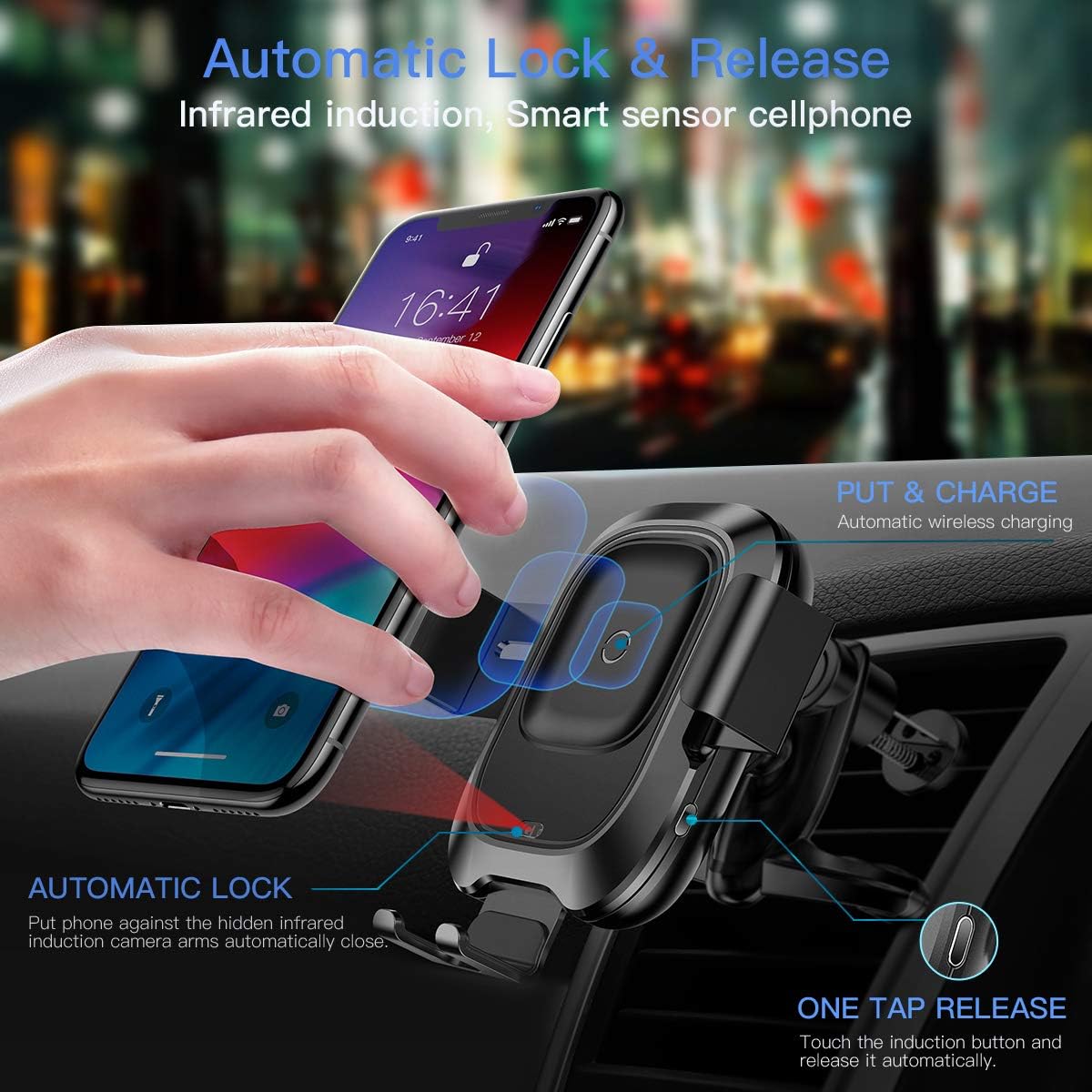
This image illustrates how the infrared sensor detects a phone, causing the arms to automatically open and then clamp shut once the phone is placed, initiating charging.
2. Removing Your Phone
- To release your phone, gently touch the sensor button located on the right side of the charger mount.
- clamping arms will automatically open, allowing you to remove your phone.
3. ワイヤレス充電機能
The charger supports Qi-enabled phones between 4.0 and 6.5 inches. Charging speeds vary:
- 10W急速充電: For compatible Samsung phones (e.g., Galaxy S10/S9/Note 9). Requires a QC 3.0 car charger.
- 7.5W急速充電: For compatible iPhones (e.g., iPhone Xs/XR/X/8). Requires a QC 3.0 car charger.
- 5W標準充電: For other Qi-enabled devices. Requires a 5V/2A car charger.
重要な注意:
- The thickness of your phone case should not exceed 4mm for optimal charging.
- Metal cases or foreign objects between the phone and charger will interfere with wireless charging.
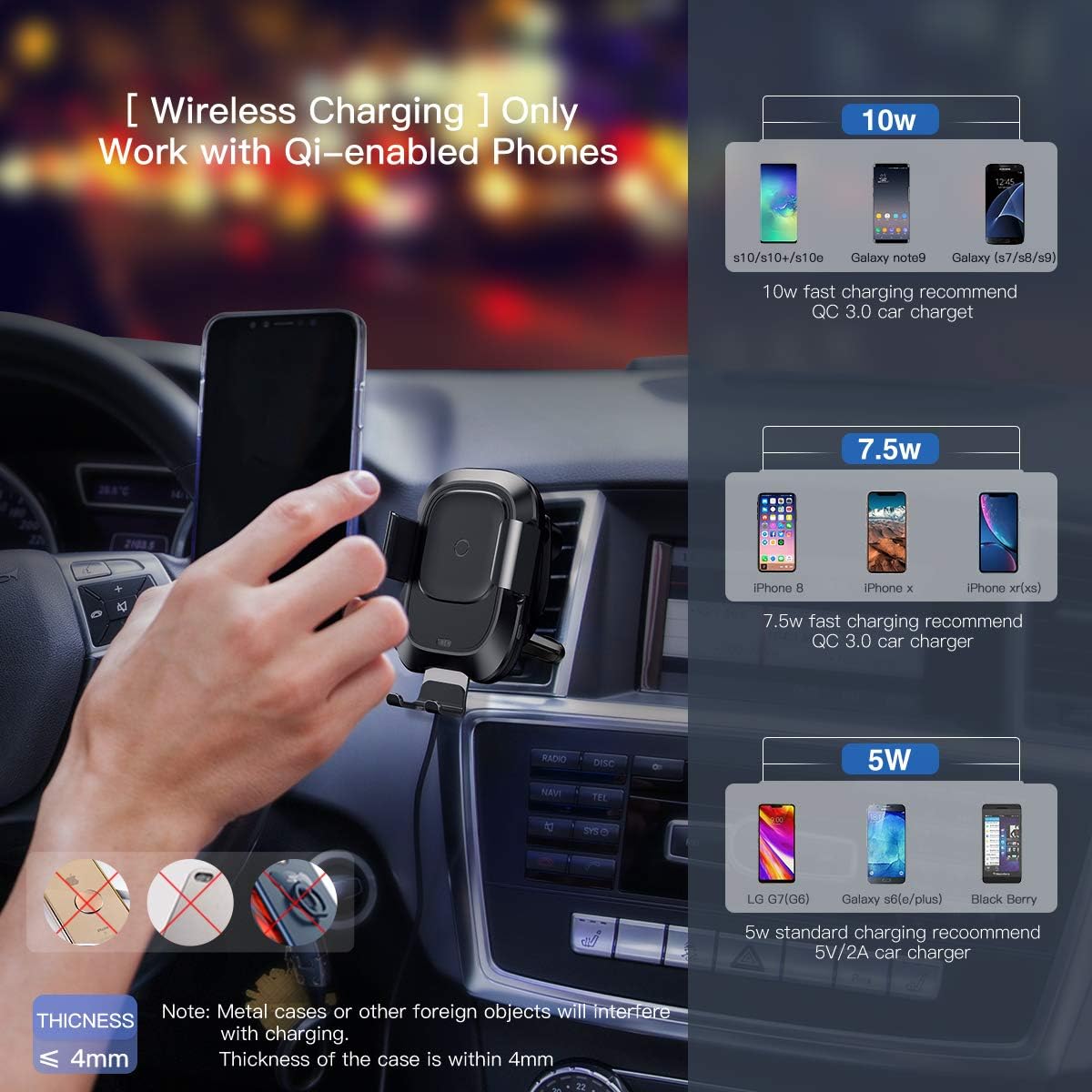
This image provides a visual guide to the wireless charging capabilities, showing 10W, 7.5W, and 5W charging for various phone models and the requirement for a QC 3.0 car charger for fast charging.
4. 製品デモビデオ
Watch this video for a visual demonstration of the Baseus Wireless Car Charger Mount's features and operation.
このビデオでは、view and demonstration of the Baseus Wireless Car Charger Mount, showcasing its automatic clamping, wireless charging, and ease of use.
メンテナンス
- 充電器の表面は、柔らかく乾いた布で拭いてください。研磨剤入りの洗剤や溶剤は使用しないでください。
- Ensure the air vent clip is free from dust and debris to maintain a secure grip.
- Regularly check the Micro USB cable for any signs of wear or damage.
トラブルシューティング
| 問題 | 考えられる原因 | 解決 |
|---|---|---|
| 携帯電話がワイヤレスで充電されません。 | 1. Phone not Qi-enabled. 2. Phone not properly aligned. 3. Phone case too thick or contains metal. 4. Insufficient power input. | 1. Verify phone supports Qi wireless charging. 2. Re-position phone on the charging pad. 3. Remove phone case or use a thinner, non-metallic case. 4. Ensure a QC 3.0 car charger is used for fast charging, or a 5V/2A for standard charging. |
| Clamping arms not opening/closing automatically. | 1.充電器に電力が供給されていません。 2. センサーが遮られています。 3.誤動作。 | 1. Check power connection and car charger. 2. Ensure the infrared sensor is clean and unobstructed. 3. 問題が解決しない場合は、カスタマー サポートにお問い合わせください。 |
| Charger mount is loose on the air vent. | Improper installation or incompatible vent type. | Ensure the air vent clip is fully engaged with a vent blade and the nut is tightened. Verify vent compatibility. |
仕様
- ブランド: ベースス
- コネクタタイプ: USB、ワイヤレス
- 対応デバイス: Qi-enabled Smartphones (4.0"-6.5")
- 互換性のある電話モデル: iPhone Xs, Xs Max, XR, X, 8, 8 Plus; Samsung Galaxy S10, S10 Plus, S10e, S9, S9 Plus, S8, S8 Plus, S7, S7 edge, S6 edge plus, Note 9, Note 5 series devices.
- 特集: 急速充電
- 色: 黒
- 入力ボリュームtage: 9ボルト
- Amperage: 1.67 Amps
- 合計 USB ポート: 1
- 商品の重量: 10.2オンス
- パッケージ寸法: 8.15 x 4.45 x 2.91インチ
保証とサポート
This Baseus Wireless Car Charger Mount comes with an 18ヶ月保証 from the date of purchase. Baseus also provides 生涯顧客サービス この製品について。
For warranty claims, technical support, or any inquiries, please refer to the contact information provided with your purchase or visit the official Baseus webサイト。