
導入
The Rockville RCS350-6 is a 350W 6-zone 70V commercial amplifier designed for reliable, high-quality audio distribution in various commercial environments such as restaurants, offices, schools, and retail spaces. This manual provides essential information for setting up, operating, and maintaining your amplifier。
主な特徴
- 高出力オーディオ性能: 350 watts to power up to 6 zones, ideal for clear and consistent sound across multiple areas.
- 6-Zone Control Flexibility: Independently manage volume for each of the 6 zones, allowing for customized audio in different rooms or areas.
- 多彩な接続性: Stream music wirelessly via Bluetooth, play MP3 files through USB or SD card, and connect external devices via RCA, optical, and microphone inputs.
- Mic Echo & Chime: Features echo control with speed and repeat adjustments, plus a chime button for professional announcements.
- Commercial Durability: Rugged rack-mount chassis and built-in cooling system ensure dependable operation.
- 70V/100V/8 Ohm/4 Ohm Compatibility: Supports various speaker configurations for flexible installation.
- Built-in Clipping Limiter: 保護する amplifier and speakers from overheating and damage.
箱の中身
- Rockville RCS350-6 Ampリファイアー
- クイックスタートガイド
- 製品保証カード
- 取り外し可能なラックマウントブラケット
- Mounting Screws for Brackets
- 電源ケーブル
- リモートコントロール
設定
ラックマウント
The RCS350-6 amplifier is 19-inch rack-mountable. To install it into a rack, attach the included rack ears to the sides of the amplifier using the provided screws. Ensure the holes on the rack ears align with the screw holes on the amplifier chassis. Handles can also be attached to the rack ears for easier handling.

図1: 前面 view of the Rockville RCS350-6 amplifier with rack ears attached.
Speaker Wiring (70V Parallel Wiring)
The RCS350-6 supports 70V, 100V, 8 Ohm, and 4 Ohm speaker configurations. For 70V/100V systems, speakers are wired in parallel. This means connecting the positive terminal of one speaker to the positive terminal of the next, and the negative to the negative, forming a daisy chain. The last speaker in the chain connects to the amplifier。
Each 70V speaker includes a built-in transformer (tap) that allows you to select the wattage drawn from the amp合計ワット数を確認するtage drawn by all speakers in a zone does not exceed the ampリファーズ ワットtage capacity per zone (100W per zone for RCS350-6).
Video 1: Learn how to parallel wire your 70V system for optimal performance and speaker distribution.
ゾーン設定
の amplifier features 6 independent zones, each with its own volume control. This allows you to distribute audio to different areas (zones) and control their volume levels separately. For example, Zone 1 could be a dining area, Zone 2 a bar, and so on. Each zone can handle a maximum of 100 watts.
ビデオ2: 詳細な説明view of the RCS350-6 amplifier's features and zone capabilities.
Video 3: Step-by-step guide on how to set up your Rockville RCS Series amplifier for multi-zone audio.
操作手順
フロントパネルコントロール
図2:詳細 view の amplifier のフロント パネル コントロール。
- 電源スイッチ: 回転する ampリファイアのオンまたはオフ。
- Bluetooth/MP3 Module: Features an LCD display, mode selection, playback controls (play/pause, next/previous, repeat), and USB/SD card slots for media playback.
- Chime Button: Activates a chime sound for announcements.
- Microphone Volume Controls (MIC 1, MIC 2, MIC 3): Adjusts the volume for each microphone input.
- Line Volume Controls (LINE 1, LINE 2): Adjusts the volume for the RCA line inputs.
- MP3 Volume Control: Adjusts the volume for the Bluetooth/USB/SD media player.
- Echo Controls (Repeat, Speed, Echo): Adjusts the echo effect for microphone inputs 2 and 3.
- Tone Controls (Bass, Treble): オーディオ出力の低周波数と高周波数を調整します。
- マスターボリュームコントロール: 全体の出力音量を調整します amplifier。
- ゾーン音量コントロール(ゾーン1~6): Independently adjusts the volume for each of the 6 speaker zones.
- Output Spectrum Display: Visual indicator of the ampライファイアの出力レベル。
背面パネルの接続
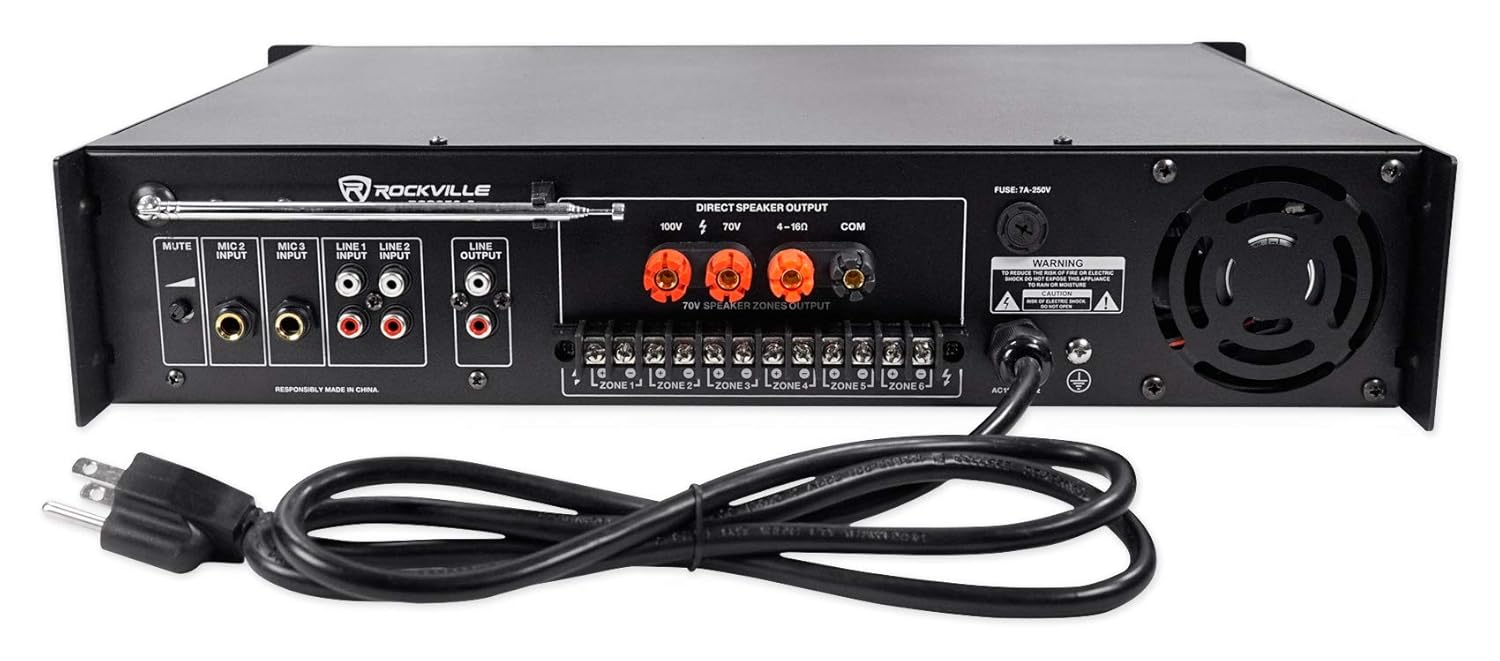
図3:詳細 view の ampライファイアの背面パネルの接続。
- FMアンテナ: 付属のFMアンテナに接続してラジオを受信できます。
- Mute Level Knob: Adjusts the level of audio reduction when the priority microphone (MIC 1) is in use.
- マイク入力(MIC 2、MIC 3): 1/4" TRS inputs for connecting microphones.
- Line Inputs (LINE 1, LINE 2): RCA inputs for connecting external audio sources (e.g., CD player, mixer).
- ライン出力: 追加の接続用のRCA出力 ampライファイアーまたは録音装置。
- Direct Speaker Output: Binding post terminals for 100V, 70V, and 4-16 Ohm speaker connections.
- 70V Speaker Zones Output: Phoenix terminals for connecting speakers to individual zones (ZONE 1-6).
- 電源入力: AC 電源ケーブルに接続します。
- 冷却ファン: 適切な換気を確保し、過熱を防ぎます。
マイクの使用
MIC 1 on the front panel is a priority microphone, meaning it will automatically lower the volume of other audio sources when spoken into. The mute level knob on the rear panel adjusts how much the other audio sources are attenuated. MIC 2 and MIC 3 inputs on the rear panel are affected by the echo controls.
Bluetooth/USB/SD Playback
To play media from a USB drive or SD card, insert the device into the corresponding slot on the front panel. Use the mode button to select the input source. For Bluetooth, select Bluetooth mode, then pair your device with "RCS350-6" from your device's Bluetooth settings. Use the playback controls on the front panel or the remote control to manage your media.
FMラジオ
Extend the FM antenna on the rear panel to improve radio reception. Use the mode button to select FM radio and the playback controls to tune stations.
リモートコントロール
The included remote control allows you to manage various functions of the amplifier, including power, mode selection, volume, playback controls, and EQ settings.
メンテナンス
To ensure optimal performance and longevity of your Rockville RCS350-6 ampライフライザーを使用する場合は、次のメンテナンス ガイドラインに従ってください。
- 保管してください amplifier in a well-ventilated area to prevent overheating. Ensure the cooling fan is not obstructed.
- Regularly clean the exterior with a soft, dry cloth. Avoid using harsh chemicals or abrasive cleaners.
- すべてのケーブル接続が安全で損傷がないことを確認するために定期的に確認してください。
- 露出を避ける amplifier to moisture, extreme temperatures, or direct sunlight.
トラブルシューティング
If you encounter any issues with your Rockville RCS350-6 amplifier, refer to the following troubleshooting tips:
- 電源なし: Ensure the power cable is securely connected and the power switch is in the ON position. Check the power outlet and the amp放電器のヒューズ。
- 音が出ない: Verify all speaker connections are correct and secure. Check input source selection and volume levels (master, zone, and individual input volumes). Ensure speakers are properly tapped for 70V/100V systems.
- 歪んだ音: Lower the volume levels to prevent clipping. Check speaker impedance and wattage taps to ensure they are within the amplifier's limits. Inspect speaker wires for damage.
- Bluetooth接続の問題: 確実に amplifier is in Bluetooth mode and your device's Bluetooth is enabled. Try unpairing and re-pairing the device. Move your device closer to the amplifier。
- マイクが機能しない: Check microphone connections and ensure the microphone volume is raised. If using MIC 1, ensure the mute level is adjusted correctly.
仕様
| 製品寸法 | 19 x 16 x 4インチ |
| アイテム重量 | 31.75 ポンド |
| モデル番号 | RCS350-6 |
| 巻tage | 100 Volts, 120 Volts, 70 Volts |
| 最大供給量tage | 120ボルト |
| 最小供給量tage | 70 ボルト (DC) |
| メーカー | ロックビル |
サポートと保証
For technical support, warranty information, or any other inquiries, please refer to the contact details provided in your Product Warranty Card or visit the official Rockville webサイト。