
ナーフ NER0226
NERF Bulls-Eye デジタルターゲット 取扱説明書
Brand: NERF | Model: NER0226
1. はじめに
The NERF Bulls-Eye Digital Target is designed to enhance your dart-blasting skills and provide engaging gameplay. Featuring 6 flip-back targets, a high-scoring bullseye, and an LCD screen for score tracking, this free-standing target offers solo and multiplayer game modes. Improve your aim and precision with this exciting addition to your Nerf collection.

図1: 前面 view of the NERF Bulls-Eye Digital Target.
2. 箱の中身
- One Digital Target Unit
3. セットアップ
- バッテリーの取り付け: Locate the battery compartment on the base of the target. Insert the required AA batteries (not included) according to the polarity indicators. Securely close the battery compartment.
- Assemble Top Piece: The target comes mostly pre-assembled. Attach the top section of the target to the main pole by aligning the connectors and pressing firmly until it clicks into place.
- 配置: Place the free-standing target on a flat, stable surface. Ensure there is ample space around the target for safe play and dart retrieval.
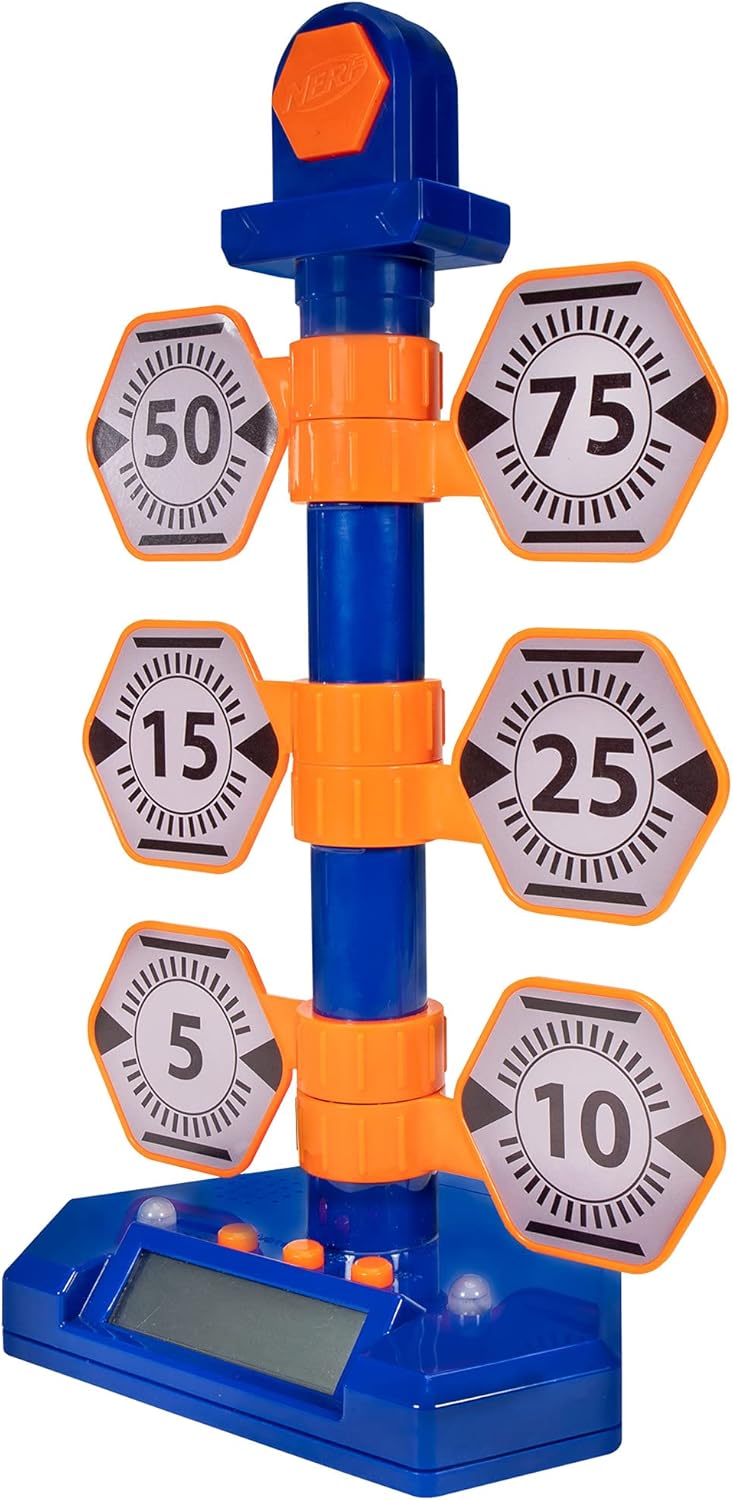
Figure 2: The fully assembled NERF Bulls-Eye Digital Target.
4. 操作手順
The NERF Bulls-Eye Digital Target features an LCD screen for score tracking and multiple game modes to challenge your skills.
4.1つのゲームモード
- ポイントカウンター: Track your total score as you hit the various targets. Each target has a designated point value (e.g., 5, 10, 15, 25, 50, 75), and the bullseye awards 100 points.
- 積み重ねる: A game mode designed to test your speed and accuracy.
- 精度テスト: Focus on hitting specific targets to improve your precision.
The target allows for both solo and multiplayer gameplay, making it versatile for individual practice or competitive fun.

Figure 3: Key features of the Digital Target, including game modes and LCD screen.

図4:詳細 view LCD 画面とコントロール ボタン。
4.2 Target Mechanism
The target features 6 flip-back targets that reset manually after being hit. The high-scoring bullseye at the top lights up upon impact, providing visual feedback.

Figure 5: The swinging action of the targets upon impact.
4.3 公式製品ビデオ
Video 1: Official product demonstration of the NERF Bulls-Eye Digital Target, showcasin機能とゲームプレイについて説明します。
5. メンテナンス
- クリーニング: 対象物の表面は、柔らかく乾いた布で拭いてください。研磨剤入りの洗剤を使用したり、本体を水に浸したりしないでください。
- バッテリー交換: If the target's lights, sounds, or LCD screen begin to malfunction, replace the AA batteries. Ensure proper polarity during installation.
- ストレージ: 使用していないときは、ターゲットを直射日光や極端な温度を避け、涼しく乾燥した場所に保管してください。
6。 トラブルシューティング
- Target Not Responding: Check if the batteries are correctly installed and have sufficient charge. Replace batteries if necessary. Ensure targets are manually reset after being hit.
- 音/照明なし: Verify battery power. If issues persist, ensure no debris is obstructing the sensors or speakers.
- 不正確な採点: Ensure darts are hitting the targets directly and with sufficient force to register. Check for any physical obstructions or damage to the target mechanisms.
- 音量コントロール: Please note that this model does not feature a dedicated volume control.
7. 仕様
| 特徴 | 詳細 |
|---|---|
| 製品寸法 | 9 x 13 x 20インチ |
| アイテム重量 | 1.17ポンド |
| 原産国 | 中国 |
| ASIN | B07PMLJ57D |
| 商品型番 | NER0226 |
| メーカー推奨年齢 | 8歳以上 |
| メーカー | ハズブロ |
| 発売日 | 15年2019月XNUMX日 |
8. 保証とサポート
For detailed warranty information and customer support, please refer to the official NERF website or contact Hasbro customer service. You can also visit the AmazonのNERFストア 製品情報とアクセサリの詳細については、こちらをご覧ください。
Ask a question about this manual
Ask about setup, troubleshooting, compatibility, parts, safety, or missing instructions. Manuals+ will review the question and use this page’s manual context to help answer it.